

Capturing Animation in Photography
Wednesday 25 September 2019, 14:07 by Nigel Hooijmans | 4,370 views | 1 commentThis article was translated from Dutch with the help of AI. Read the original.
You may be familiar with the phenomenon by now: the world is increasingly turning to video. Are you a photographer wondering whether it is passing you by like a time-lapse and you are missing the boat?
Do not worry, there is good news for all photographers. Just carry on doing your thing, but add a little movement to your photos to liven them up and show the world that you are developing your photography skills.
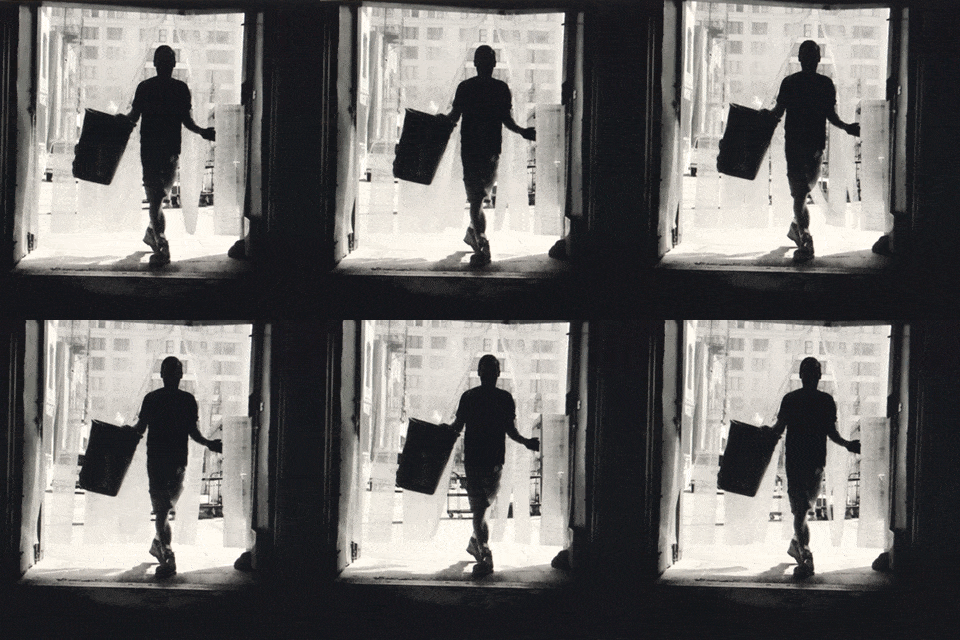
The following application offers great effects without requiring too much effort or time. There are also plenty of online tutorials available. Below, I will give you a brief description.
Cinemagraphs (GIFs)
The Cinemagraph has been around since about 2011, so you have probably already seen a few. It has all the characteristics of a photo, except that there is always a small part that seems to move magically.
The technique for achieving this effect is to make a short video and then mask it using Cinemagraph Pro. Except for the parts you want to keep moving.
What you need to know
When you are going to take the photo or short video, bring a tripod. You want as much stillness as possible in your cinemagraph so that the masking works properly once it is in the application.
Choose your locations based on a part of the landscape that moves in an interesting way. It is a different way of looking, but use the same instinct as a photographer. Then look for the section that you can repeat as an animation within the scene. You will get used to it quickly.
The key to smooth Cinemagraphs is smooth movement, so that it feels endless. While taking the photos, bear in mind that you want to give the photo a moving loop, if possible.
Otherwise, you have to let the application 'fake' it with a crossfade. Not bad, but not perfect. You want to create a GIF that stands out. The best way to achieve this is by creating a smooth Cinemagraphic!
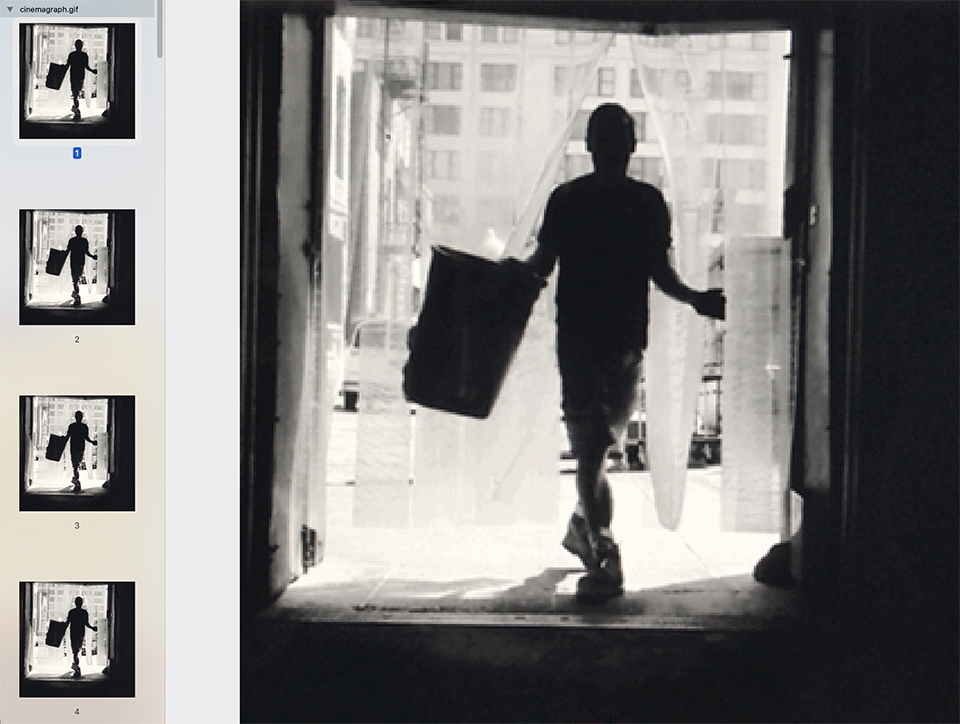
The Cinemagraphic programme brings the still image to life. It is still a captured moment, but with a little more information for the viewer. It is an extremely effective way to attract attention.
These days, there are also many media where you can place a GIF image. Think of Facebook, Twitter, as well as various websites and forums!
About the author
Fotografie doet altijd al wat met Nigel. Zijn eerste professionele camera kocht hij toen hij twaalf was. Tegenwoordig is hij actief bij het Rotterdamse bedrijf PitchParrot, waar animaties worden gemaakt.
You might also like
-
 Photoshop competition: mix animals with each other
by Michelle Peeters
-
 Landscape with or without an animal?
by Nando Harmsen
-
 Show more than just an animal in the photo
by Nando Harmsen
-
 8 tips for photographing in a zoo
by Michelle Peeters
-
 Focusing on Large Groups of Animals
by Nando Harmsen

1 comment
-
 Nigel wrote on Thursday 26 September 2019 at 10:40 | reply
Thanks for publishing!
Translated from Dutch.
Have your say
Please note: Articles older than a week can only be commented on by signed-in visitors.Would you still like to comment? sign in or create a free account.
Become a better photographer every week
A practical photography tip in your inbox every week.
38,937 photography enthusiasts already receive the tips! More about the weekly mail. Or keep up to date via  Facebook.

Elja Trum
Photofacts; everything to do with photography!
Would you like to take better photos and keep up with what is happening in photography? Photofacts publishes articles that teach you something about photography — from a product announcement to a practical shooting tip or a look at a website. Photofacts covers photography every day and is a hobby project of Elja Trum's that got out of hand. The articles are written by a team of volunteer authors. If you would enjoy writing one or more articles for Photofacts, do get in touch.More about PhotofactsPhotofacts is made possible in part by
