

Online Backup: Backblaze versus Crashplan Pro
Thursday 13 January 2022, 10:37 by Elja Trum | 8,697 views | 13 commentsThis article was translated from Dutch with the help of AI. Read the original.
Last Saturday was World Backup Day. A day to remind you to make sure your backups are properly sorted. This certainly applies to photographers.
You wouldn't want to think about losing all, or some, of your photos, would you?
One backup is no backup
To make sure your backup is properly sorted, it is wise to always have three copies of all your files. One is your original. Two is your local backup and three is your backup at another location.
For my local backup I use a NAS, basically a kind of hard drive connected to your network. My NAS is in my meter cupboard, which means it is already physically separated from my computer in the attic.
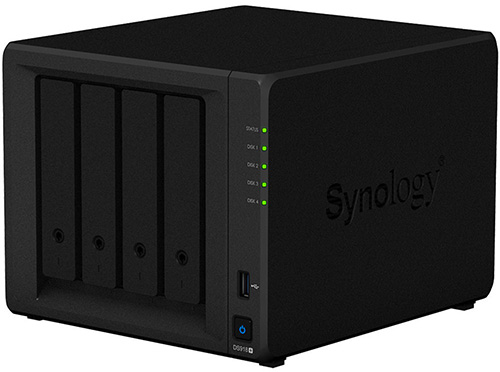
The backup to my NAS is automatic, by the way. I use Time Machine for this, which is supplied free with every Mac. If you don't make backups automatically, sooner or later you will fail to keep them properly sorted.
For my external backup I use an online backup service. The advantage is that your computer keeps making backups continuously. It is also a matter of setting it up once and then not having to think about it again. An added advantage is that you can always access your files from anywhere.
Crashplan versus Backblaze
I had been using Crashplan for years. Since 2017, however, the affordable family subscription I used has been discontinued. A shame, because for a reasonable amount you could back up 10 computers without limits.

Crashplan has consequently become considerably more expensive. So it made sense to look at the alternatives. The most popular alternative is probably Backblaze. So I compared it thoroughly with Crashplan.
Speed
Backblaze clearly does better on one point: speed. With my Crashplan installation, I have been working on getting a complete backup for months. I have a fast fibre-optic connection, but Crashplan has been working for three months to get my 3-terabyte backup onto the server and is only halfway there.
After just 5 days, Backblaze had already overtaken competitor Crashplan and had also put one and a half terabytes into its backup.
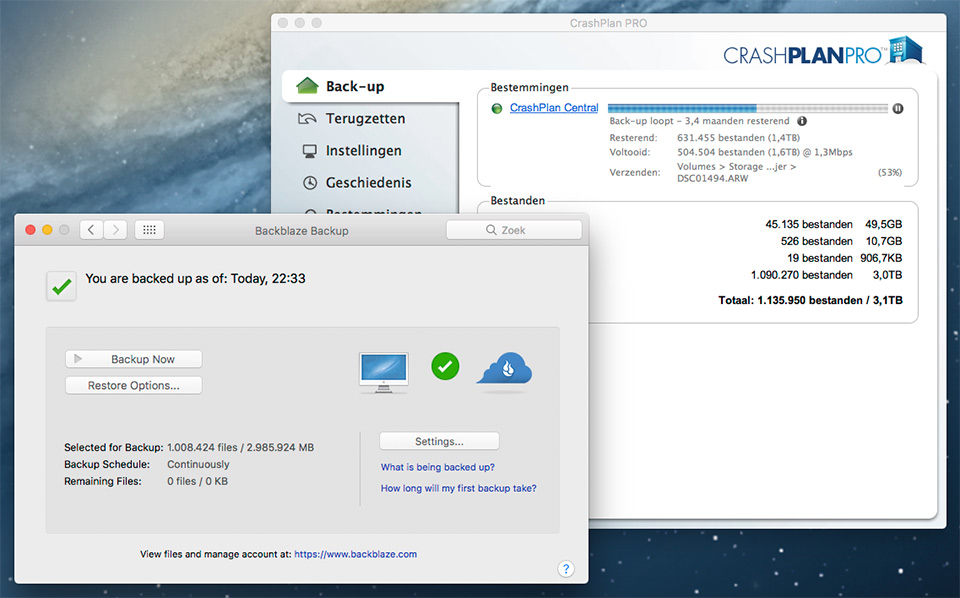
About a month after installation, Backblaze had all the files, more than a million, in its online backup. Crashplan, which has been running exactly as often and had an extra three months, has still barely made any further progress.
Not unimportant: Crashplan's slower speed will probably also get in your way considerably if you need the backup. Imagine it taking months before you finally restore your backup.
Costs
The cost is obviously important. At 5 dollars per month, Backblaze is quite affordable. If you take out a subscription directly for 2 years, you pay 95 dollars, which works out at 3.96 dollars per month. In my view, that is a small price to pay for a secure backup on the internet.
Crashplan used to be cheaper. With the Family plan, you could back up no fewer than 10 computers for around 80 euros per year. Without limits. Ideal if, like me, you have two computers at home, a laptop and a computer at the office.
They have now adjusted their prices. You can only take out a Crashplan Pro subscription, which costs 10 dollars per month per computer. This makes Backblaze the cheaper option.
Security
Security is of course also important when backing up all your data. Both companies have this well organised, though. The data is sent encrypted and can only be viewed if you have the login details.
In my view, two-factor authentication would not be a bad idea for this purpose. In that respect, both services still have room for improvement.
Data retention period
There is one important disadvantage to Blackblaze. If data is unavailable for thirty days, it is deleted. If a file disappears from your computer and you don't notice, the file will also disappear from your backup after 30 days.
This also applies if, for example, you include external drives in your backup. That is fine, but you do need to make sure that those drives are connected to your computer at least once every thirty days to keep the backup.
Crashplan does not have this problem and ensures that deleted files also remain available indefinitely.
Conclusion
Backblaze is therefore cheaper and much faster. As far as I am concerned, the choice is clear, and I have also switched to Backblaze. Crashplan's slowness is a really important factor, because you don't want to discover after a crash that your files were not all in your backup yet.
» Try Backblaze for free (recommended), or try Crashplan for free
The link to Backblaze above gives you and me one month of free Backblaze use if you sign up. If you would rather not do that, feel free to use this link.
Dit artikel is voor het laatst bijgewerkt op 13 januari 2022.
De eerste publicatiedatum is maandag 2 april 2018, 20:20.
About the author
Elja Trum is the founder of Photofacts and online photography course website Photofacts Academy. He has been writing about photography since 2006. Elja is also the author of (Dutch) books on composition, black-and-white photography, flash photography and portrait photography.
You might also like
-
 The pros and cons of a backup camera
by Nando Harmsen
-
 Editing photos with the Apple Vision Pro
by Elja Trum
-
 iPhone 11 Pro versus 100-megapixel medium-format camera
by Michelle Peeters
-
 Advice for beginner photographers
by Elja Trum

13 comments
-
 ine vernooij wrote on Tuesday 3 April 2018 at 11:09 | reply
Wat als je drie maanden op reis bent en je computer dus ongebruikt thuis staat?
This comment was written in another language and has not been translated yet. -

 Elja Trum
wrote on Tuesday 3 April 2018 at 11:14
| reply
@Ine; Ik heb het nog even nagezocht.
This comment was written in another language and has not been translated yet.
Je kunt gerust zijn, je kunt 6 maanden je computer uit laten zonder dat er iets verloren gaat. -
 Peter van den Broek wrote on Tuesday 3 April 2018 at 11:18 | reply
Ook ik ben zeer tevreden over Backblaze. Ik kan naast mijn iMac ook al mijn externe schijven op deze manier van een backup voorzien.
This comment was written in another language and has not been translated yet. -
 Nick wrote on Tuesday 3 April 2018 at 11:48 | reply
Leuk artikel! Ik heb het zelf iets anders geregeld omdat ik graag zelf alles in de hand heb. Ik gebruik lokaal ook een NAS in mijn eigen netwerk en laat deze 2x per week 's nachts naar een NAS op een andere locatie synchroniseren.
This comment was written in another language and has not been translated yet.
Zo houd ik zelf de controle en heb ik maar eens in de zoveel tijd kosten aan bijvoorbeeld een vervangende harddisk. -
 Bob Luijks wrote on Tuesday 3 April 2018 at 11:51 | reply
Hoe doe je dat met een nas? Ik lees op de site van Backblaze dat je daar los voor moet bij betalen? Vreemd genoeg geldt dat niet voor normale losse externe harde schijven. Eerst de data op een external hard disk?
This comment was written in another language and has not been translated yet. -
Elja Trum
wrote on Tuesday 3 April 2018 at 11:59
| reply
@Bob; De NAS is een kopie van het origineel (lokaal) en de online back-up ook.
This comment was written in another language and has not been translated yet.
Ik back-up dus niet vanaf de NAS, maar vanaf mijn lokale data drive (wat overigens een externe Lacie 5Big disk is via een Thunderbolt aansluiting).
Overigens gebruik ik op kantoor (nog) Crashplan. Daar kan je een NAS ook back-uppen naar Crashplan door hem (in Windows) een vaste driveletter toe te kennen. Ik heb nog niet getest of dat bij Backblaze zo ook kan. -
Bob Luijks wrote on Tuesday 3 April 2018 at 12:10 | reply
Bedankt Elja voor de reactie. Mijn nas heeft een schijfaanduiding, maar daar trapt ie dus niet in.
This comment was written in another language and has not been translated yet. -
 bert van herk wrote on Tuesday 3 April 2018 at 13:23 | reply
waarom gebruik je myalbum niet . onbeperkte opslag 50 euries per jaar
This comment was written in another language and has not been translated yet. -
 Menno wrote on Tuesday 3 April 2018 at 18:36 | reply
Ik ben heel benieuwd naar de geleverde uploadspeed van deze backup services. Dat lees ik eigenlijk in geen enkele review terug. Ik had Amazon, maar na maanden uploaden was ik nog nergens en er waren fouten ingeslopen waardoor sommige files ontbraken.
This comment was written in another language and has not been translated yet. -
 Johan wrote on Tuesday 3 April 2018 at 21:48 | reply
Kan je vanuit een synology NAS rechtstreeks naar Backblaze backuppen? Ik heb zoveel foto's dat ik die niet op mijn laptop kan laten staan, dus telkens ik een project afgewerkt heb zet ik al de foto's fysiek over naar de NAS vanuit Lightroom, maar dan heb ik natuurlijk graag een backup van wat op de NAS staat
This comment was written in another language and has not been translated yet. -
 dfgh wrote on Wednesday 4 April 2018 at 09:08 | reply
het automatisch synchroniseren is handig maar wat je niet meer op je lokale pc hebt staat op een gegeven moment ook niet meer in je backup
This comment was written in another language and has not been translated yet. -
Elja Trum
wrote on Wednesday 4 April 2018 at 12:15
| reply
@Menno; de snelheid zal van veel factoren afhangen, maar zoals je in het artikel leest: Crashplan doet maanden over het uploaden van een terabyte. Backblaze doet dat in circa een week.
This comment was written in another language and has not been translated yet.
Ik heb hier een 100 Mbit uploadsnelheid via glasvezel. Dus dat zou de bottleneck niet moeten zijn.
@dfgh; Dat klopt ja. Bij Crashplan overigens wel, daar blijft elk bestand bewaart, ook als je het lokaal verwijderd hebt.
@Johan; ik heb het zelf niet getest, maar er is een app voor je Synology NAS van Backblaze waarmee je dat moet kunnen. Zie deze link.
@Bert; Ik heb niet naar Myalbum gekeken, maar volgens mij kun je daar geen automatische back-ups instellen, toch? Dan moet je dus telkens je foto's uploaden naar hun site. Lijkt mij iets wat je gaat vergeten. -
 Paul wrote on Wednesday 4 April 2018 at 12:35 | reply
Hoi, gebaseerd op de beschrijving van de bewaar periode bij blackblaze vindt ik het moeilijk te begrijpen/aanvaarden dat het een backup oplossing is. Voor mij klinkt dit meer als mirroring. Een backup heeft juist tot doel om ten alle tijden een/elk bestand te kunnen terughalen. Vind dat toch wel een serieus nadeel van blackblaze.
This comment was written in another language and has not been translated yet.
Have your say
Please note: Articles older than a week can only be commented on by signed-in visitors.Would you still like to comment? sign in or create a free account.
Become a better photographer every week
A practical photography tip in your inbox every week.
38,886 photography enthusiasts already receive the tips! More about the weekly mail. Or keep up to date via  Facebook.

Elja Trum
Photofacts; everything to do with photography!
Would you like to take better photos and keep up with what is happening in photography? Photofacts publishes articles that teach you something about photography — from a product announcement to a practical shooting tip or a look at a website. Photofacts covers photography every day and is a hobby project of Elja Trum's that got out of hand. The articles are written by a team of volunteer authors. If you would enjoy writing one or more articles for Photofacts, do get in touch.More about PhotofactsPhotofacts is made possible in part by
