

Black and white photography using the Zone System
Saturday 20 July 2019, 22:11 by Liesbeth van Asselt | 13,380 views | 10 commentsThis article was translated from Dutch with the help of AI. Read the original.
Why get started with black and white photography, while the world around us is so colourful? There are several reasons to think of.
Textures are more visible, black and white is often seen as more artistic, it conveys pure emotion better and gives a photo more depth.
Why black and white?
Advantages of colour:
• Colour is more realistic than black and white photography
• With colour, you can draw attention to the main subject
Advantages of black and white:
• Black and white is often seen as more artistic
• Black and white conveys more emotion, as the colours do not distract
• Black and white shows differences in brightness much more clearly than colour, giving a black and white photo more depth.
• Textures are more visible.
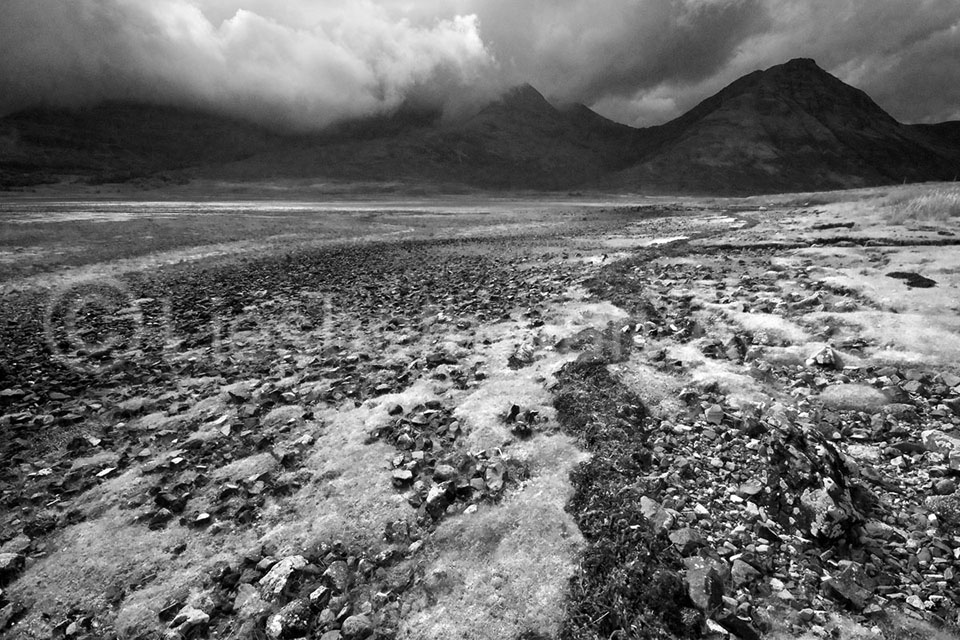
Most cameras can be set to black and white photography. This can often be done in two ways: via Picture Style or via the retouch menu.
For RAW photographers, it is important to do this via “Picture Style” - “Monochrome” (on your camera, this may be called “Picture Control” - “Monochrome”, for example, while on Fuji it is found under Film Simulations and on Sony under Creative Style).
You will then see a black and white preview on your LCD screen, but your RAW file still contains all the colour information. You can therefore still take it in any direction during post-processing.
The advantage is that you can already see the (sometimes small) difference in brightness between, for example, green leaves and a red roof. You can then decide on the spot whether to take the photo so that another colour is still visible between the green and red.
JPEG photographers who do not post-process their photos usually choose to convert them to black and white via the camera's retouch menu. The difference is that this removes all the colour information from the file. The photo is therefore permanently black and white.
The post-processing options are much more limited. But that was precisely the intention of this photographer who shoots JPEG. They do not want to have to post-process at all..…
Colour versus black and white
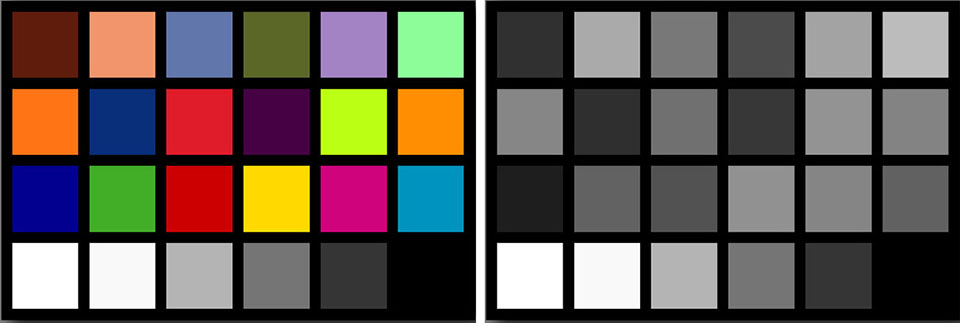
In colour, we can see the difference between lilac and lime, while in black and white they both become roughly the same shade of grey. So practise which colour will be shown as which shade of grey. You could photograph a colour chart in black and white to have a cheat sheet.
Black and white photography really requires a different way of looking. It is much more than a post-processing technique using an Instagram filter, for example. So limit yourself to black and white photography for a day, week or month.
Look for subjects that you want to photograph in black and white. What lends itself to black and white and what does not? Look for abstractions, for “negative space”, for shadows, lines, textures, for which light is suitable, etc. As Ansel Adams said (more on that later): you don't take a photograph, you make it.
Technique
Beautiful shapes and textures are often lost in the abundance of colour, while they become clearly visible in black and white. Removing colour strengthens elements in the photo.
Unfortunately, this also applies to things such as noise and “banding” (stripes), so shoot at a low ISO and, if you shoot in RAW, use as many bits as possible. With Nikon, you can choose between 12 or 14, so choose 14. Unless you need to save space on your card or need to write your photos very quickly in continuous mode.
For example, the Sony A7III and A9 are set to 14 bits by default, while the Olympus OM-D uses 12 bits. With these cameras, you therefore have no influence on the number of bits.
Unfortunately, JPEG photographers can only shoot in 8 bits. It is worth considering shooting in RAW for black and white photography after all. Or at least in RAW+JPEG. Why?
An 8-bit (JPEG) file contains a total of 16.7 million shades. If you shoot in colour….. Namely, 256 for red, 256 for green and 256 for blue. And 256 x 256 x 256 = 16.7 million. But if you shoot in black and white, you are not recording the three colours red, green and blue, but only 256 shades of grey!
The 16-bit RAW colour file that we later convert to black and white during post-processing, on the other hand, contains 280 trillion (!) shades. As a result, the shades blend smoothly into each other in a 16-bit file, while you sometimes see “banding” in an 8-bit file.
There are then too few intermediate shades in the file to get from one shade to the next, so the transition happens in steps.
Which genres of photography?
Besides street photographers, portrait, landscape and architecture photographers also often take black and white photos. High-contrast scenes often work better in black and white than scenes with little contrast.
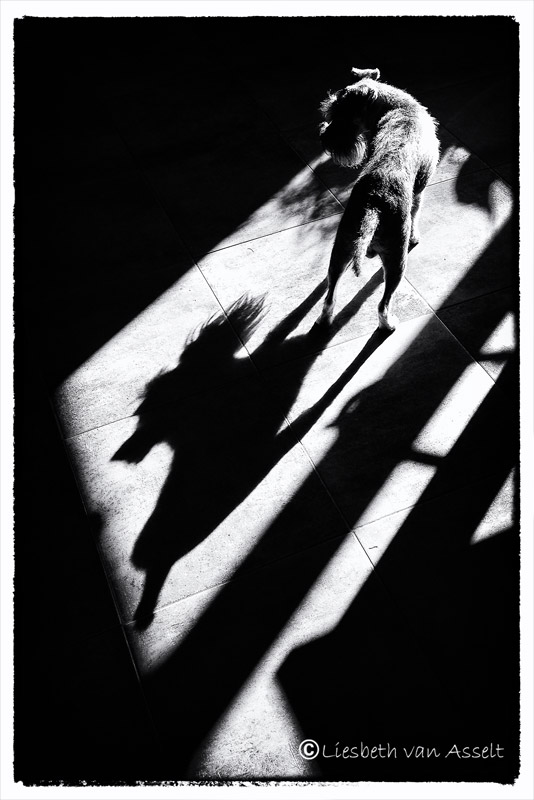
Hard shadows can become a subject in their own right. Especially with the sun low in the sky, a walker, dog, fence or cyclist can cast a beautiful long shadow.
Portrait photography
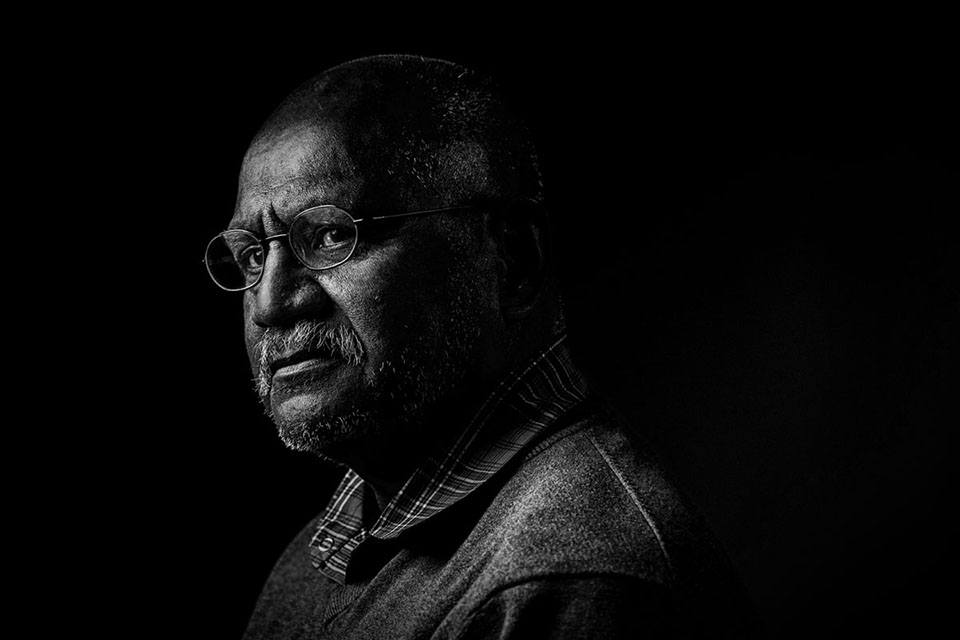
High-key or low-key photos are often used in black and white portrait photography. Think of Rembrandt's chiaroscuro technique, where a spotlight illuminates the subject.
Note that light coming from the side shows the texture of the skin much better than light shining directly at the subject. Side lighting also creates shadow, which gives the portrait depth. Direct light makes everything 'flat'.
Landscape photography
Black and white is often used for minimalist seascapes. Usually made with very long shutter speeds.
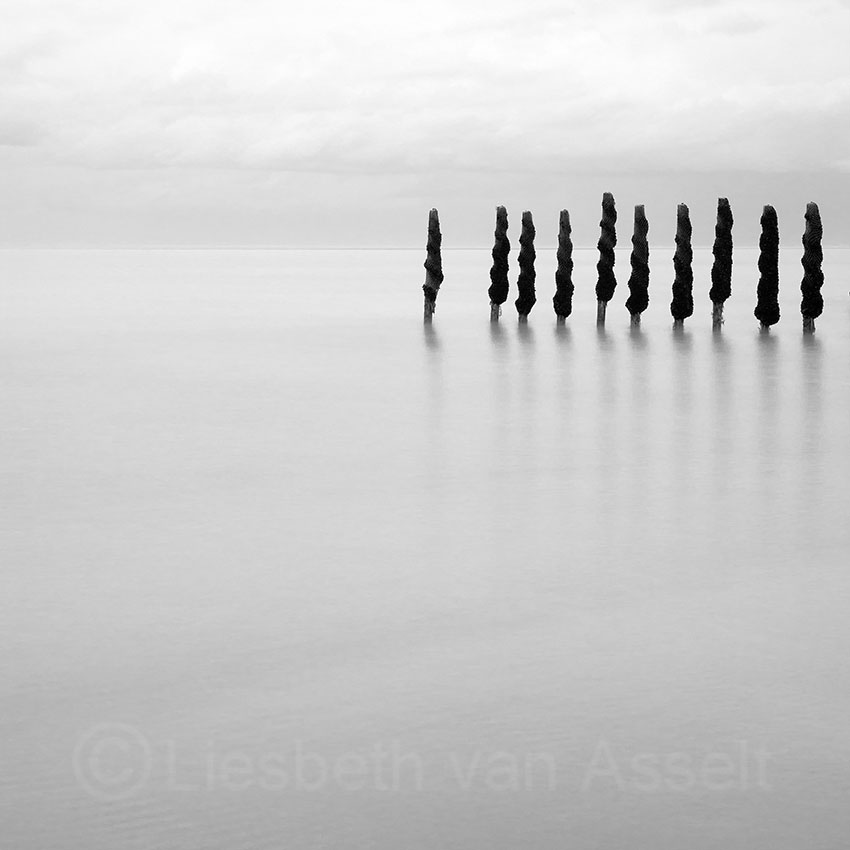
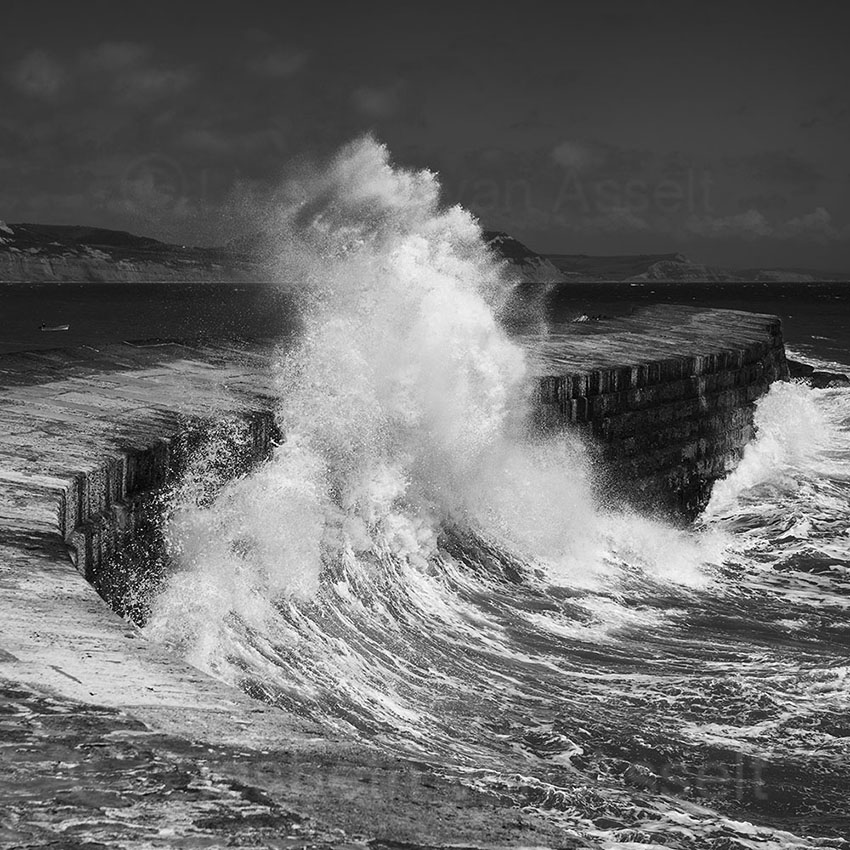
In colour photography, landscape photographers favour early morning or late evening, but with black and white photography you can also head out when the sun is high in the sky. The contrasts created then are precisely what make the black and white photo so powerful.
A black and white photo also conveys the mood of stormy weather with dark skies well! So keep an eye on the weather forecast and head out when the weather is 'bad' too.
Architecture photography
Black and white is also often used in architecture photography. Especially to show the shapes clearly.
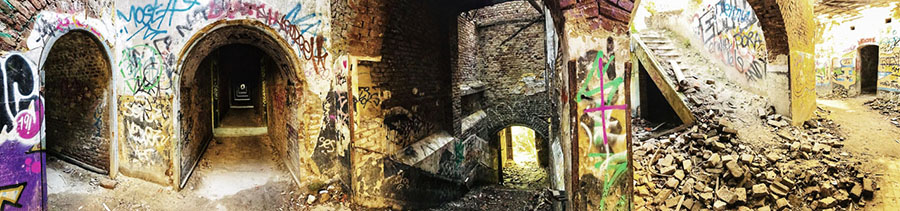
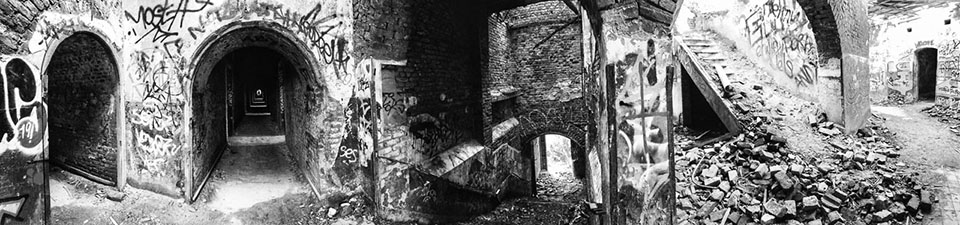
In the panorama below, you can see in the colour version that your attention is drawn strongly to the purple corner in the bottom left. The graffiti attracts a lot of attention anyway. That is of course fine if that is what your photo is about.
In the black and white version, the three sections, left, middle and right, receive equal attention. Your attention is mainly drawn to the building.
The Zone System
Okay, I said I would tell you something about Ansel Adams's Zone System. The Zone System is a technique for exposure that he devised to achieve an optimal black and white photo. The system consists of 10 zones, with each zone being one stop more or less light. See the image below from Photopills.
How does it work in practice? Imagine that you want to take a photo in which you can still see sufficient detail in the shadows. You then meter that shadow with the spot meter in your camera (or preferably with a separate light meter, but not all of us have one).
If you now take a photo, that shadow will become middle grey. The camera is programmed to make everything you meter middle grey. Your shadow is therefore in the middle of the Zone System, in zone five. But you want it to be darker, in zone three. So you expose 2 stops under (each zone is 1 stop). This can be done in manual mode, but also with your +/- button, of course.
You then go, for example, from 1/125 f 4 to 1/125 f8.
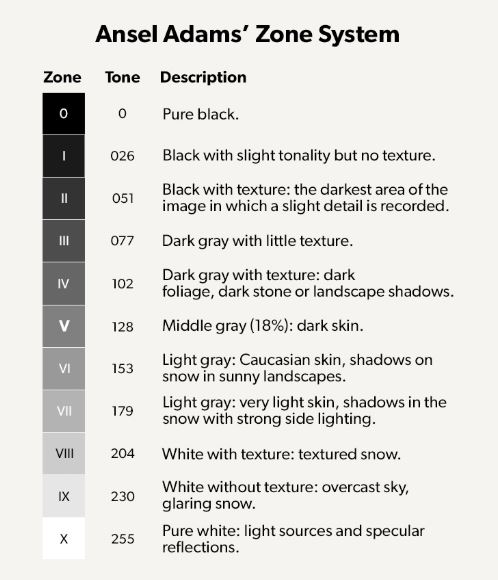
What I see is that most course participants want all the shadows in zone three and all the highlights in zone seven. The result is then a flat image with (too) little contrast. You are using only five zones instead of ten. So do not be afraid to let a deep shadow become truly black and, for example, a reflection of the sun on water or chrome become truly white.
Extremely light and extremely dark areas cannot both be photographed with detail in one image. Unless we use more advanced techniques such as HDR. The only question is whether that is always more beautiful......
You therefore have to choose between exposing for the highlights or exposing for the shadows. If you expose for the highlights, the shadows will become blocked up. If you expose for the shadows, the highlights will blow out.
You can accept that, or make an exposure bracket to work with later in post-processing. Or you can choose a different viewpoint so that the bleached-out white areas or blocked-up shadows are just outside the frame.
Post-processing
Suppose you have shot in RAW and want to convert your photo to black and white during post-processing. How do you do that? In Lightroom, you can convert the photo to black and white under the Develop heading on the right side of the screen.
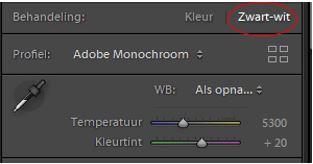
Once the photo is in black and white, we first work on the basic settings. Sometimes you can achieve in post-processing something that was not possible with the camera, such as going from 7 to 9 zones.
Suppose we want the blacks to be truly black and the whites truly white, following the Zone System. The order of work is as follows. First adjust the midtones with the exposure slider, then the highlights and shadows. Finally, adjust the white and black tones, the outer edges of the histogram.
The clipping triangles show whether you are in the right place. Turn them on by clicking them and move the slider until you see clipping. How do you see that clipping? If you move the black slider too far, the areas of the photo where the blacks are now blocked up will turn blue.
If you move the white slider too far, the areas of the photo where the whites are now blown out (= no detail left) will turn red. Then move the slider back until the clipping has just disappeared. At that point, the whites are white and the blacks are black without being blown out or blocked up respectively.
Then you work with the colour sliders.
You can set the brightness of the grey tone for each colour in the original photo.
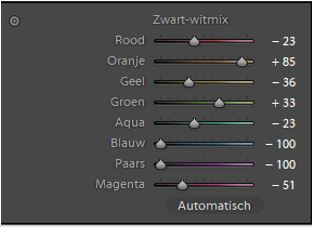
Of course, you can then add all kinds of adjustments according to taste using the adjustment brush, gradient filters, local contrast, et cetera.
Adobe Camera Raw works in exactly the same way. You tick black and white at the top. In the tab that is normally called HSL (hue, saturation, luminance), you can then adjust the brightness for each colour. Once you have converted a photo to black and white, this tab is called Black and White Mix.
If you would rather wait before converting to black and white and do it later, after all the edits in Photoshop, you can do that too.
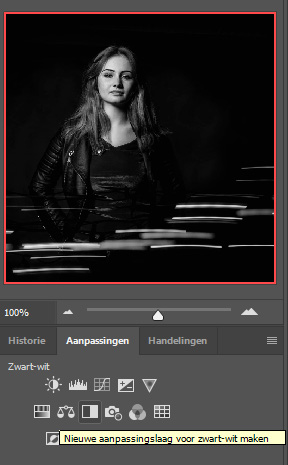
At the bottom of the Layers palette, click the black and white circle (create a new fill or adjustment layer) and choose black and white. You will again see a screen where you can choose how light or dark each colour should be in the black and white photo.
In Adobe, there are always several ways to achieve the same result, so you can also find the same screen by clicking the black and white square via the "Adjustments" tab.
Remember that black and white photography is not simply about converting a colour photo to greyscale afterwards. You have to learn to look differently and be able to predict what a colour photo will look like in black and white.
You often work with strong contrasts, backlighting!, because a dark subject against a light background stands out so beautifully in black and white. As our attention is not drawn to the colours, a strong composition is important and lines, shapes and patterns stand out much more. So actively look for them.
In the Stapfoto group (these are my advanced course participants), we even devote an entire year to the theme of black and white. By practising “seeing in black and white” a lot, you will really take different photos. And you will enjoy it more and more. The coming holiday period is a great opportunity to experiment with it!
About the author
Liesbeth fotografeert met haar bedrijf stapfoto.nl voor websites van bedrijven. Daarnaast verzorgt ze al sinds 2004 (vooral creatieve) workshops zoals lightpainting, flitsen in de natuur, fine art, frozen flowers, paintsplash, infrarood, icm en multi exposure. Daarnaast is er een Stapfoto vakgroep voor de meer gevorderde fotografen.
You might also like
-
 Street photography tip: Use zone focusing
by Michiel Heijmans
-
 Increase Your Chances of Taking Successful Street Photos
by Huub Keulers
-
 I am not a street photographer
by Michiel Heijmans
-
 Street photography: follow your street heroes
by Jan Poldervaart
-
 Using Lightroom Without a Catalogue
by Nando Harmsen
-
 5 tips to work faster in Lightroom Classic
by Thijs Schouten
10 comments
-
 Jan Leys wrote on Sunday 21 July 2019 at 12:19 | reply
Nog nooit zo'n korte en duidelijke uitleg over het Zonesysteem gehoord, super!
This comment was written in another language and has not been translated yet.
Ik heb ooit (jaren geleden) een workshop Zonesysteem gevolgd bij Paule Pia in Antwerpen. Zij legde er de nadruk op dat (in de "natte" doka) je eerst aan de afdruk moest denken, dat je moest weten wat (welke zones) je wel of niet op papier kon krijgen eer je een opname maakt.
Daarom zou het ook wel interessant zijn om wat meer te weten hoe jij verder naar het afdrukken kijkt in het Zonesysteem, toch wel de moeite vermoed ik... -

 Liesbeth van Asselt
wrote on Monday 22 July 2019 at 16:26
| reply
Liesbeth van Asselt
wrote on Monday 22 July 2019 at 16:26
| reply
Dag Jan, afdrukken van foto's is wel een aparte blog waard inderdaad
This comment was written in another language and has not been translated yet. . Zwart loopt op een afdruk b.v. eerder dicht dan op een scherm omdat er op papier nu eenmaal geen licht doorheen schijnt zoals op je beeldscherm wel het geval is. Veel DOEN is het devies, dan weet je uiteindelijk wel de vertaalslag te maken van wat je voor je ziet naar papier.....
 -
 Jan-Karel wrote on Tuesday 23 July 2019 at 14:02 | reply
Eens met de vorige schrijver: goede uitleg over zonesysteem en hoe dit tie te passen. Ik zou er nog iets aan toe willen voegen. De aanpassingslaag 'niveaus' wordt, meen ik, ook wel gebruikt om de uitersten te bepalen van wit en zwart, om daarbinnen te variëren.
This comment was written in another language and has not been translated yet.
Wat ik miste is de software SilverEfex Pro2 van de NIK-collection (die helaas erg duur is geworden). In deze software zit namelijk standaard een balkje met de zones. Dat is toch ook wel handig.
Nogmaals bedankt voor de handzame uitleg! -
 Jan-Karel Kok wrote on Tuesday 23 July 2019 at 14:03 | reply
naschrift: het beeld floepte te snel weg:
This comment was written in another language and has not been translated yet. -
Liesbeth van Asselt
wrote on Tuesday 23 July 2019 at 14:24
| reply
Goede toevoeging Jan-Karel, in Silver Efex zit inderdaad een balkje zodat je kunt zien welk gebied in welke zone zit.
This comment was written in another language and has not been translated yet. -
 Motorwybe wrote on Wednesday 24 July 2019 at 10:58 | reply
Ik snap iets niet. Een foto in 10 stappen betekent voor mij bracketing en dan maak ik 10 opnamen direct achter elkaar.?
This comment was written in another language and has not been translated yet.
Ik gebruik vaak bracketing in 3 stappen, t.w. éénmaal onderbelicht en éénmaal 1 stap overbelicht.
Wie laat bij mij het spreekwoordelijke kwartje vallen ? -
 Douwe Struiksma wrote on Wednesday 24 July 2019 at 11:32 | reply
Mooie en heldere beschrijving, complimenten. En idd anders kijken en anders doen, denken in zwart-wit beelden bij het maken van compositie en beeld, prachtige tak van sport.
This comment was written in another language and has not been translated yet.
Voor wat betreft bewerkingen maar ook omzettingen naar zwart-wit maak ik in Ps vaak gebruik van de extensie TKActions van Tony Kuyper (http://goodlight.us). Selecties maken en bewerken op basis van helderheidsmaskers met daaraan gekoppeld dat prachtige zone-systeem van Ansel Adams. In de extensie kan ook prachtig de omzetting naar zwart-wit worden gemaakt. Lijkt redelijk complex maar valt, uiteraard na nodige studie en oefenen, erg mee. Zeker na het volgen van de online videocursus over deze extensie van Sean Bagshaw.
NB Jammer dat Stapfoto niet een beetje bij mij in de buurt zit, vakgroep zwart-wit lijkt wel heel interessant.
Vriendelijke groet -
Jan Leys wrote on Wednesday 24 July 2019 at 11:45 | reply
#MotorwybeMotorwybe
This comment was written in another language and has not been translated yet.
Bij het Zonesysteem bereken je de belichting zodanig dat in één opname er 10 stappen (f-stops) in je belichting zitten (of zouden kunnen zitten). Hierbij bekom je een optimale belichting. Weet dat het Zonesysteem ontstaan is bij het gebruik van een platencamera waarbij bracketing helemaal niet mogelijk was /is.
in principe gaat dit nog verder in de ontwikkeling van de film (met begrippen als N-1, N+1,2...) en in de afdruk. Het ganse chemische proces in de natte doka was er op gericht om zoveel mogelijk detail te halen uit de volgens het Zonesysteem belichte film...
zie ook https://nl.wikipedia.org/wiki/Zone-systeem -
Liesbeth van Asselt
wrote on Wednesday 24 July 2019 at 11:53
| reply
Dag Douwe, leuk, ik kende deze TKActions niet! Ga er eens naar kijken. Ziet er op het eerste gezicht druk en ingewikkeld uit, vraagt dus inderdaad wel wat tijd om er in thuis te raken denk ik
This comment was written in another language and has not been translated yet.. Ik werk nu met Easy Panel voor luminosity masks, helaas daar 6 ipv 10 zones.... -
Liesbeth van Asselt
wrote on Wednesday 24 July 2019 at 12:06
| reply
@Motorwybe het zonesysteem gaat over het verkrijgen van 10 zones = 10 stapjes met oplopende helderheden in 1 foto. Als dat ter plekke niet lukt, kun je als hulpmiddel een HDR maken (in de camera of achter de computer), waarvoor je dan inderdaad bracketing kunt gebruiken. Meestal zijn drie foto's met 1 stop verschil ruim voldoende om een HDR-foto te maken waar 10 stops in zitten. Tien foto's heb je echt niet nodig
This comment was written in another language and has not been translated yet..
Have your say
Please note: Articles older than a week can only be commented on by signed-in visitors.Would you still like to comment? sign in or create a free account.
Become a better photographer every week
A practical photography tip in your inbox every week.
38,982 photography enthusiasts already receive the tips! More about the weekly mail. Or keep up to date via  Facebook.

Elja Trum
Photofacts; everything to do with photography!
Would you like to take better photos and keep up with what is happening in photography? Photofacts publishes articles that teach you something about photography — from a product announcement to a practical shooting tip or a look at a website. Photofacts covers photography every day and is a hobby project of Elja Trum's that got out of hand. The articles are written by a team of volunteer authors. If you would enjoy writing one or more articles for Photofacts, do get in touch.More about PhotofactsPhotofacts is made possible in part by
