

Black and white photography tip: adding a colour tint
Thursday 14 December 2023, 20:02 by Nando Harmsen | 2,930 views | 2 commentsThis article was translated from Dutch with the help of AI. Read the original.
Sometimes you still want a little colour in your black and white photo. It does not have to be much, just a hint is enough. It is easy to add a colour tint in Lightroom. This gives your photo a unique look. It is important to have a good black and white photo as a base.
You know them, those sepia photos from the past. This yellow tint gives the photo an old-fashioned look, as if time has left its mark. But it does not stop there. You can give a black and white photo all kinds of colour tints.
Choose yellow, red, blue or green. It does not matter, as long as you make it your own unique style. The basis must be a well-edited black and white photo, though. Before you start using colour, you first need to remove it.
Once you have edited a beautiful black and white photo, with fine and pleasing contrast, it is time to add colours. In Lightroom, you can do this with the Colour Grading editing panel.
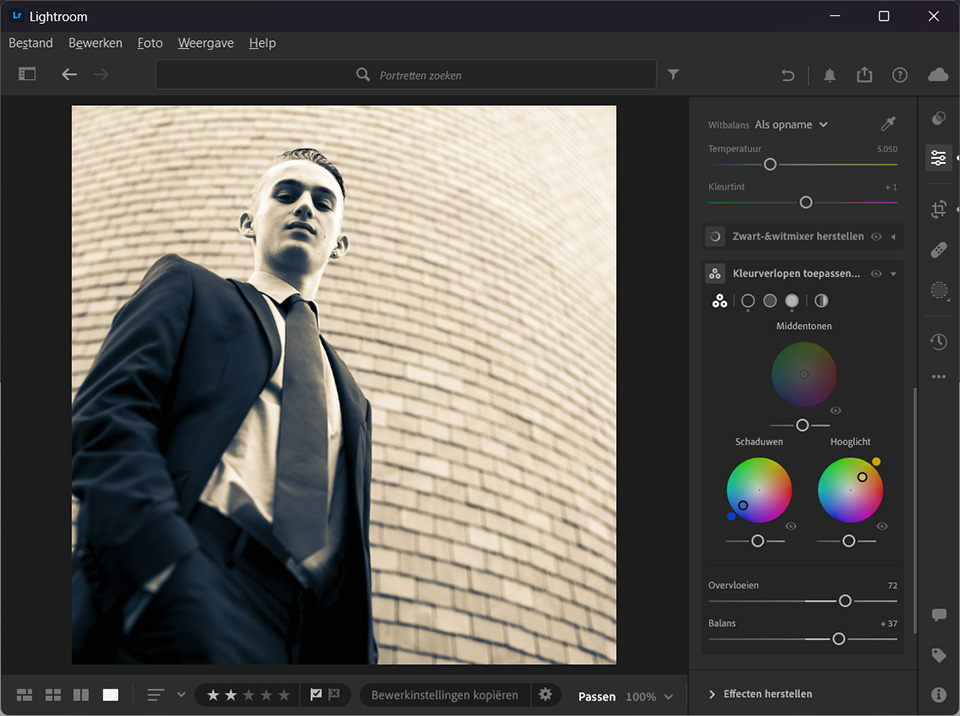
You can choose a global colour, or adjust the colour intensity separately for the midtones, shadows and highlights. This gives you complete control over the strength of the colours in the different brightness levels of the photo.
If you like, you can even use two colours. One for the shadows and one for the highlights. You then get a duotone photo. In that case, complementary colours are recommended. But you do not have to use them if you do not want to.
About the author
Nando Harmsen has been photographing for more than 40 years. He specialises in wedding photography and landscape photography. Nando also gives talks, workshops, masterclasses and photo trips, and regularly reviews new and interesting equipment.
You might also like
-
 Sometimes a black-and-white photo needs to be grey
by Nando Harmsen
-
 The added value of a good foreground
by Nando Harmsen
-
 Generative Expand added to Photoshop Beta
by Elja Trum
-
 Step by step: Adding flash to daylight
by Elja Trum
-
 Adding keywords, do you do it consistently?
by Nando Harmsen

2 comments
-
 Haegeman Roland wrote on Tuesday 19 December 2023 at 12:49 | reply
Seems very interesting to me.
Translated from Dutch. -

 Ynze Braaksma wrote on Wednesday 20 December 2023 at 00:21
| reply
Ynze Braaksma wrote on Wednesday 20 December 2023 at 00:21
| reply
Nice tip! I knew it existed but had never worked with it before. I’ve now applied it to a suitable photo. It turned out nice.
Translated from Dutch.
Have your say
Please note: Articles older than a week can only be commented on by signed-in visitors.Would you still like to comment? sign in or create a free account.
Become a better photographer every week
A practical photography tip in your inbox every week.
39,024 photography enthusiasts already receive the tips! More about the weekly mail. Or keep up to date via  Facebook.

Elja Trum
Photofacts; everything to do with photography!
Would you like to take better photos and keep up with what is happening in photography? Photofacts publishes articles that teach you something about photography — from a product announcement to a practical shooting tip or a look at a website. Photofacts covers photography every day and is a hobby project of Elja Trum's that got out of hand. The articles are written by a team of volunteer authors. If you would enjoy writing one or more articles for Photofacts, do get in touch.More about PhotofactsPhotofacts is made possible in part by
