

Magic Lantern: 4K video on the 5D Mark III
Tuesday 4 April 2017, 22:44 by Elja Trum | 6,705 views | 1 commentThis article was translated from Dutch with the help of AI. Read the original.
On 1 April, the developers of Magic Lantern announced that their firmware would also let you record 4K video on the Canon 5D Mark III. It was only the next day that it became clear it was not an April Fool's joke.
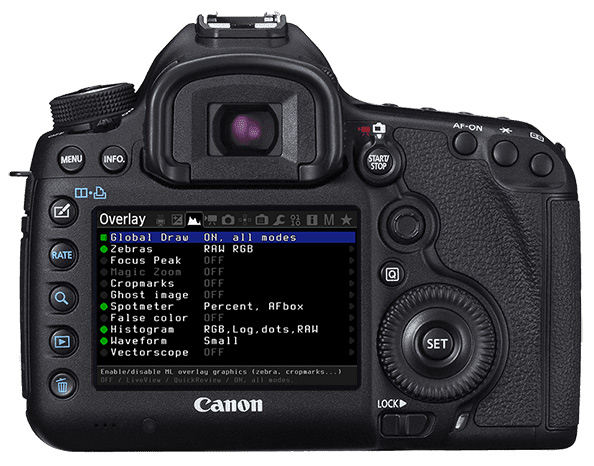
Magic Lantern is free software for your Canon camera that adds extra features, mainly for video.
You can now record at these resolutions on the 5D Mark III:
- 1920×960 @ 50p (both 1:1 crop and full-frame, 3×3 pixel binning)
- 1920×800 @ 60p (same as above)
- 1920×1080 @ 45p and 48p (3×3 binning)
- 1920×1920 @ 24p (1:1 square crop)
- 3072×1920 @ 24p (1:1 crop)
- 3840×1600 @ 24p (1:1 crop)
- 4096×2560 @ 12.5p (1:1 crop)
- 4096×1440 @ 25p (1:1 crop)
- Full-resolution LiveView: 5796×3870 at 7.4 fps (128ms rolling shutter).
You can download the software here for free. Use it at your own risk, although nothing is likely to go wrong very quickly. It is useful to understand what you are doing, at least.
About the author
Elja Trum is the founder of Photofacts and online photography course website Photofacts Academy. He has been writing about photography since 2006. Elja is also the author of (Dutch) books on composition, black-and-white photography, flash photography and portrait photography.
You might also like
-
 New firmware for filmmakers with the Canon R6 and 1D Mark III
by Nando Harmsen
-
 New firmware for the Canon EOS R5, R6 and 1D Mark III
by Nando Harmsen
-
 An interesting firmware update for the Nikon Z6 II and Z7 II
by Nando Harmsen
-
 New firmware update for Canon mirrorless cameras
by Nando Harmsen
-
 Olympus improves its E-M10 with the Mark III
by Michelle Peeters
-
 Review: Canon EOS 1Dx mark III
by Nando Harmsen
1 comment
-
 Wim Hendriks wrote on Thursday 6 April 2017 at 21:19 | reply
Hi Elja,
Translated from Dutch.
I waited a few days, looking to see if there are photographers who also had an additional paste for filming with a DSLR, I am writing this in capital letters, because it is different from photographing with such a camera.
Returning to ML, I used that on my Canon5D2 and, so to speak, to complete satisfaction, although I do have to mention that, when you load the sd card, in e.g. Bridge, you should not load the entire card, but only the files, otherwise you have to put the ML on your card again every time, with the D60 I bought the C-log from EOSHD which puts a so-called LUT over the recorded file, also to complete satisfaction, you do have to mention that you get the best result with DaVinci Resolve editing.
Looking at 4K filming, it stands out that you have to use 24p for maximum 4K, in Europe we use 25p/30p/60p/, so if you take 25p that only happens in 4096x1440, so a black bar on your screen. If you want to get 4086x2560, then you end up with the very slow recordings and use a tripod to prevent shaking.
Have your say
Please note: Articles older than a week can only be commented on by signed-in visitors.Would you still like to comment? sign in or create a free account.
Become a better photographer every week
A practical photography tip in your inbox every week.
38,764 photography enthusiasts already receive the tips! More about the weekly mail. Or keep up to date via  Facebook.

Elja Trum
Photofacts; everything to do with photography!
Would you like to take better photos and keep up with what is happening in photography? Photofacts publishes articles that teach you something about photography — from a product announcement to a practical shooting tip or a look at a website. Photofacts covers photography every day and is a hobby project of Elja Trum's that got out of hand. The articles are written by a team of volunteer authors. If you would enjoy writing one or more articles for Photofacts, do get in touch.More about PhotofactsPhotofacts is made possible in part by
