

How do you create a good photography website?
Monday 8 August 2016, 15:51 by Marit Hilarius | 28,042 views | 23 commentsThis article was translated from Dutch with the help of AI. Read the original.
If you want to get serious about working as a photographer, a website is naturally one of the very first steps. Without a website, people cannot find you and the chance of bookings is small.
The importance of a good website is therefore enormous, and it can make a difference when a potential client is choosing between several photographers. These steps can help you put together a good photography website that suits your target audience and their needs.
Step 1: An overview
First of all, when setting up your website, it is important to know where you want your website to go, who you want to address, and why. You can do this by asking yourself various questions and answering them clearly.
The function
What is the function of the website? Do you only want to provide information? Do you want to sell products, offline or online? Do you want to show your work and let people share it? Or perhaps all of these things?
The goal
What is the goal of your website? What would you like to achieve with your website? Most goals are often 'making money' or 'sharing information'. With a photography website, it can be both.
If you are more of a blog, you are providing information. But if it is really a portfolio, you are probably aiming for bookings, and therefore making money.
Your target audience
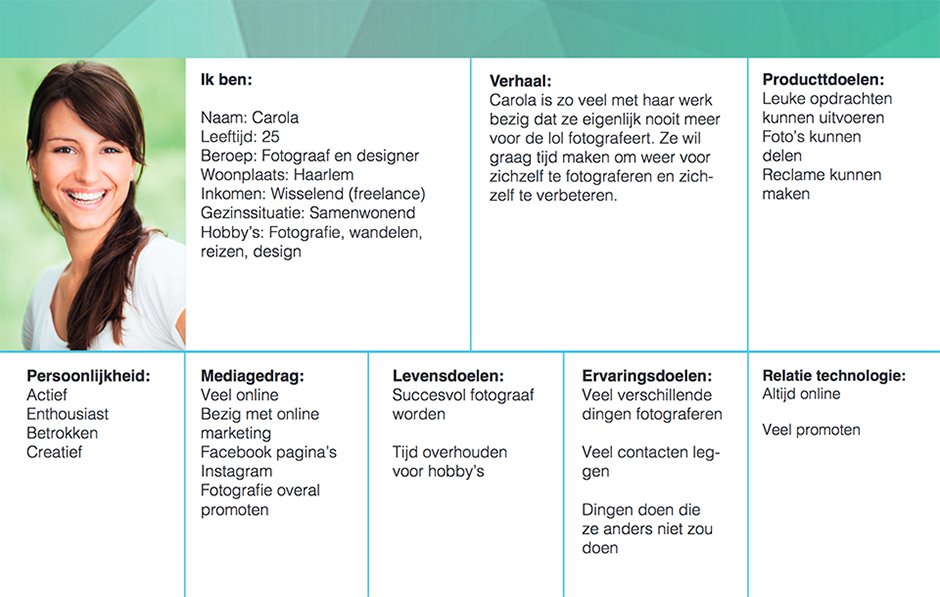
Which target audience should help you achieve these goals? Try to picture one person. We call this a 'persona' of your ideal target audience.
For example, are you focusing on children's photography? Then sketch out the character of a mother with young children. How old is she, and what stage of life is she in? What are her hobbies?
How does she view the world? What would she want to find on your site? What is important to her?
This may seem excessive, but creating a persona is a very important step.
You can then adapt the design and content of your website to this specific target audience, so that the audience's wants and needs match your website.
A mother who would like photos of her children probably is not waiting for a dark, gloomy website without information about the photographer, to give an example.
Content
What content should be found on your website? In other words, what would the target audience like to read or see? What do they consider important? Prices, information about you, a way of working?
An extensive or minimal portfolio? If you find this difficult to determine, take another look at your persona. You can of course also ask the target audience what they would like to read or see.
Step 2: A site plan
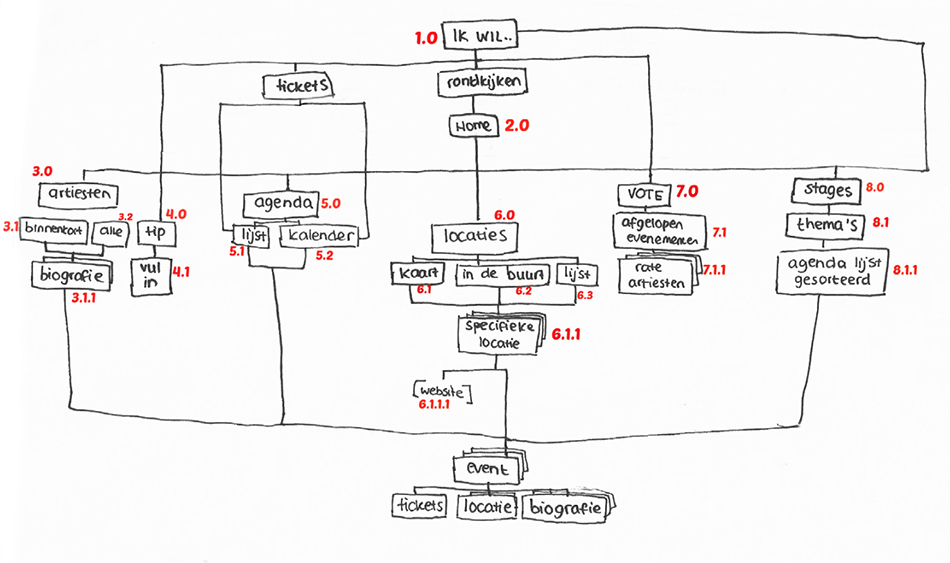
The second step is to make a plan for your website. This is not the same as a schedule, but a website plan, or a sitemap, is an overview of all your pages and navigation. Which pages do you want to show on your website, and how are they divided up?
Which menu items do you want to show? The navigation of your website is hugely important. Your users must be able to see at a glance what information can be found on your website.
No more than 7 items
Try not to show more than 7 items in your main menu. The same applies if you use categories. Our short-term memory can only remember 7 items at a time.
With fewer menu items, there is less chance that your visitor will not see or miss important items. Ideally, you should have no more than 5 menu items in your main menu.
Order
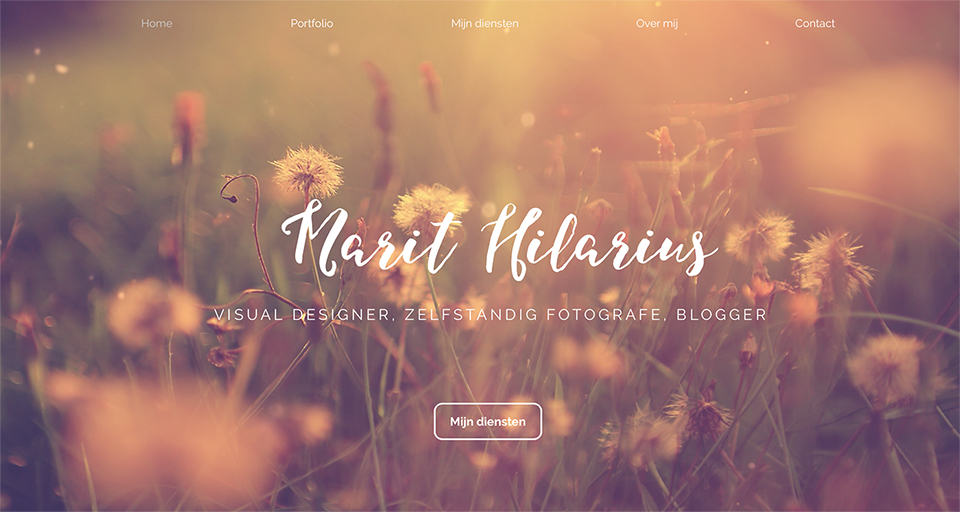
Make sure your most important item is on the left. Your users see this first. The contact information is usually on the far right in the menu.
Step 3: Write your content
It is important to write your content first before you start on the design. You cannot know what a page should look like if you have not yet decided on the content.
So, tempting as it may be to start on the design, write your texts first.
How do you address the target audience?
Do you remain formal and distant? Or do you address people as 'you' and try to make it very personal? This all relates to the persona you created in step 1.
Do you photograph weddings? Then it is very important to be personal and to use a warm tone in your text. After all, you will be photographing on a very intimate day.
Do you work for businesses? Then you can maintain a somewhat more formal tone.
How much information do you want to show on your site?
How do you want to get a booking? Would you like your clients to contact you personally for a quote, and leave the prices off your website?
Or would you rather have as much information as possible available on your website?
This also differs depending on the target audience, but it is personal too.
You could put the following subjects on your website:
- Your way of working. How do you like to work, when do you deliver the photos, how does a photoshoot work, etc.
- Clothing tips for a photoshoot
- Detailed prices, what do clients get for this package, what about ordering extra prints?
- Locations where you like to photograph
Which photos are you going to show?
Naturally, your photos are the main focus, because it is a photography website after all! So choose carefully which images you want to show. If you have too many photos, there is a good chance that nobody will look at them all.
The photos must also be truly representative of your work and your style. The client must be able to get a good impression of the result they will receive.
Step 4: The design
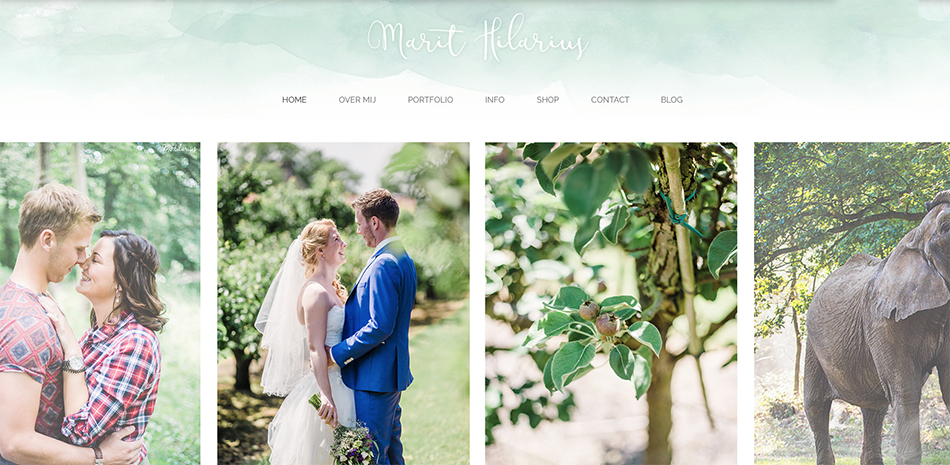
The next step is creating a design for your website. It is a step that takes a lot of time and that you can perfect endlessly. I will publish a separate article about this step soon.
Step 5: Testing
Finally, your website is finished! Before you put it online, have someone test it. Find someone from your chosen target audience and ask them to look at the website. Put your website in front of the test person without any introduction.
Ask the test person how your website makes them feel. Does the atmosphere come across well? Can the person immediately see that you are a photographer? Is it clear what you stand for and what your style is?
You can then give your test person several tasks, such as 'you want to know the price of a photoshoot with your child'. Watch which steps the test person takes to find this information, and compare this with the steps you expected them to take.
This way, you find out whether your website really is as good and user-friendly as you thought, and whether you still need to make a few changes here and there.
Step 6: Launching
Now you can launch your website! You can turn it into a fun event by launching a discount campaign or giveaway alongside it, so that your new website gets more attention. Of course, you can also simply post a message on your social media channels to share your website.
Creating a website takes as much work as you want to put into it, but if you follow these steps, you can be sure that your website fits your target audience well, and that alone could gain you a few clients.
About the author
Marit Hilarius is een fotografe die gespecialiseerd is in geavanceerde Photoshop bewerkingen. Ze heeft de basisopleiding van de FotoAcademie in Amsterdam afgerond. Haar stijl kenmerkt zich door de sprookjesachtige sfeer die ze in haar foto's creëert.
You might also like
-
 Do you still need a website as a photographer?
by Michelle Peeters
-
 Should you list photography prices on your website?
by Wilmar Dik
-
 How to take good photos for a website
by Elja Trum
-
 How reading fewer blogs and watching fewer YouTube videos improved my photography
by Frédéric Paulussen
-
 13 populaire portfoliosites beoordeeld
by Elja Trum
-
 ARS BETA: a website for photo critiques
by Michelle Peeters
23 comments
-

-

 Donald Willemsen
wrote on Tuesday 9 August 2016 at 11:27
| reply
A great article with good tips. But I’m missing something. Which software is best to use to create the website? Do you use pre-programmed templates. How do you protect the photos against misuse? What if you’re a layperson when it comes to web design?
Translated from Dutch.
Just a few questions that come to mind. -
 Joop Otting wrote on Tuesday 9 August 2016 at 12:09 | reply
Very interesting but as asked above which program is the most user-friendly for creating a website. In previous years I had a website based on iWeb but this has disappeared from the program.
Translated from Dutch.
I would appreciate some advice. -
 Riechelle wrote on Tuesday 9 August 2016 at 12:16 | reply
I am a professional photographer and I can recommend the Wordpress themes to you, @donniebelg. My site is currently temporarily offline due to updating | maintenance of the website. I deliberately do this during the summer holidays, when my clients are on holiday themselves
Translated from Dutch. . Maintaining it is easy to do yourself with Wordpress.
-
 Bert Hazekamp wrote on Tuesday 9 August 2016 at 14:09 | reply
Ensure good copyright protection and disable the right mouse button for this per site or for the entire website;the scripts differ for Chrome and Internet Explorer
Translated from Dutch. -
 Lauran wrote on Tuesday 9 August 2016 at 14:38
| reply
I can figure all of this out myself. Building a site itself really involves quite a bit more. Unfortunately, I don't see any of that reflected here.
Translated from Dutch. -
 eduardvanmil
wrote on Tuesday 9 August 2016 at 14:46
| reply
@Joop Otting, I still have my website (10 years) via iWeb. It is no longer supported by Apple but still runs fine with the current software under the latest operating systems such as Apple's OS X El Capitan.
Translated from Dutch.
Now I am an older amateur and do everything for fun, but I do want to send my final photo/product out into the world, e.g. via Nederpix/Flickr/500px/website. That way you also meet other photographers with your interests who you can exchange things with and from whom you learn again, even if it is only to discover new (travel) locations and or to improve your photo! I know people who are busy with their hobby but do not let their photos get any further than Lightroom's archive and that is a shame because there are sometimes beautiful photos among them that would not look out of place in a travel guide!
Finally, iWeb is too old to start with, there are excellent other possibilities such as Wordpress which, incidentally, also works with templates. If you really want to build your own website, then you cannot avoid delving into the HTML codes (there are courses for beginners), but then you do have a self-designed website.
If you want to work even more professionally, then it is advisable to delve into Google's advertising strategy and have your website connect to it directly (quickly). The interested visitors then come via certain links directly to your product/photos for sale, with the aim of leading your potential customer directly via your Google advertisement to the product to be ordered! -

-
 R K wrote on Tuesday 9 August 2016 at 18:02 | reply
For putting together and especially maintaining your own portfolio site yourself, Squarespace
Translated from Dutch.
and Format are currently the best and - when I look around online - most widely used options. And I agree with Marco, Wordpress is unnecessarily complicated compared to other website builders. -
 RobinV1991nl wrote on Tuesday 9 August 2016 at 19:26 | reply
@Riechelle, @donniebelg: I’m a website developer by profession and (motor racing) photography is my hobby that got out of hand
Translated from Dutch. I especially wouldn’t recommend Wordpress. Its updates are extremely important, miss an update and you’re very vulnerable to hacks and viruses. From my experience with clients I know that an update sometimes gets forgotten.
Another Open Source system is Joomla. Much more freedom in layout, a tad more complicated but also less susceptible to hacks. In addition, an extreme number of (free) components for beautiful displays or features. There are also many templates available for this via, for example, themeforest. It costs you a few euros, but you get a very extensive description with all the possibilities.
The article is a great starting point to start building from there (or have it built!) Useful article Photofacts. -
 Pammy wrote on Wednesday 10 August 2016 at 11:19 | reply
You can also have your website "built" and then do the maintenance yourself in Wordpress. I have been building and maintaining websites for others for years, so I’m offering myself here to make a website that you can then either maintain yourself or have me maintain.
Translated from Dutch. -
 joey lindeman wrote on Wednesday 10 August 2016 at 18:01 | reply
I hear Wordpress being mentioned here. Now I really don't know anything about it, but during the birthday party chatter with a few internet entrepreneurs I thought I had picked up that a website made with wordpress doesn't offer the best visibility. And I know that again from other bits of party chatter: Visibility is apparently everything in internetland.
Translated from Dutch. -
 Jan Wijn wrote on Wednesday 10 August 2016 at 18:32 | reply
The private information about who you are is not necessary: that has nothing to do with your profession. When I go into a store, I also do not ask the salesperson about their family situation and their age. Do mention your specialty in photography and what your working method is. Put one or more work shots on your site and examples of your sold work.
Translated from Dutch.
Stay formal with your clients at all times, so do not use the Dutch informal jij or jou, but you: it does not matter whether it is directed at a company or a private individual, after all, they are not family of yours. It is also important to update your site from time to time, then it will also be visited more often. -
 Brian wrote on Thursday 11 August 2016 at 00:35 | reply
@joey lindeman
Translated from Dutch.
There are very important and large WordPress websites that you may visit daily, so whoever says that really isn't entirely up to date.
What is true is that you can't expect to use a package and not have to do anything more about SEO. Being found means working on your discoverability. You can do that in WordPress, you can do that in Drupal or in a self-built HTML website.
If you don't know what you're doing, or if you think you know what you're doing but actually still don't know what you're doing, you won't be found.
P.S.: I think this website was made in WordPress. -
 Elja Trum
wrote on Thursday 11 August 2016 at 09:17
| reply
@Jan Wijn; So I totally disagree with you. As a photographer, you should actually be very personal. People choose the photographer for who he is, much less for the photos he/she takes.
Translated from Dutch.
Your personal story on your website makes them see you as a person sooner and like you. You give an assignment to someone you want to give it to. You choose with emotion, not with reason.
Whether you use the formal or informal form of address on your site is again related to your personality. If in real life you are the type who says 'you' formally to everyone, then you can probably best do that on your site as well (it suits you).
Most people nowadays use the informal form of address in a conversation. Then it is strange if you don't do that on your website as well.
@Joey Lindeman; Wordpress is the most used software on the internet for creating websites. Of the ten million most visited websites worldwide, 26.4% (measurement April 2016) use Wordpress.
There is of course a reason why Wordpress is used so much. The disadvantage of this has already been mentioned: many hacking attempts are made on the system, so it is very important to keep everything up to date. Nowadays, that can often be done largely automatically, by the way.
@Brian; Photofacts was in fact not made in Wordpress, but built entirely by me.
-
Donald Willemsen
wrote on Thursday 11 August 2016 at 10:23
| reply
You, you, you, your; it makes no difference. Parents in Flanders often even address their children as 'u'. It is mainly about being polite and treating a (potential) customer respectfully.
Translated from Dutch.
If it is about model or, for example, wedding photography, then first and foremost it is about there being a good click between the photographer and the model/wedding couple. Otherwise you will not get really good photos. Moreover, your idea also has to appeal to those who will be in the photo. A good initial consultation works wonders. But now back to the actual subject. In the past I made my website with Frontpage and later kept it up to date with Sharepoint Designer. Both programs are now outdated. Dreamweaver is a good replacement, but unaffordable for the hobbyist. Then you quickly end up with free software with all its pros, cons and complexities. Often that software is also in another language. Having it built is of course also possible, but that too is gradually becoming too expensive for the hobbyist. This leaves the poor hobbyist with little choice but to put his photos on Facebook or Flickr for free, with all the consequences that entails.
Something else that is important is the platform on which a website runs. That can be a Windows or Linux platform. From my own experience I know that a Windows platform is easily hacked. So bear that in mind. -

-
 Gerda wrote on Friday 12 August 2016 at 17:42 | reply
I use squarespace.com as a hobby photographer. Easy to manage yourself. Recommended for the digitally challenged!
Translated from Dutch. -
AC wrote on Saturday 13 August 2016 at 00:51 | reply
I myself obviously also have a website, an information website that is, to be clear.
Translated from Dutch.
What I think could be better is my SEO. However, I'm a layman in that area, but if you have your SEO properly adjusted by someone, what might that approximately cost?
My website is via Joomla, and I like it just fine. -
 Vincent Schiphorst
wrote on Monday 15 August 2016 at 22:50
| reply
I also have a paid Wordpress Theme. It works great for me and the maintenance is quite manageable. Even setting up good SEO (Google optimization) can be done with various plugins.
Translated from Dutch. -
 Daniel Trapman wrote on Wednesday 31 August 2016 at 09:49
| reply
What I wonder about is the point of listing prices or not on your site. Personally, I like to look for what something costs and I don't like having to contact you first to ask what something costs.
Translated from Dutch.
How do you yourselves feel about this? -
 kiek82 wrote on Monday 12 June 2017 at 12:01
| reply
I am still one step removed from this subject, but hope to really have my own website within a year. Thanks for the tips, very useful. Since I am here anyway, I have a request. I want to follow my passion and retrain and go into photography. Because of this I have started a project. Perhaps strange to ask here, but I am looking for donors, see here; https://www.donate2shop.com/nl/profiel/home.html. I would love to hear whether you would like to help me get started with my dream or donate on the website. Perhaps you know a good platform where I can explain my dream and find donors. Kind regards, Kirsten
Translated from Dutch.
Have your say
Please note: Articles older than a week can only be commented on by signed-in visitors.Would you still like to comment? sign in or create a free account.
Become a better photographer every week
A practical photography tip in your inbox every week.
38,729 photography enthusiasts already receive the tips! More about the weekly mail. Or keep up to date via  Facebook.

Elja Trum
Photofacts; everything to do with photography!
Would you like to take better photos and keep up with what is happening in photography? Photofacts publishes articles that teach you something about photography — from a product announcement to a practical shooting tip or a look at a website. Photofacts covers photography every day and is a hobby project of Elja Trum's that got out of hand. The articles are written by a team of volunteer authors. If you would enjoy writing one or more articles for Photofacts, do get in touch.More about Photofacts Photos


Photofacts is made possible in part by
