

Adobe releases Lightroom Classic CC 7.3
Tuesday 3 April 2018, 16:32 by Elja Trum | 7,490 views | 6 commentsThis article was translated from Dutch with the help of AI. Read the original.
Adobe has just released Adobe Classic CC 7.3. An update to Lightroom Classic CC with some great improvements. If you have a Creative Cloud membership, you can download the update for free straight away.
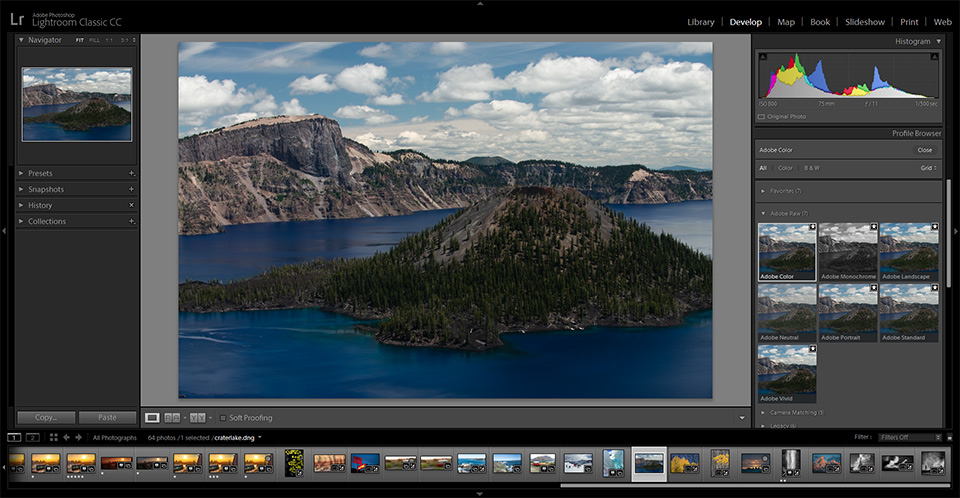
The main improvement, in my opinion, is moving the camera profiles to a clearer location. Instead of being right at the bottom of the Develop panel, they are now right at the top.
After all, selecting the camera profile you want to use is also a logical first step when you start working on a photo. It is good that this is now easier to access.
The Adobe profiles have been updated and the default profile has also been changed. New creative profiles have also been added, and you can create profiles yourself.
Watch the video with all the improvements
Piet Van den Eynde, our Adobe Certified Photoshop Lightroom Expert at Photofacts Academy, has made an extensive video in Dutch about the improvements in Lightroom.
The video was of course made available to our members straight away, but we have also made it public so that everyone can watch it.
» Watch the video with improvements in Lightroom Classic CC 7.3 for free
You can download the update straight away by starting your Creative Cloud app and clicking update. If the update is not available yet, it will probably be available within a few hours.
About the author
Elja Trum is the founder of Photofacts and online photography course website Photofacts Academy. He has been writing about photography since 2006. Elja is also the author of (Dutch) books on composition, black-and-white photography, flash photography and portrait photography.
You might also like
-
 Adobe updates Lightroom (Classic) with new AI masks
by Elja Trum
-
 20 new features in Adobe Photoshop CC 2019
by Michelle Peeters
-
 Lightroom Classic 8.0 and Lightroom CC 2.0
by Michelle Peeters
-
 What's new in the Lightroom Classic 13 update?
by Nando Harmsen
-
 The new Lightroom update now offers super-resolution
by Nando Harmsen
-
 A new update for Lightroom Classic
by Nando Harmsen
6 comments
-
 R K wrote on Thursday 5 April 2018 at 18:44 | reply
Update is niet aan te raden wanneer je gebruik maakt van aangekochte presets van bijvoorbeeld RNI Films, Classic Presets of VSCO. Die bleken bij mij allemaal onbruikbaar geworden. Heb vanmiddag een half uur doorgebracht met een dame van Adobe Remote Support, die er ook niet uitkwam en uiteindelijk de vorige versie van Lightroom Classic weer heeft geïnstalleerd. En zij adviseerde mij voorlopig niet bij te werken naar 7.3.
This comment was written in another language and has not been translated yet. -

-
R K wrote on Friday 6 April 2018 at 09:53 | reply
@Elja: vanochtend van Adobe Support een mail ontvangen met een link naar een tijdelijke workaround:
This comment was written in another language and has not been translated yet.
https://helpx.adobe.com/lightroom/kb/not-all-presets-are-converted.html
Ik blijf zelf voorlopig lekker op versie 7.2, maar voor anderen die ook werken met presets wellicht nuttig. -

 Phil wrote on Tuesday 10 April 2018 at 13:38
| reply
Cameraprofielen toevoegen was ook mogelijk bij "Importeren"
This comment was written in another language and has not been translated yet.
gewoon met een preset aanmaken en "Camera profielen" aanvinken. Desnoods één preset voor verschillende camera.
Dat is zelf makkelijk vind ik gezien dat je andere correcties in die zelfde preset kan laten gebeuren tijdens importeren. -
 Bart wrote on Saturday 14 April 2018 at 09:31
| reply
Heb de 7.3 versie geinstalleerd en veel presets zijn verdwenen. Als ik de 7.2 opnieuw installeer heb ik dan mijn complete oude versie terug??? Graag advies
This comment was written in another language and has not been translated yet. -
 FransJ wrote on Friday 7 September 2018 at 16:16
| reply
Misschien niet helemaal de juiste plek om deze vraag te stellen maar ik waag het er op. Ik werk met deze nieuwste versie van CC Classic en verbaas mij er over dat ik op Youtube mogelijkheden zie die in mijn versie niet kan vinden. Er zou een mogelijkheid moeten zijn om onder gebruikersvoorinstellingen (eigen presets) een submap aan te maken. Dit is erg handig als je (te) veel presents hebt/krijgt. Kan dit nou wel of niet? Dank voor uw tijd.
This comment was written in another language and has not been translated yet.
Have your say
Please note: Articles older than a week can only be commented on by signed-in visitors.Would you still like to comment? sign in or create a free account.
Become a better photographer every week
A practical photography tip in your inbox every week.
38,886 photography enthusiasts already receive the tips! More about the weekly mail. Or keep up to date via  Facebook.

Elja Trum
Photofacts; everything to do with photography!
Would you like to take better photos and keep up with what is happening in photography? Photofacts publishes articles that teach you something about photography — from a product announcement to a practical shooting tip or a look at a website. Photofacts covers photography every day and is a hobby project of Elja Trum's that got out of hand. The articles are written by a team of volunteer authors. If you would enjoy writing one or more articles for Photofacts, do get in touch.More about PhotofactsPhotofacts is made possible in part by
