

Filmborn: analogue photos with the iPhone
Saturday 5 November 2016, 13:13 by Robert Kruyskamp | 5,034 views | 0 commentsThis article was translated from Dutch with the help of AI. Read the original.
The name had been circulating among mobile photographers for some time: Filmborn. An iOS app that gives your iPhone photos an analogue 'look'. Beta testers had already shown some previews on Instagram, but since Friday every iPhone photographer has been able to download Filmborn from the App Store.
Analogue photography remains popular. Not just among older generations. It is young photographers in particular who are getting started with film cameras. Found in their father's attic, or bought for a few tens of euros on eBay. Just look at the many analogue photography blogs on Tumblr and 'film only' feeds on Instagram.
Digital photos lack the subtlety, character and authenticity of film. They look a little too perfect, too clean. The downside of analogue is the cost: buying film, having it developed and scanning it, it is expensive. That is why many photographers shoot digitally, but try to simulate the analogue feel when editing.
Wedding photographer Kirk Mastin still shoots enthusiastically on film. And he is the man behind Mastin Labs, which offers film presets for Lightroom and ACR. Mastin also takes a lot of photos with his iPhone. Because, as he says, it is the camera he always has within reach, and the quality of mobile photography is also making great strides.
Mastin wants his iPhone photos to have the same 'look' as his analogue photos. And that is why he developed Filmborn.
Filmborn
The app has been available to download since Friday. Filmborn is free, but extra options, such as a rangefinder simulation in the camera function, have to be purchased within the app.
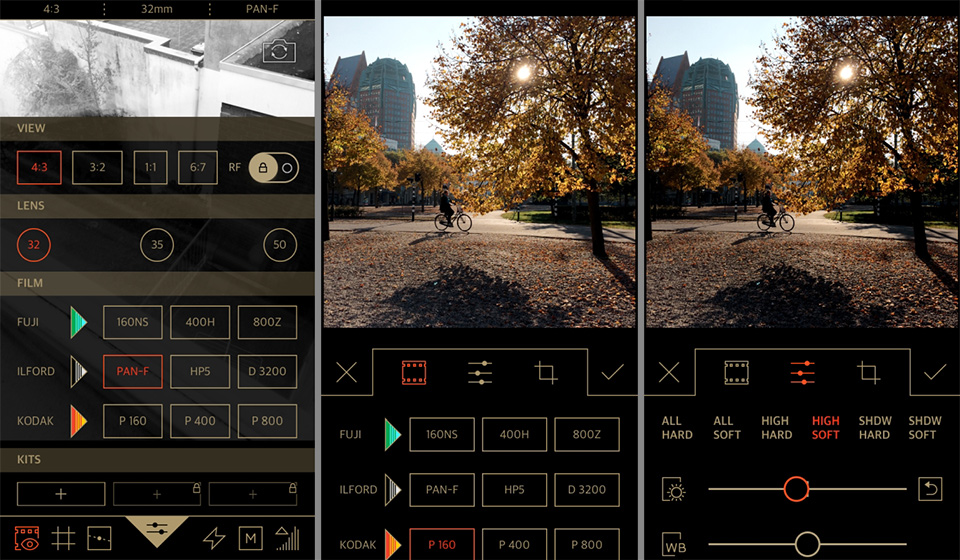
The camera in Filmborn lets you choose between different ratios, and, in 35mm equivalent, you can choose 35mm or 50mm 'lenses' alongside Apple's 32mm focal length. Naturally, this does not change the lens, you are only cropping the original image, and that does reduce the quality.

It is also possible to edit photos from your library. These can also be non-mobile photos that you have imported to your iPhone.
For film simulation, there is a choice of nine presets: three films from Fuji (160NS, 400H and 800Z), three Ilford black-and-white films (PAN-F, HP5 and Delta 3200), and three Kodak Portra films (160, 400 and 800). The presets are based on real scans made with a Fuji Frontier SP3000.
You can also reduce or increase the highlights and shadows, and adjust the exposure and white balance, for example.
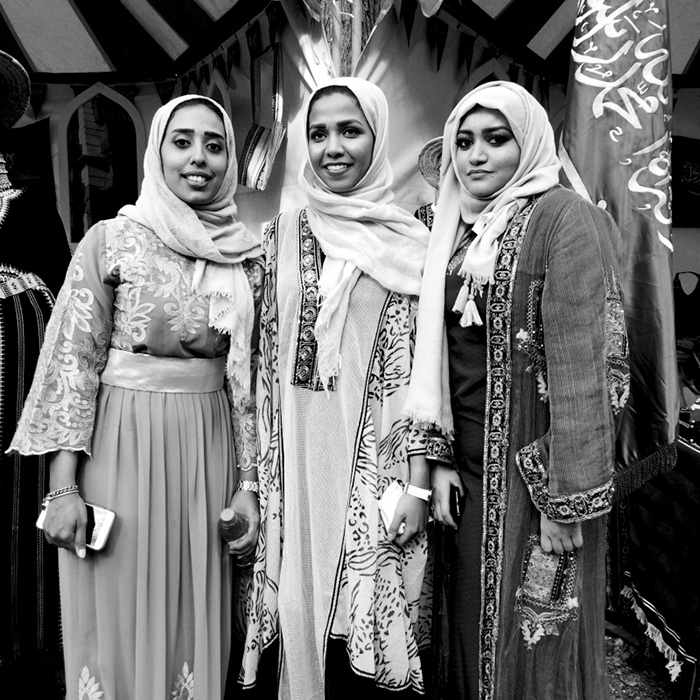
The makers have clearly chosen a subtle approach. Do not expect the strong effects that other photo apps sometimes apply. I suspect that photographers who shoot film as well as using an iPhone will especially appreciate the understated results of the Filmborn edits. For others, they may be a little dull.
Alternatives
Although the online buzz around Filmborn may suggest otherwise, the idea of simulating film through an app is of course not new. Hipstamatic was one of the first photo apps to make mobile photos look as if they had been taken with analogue toy cameras such as the Holga and Diana.
VSCO and the versatile editor Snapseed, both also available for Android, do not name specific films as inspiration for their presets, but they offer an unmistakable analogue feel.
The well-known photography blogger Eric Kim, for example, says that the VSCO A6 preset is barely distinguishable from the photos he shoots on Portra with his film cameras.
I use RNI Films myself, alongside Hipstamatic, which also makes presets for Lightroom. RNI has no camera function and is not free, but the app contains many more film simulations than Filmborn.
Not just from Fuji, Kodak and Ilford, but also from Agfa, Rollei and the instant films from Fuji and Polaroid, for example. RNI also offers options for tweaking the results to your personal taste, and you can add extra analogue effects such as vignetting, grain and even “dust”.
Android
Unfortunately, like many photo apps, Filmborn is only available for the iPhone and not for Android photographers. The reason is simple: the Android platform has multiple manufacturers, so photos from Android smartphones can differ in terms of output, for example in their colours.
It is then difficult to develop an app that simulates the look of a specific film exactly. The result will look different for each brand.
Kirk Mastin has not ruled out an Android version of Filmborn in the future, though. There are no concrete plans yet.
About the author
Voormalig journalist en woonachtig in Den Haag. Fotografeert sinds de jaren 80 met camera's in alle soorten en maten, maar heeft een voorkeur voor lo-fi analoog gereedschap en mobiele fotografie.
You might also like
-
 Review: iPhone 7 Plus camera
by Lars Paymans
-
 Review: iPhone XS, the latest iPhone camera
by Lars Paymans
-
 My Struggle with Analogue Photography
by Michiel Heijmans
-
 The Best iPhone Photos of 2017
by Michelle Peeters
-
 Learn to film better with your iPhone
by Michelle Peeters
0 comments
Be the first to share what you think!
Have your say
Please note: Articles older than a week can only be commented on by signed-in visitors.Would you still like to comment? sign in or create a free account.
Become a better photographer every week
A practical photography tip in your inbox every week.
38,729 photography enthusiasts already receive the tips! More about the weekly mail. Or keep up to date via  Facebook.

Elja Trum
Photofacts; everything to do with photography!
Would you like to take better photos and keep up with what is happening in photography? Photofacts publishes articles that teach you something about photography — from a product announcement to a practical shooting tip or a look at a website. Photofacts covers photography every day and is a hobby project of Elja Trum's that got out of hand. The articles are written by a team of volunteer authors. If you would enjoy writing one or more articles for Photofacts, do get in touch.More about Photofacts Photos
Photofacts is made possible in part by
