

7 useful camera tricks for Nikonians
Wednesday 26 April 2017, 16:32 by Michelle Peeters | 11,911 views | 4 commentsThis article was translated from Dutch with the help of AI. Read the original.
If you’re a Nikon photographer, pay attention. Wildlife and Nikon expert photographer Steve Perry has some very useful tips and tricks that can make your life much easier.
Steve Perry has photographed with Nikon all his life, and his video covers his seven favourite camera settings and tricks that he has discovered over the years.
These tricks cannot be used on the D3XXX or D5XXX series. They do work on all more recent cameras, which have these settings in their camera menus. You just need to know where to look.
You can watch the video below for a full explanation of each tip, including instructions on how to apply these custom settings. All 7 tips have also been written out below.
1. Quickly zoom in to check focus
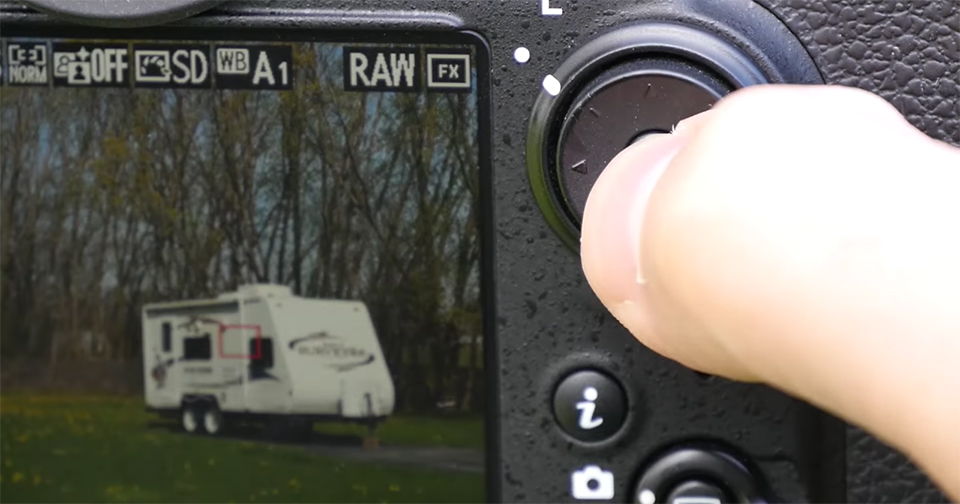
You can adjust the multi-selector button so that it automatically zooms in to 100% at the point where you focused. A great way to quickly check your focus and zoom back out.
2. Quickly zoom in to 100% in Live View
This is the same trick as the first one, except that you zoom in in Live View and check your focus before taking the photo. It is a quicker way to check your focus at 100% than pressing the zoom-in magnifying glass button three times.
3. Quick image review
Jealous of the nice Canon dial that lets you quickly scroll through images? No need to be. You can set the main command dial on the back of the camera, behind the shutter button, to quickly scroll through one image at a time. You can set the sub-command dial, in front of the shutter button, to scroll through 10 images at a time.
4. Quickly format your memory card
You no longer need to dig deep into your menus to find the option for formatting your memory card. Instead, you can use the two buttons with the Format logo underneath. It looks like this:
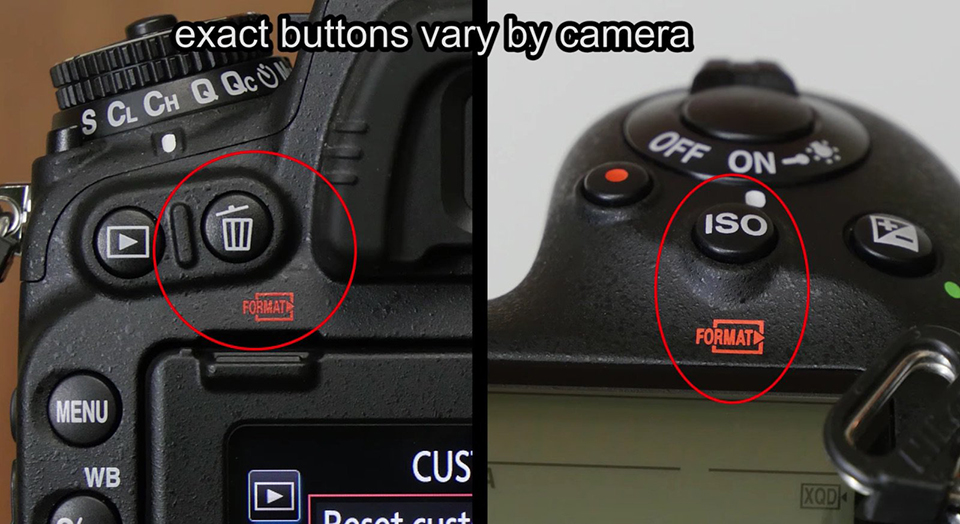
Simply hold the two buttons down until “For” appears on the top display. Press them again to format your card. You no longer need to dive into the menu.
You can even use the main command dial to select which card you want to format. You can even use the main command dial to select which card you want to format from the ‘For’ screen.
5. Temporarily disable the flash
If you have a Speedlight flash connected to your camera, you do not need to turn it on and off every time you do or do not want to use it. Instead, you can leave it on and programme your Function or Preview buttons to temporarily disable it when you press and hold the button.
6. Use the Movie Record button to change the ISO setting
For on-the-fly ISO changes while looking through the viewfinder, simply customise your Movie Record button so that you can change your ISO setting by holding down the main command dial. Easy! You can also set the sub-command dial on the front of the camera to switch from normal ISO to Auto ISO in the same way.
7. Save AF points by orientation
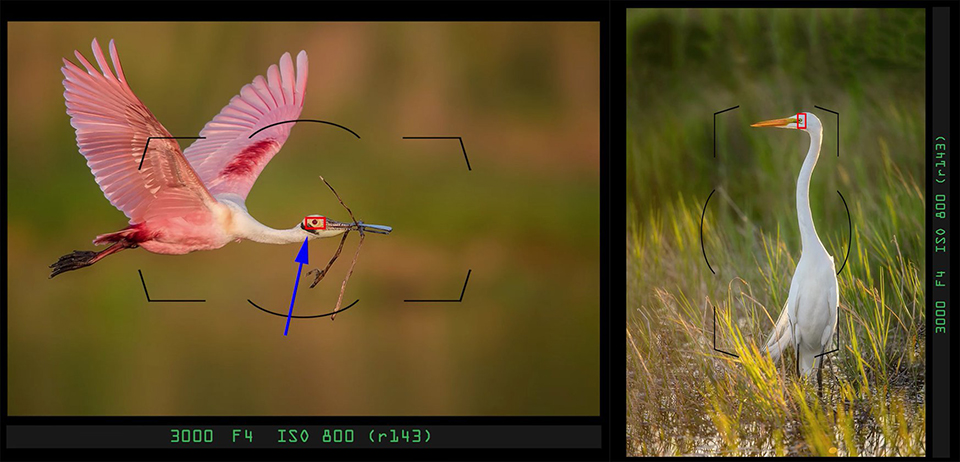
Steve Perry saved his favourite adjustment for last. If you use this, your camera will remember where your selected AF point was the last time you held the camera in a vertical position or in a horizontal orientation.
So when you turn the camera, it automatically moves the AF point back to where it was the last time you held it in that same position. SUPER useful.
About the author
Michelle Peeters is fotografe en oprichter van DeuxBleus Fotografie. Michelle herkent het bijzondere in het gewone en het gewone in het bijzondere. Ze heeft zich nooit willen specialiseren en is daardoor van alle markten thuis.
You might also like
-
 Nikon DSLR cameras, an overview
by Paul Oosterlaak
-
 Nikon D7500 announced
by Elja Trum
-
 Nikon announces D6 and 120-300mm f/2.8 lens
by Michelle Peeters
-
 Review: Nikon Z 50
by Michelle Peeters
-
 Nikon ambassador David Yarrow
by Michelle Peeters

4 comments
-
 Evert Warrink wrote on Tuesday 2 May 2017 at 16:55 | reply
I have the Nikon D7000 but completely different settings than those mentioned here. The moment I set it I get a completely different function. Can or is someone willing to help me with these above-mentioned settings?
Translated from Dutch. -
 Ine wrote on Tuesday 2 May 2017 at 20:41 | reply
I have a D 610 and I notice there are other settings on it too!
Translated from Dutch.
If possible, I would also appreciate tips about this. -

 Bart wrote on Wednesday 3 May 2017 at 13:37
| reply
Seems to only work with the D810. With my D610 it doesn't do anything. A bit of a shame. Or am I doing something wrong?
Translated from Dutch. -
 Vira wrote on Thursday 4 May 2017 at 21:34
| reply
Indeed, a bit of a shame, my D7000 also has a different menu structure, which means these tips don't work.
Translated from Dutch.
Have your say
Please note: Articles older than a week can only be commented on by signed-in visitors.Would you still like to comment? sign in or create a free account.
Become a better photographer every week
A practical photography tip in your inbox every week.
38,764 photography enthusiasts already receive the tips! More about the weekly mail. Or keep up to date via  Facebook.

Elja Trum
Photofacts; everything to do with photography!
Would you like to take better photos and keep up with what is happening in photography? Photofacts publishes articles that teach you something about photography — from a product announcement to a practical shooting tip or a look at a website. Photofacts covers photography every day and is a hobby project of Elja Trum's that got out of hand. The articles are written by a team of volunteer authors. If you would enjoy writing one or more articles for Photofacts, do get in touch.More about PhotofactsPhotofacts is made possible in part by
