

How to turn a so-so shot into something fun
Saturday 15 February 2020, 15:51 by Leen Koper | 6,570 views | 8 commentsThis article was translated from Dutch with the help of AI. Read the original.
This is the story of how a little photo on my Facebook page came about. I unexpectedly received a lot of questions about it, which made me think it might be suitable for Photofacts.
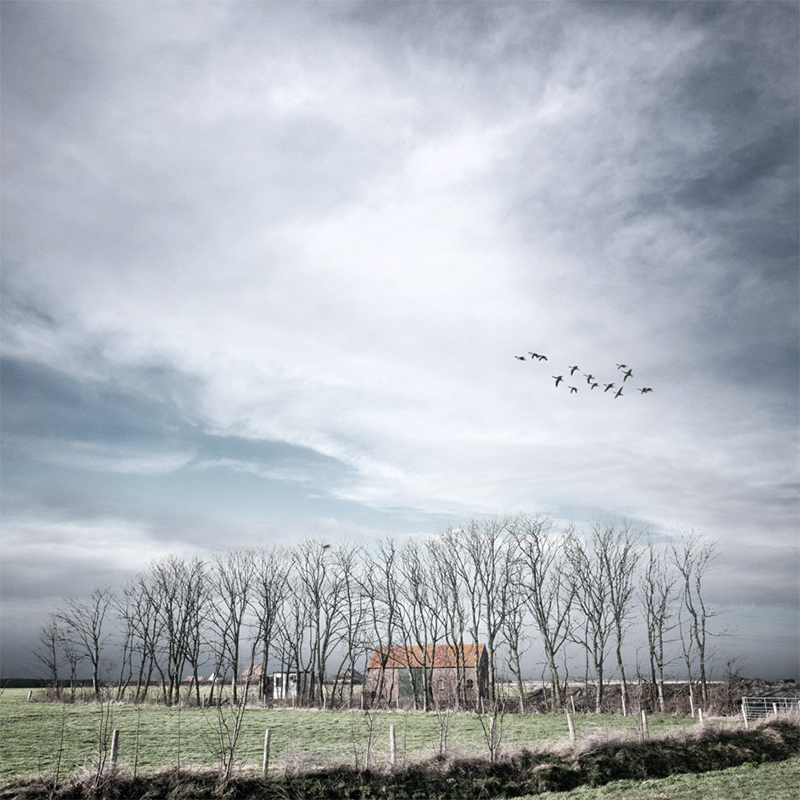
The only problem was that I had flattened all the layers of the image published on Facebook long ago, so I could no longer check which route I had taken to arrive at this result. But anyway, what follows is a kind of reconstruction. Just to tell the story after all.
Once again, I was driving past a shed beside the A57 in my little car. I must have passed it thousands of times. Every time, the lonely shed standing in the fields intrigued me, but I never saw how I could photograph it in such a way that it would be worth a second look.
It got even worse when they built some kind of earth bank right next to it. As soon as you got closer, it completely ruined the view.
Until last Sunday. When I was about to drive past it again, and was once again annoyed by the earth bank, I decided to turn into the nearby side road and stop for a moment.
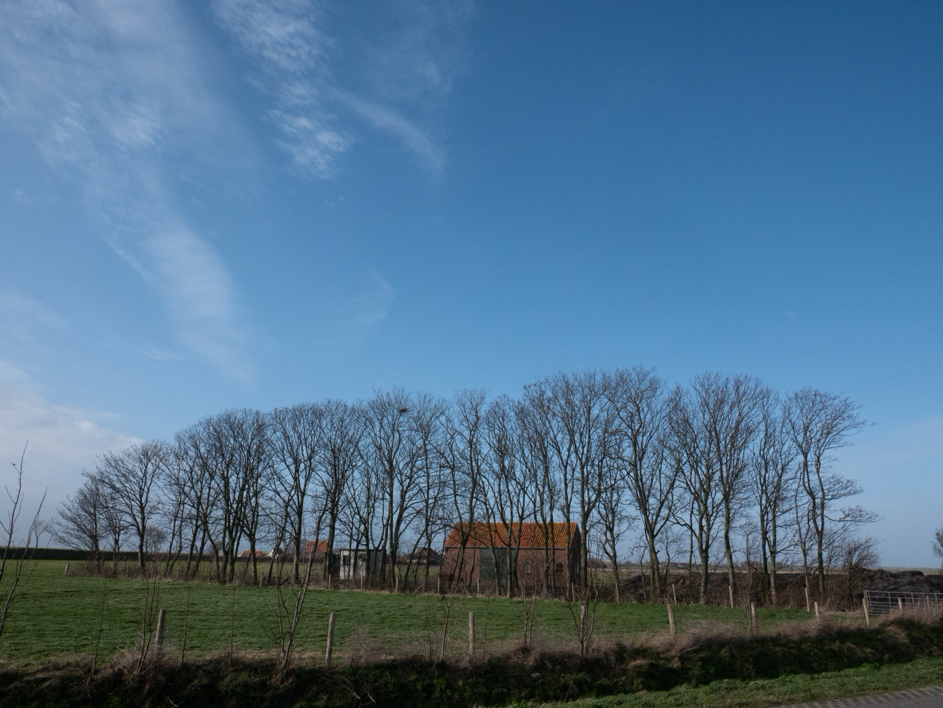
I thought it would probably come to nothing again. It was blowing like mad, so I made two shots from my car window, safely sheltered from the elements. Once I got home, the RAW file looked like this:
I quickly developed it in Photoshop Elements, and it was at least a little better:
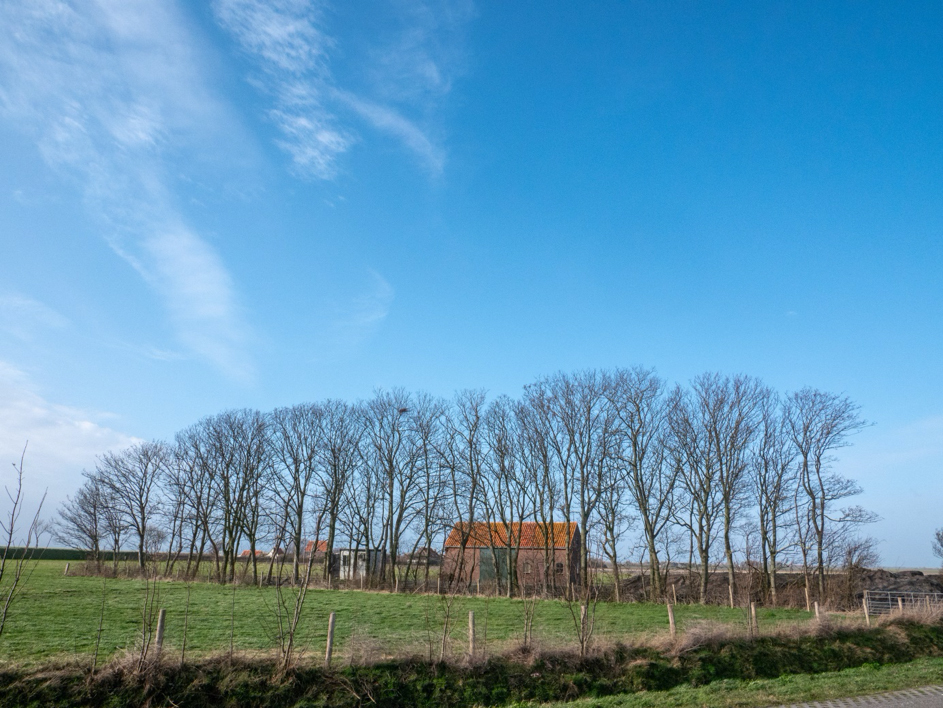
Right, that was already a bit better. But the horizon was crooked, so I quickly straightened it and cropped it slightly. It looked a lot better after that, but it still wasn't much. The boring sky did have a few clouds, but it could be better, and certainly more interesting.
First, I prepared the sky for replacing that boring blue. And besides, why not make this image square, so the emphasis would be on the sky?
Also, looking back, the picture could be a little lighter. The fact that a little light blue was still showing between the trees was less important. That would disappear into the sky I would paste over it later.
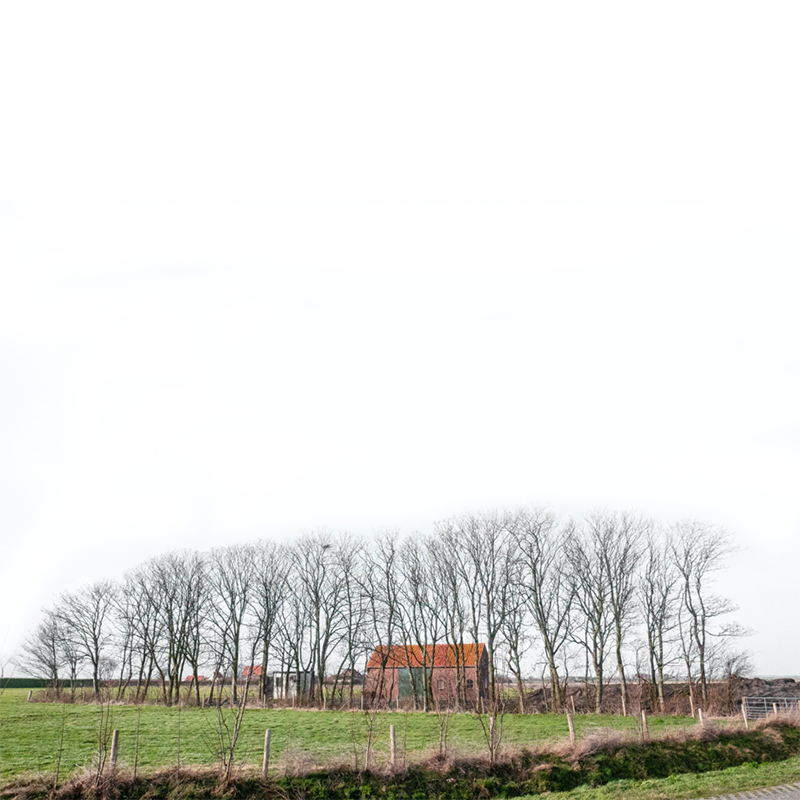
Right, now to fetch a sky from my collection:
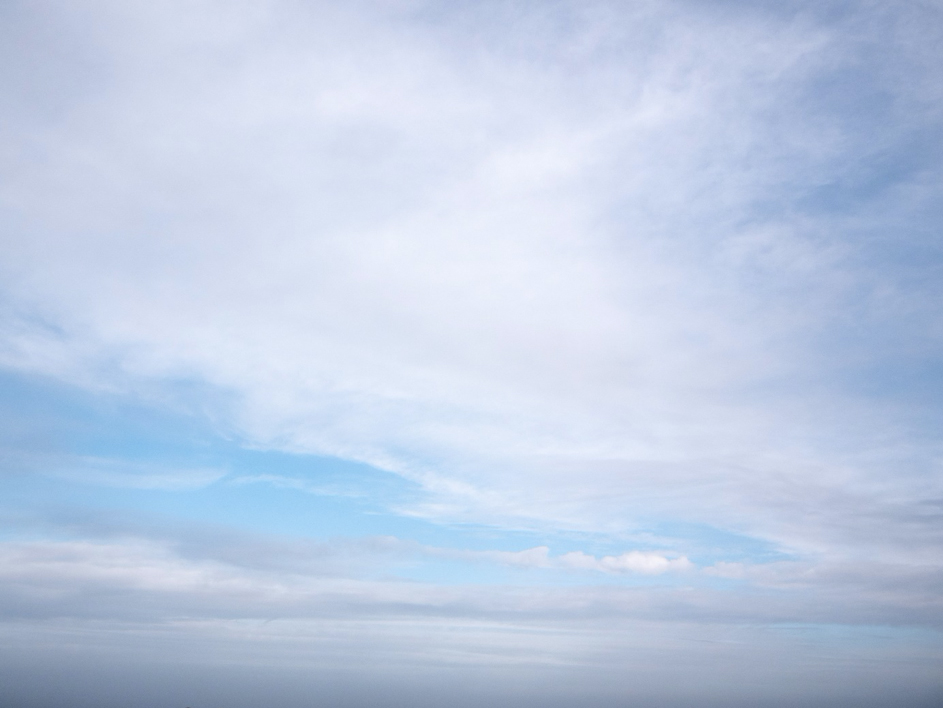
This one might fit quite nicely. I dragged it over the image and set the blend mode of this layer to 'darken'. I adjusted it a little so it fitted better, set it to about 65% opacity to make it less saturated, and it was already starting to look quite good.
But then comes a small, annoying job: erasing the sky that falls over the background and affects the colour. I could also have made a selection, inverted it and then moved the sky onto the light area, but I always end up missing some part or other that way. Now it already looked very different:
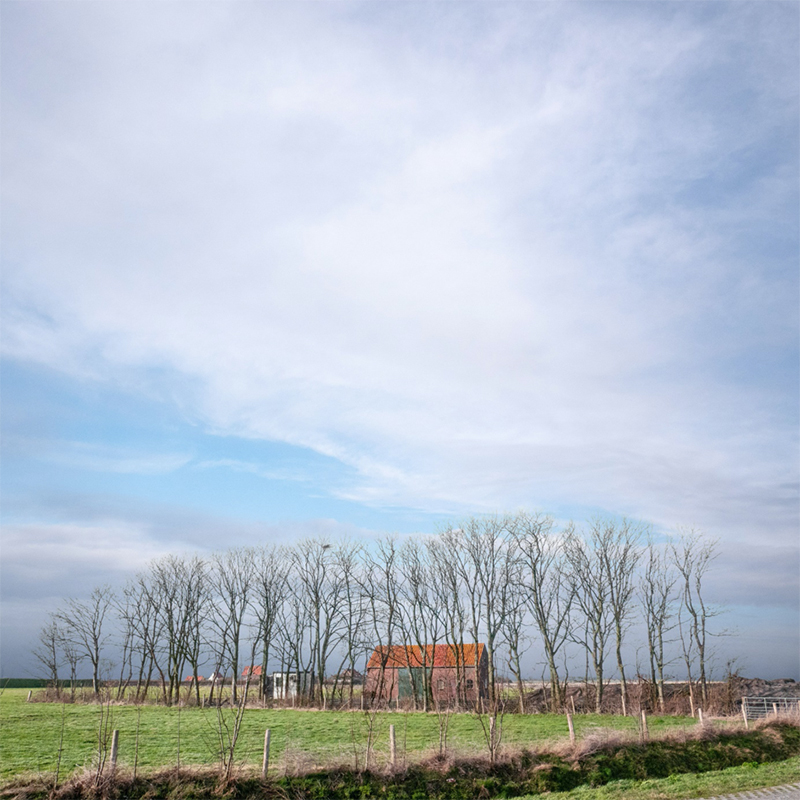
And look, the bits of blue between the trees have now disappeared completely! But I'm still far from satisfied. What next? I still find the colours a little too bright, which I have found to be the case with almost all my landscape shots lately.
Although I know most people won't agree with me, something also needs to be done to emphasise the wintry atmosphere a little more. Instead of simply lowering the saturation, I use a different method.
I turn it into a black-and-white layer using the NIK filters and make it a little more contrasty by adding an orange filter. This is what it looks like when I place it over the image and reduce the opacity a little:
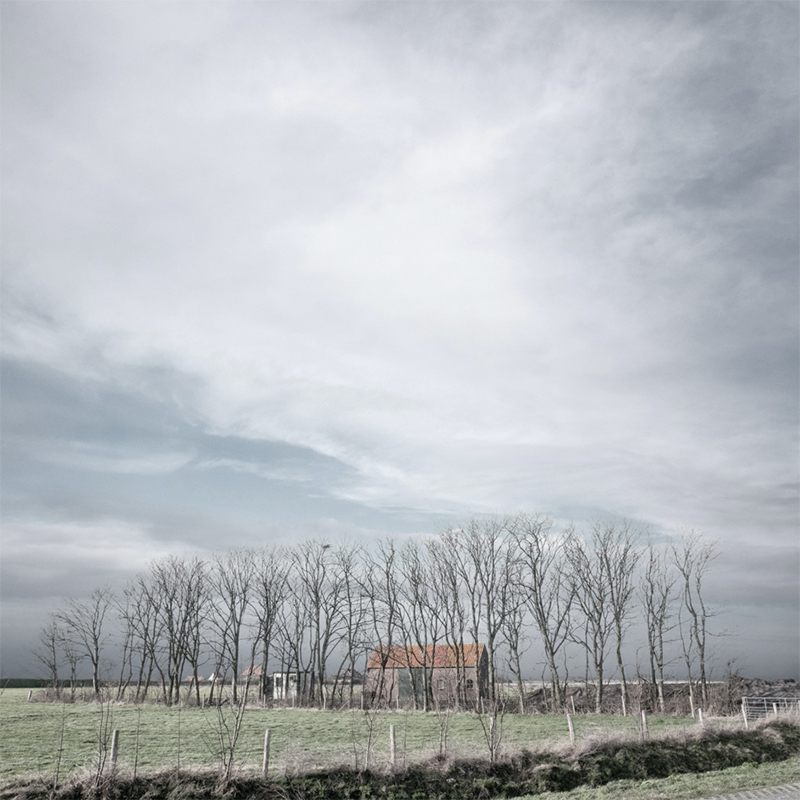
A lot better, and it is getting closer to what I had in mind. One more go with the NIK filters, 'Graduated neutral density' and 'Darken/lighten center'. I placed the 'lighten center' a little lower and applied both at a lower percentage. And suddenly it had become much nicer.
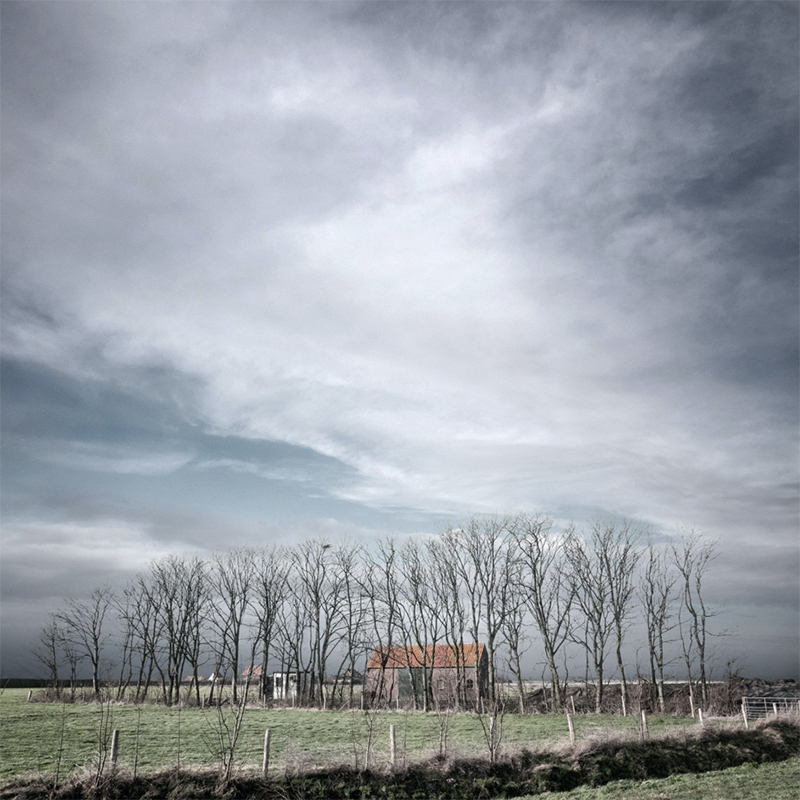
Finally, I pasted a few geese from the nearby 'Plan Tureluur' nature reserve into the sky, made a few minor changes to the whole image, such as removing the road in the foreground, and the picture was finished.
So, I had finally captured that shed in an atmosphere that radiates the omnipresent cold.
Finally, one very personal opinion. The saturation of almost all photos is nearly always slightly on the high side with every camera. Most people like this very much, and regularly increase it even further to make the photo even more colourful.
That does produce a very attractive image, but if you look at it for longer, it gradually starts to become just a little boring. In my opinion, but as I said, this is personal, lower colour saturation often produces an image that becomes boring less quickly.
Anyway, you don't have to agree with me. As long as you enjoy the hobby.
About the author
Leen Koper woont en had tot voor kort een fotostudio in Zierikzee. Na ruim 40 jaar als fotograaf gewerkt te hebben, houdt hij zich nu voornamelijk bezig met landschapsfotografie. Als beroepsfotograaf heeft hij in de loop der jaren vele internationale prijzen gewonnen en gaf les en ook regelmatig seminars in Engeland, België, Frankrijk, Duitsland en Oostenrijk.
You might also like
-
 How much software do you need for your photos?
by Nando Harmsen
-
 What came of my New Year's resolution?
by Nando Harmsen
-
 The story behind the photo: a rainbow
by Nando Harmsen


8 comments
-

 krissie wrote on Tuesday 18 February 2020 at 11:18
| reply
krissie wrote on Tuesday 18 February 2020 at 11:18
| reply
Beautiful result!
Translated from Dutch. -
 Iwan wrote on Tuesday 18 February 2020 at 12:17 | reply
Wonderfully beautiful and illustrative story.
Translated from Dutch.
Thanks for sharing! -
 Jan F wrote on Tuesday 18 February 2020 at 13:25 | reply
The applied sky has clear vignetting. That vignetting of the sky is clearly visible in the result, including at the horizon, but not in the foreground.
Translated from Dutch.
Why the "difficult job" with the eraser to get the sky behind the foreground. In the intermediate step where the boring sky has been left behind, the background is now approximately white, with a selection of the very light colors (by playing with the tolerance and turning the background on and off you can very quickly see whether parts are "missing" and inverting the selection, a layer can be made from the foreground behind which the new sky is placed. Takes much less time than working with the eraser.
 -
 Leen Koper wrote on Tuesday 18 February 2020 at 13:40
| reply
Leen Koper wrote on Tuesday 18 February 2020 at 13:40
| reply
The vignetting of the background was deliberately done afterwards on the file before I saved it; it was reasonably even, a little too even for my taste.
Translated from Dutch. -
 Donald Willemsen
wrote on Tuesday 18 February 2020 at 14:59
| reply
Donald Willemsen
wrote on Tuesday 18 February 2020 at 14:59
| reply
A good story with clear reasoning. I agree with the writer regarding the saturation of colors. Somewhat excessive saturation leads to a photo with a postcard-like quality. That gets boring quickly. In my eyes, the writer is right about that. A somewhat lower saturation appeals to me more as well. Moreover, that also provides a bit more detail.
Translated from Dutch. -
 Nijs wrote on Tuesday 18 February 2020 at 17:07 | reply
All in all, I think it is a fine result.
Translated from Dutch.
Opinions on colours etc are very personal of course, so no opinion on that. I do think this is more about making art out of your photo than the photo itself. So it is no longer an authentic photo. Nothing wrong with that, but for me it's borderline. -
 Leopold Murk wrote on Tuesday 18 February 2020 at 17:18 | reply
Nice that you show here that you can go further with a photo than just pressing the button, which doesn't give you the intended end result. How the further compositing work is done is a good instruction for how this can be approached, but everyone can follow their own path using the tools they already know. Thank you for the good initiative to want to share it with all of us.
Translated from Dutch. -
 Huub Keulers
wrote on Wednesday 19 February 2020 at 12:07
| reply
Huub Keulers
wrote on Wednesday 19 February 2020 at 12:07
| reply
Nice article Leen. Well described.
Translated from Dutch.
Have your say
Please note: Articles older than a week can only be commented on by signed-in visitors.Would you still like to comment? sign in or create a free account.
Become a better photographer every week
A practical photography tip in your inbox every week.
39,021 photography enthusiasts already receive the tips! More about the weekly mail. Or keep up to date via  Facebook.

Elja Trum
Photofacts; everything to do with photography!
Would you like to take better photos and keep up with what is happening in photography? Photofacts publishes articles that teach you something about photography — from a product announcement to a practical shooting tip or a look at a website. Photofacts covers photography every day and is a hobby project of Elja Trum's that got out of hand. The articles are written by a team of volunteer authors. If you would enjoy writing one or more articles for Photofacts, do get in touch.More about PhotofactsPhotofacts is made possible in part by
