

Black and white photography tip: Adding noise to your photo
Sunday 9 June 2024, 13:31 by Elja Trum | 3,190 views | 0 commentsThis article was translated from Dutch with the help of AI. Read the original.
As a photographer, you generally try to avoid noise as much as possible. These days, cameras are so good that you hardly notice it, unless you set the sensitivity really high.
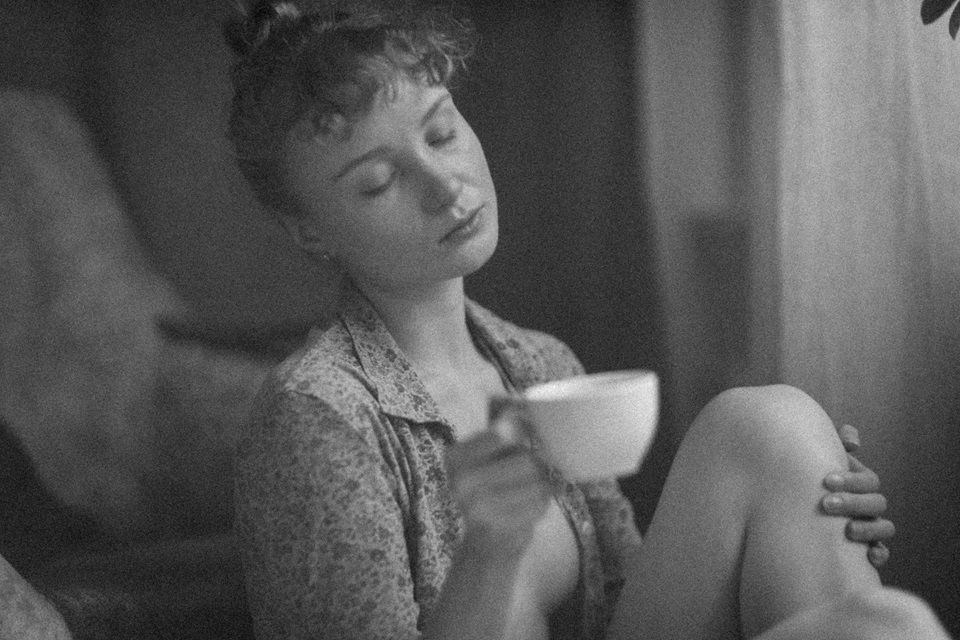
In the past, you had less choice as a photographer. If there was little light, you needed a high-speed film, and you were sure to get noise because of the larger grain of your film. Noise can sometimes be very pleasant for the atmosphere of a photo.
Adding noise is not complicated in Lightroom Classic, for example. In the Develop module, under 'Effects', you will find the option to add 'Grain'. Use the different sliders to adjust the effect to your liking.
About the author
Elja Trum is the founder of Photofacts and online photography course website Photofacts Academy. He has been writing about photography since 2006. Elja is also the author of (Dutch) books on composition, black-and-white photography, flash photography and portrait photography.
You might also like
-
 Which is better? Stacking or noise reduction?
by Nando Harmsen
-
 How can you avoid and reduce noise in your photos?
by Huub Keulers
-
 Why I Usually Don't See Noise as a Problem
by Yljas Roeper
-
 10 tips for atmospheric portrait photography
by Laura van der Burgt
-
 New update for Lightroom Classic enables AI noise reduction
by Nando Harmsen
-
 Creating atmosphere with light and pose
by Elja Trum
0 comments
Be the first to share what you think!
Have your say
Please note: Articles older than a week can only be commented on by signed-in visitors.Would you still like to comment? sign in or create a free account.
Become a better photographer every week
A practical photography tip in your inbox every week.
38,890 photography enthusiasts already receive the tips! More about the weekly mail. Or keep up to date via  Facebook.

Elja Trum
Photofacts; everything to do with photography!
Would you like to take better photos and keep up with what is happening in photography? Photofacts publishes articles that teach you something about photography — from a product announcement to a practical shooting tip or a look at a website. Photofacts covers photography every day and is a hobby project of Elja Trum's that got out of hand. The articles are written by a team of volunteer authors. If you would enjoy writing one or more articles for Photofacts, do get in touch.More about PhotofactsPhotofacts is made possible in part by
