

New update for Lightroom Classic enables AI noise reduction
Thursday 20 April 2023, 20:02 by Nando Harmsen | 9,031 views | 12 commentsThis article was translated from Dutch with the help of AI. Read the original.
Adobe has released a new update for Lightroom Classic. The most notable new option is AI-powered noise reduction. At first glance, this update promises to make other software for smart noise reduction completely unnecessary.

Until recently, you had to rely on third-party software for advanced noise reduction. The existing noise reduction options worked perfectly well in most cases. But they still fell far short of what was possible with smart noise reduction using machine learning techniques.
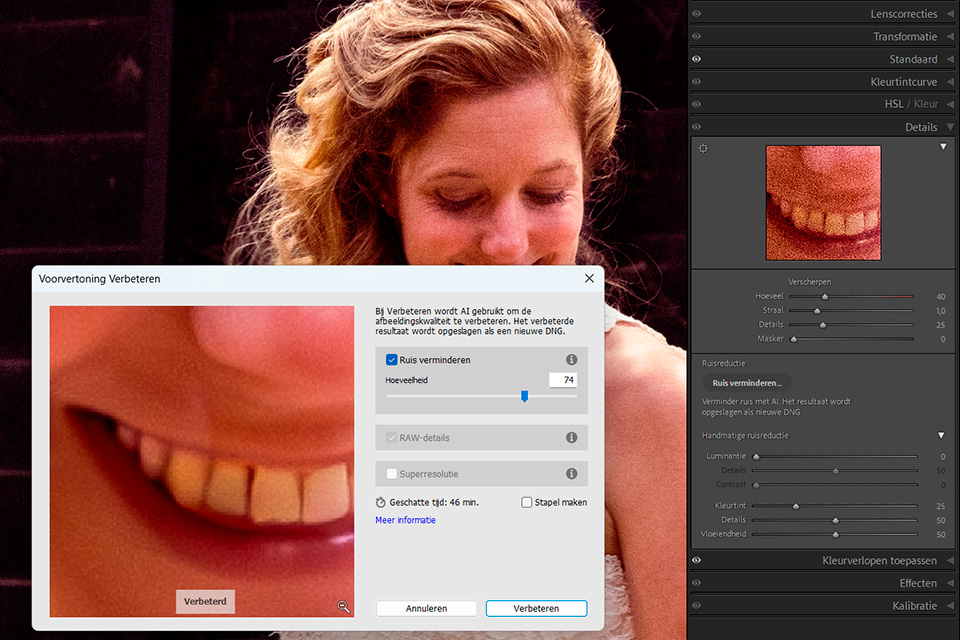
The latest update to Lightroom Classic has finally made AI noise reduction available. The result is saved as a separate DNG file, leaving the original file untouched. Non-destructive editing is therefore maintained.
The results of my own first attempts look fantastic. It is easy to use, with just one slider. Details are preserved very well, and at first glance it seems to perform better than the competition.

Noise reduction is not the only change Adobe has introduced with the update. The masks have also been updated, and automatic detection for people can now recognise facial hair and clothing. You will also see these masks listed as an adaptive preset.

The adjustment options for masks now also include curves. Until now, this was only available in Camera Raw. You can now apply curves to every mask in Lightroom Classic as well.

With this update, Adobe has made third-party noise reduction software almost unnecessary. However, there is one important limitation.
AI noise reduction currently only works with raw files. If you have a JPEG or TIFF file, AI noise reduction is not yet available. We will have to be patient a little longer for that.
About the author
Nando Harmsen has been photographing for more than 40 years. He specialises in wedding photography and landscape photography. Nando also gives talks, workshops, masterclasses and photo trips, and regularly reviews new and interesting equipment.
You might also like
-
 Which is better? Stacking or noise reduction?
by Nando Harmsen
-
 Adobe updates Lightroom (Classic) with new AI masks
by Elja Trum
-
 The new Lightroom Classic updates
by Nando Harmsen
-
 A new update for Lightroom Classic
by Nando Harmsen
-
 New updates in Adobe Lightroom
by Nando Harmsen

12 comments
-
 Ellen Keizer wrote on Tuesday 25 April 2023 at 10:18 | reply
Thank you very much for the clear explanation. I immediately performed the update after reading it. Unfortunately, I get the message “denoise is currently not compatible with the format of this photo”. These are RAW files, taken with a Canon R6. How do I solve this?
Translated from Dutch. -

-

 Nando
wrote on Tuesday 25 April 2023 at 10:27
| reply
Nando
wrote on Tuesday 25 April 2023 at 10:27
| reply
@Ellen:
Translated from Dutch.
I just tried reducing noise with AI using the raw files (c-raw to be precise) from both the Canon EOS R6 and the EOS R6 Mark II. In both cases it works perfectly.
Why it doesn't work for you is the question. I don't (yet) have an answer to that. -
 guest wrote on Tuesday 25 April 2023 at 11:39 | reply
I have the same experience as Ellen. RAW files with the Sony @7MIV and also RAW in HDR.
Translated from Dutch. -
 rob vosse wrote on Tuesday 25 April 2023 at 12:01 | reply
This has been possible in Luminar Neo for a long time, but I hear and see very little about that, always Photoshop and or Lightroom!!
Translated from Dutch. -
 fotosvanrob
wrote on Tuesday 25 April 2023 at 12:15
| reply
fotosvanrob
wrote on Tuesday 25 April 2023 at 12:15
| reply
Using a RAW photo from my Canon R5, I made a comparison between Lightroom's new noise reduction and that of Topaz Denoise. For Topaz, I made a TIFF from LR and had Topaz work on the TIFF. I was able to draw two conclusions from this.
Translated from Dutch.
1. The noise reduction of the two results was comparable, but the Topaz photo was sharper
2. Lightroom took half an hour, while Topaz needed more than 5 minutes. -
 Frans Visser wrote on Tuesday 25 April 2023 at 12:17 | reply
Same here as Ellen. Strange is that I did have success on the first attempt, but with subsequent RAW photos I get the same message. (EOS R7).
Translated from Dutch. -
 Gerhard wrote on Tuesday 25 April 2023 at 12:40 | reply
RAW files taken with my Sony A7iv are processed and 'denoised' just fine in LrC. Very satisfied with the result.
Translated from Dutch. -
 Paul wrote on Tuesday 25 April 2023 at 13:38 | reply
It works perfectly with the raw files on both my EOS R5 and EOS R6 Mark II.
Translated from Dutch. -
 Cees wrote on Tuesday 25 April 2023 at 15:02 | reply
My experience with the new possibilities for noise reduction in Lightroom (Classic) is positive in terms of the results. However, what is a problem is that L.R. takes a very, very long time, even though I have a computer that is quite fast with the other operations in Lightroom.
Translated from Dutch.
Apparently, it is essential that your computer has a fast processor, but especially the graphics card seems to have a lot of influence on the "noise reduction" operation.
This is also the case when using Topaz Photo A.I. software, but that still takes much less time for me than Lightroom. -
Ellen Keizer wrote on Tuesday 25 April 2023 at 15:26 | reply
It looks like I’ve discovered the problem: I always import my photos to store them on a NAS server. When I load the photos into LrC from this storage, noise reduction doesn’t work.
Translated from Dutch.
Just imported photos directly from the memory card into LrC, and noise reduction became active immediately. -
 Lotte wrote on Monday 29 May 2023 at 14:20
| reply
Lotte wrote on Monday 29 May 2023 at 14:20
| reply
I’m trying to apply this to my photos, but every time Lightroom is busy improving the photo, an unknown error occurs. And the process is aborted. I have no idea what’s causing it. It does work on another computer / laptop, so it can’t be the photos.
Translated from Dutch.
Have your say
Please note: Articles older than a week can only be commented on by signed-in visitors.Would you still like to comment? sign in or create a free account.
Become a better photographer every week
A practical photography tip in your inbox every week.
38,982 photography enthusiasts already receive the tips! More about the weekly mail. Or keep up to date via  Facebook.

Elja Trum
Photofacts; everything to do with photography!
Would you like to take better photos and keep up with what is happening in photography? Photofacts publishes articles that teach you something about photography — from a product announcement to a practical shooting tip or a look at a website. Photofacts covers photography every day and is a hobby project of Elja Trum's that got out of hand. The articles are written by a team of volunteer authors. If you would enjoy writing one or more articles for Photofacts, do get in touch.More about PhotofactsPhotofacts is made possible in part by
