

Creating atmosphere with light and pose
Thursday 15 August 2019, 14:28 by Elja Trum | 5,381 views | 1 commentThis article was translated from Dutch with the help of AI. Read the original.
If you want to convey a particular emotion in a portrait photo, the pose is naturally very important. But the light you use also plays a major role.
Last week I did a shoot with model Anne de Jong with 'dark portraits' as the starting point. The photos had to convey a slightly uncomfortable feeling. This is one of the photos I'm enthusiastic about.
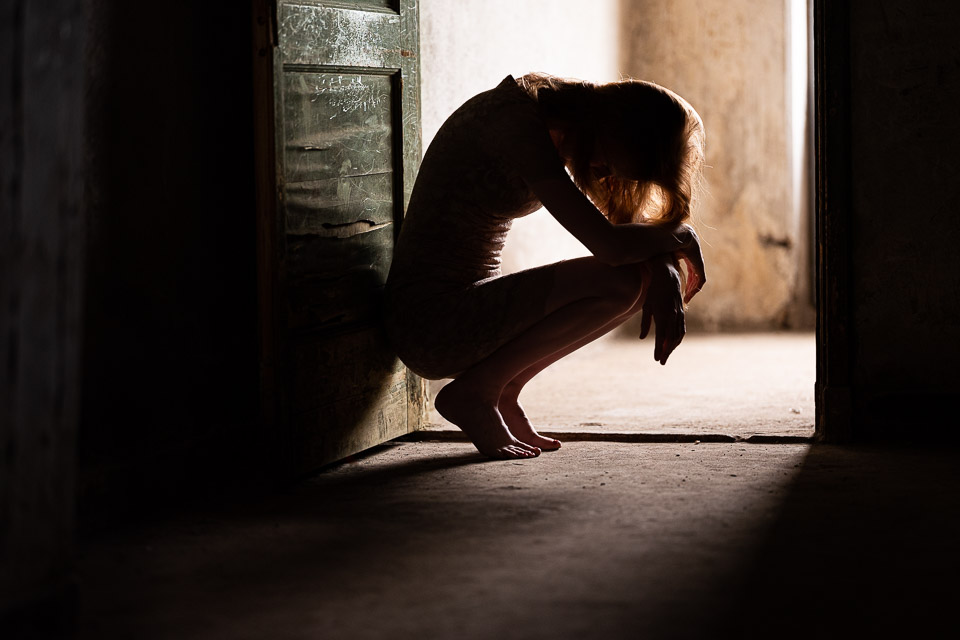
Anne's pose naturally does a lot for the atmosphere in this photo. Her curved back, her hands resting on her knees and her head hanging down. It all gives the photo a somewhat depressed appearance, which fits the concept perfectly.
Another important part of this photo is the light. Interestingly enough, I worked with a lot of flashes for the light during this shoot, but this photo was actually taken using natural light.
In this case, the light comes in through a window that is just outside the frame. It isn't direct sunlight, so the window light is pleasantly soft.
The room where I was standing was very dark. The light therefore only came from one direction, from behind the model. This creates dark shadows and also a clear silhouette of Anne.
The photo was taken with a Fujifilm GFX-50R medium-format camera, which I currently have for review, but it could just as easily have been taken with any other camera.
The camera's sensor does have such a wide dynamic range that I could easily have lit the model as well. That would only have taken away a lot of the atmosphere.
Post-processing
I sometimes hear photographers say that they don't post-process their photos. Usually, that's an excuse because they have never looked into post-processing, or why not take a course?, but of course I also want to get the best possible photo straight out of my camera.
By post-processing a good photo, you can almost always make it even better. In my view, post-processing is therefore an important step.
Below you can see the photo as it came out of the camera:
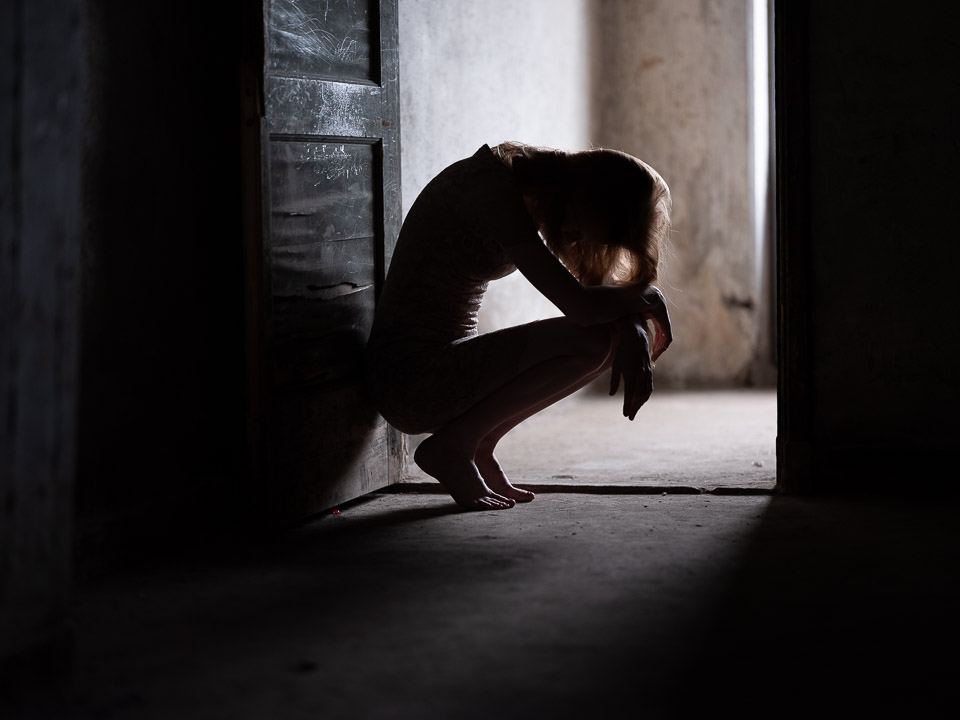
I briefly considered converting it to black and white. That would naturally also suit a photo like this very well. But I thought the colours were far too beautiful. The blurred yellowish wall in the background and the green door.
As you can see, I boosted those colours in post-processing. The Fuijfilm's automatic white balance had left the photo looking a little cold. It may have been accurate, but I prefer the warmer tone in this photo.
I also boosted the door using an adjustment brush in Lightroom, adding more saturation to bring out the green.
I also used an adjustment brush to give the door and the rest of the room, everything except the model herself, some extra texture.
As you can see, the crop has also been adjusted slightly. The Fuijfilm normally shoots in a 4:3 aspect ratio. I'm more used to a 3:2 format in my photos, and I notice that I regularly adjust the proportions to what I'm used to.
In my view, there is little useful information in the space above Anne's head, so I could easily crop some of it away. At the bottom of the frame, the light fades away nicely, so I kept more of it.
The tight crop also draws more attention to Anne and her pose.
About the author
Elja Trum is the founder of Photofacts and online photography course website Photofacts Academy. He has been writing about photography since 2006. Elja is also the author of (Dutch) books on composition, black-and-white photography, flash photography and portrait photography.
You might also like
-
 10 tips for atmospheric portrait photography
by Laura van der Burgt
-
 Portrait photography tip: Playing with backlighting
by Elja Trum
-
 Atmospheric images without leaving the house
by Laura van der Burgt
-
 20 poses for couples in less than 10 minutes
by Michelle Peeters
-
 Posing tip: play with curves and use a prop
by Frank Doorhof
-
 Portrait photography tip: Use a window as backlight
by Elja Trum
1 comment
-
 Robert wrote on Tuesday 20 August 2019 at 14:47 | reply
Subtle post-processing Elja.....Top.
Translated from Dutch.
Photo-shooting greetings Robert
Have your say
Please note: Articles older than a week can only be commented on by signed-in visitors.Would you still like to comment? sign in or create a free account.
Become a better photographer every week
A practical photography tip in your inbox every week.
38,982 photography enthusiasts already receive the tips! More about the weekly mail. Or keep up to date via  Facebook.

Elja Trum
Photofacts; everything to do with photography!
Would you like to take better photos and keep up with what is happening in photography? Photofacts publishes articles that teach you something about photography — from a product announcement to a practical shooting tip or a look at a website. Photofacts covers photography every day and is a hobby project of Elja Trum's that got out of hand. The articles are written by a team of volunteer authors. If you would enjoy writing one or more articles for Photofacts, do get in touch.More about PhotofactsPhotofacts is made possible in part by
