
Nature photography tip: Create a timelapse with your phone
Thursday 30 October 2025, 15:30 by Rob Dijkstra | 1,797 views | 0 commentsThis article was translated from Dutch with the help of AI. Read the original.
When you want to create a timelapse, you can often simply use the interval setting on your camera. The downside is that the camera remains active for a longer period, while you have to keep waiting.
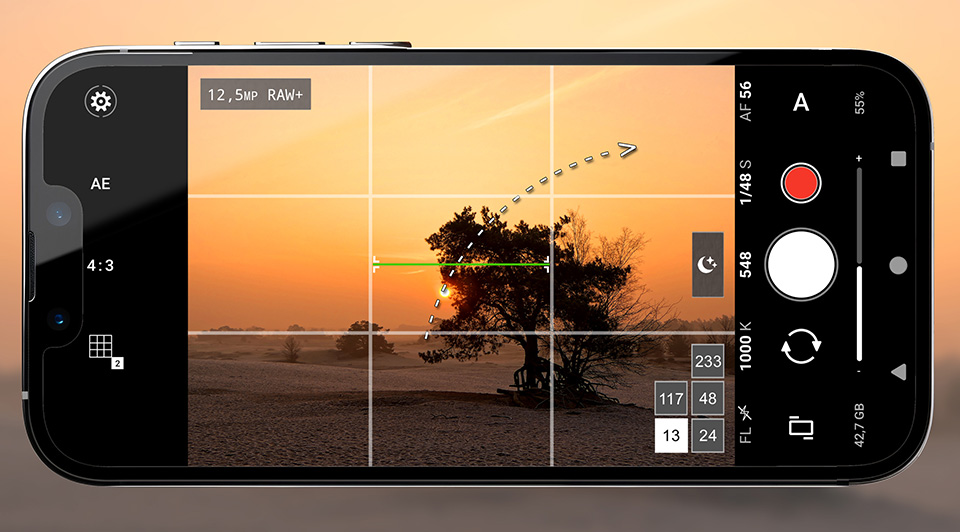
A good solution is to use your phone to create the timelapse. This way, you can leave the recording running while you use your camera to capture other subjects.
To increase the quality and flexibility, you can use the app ProShot. This app offers advanced timelapse features, such as full manual control over exposure and interval settings, which is crucial for achieving the desired results in timelapse photography.
By using ProShot, you can capture timelapses more efficiently and with greater creative freedom.
About the author
Rob is fotograaf, filmer en natuurgids. Onder de naam WILDvanNATUUR organiseert hij een groot aantal excursies en workshops voor hobbyfotografen en natuurliefhebbers in het gebied tussen Zuid-Duitsland, Denemarken en de Franse noordkust, op maximaal een dag autorijden.
You might also like
-
 The importance of the interval in a timelapse
by Nando Harmsen
-
 Photographing a Timelapse by the Waal
by Nando Harmsen
-
 Review: LRTimelapse Pro Timer 3 for timelapse photography
by Nando Harmsen
-
 Paying Attention to Timelapse Photography
by Nando Harmsen
-
 Make a timelapse more engaging with video footage
by Nando Harmsen
-
 A timelapse video of the solar eclipse
by Nando Harmsen
0 comments
Be the first to share what you think!
Have your say
Please note: Articles older than a week can only be commented on by signed-in visitors.Would you still like to comment? sign in or create a free account.
Become a better photographer every week
A practical photography tip in your inbox every week.
39,024 photography enthusiasts already receive the tips! More about the weekly mail. Or keep up to date via  Facebook.

Elja Trum
Photofacts; everything to do with photography!
Would you like to take better photos and keep up with what is happening in photography? Photofacts publishes articles that teach you something about photography — from a product announcement to a practical shooting tip or a look at a website. Photofacts covers photography every day and is a hobby project of Elja Trum's that got out of hand. The articles are written by a team of volunteer authors. If you would enjoy writing one or more articles for Photofacts, do get in touch.More about PhotofactsPhotofacts is made possible in part by
