

Avoiding or removing reflections in glasses
Saturday 23 February 2019, 20:02 by Michelle Peeters | 45,896 views | 7 commentsThis article was translated from Dutch with the help of AI. Read the original.
It is always a sad moment when you discover unwanted reflections in someone's glasses! Prevention is best, of course, but sometimes it simply is not possible.
In this article, I show you the standard trick for preventing reflections in glasses and, if that does not work, how to remove them with Photoshop.

Preventing reflections
If you work with studio lights, position them as far above eye level as possible. If you do not, the light will reflect straight into the glasses and you will get those ugly white reflections on the lenses.
So position your light slightly higher than your model, so the light really shines downwards from above. You will get rid of the reflection straight away.
The angle of incidence is the angle of reflection. You can also read this in Frank Doorhof's article. Light only travels in straight lines. Glasses reflect light just like a mirror. So if you know where the light hits the glasses, you can take this into account and avoid the angle of reflection.
So do not let your model look into the light, so the angle of incidence definitely is not the angle of reflection. It also helps to have your model look slightly downwards.
Usually, your softboxes will be positioned at an angle, on either side of your model. The reflection will then at least not run straight across the eye, but will sit more to the side. That makes it easier to remove.

You often see the shadow of the arms or frame running across the face of people who wear glasses. Sometimes even straight across the eye... If you move your model further away from the light source or use a light modifier such as a softbox, you can reduce the light and therefore soften the shadows.
Removing reflections with Photoshop
For this technique, you need to make sure that one eye is free of reflections, so that you can use it to copy to the other eye.
Set the following clone settings in Photoshop:
Opacity: 100% (but it can also be slightly lower), Flow: 100%, Aligned: on, Sample: Current and Below
To open the Clone Stamp dialogue box, go to Window "Clone Source". Check that the following settings are enabled: turn on "Show Overlay" to make a preview of what you are going to clone visible.
Tick "Invert" so that the clone is flipped horizontally. Set the height and width scaling to 100%.
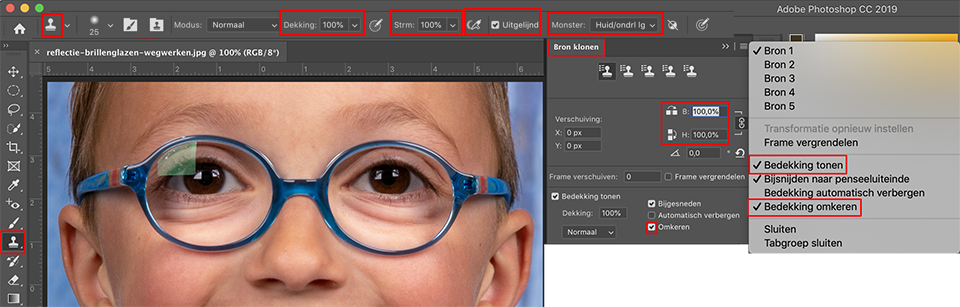
You can then start cloning parts of the right eye onto the left eye. Make sure that the glasses are aligned as accurately as possible. The clone preview is a useful aid for this alignment.
You can also use layer masks to undo all areas that were cloned too much, using a black brush.
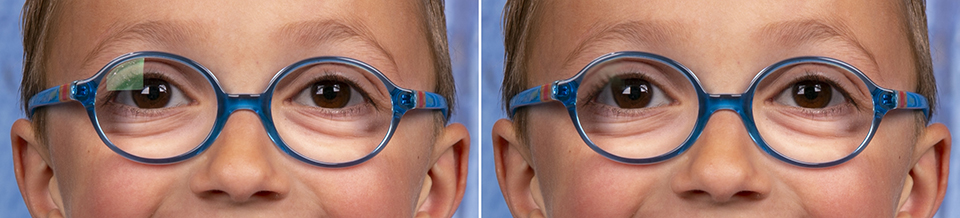
The Clone Stamp often gives the best results. It will never be completely perfect, because you have to recreate something that is not there!
If the Clone tool does not produce the desired results either, and you have at least one 'good' eye, you could also select the part to be filled in from the good eye using the Lasso tool.
You copy and paste this part, then mirror and rotate it using the Free Transform tool until it fits exactly over the part of the eye that is missing because of the reflection.
More or better tips?
Of course, it remains a workaround and you will never get it completely perfect (at least I won't). It remains a difficult problem to fix.
If anyone has better tips, we would of course be very pleased if you would share them in the comments!
About the author
Michelle Peeters is fotografe en oprichter van DeuxBleus Fotografie. Michelle herkent het bijzondere in het gewone en het gewone in het bijzondere. Ze heeft zich nooit willen specialiseren en is daardoor van alle markten thuis.
You might also like
-
 The World Through a Glass Ball
by Laura van der Burgt
-
 Control reflections with a polarising filter
by Erik Nevels
-
 Portrait photography tip: use a window's reflection
by Elja Trum
-
 Passport photos: should you wear glasses?
by Marije Weterings
-
 Street photography tip: Reflections are everywhere, use them
by Michiel Heijmans

7 comments
-
 Jan Kleinjan wrote on Tuesday 26 February 2019 at 11:41 | reply
Why would you want to remove reflections from glasses? A spectacle lens without any reflection looks lifeless and flat, without any depth. Doesn't look like anything, in my opinion.
Translated from Dutch.
Of course, everyone photographs in their own way and that's how it should be. My way is to get the photo in Lightroom afterwards to look exactly like what I saw when I took that photo. What did the sky look like, what was the color of the water, what reflections did I see. That is what I find exciting, finding the earlier reality again in my final photo.
So no polarizing filter for me, are you crazy? That sparkle belongs on that water or on that spectacle lens.
And that's how we all do it in our own way and that's fun. -
Jan Kleinjan wrote on Tuesday 26 February 2019 at 11:51 | reply
Why remove reflections from a pair of glasses. If you do that, it kills the whole thing, no character.
Translated from Dutch.
Everyone photographs in their own way and that's how it should be, of course.
I try to make the photo in Lightroom ultimately look exactly like what I saw when I took that photo. Often quite a job, because: what was the colour of the clouds, the water, etc.
So no polarising filter for me, are you crazy? That sparkle belongs on that water, on those glasses. And so we each do it in our own way and that's how it should be.
Kind regards,
Jan Kleinjan
Zwolle. -
 Richard wrote on Tuesday 26 February 2019 at 15:01 | reply
You can also put a pair of glasses without lenses on your model.
Translated from Dutch.
Then you won't have any reflection anymore. -
 Kees wrote on Tuesday 26 February 2019 at 16:07 | reply
Is this also possible with LR ?
Translated from Dutch. -
 guest wrote on Tuesday 26 February 2019 at 18:46 | reply
@Jan Kleinjan: I do think a natural sparkle is something different from ugly softboxes reflected in eyeglass lenses.. You only need to remove it if it bothers you though, not a must.
Translated from Dutch.
@Kees: I wouldn't know with Lightroom, I don't think so actually. -
 Fotogroep Klazienaveen wrote on Tuesday 26 February 2019 at 19:18 | reply
If it’s a portrait, you can first photograph the model without glasses and later with glasses. in Photoshop, you place the layer without glasses underneath and erase the glasses lenses from the top layer.
Translated from Dutch. -

 Michelle Peeters wrote on Tuesday 26 February 2019 at 19:26
| reply
Michelle Peeters wrote on Tuesday 26 February 2019 at 19:26
| reply
@Fotogroep Klazinaveen: thanks, good tip!
Translated from Dutch.
Have your say
Please note: Articles older than a week can only be commented on by signed-in visitors.Would you still like to comment? sign in or create a free account.
Become a better photographer every week
A practical photography tip in your inbox every week.
38,943 photography enthusiasts already receive the tips! More about the weekly mail. Or keep up to date via  Facebook.

Elja Trum
Photofacts; everything to do with photography!
Would you like to take better photos and keep up with what is happening in photography? Photofacts publishes articles that teach you something about photography — from a product announcement to a practical shooting tip or a look at a website. Photofacts covers photography every day and is a hobby project of Elja Trum's that got out of hand. The articles are written by a team of volunteer authors. If you would enjoy writing one or more articles for Photofacts, do get in touch.More about PhotofactsPhotofacts is made possible in part by
