

Photoshop tip: Keep your layer stack organised
Sunday 23 November 2025, 16:08 by Nando Harmsen | 1,897 views | 0 commentsThis article was translated from Dutch with the help of AI. Read the original.
Complex edits in Photoshop require lots of layers. Pixel layers, adjustment layers, and many more variations. How do you keep track? The answer is simple: organise them properly.
Having lots of layers means you can easily lose track. Maybe not straight away, but you might if you open the Photoshop file again in six months to make some adjustments.
There are several things you can do to keep track. Of course, you can give each layer a name that describes the edit. That way, you can immediately see what each layer does.
If you have a layer that uses part of a photo, give the layer the photo's filename. If necessary, you'll always be able to find the original photo again.
Group different layers that are used for a specific purpose. For example, dodging and burning, colour edits, or exposure adjustments. You can collapse the folders to keep things organised.
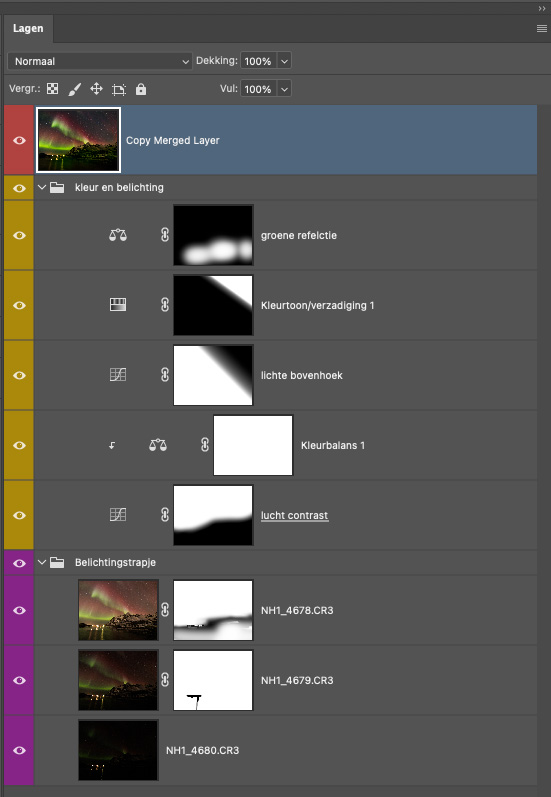
Select the layers you want to place in a group and use CMD/CTRL + G as a keyboard shortcut. All those layers will automatically be placed in a folder. It's quick and easy.
You can give each layer or group of layers a colour so they are even easier to distinguish. Use a unique colour for each type of layer.
By investing time in organising your layers properly and logically, you save a lot of time in the long run. This is especially useful when carrying out complex edits. There is no rule for how you should do it. Choose your own approach.
As a bonus tip, clicking the 'hamburger icon' at the top right of the panel lets you select panel options. Here you'll find even more settings.
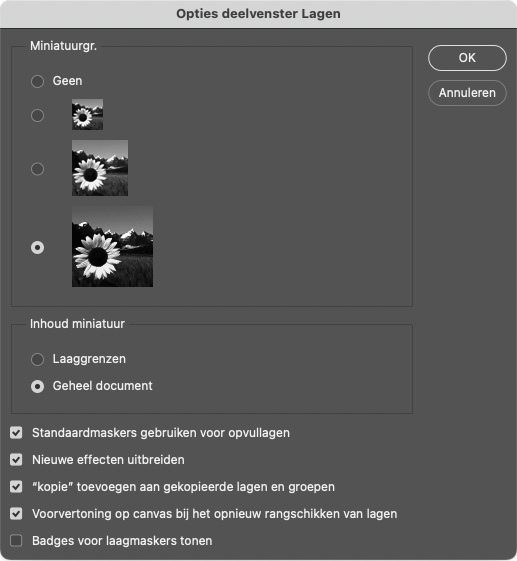
You can then arrange the display of the Layers panel more to your liking. Play around with it and change things to suit your preferences. This way, you can make Photoshop completely your own programme.
About the author
Nando Harmsen has been photographing for more than 40 years. He specialises in wedding photography and landscape photography. Nando also gives talks, workshops, masterclasses and photo trips, and regularly reviews new and interesting equipment.
You might also like
-
 Photoshop tip: Use a copy of a merged layer
by Nando Harmsen
-
 To stack or not to stack
by Erik Nevels
-
 Photoshop tip: Using a clipping mask
by Nando Harmsen
-
 Review: The Photoshop Layers Book - Johan Elzenga
by Michelle Peeters
-
Does Lightroom make Photoshop redundant?
by Nando Harmsen
-
 Photoshop tip: use the export function
by Nando Harmsen
0 comments
Be the first to share what you think!
Have your say
Please note: Articles older than a week can only be commented on by signed-in visitors.Would you still like to comment? sign in or create a free account.
Become a better photographer every week
A practical photography tip in your inbox every week.
38,937 photography enthusiasts already receive the tips! More about the weekly mail. Or keep up to date via  Facebook.

Elja Trum
Photofacts; everything to do with photography!
Would you like to take better photos and keep up with what is happening in photography? Photofacts publishes articles that teach you something about photography — from a product announcement to a practical shooting tip or a look at a website. Photofacts covers photography every day and is a hobby project of Elja Trum's that got out of hand. The articles are written by a team of volunteer authors. If you would enjoy writing one or more articles for Photofacts, do get in touch.More about PhotofactsPhotofacts is made possible in part by
