
Replacing skies in Photoshop is getting easier
Tuesday 4 January 2022, 20:10 by Johan Elzenga | 4,616 views | 0 commentsThis article was translated from Dutch with the help of AI. Read the original.
Adobe regularly releases updates for programmes such as Lightroom and Photoshop, including completely new features or changes to existing ones. For someone who makes video courses, this has advantages and disadvantages.
The advantage is that you can sometimes create new courses about those changes. Think of the completely new course I made about the new masks in Lightroom and Camera Raw.
The disadvantage is that your existing courses can become partly outdated as a result. They will not become completely outdated very often.
The basics of Photoshop or Lightroom do not change overnight, of course, so there will always still be something to learn from such a video. But part of it can of course become genuinely outdated because of an update.
Replacing a sky
A good example of this is the video about replacing a white sky with a different sky. It is one of the videos in the course about layers in Photoshop.
The basic principle of this video is still relevant, so there is no reason to remove the video from the course altogether. You can still learn something from it, namely how you can sometimes use a layer's so-called blend mode very effectively in composites, so you do not need complicated masks.
But I have to admit that replacing a sky is now done quite differently in practice, because not long ago Adobe added the special 'Sky Replacement' menu in a Photoshop update.
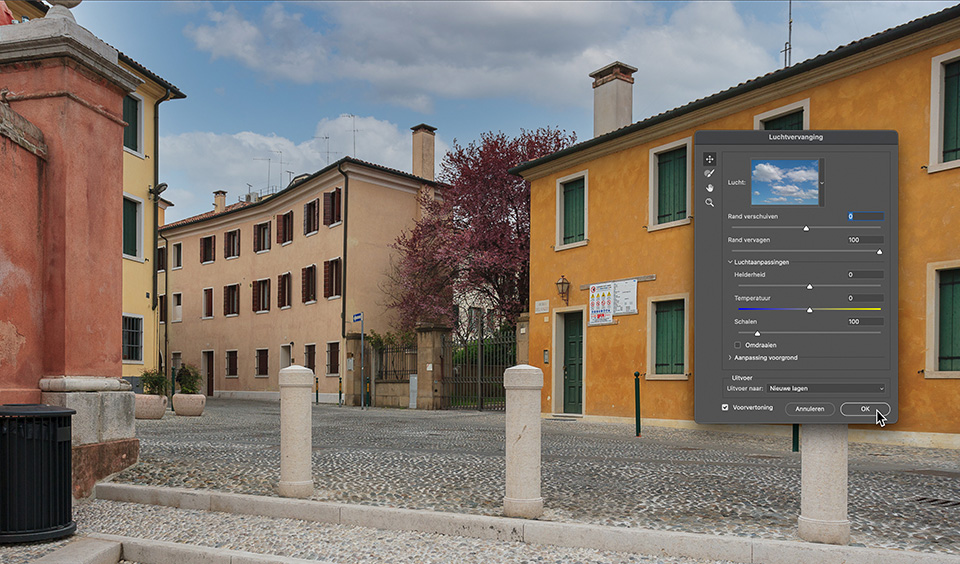
You can find it under the main menu 'Edit', if you have not discovered it yet. With this menu, you can replace a dull sky above a photo with a different sky with a single click.
You get a number of standard sky photos that you can use for this, and you can also add your own photos.
There are a few sliders for 'fine-tuning' if needed, and sometimes they are needed, but in the end it is so quick and easy that I too now often prefer this method to the one in my own video.
There you go. Slowly but surely, Photoshop is getting easier and easier. Soon I will not retire because I have officially reached retirement age, as I have already done, but simply because there will be nothing left to explain about Photoshop!
About the author
Johan W. Elzenga is een award-winnende freelance fotograaf en schrijver van boeken over Photoshop en Lightroom Classic. Hij schrijft en fotografeert ook voor een aantal tijdschriften in binnen- en buitenland. Zijn artikel 'Why zebras are striped' is gepubliceerd in vijf talen en zes landen en het lijkt erop dat zelfs de beroemde auteur Desmond Morris werd geïnspireerd door dit verhaal.
You might also like
-
 Photoshop now also has a sky replacement option
by Elja Trum
-
 The new updates for Adobe Lightroom and Photoshop
by Nando Harmsen
-
 The New Photoshop 2020 Updates
by Nando Harmsen
-
 Adobe updates Lightroom (Classic) with new AI masks
by Elja Trum
-
 The annual major update for Lightroom and Photoshop
by Nando Harmsen

0 comments
Be the first to share what you think!
Have your say
Please note: Articles older than a week can only be commented on by signed-in visitors.Would you still like to comment? sign in or create a free account.
Become a better photographer every week
A practical photography tip in your inbox every week.
39,024 photography enthusiasts already receive the tips! More about the weekly mail. Or keep up to date via  Facebook.

Elja Trum
Photofacts; everything to do with photography!
Would you like to take better photos and keep up with what is happening in photography? Photofacts publishes articles that teach you something about photography — from a product announcement to a practical shooting tip or a look at a website. Photofacts covers photography every day and is a hobby project of Elja Trum's that got out of hand. The articles are written by a team of volunteer authors. If you would enjoy writing one or more articles for Photofacts, do get in touch.More about PhotofactsPhotofacts is made possible in part by
