

Review: DesignCap for designing posters and flyers
Saturday 28 December 2019, 23:51 by Michelle Peeters | 6,437 views | 7 commentsThis article was translated from Dutch with the help of AI. Read the original.
Do you need a suitable poster to promote your product or business? Are you worried about the cost of hiring a designer? Or are you concerned about how to create a good poster yourself? DesignCap solves all those problems.
DesignCap is an online logo maker with a large number of resources that anyone can use to create posters online.
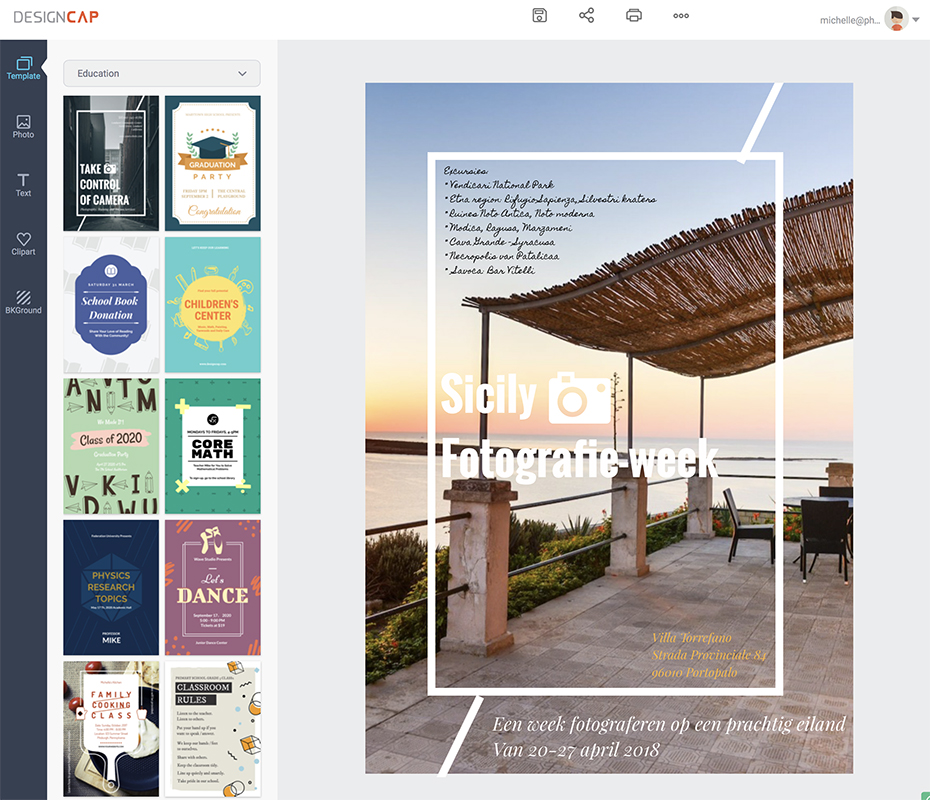
DesignCap contains hundreds of templates, various photos, stylish fonts, well-designed clipart and beautiful backgrounds. With DesignCap's poster maker, you can fully use and improve your creativity in stunning posters.
Recently, DesignCap, a free online poster & flyer maker, was released. I was invited to test and review it. I previously wrote an article about DesignEvo, which lets you easily design logos yourself.
Here are some of the main features:
- Hundreds of professionally designed templates;
- A wide variety of stock photos, clipart images, text fonts and backgrounds;
- Powerful editing tools: cropping, resizing, rotating, layer management, duplicating, undo / redo, etc;
It's a fun little programme that lets you easily create beautiful posters / flyers for all kinds of events and occasions.
Templates
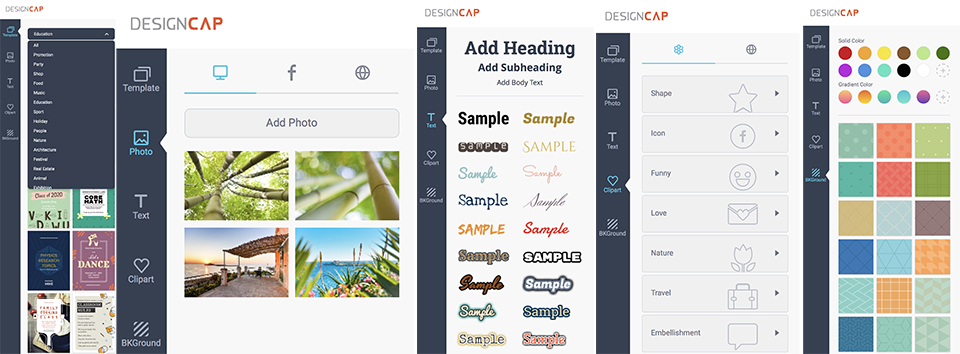
As a tool, DesignCap has prepared hundreds of poster templates to simplify your design process. Whatever type of poster you need, music, party, wedding or festival posters, there is plenty to choose from.
You can choose a suitable poster here. All the templates have been well designed by DesignCap's professional designers and are fully customisable to inspire you. You can easily choose a preferred language, adjust its elements and customise it completely to suit your needs.
Photos
To make things easy for you, DesignCap allows you to import Facebook photos, upload your own photos from your computer and even search through 580,000 images on the internet. When designing the poster, you can choose a good photo yourself as a background or as the subject, making the poster unique.
Decoration tools
In addition to templates and photos, DesignCap has also put together lots of clipart, background images and text for you. There are many useful clipart items in different categories, including icons, funny clipart, nature clipart and so on.
You can also search the internet for 93,000 clipart items to decorate your poster.
Another important part of a poster is the background. The DesignCap designers have created many useful background images in a wide variety of styles, such as colourful, simple, elegant and so on.
A complete poster also cannot do without text, of course. There are many stylish fonts available that you can use to decorate your poster with text.
Conclusion
DesignCap is designed to help people who need posters. It requires no download or registration. You don't have to worry if you're not familiar with design. DesignCap is so powerful and easy to use that even a beginner can create beautiful posters online.
As a final plus point: DesignCap is free! So what are you waiting for? Give it a try!
Dit artikel is voor het laatst bijgewerkt op 28 december 2019.
De eerste publicatiedatum is vrijdag 20 april 2018, 22:22.
About the author
Michelle Peeters is fotografe en oprichter van DeuxBleus Fotografie. Michelle herkent het bijzondere in het gewone en het gewone in het bijzondere. Ze heeft zich nooit willen specialiseren en is daardoor van alle markten thuis.
You might also like
-
 Review: DesignCap (latest version)
by Michelle Peeters
-
 Do you print photos for the wall, or have them printed?
by Nando Harmsen
-
 Red Dot Award: Product Design for Nikon
by Michelle Peeters
-
 Review: Fotor, powerful design and photo editing tool
by Michelle Peeters
-
 Printing your photos? Which Canon printer should you choose?
by Nando Harmsen

7 comments
-

 martinphili wrote on Saturday 21 April 2018 at 06:50
| reply
I immediately take your word for it that it is a great program but I always wonder then: 'Where's the catch? How can this be free? What is the business model? "
Translated from Dutch.
And those 580,000 photos from the internet, are they free of copyright? -
 Michelle Peeters wrote on Saturday 21 April 2018 at 16:54
| reply
@Martin: I asked about it, I'm also quite curious myself!
Translated from Dutch. -
 R K wrote on Saturday 21 April 2018 at 17:29 | reply
@martinphili: the now familiar story of free online services. See on the website under the heading Privacy, they provide users' data to third parties.
Translated from Dutch. -
martinphili wrote on Sunday 22 April 2018 at 06:34
| reply
My suspicion was indeed already that familiar story. The question was more rhetorical than an actual request for information
Translated from Dutch. It’s important that everyone realizes that with free services, there’s a catch somewhere. What I’m really curious about is the story behind the copyright of those photos.
-
 iltw wrote on Sunday 22 April 2018 at 09:36
| reply
Besides data trading and advertisements, this is partly also a gateway to their other products (www.fotojet.com and www.pearlmountainsoft.com), which do require payment (one-time or subscription).
Translated from Dutch.
@martinphili: free photos (without the "burden" of copyright) are simple: if they don't have those photos themselves, they can immediately make use of the photos on www.unsplash.com.
Anyone can get (and put) photos there for free use for both personal and commercial purposes. -
Michelle Peeters wrote on Monday 23 April 2018 at 13:18
| reply
Antwoord van Sophia van DesignCap:
Translated from Dutch.
As for the copyright issue, all the preset resources on the website owned by us, and users can not copyright any unmodified resources like templates, clipart, shapes, etc.
And the other integrated photos from Pixabay and online clipart are free and can be used for personal and commercial use as claimed on their websites. -
martinphili wrote on Monday 23 April 2018 at 17:35
| reply
Cool, thanks for looking into it
Translated from Dutch.
Have your say
Please note: Articles older than a week can only be commented on by signed-in visitors.Would you still like to comment? sign in or create a free account.
Become a better photographer every week
A practical photography tip in your inbox every week.
38,886 photography enthusiasts already receive the tips! More about the weekly mail. Or keep up to date via  Facebook.

Elja Trum
Photofacts; everything to do with photography!
Would you like to take better photos and keep up with what is happening in photography? Photofacts publishes articles that teach you something about photography — from a product announcement to a practical shooting tip or a look at a website. Photofacts covers photography every day and is a hobby project of Elja Trum's that got out of hand. The articles are written by a team of volunteer authors. If you would enjoy writing one or more articles for Photofacts, do get in touch.More about PhotofactsPhotofacts is made possible in part by
