

Review: SAAL Digital photobook
Friday 19 January 2018, 20:40 by Michelle Peeters | 16,579 views | 22 commentsThis article was translated from Dutch with the help of AI. Read the original.
SAAL Digital is a new provider on the Dutch market. They offer photobooks, photo prints, posters and more. They sponsor their posts on Facebook and Instagram and invite professional or hobby photographers, bloggers or models to assess and review their photobook.
Saal Digital's photobooks have already won many awards, so I was very curious about the quality. Reason enough to order this photobook and write a review about it.
I received a code for a 100-euro voucher and, just before it expired, found some time in my diary to get started. These are my findings.
I regularly make photobooks through various providers, with Albelli and Blurb always being my favourites. The photos looked good and the software offered enough creative freedom. The Blurb software even offered the option of designing the album entirely as you wanted with Adobe InDesign.
With other suppliers, you were often tied to predetermined, automatic layouts in the past, where your photos were sometimes cropped incorrectly or unattractively.
Options
Saal-Digital offers a choice of various photobooks. There are books with spiral binding, a softcover book and hardcover books, with the option of a padded cover, which is a softcover after all.
You can also choose extra-thick, almost cardboard-like pages. I chose a standard hardcover book. Within that, you can choose from A5, A4 and A3 books, sometimes portrait, sometimes landscape and sometimes square. I chose 28×28 square.
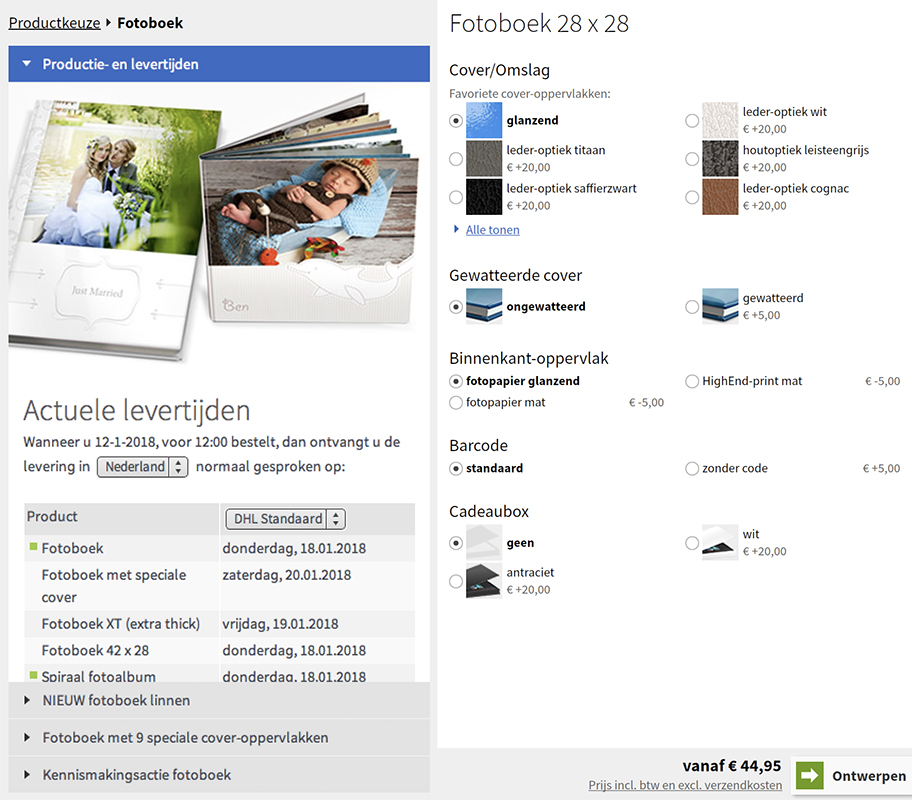
With the hardcover books, you can add the number of pages per spread. That's useful, so you are not tied to fixed numbers as you are with the softcover book. If you choose incorrectly, you can easily add or remove pages in the software, up to a maximum of 120.
For the cover and paper, you can choose matt or gloss. If you don't want a photo on your cover, you can choose a faux-leather cover. Finally, a gift box and leaving out a barcode are among the paid options.
The software
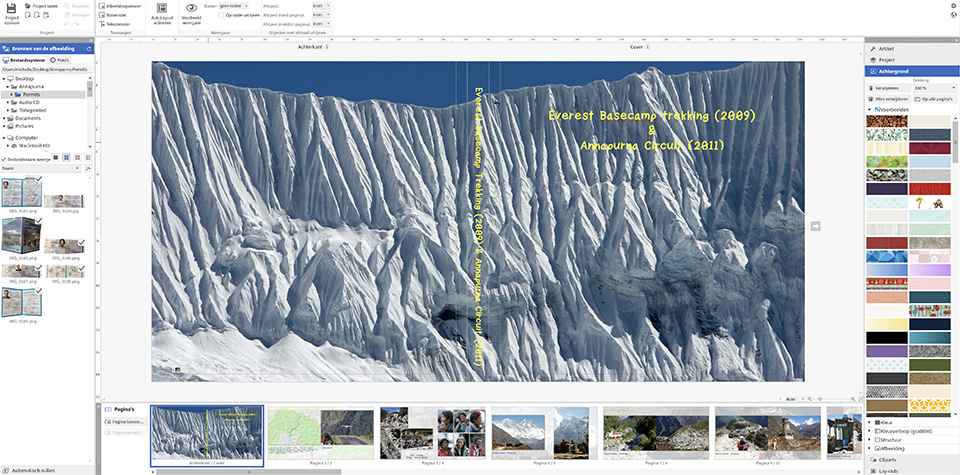
Once the software has been downloaded and installed, everything works very smoothly, quickly and easily. You can easily choose your product and inserting photos causes no problems. This is unlike some other photobook software.


You can also choose from different templates (one-minute photobook or auto-layout) or a blank layout. I chose the blank layout for optimum creative freedom. This means large, attractive photos spread across two pages.
You can choose to fill automatically (one page or all pages), selecting the photos to be placed in advance.
You can also activate AutoLayout, which creates a layout for you with the photos placed automatically. You can even do this afterwards.
You will be warned, however, that applying a new layout may remove or move image frames, text and clip art.
You simply drag the photos from the Image sources on the left of your screen to your photobook. You can then move them as you wish, make them larger or smaller by dragging the corners, zoom in and out, flip them horizontally or vertically, rotate them and crop them. You can also immediately see the image quality.
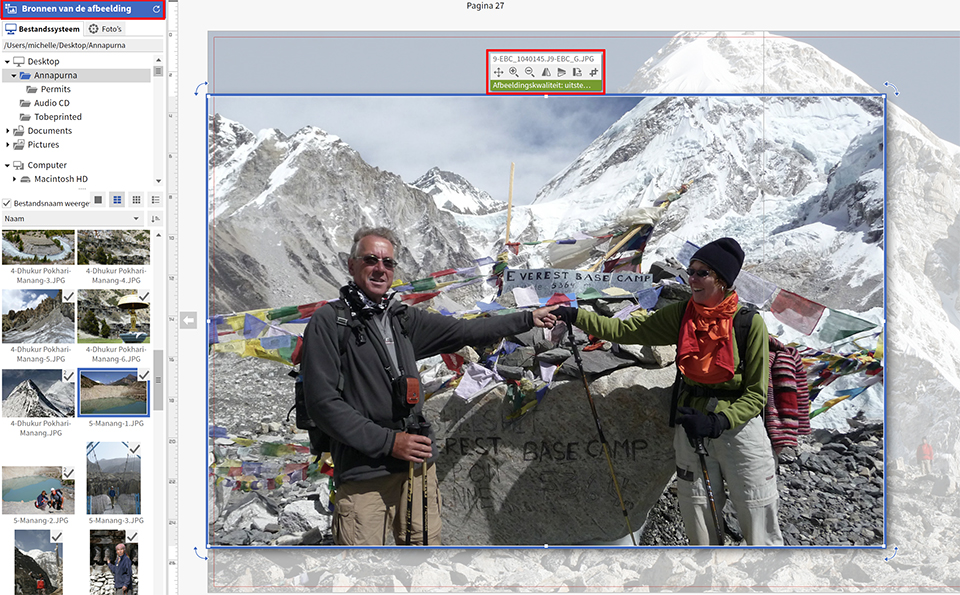
You can remove the image just as easily with the 'delete' button, and you can go back several steps to undo actions with the Ctrl/Cmd-Z key combination.
You can let your photos run across the page seam because the pages do not show a fold, as they are lay-flat pages. This is ideal when a photo spans both the left and right pages.
You can create fill frames and fill them with a colour of your choice. You can then create a text frame inside them, so your text stands out more, for example within a photo.
I think it is very professional that Saal Digital has its own Photoshop plugin to help you maintain the correct dimensions and proportions. The plug-ins automatically generate the templates, which can be used as the basis for your photobook.
You can see the exact dimensions of the pages, the bleed and other indications for the spine on the cover. You can download the plug-in for Photoshop CC and InDesign CC from Adobe Add-ons.
I could barely resist the temptation to add background colours and clip art to the pages. It's nice that you can, but I chose a photo background. Often the same photo as on the page, but with reduced opacity.
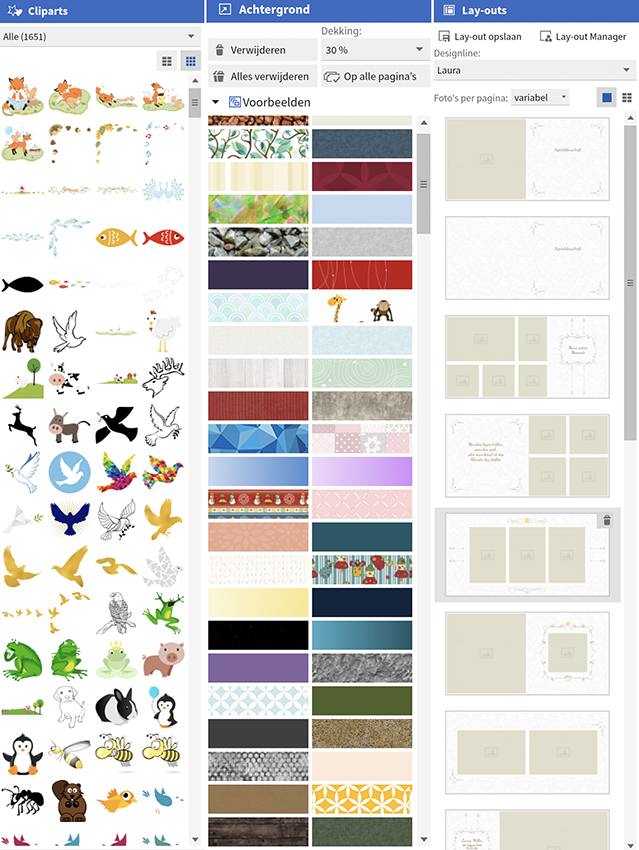
You can also very easily delete or copy pages, add text or change your product halfway through.
My book consists of 80 pages, which means a lot of scrolling along the timeline. There is no easy way to move, for example, the second spread further back, because there is no overview of your entire book in thumbnails.
You can drag a spread, but only within the visible part of the timeline. Moving it to the end takes about nine drag actions.
Because SAAL Digital is a German company, the 'translation' from German still sometimes leads to spelling mistakes such as 'verspeelt' and 'uitgebreidt'. If they want to gain a foothold in the Netherlands, they should have a Dutch person take a good look at it.
You can export your book as a PDF. That sounds like a solution, but is actually a hollow gesture: every spread has the words 'preview' written across it in large letters. At least the Dutch is faultless!
Image optimisation
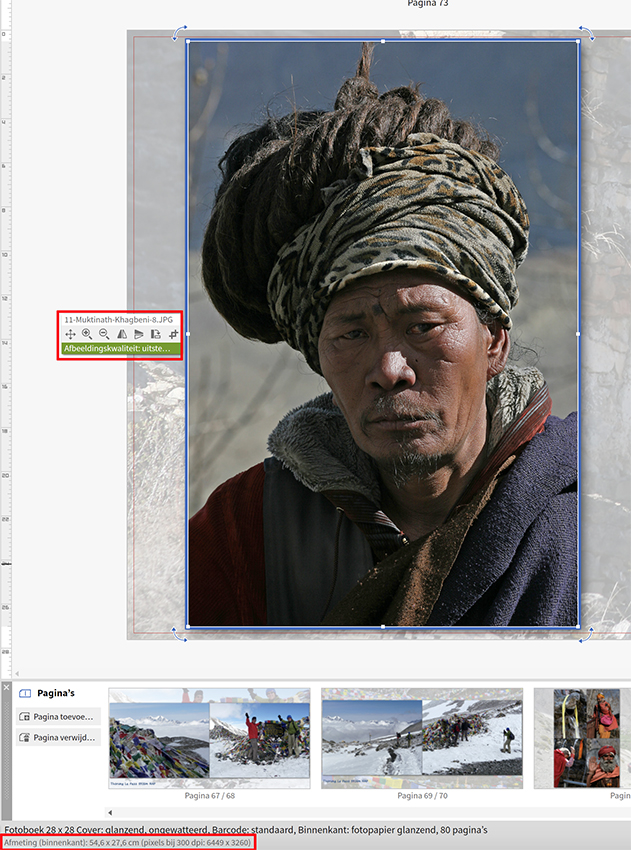
It is important to optimise your photos for print. So your photos need to be edited and sharpened before you place them in the book. Saal Digital's software shows at the very bottom of the screen how many pixels a spread consists of at 300 ppi.
JPEG files of around 3,000 pixels are perfectly adequate. Both AdobeRGB and sRGB are supported, and Saal Digital provides an ICC profile. This allows you to soft-proof in Photoshop. You then get an idea of what the colours will look like in print.
Production and delivery
Once you are happy with the book's layout, you can order it. The price is clearly shown, including VAT and excluding delivery costs of 4.95 euros.
You upload the file and are immediately told the expected delivery time. This is about one week. You should bear in mind that the books are made in Germany. This means it can take an extra two to three days before the book actually arrives on your doorstep.
Final result
I chose a 28×28 centimetre square book because I think it looks best and my other photobooks are in this format or the 30x30 centimetre format.
It also means you can include horizontal and vertical photos at the same size in the book. You do end up with quite a lot of empty space, but I think that gives a book a more professional look.
For both the cover and the inner pages, I chose glossy paper because I think it looks more attractive and professional.
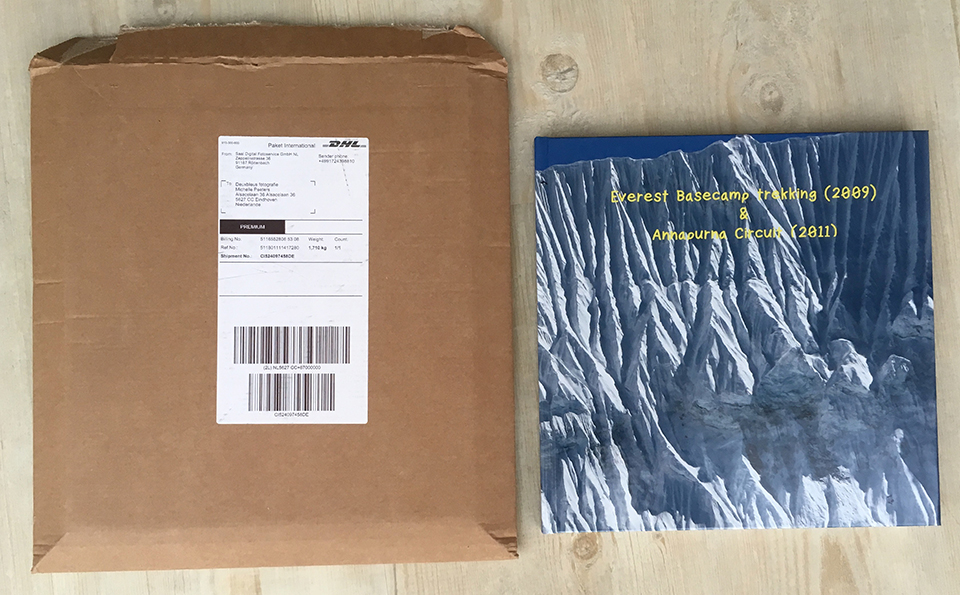
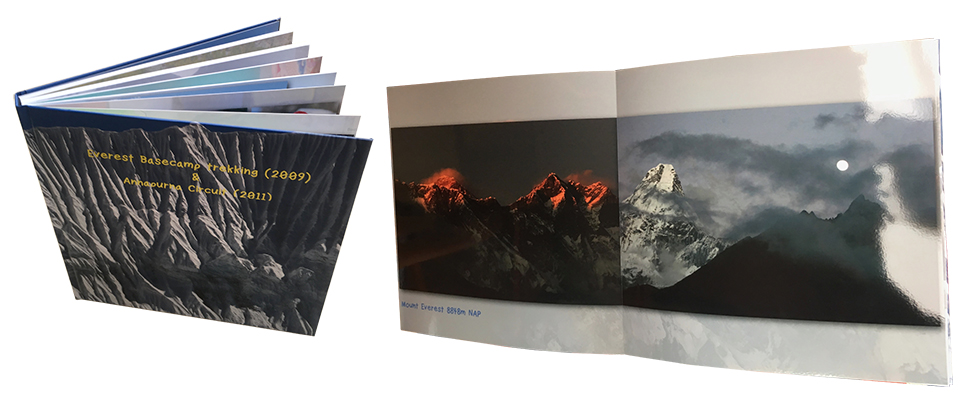
The book was delivered by DHL after just under a week. It came in sturdy cardboard packaging, with a foam sleeve around the book. So it was well protected! The book looks professional. The cover is beautifully glossy and the book looks sturdy and straight. It closes nicely.
When you start turning the pages, the thick paper and the quality of the printing stand out. The photos look great, they are actually high-quality prints bound into a book.
Conclusion
I am very enthusiastic about using the software, its possibilities and the quality of the book. It looks professional, stylish and solid. The price is comparable to other providers.
The only slight downside compared with Albelli is that there is no option to create a free online version of your photobook. Albelli does offer this option, and I think it is an ideal way to share your album with lots of people. The album also stays online until you delete it yourself.
SAAL Digital regularly has special offers to introduce people to various products, allowing you to save quite a lot. That's quite a few extra spreads in your book.
Would you also like to try SAAL Digital's service? Download the software from the website and give it a try!
About the author
Michelle Peeters is fotografe en oprichter van DeuxBleus Fotografie. Michelle herkent het bijzondere in het gewone en het gewone in het bijzondere. Ze heeft zich nooit willen specialiseren en is daardoor van alle markten thuis.
You might also like
-
 Review: Pro Line photobook by Saal Digital
by Erik van Rosmalen
-
 Review: SAAL Digital wall decoration
by Michelle Peeters
-
 Review: CeWe photobook
by Michelle Peeters
-
 Review: DesignCap for designing posters and flyers
by Michelle Peeters
-
 Review: Canon EOS R50 mirrorless camera
by Nando Harmsen
-
 Review: The Canon RF 85mm macro lens
by Nando Harmsen
22 comments
-
 Richard van Mook wrote on Friday 19 January 2018 at 22:28 | reply
When you make a PDF, it is possible to remove the word preview. You can even change it to another word.
Translated from Dutch.
One disadvantage is that you cannot pay with iDEAL. Previously, you could simply pay with an invoice you received when the book was finished. You had to pay it immediately. Now you have to pay with a credit card or PayPal. I have neither.
For me, that was a reason to stop using Saal. -

 Michelle Peeters wrote on Friday 19 January 2018 at 23:29
| reply
@Richard: ok, that's good to know! A shame indeed that you can't pay with iDEAL, hopefully they'll still change that in the future.
Translated from Dutch. -
 hypofocus
wrote on Saturday 20 January 2018 at 11:44
| reply
Paying with PayPal is also very simple.
Translated from Dutch.
You only need to create an account and you can link your bank account to it. PayPal then simply debits the amounts each time with a direct debit authorization when you have paid for something at an online store.
And one advantage of PayPal: very good buyer protection. If something doesn't arrive and the online store doesn't respond, you will get your money back properly.
So you don't need a credit card or anything like that for PayPal either.
You just have to go through the registration process. But after that it's very convenient, because you can pay with PayPal at many (also international) stores.
I myself have had very good experiences with Saal. The extra-thick photo books are also beautiful. Extremely neatly finished and top print quality. At a very favorable price.
What I do consider a disadvantage with Saal Digital (especially for businesses), is that they don't make an invoice excluding VAT for you.
So you first have to pay German VAT and then Dutch VAT in the Netherlands as well.
But even then they remain by far the best in terms of quality for that extremely competitive price. -

-
Michelle Peeters wrote on Saturday 20 January 2018 at 12:11
| reply
@Frans: I find Saal just as good in terms of quality as Blurb. Blurb may be somewhat more suitable for combining lots of (beautifully formatted) text with photos. I find Saal easier to use and cheaper than Blurb. The only downside of Saal is that it doesn't offer the option to put your book online and possibly sell it there as well. That last option is really a plus for Blurb!
Translated from Dutch. -
 Piet van Kroonenburg
wrote on Saturday 20 January 2018 at 19:39
| reply
Clear explanation and product review Michelle, thanks for that. So another new player in what is, in my opinion, an already overcrowded market!
Translated from Dutch.
I can be brief about the quality of the photo books, it is good to excellent.
I am less impressed with the software. Apart from the often clumsy interface, they are usually terribly slow and when starting up they once again insist on connecting to install a new version containing a few new clip arts (who still uses those!?) and similar junk. I could do without those kinds of bells and whistles. I don't use the template layouts either, because I don't necessarily need 600 photos in my photo book. Just like you, I choose 1 photo per page, but perhaps most customers will think differently about that.
To be as little at the mercy of that kind of software as possible, I prepare my pages completely ready-made at 30x30cm in my own, trusted Affinity Photo. I believe I can control and fine-tune any montages, drop shadows, frames and other effects better there. I can also determine the positioning of the photo on the page much more accurately that way (to within 0.5mm), which is very important if you want to mirror the facing pages. I only create the captions in the book program itself because of the better font quality.
After that it's a matter of importing, creating captions and uploading. -
 Eddy Moens wrote on Tuesday 23 January 2018 at 13:25 | reply
hey, I have already had three 50x70 prints made and the quality is sublime .. wonderfully beautiful colors .... I was dumbfounded by it ... so everyone to Saal ...
Translated from Dutch. -
 Frans wrote on Tuesday 23 January 2018 at 15:26 | reply
I ordered a book and am also very satisfied. I do wonder how the preview can be removed when exporting to PDF. Frans
Translated from Dutch. -
 Rob de Joode wrote on Tuesday 23 January 2018 at 15:49 | reply
For a long time I ordered books (funeral photography) from Saal. But last summer three books whose pages were very wavy, after a complaint I received new books with the same issue. I cannot deliver this to customers.
Translated from Dutch.
Saal's response was: put them in a neutral room, humidity, or put something heavy on them. But this did not help at all.
In the beginning it took over a week for me to receive the books, the last shipments arrived in three days. But the quality also deteriorated.
In the meantime I have switched to another provider, who only makes albums for professional photographers (with a Chamber of Commerce registration). Saal is good for consumers, but not for businesses. At least for me, the quality is below par.... -
 Jeroen wrote on Tuesday 23 January 2018 at 15:58 | reply
We’ve had a number of yearbooks printed by Saal over the years. Beautiful books and great prints.
Translated from Dutch.
The only thing we ran into was that one photo had inexplicably been rotated 90 degrees. This wasn’t visible in the software.
We reported this and had a new book delivered within a short time. -
 Ine Boddaert wrote on Tuesday 23 January 2018 at 16:38 | reply
We as the photo club Mik&Klik have a completely different experience with Saal. On June 3, 2017, the opening of our first photo exhibition was to take place because of our 5th anniversary. For this, we placed an order with Saal on May 11 for 103 photos for the amount of 170.78 euros. Various sizes ranging from 9/13 to 60/90. On May 22, we received an e-mail saying that the order had been received with pleasure and here is also the invoice. Also on May 22, an e-mail saying that the order had been shipped. When nothing arrived, we tried to contact them by phone several times, to no avail Eventually, the response came on May 30: thank you very much, we will look into it.
Translated from Dutch.
The order appears to have been shipped via DHL and only the sender can contact DHL Germany. The message on May 31 said: no depot known, but please call the depot near you. On June 1, 10 photos were delivered. Saal claims that they sent 2 packages, but it clearly says on the delivered package that there was only 1 delivery from Saal. The opening of the exhibition is in 2 days, so we can do nothing but approach a local photographer and ask if they can help us out. They worked overtime. On June 2, all the prints were there, fortunately. With an invoice of 477.84 euros, though. But you have to do something!! On June 6, we received an e-mail asking whether we agreed to a voucher worth 50 euros. On June 13, we received a message that the order had been shipped and included....the invoice. On June 14, Saal closed the discussion with: Unfortunately, we cannot influence unforeseen problems during transport. We ask for your understanding.
End of story.
Fortunately, our photo exhibition was a great success. However, Saal will never receive another order from us -
 Bart wrote on Tuesday 23 January 2018 at 17:59 | reply
Dear Michelle, thank you for another excellent article! Would it be an idea to do a comparative test of the best-known/most-used/best/etc. photo books? Or at least to compare the pros and cons of the various options? That could perhaps help many photographers get started.
Translated from Dutch.
Kind regards, Bart -
Michelle Peeters wrote on Tuesday 23 January 2018 at 18:30
| reply
@Bart: I'll contact some other suppliers to see if they're interested in a review.
Translated from Dutch. -
 Bernard wrote on Tuesday 23 January 2018 at 22:05 | reply
I am a real Blurb user and am very satisfied with it, especially because they have regular discount promotions lately. I tried a book at Saal and am very satisfied with it. An important difference between Blurb and Saal is that the photos at Blurb are rasterized and at Saal they are not. My choice is Blurb for extensive layout options and good print quality, Saal when it is only about photos. My experience is that Saal is more expensive than Blurb
Translated from Dutch. -
 Johan wrote on Wednesday 24 January 2018 at 09:38 | reply
Unfortunately, the communication is very frustrating, you can only contact them by email and they often don't respond. I've already been trying for 2 months to get an answer so that I can order a book. unfortunately, the alternatives aren't what I want or are very expensive.
Translated from Dutch. -
Michelle Peeters wrote on Wednesday 24 January 2018 at 11:28
| reply
I received a reply from Saal Digital:
Translated from Dutch.
You can remove or adjust the watermark in our software. To change this, go to the settings in the software (small gear icon in the top right corner) and remove the checkmark next to „PDF export: Show watermark”.
We are working on iDeal and hope to introduce this soon. -
 Bernard Stouten wrote on Thursday 25 January 2018 at 11:55 | reply
Only downside of this company is........communicating!!!!
Translated from Dutch.
As an entrepreneur I was in contact with them for a while but that turned out to be veeeery difficult every time.
Shame because they have a fine product.
Sorry had to get this off my chest........last time I simply got NO answer to my emails anymore. -
 Miriam wrote on Saturday 11 May 2019 at 22:33
| reply
I'm looking for a printing lab that can print a layflat book on real photo paper and have just read your reviews of Saal, profonet, Pixum and CeWe. Do you think there are any other notable differences between these providers? I find that difficult to compare from the reviews. And with one or more of these providers, is there still a "white" page as the first and last endpaper, or are the photos glued directly to the inside cover?
Translated from Dutch. -
Michelle Peeters wrote on Saturday 11 May 2019 at 23:09
| reply
@Miriam: the quality doesn't differ much between them. Profotonet and Albelli provide a white page as an endpaper. With Saal, the first page is glued directly to the inside of the left cover.
Translated from Dutch. -
Miriam wrote on Tuesday 14 May 2019 at 09:15
| reply
@ Michelle: thank you, then I know which one I'm going to choose!
Translated from Dutch. -
 sandersmenno wrote on Saturday 3 August 2019 at 00:42
| reply
Hi Michelle, when I use soft proofing (with the correct ICC profile) in Lightroom and Photoshop for a photo book, the photos look very dull and washed out. Is that how they will actually be printed? If so, what’s the best way to adjust my photos to prevent this?
Translated from Dutch. -
Michelle Peeters wrote on Saturday 3 August 2019 at 09:39
| reply
@Menno: I think that was just the preview. It looks good printed!
Translated from Dutch.
Have your say
Please note: Articles older than a week can only be commented on by signed-in visitors.Would you still like to comment? sign in or create a free account.
Become a better photographer every week
A practical photography tip in your inbox every week.
38,884 photography enthusiasts already receive the tips! More about the weekly mail. Or keep up to date via  Facebook.

Elja Trum
Photofacts; everything to do with photography!
Would you like to take better photos and keep up with what is happening in photography? Photofacts publishes articles that teach you something about photography — from a product announcement to a practical shooting tip or a look at a website. Photofacts covers photography every day and is a hobby project of Elja Trum's that got out of hand. The articles are written by a team of volunteer authors. If you would enjoy writing one or more articles for Photofacts, do get in touch.More about PhotofactsPhotofacts is made possible in part by
