

PhotoShelter has made my life as a photographer more enjoyable
Friday 21 January 2022, 15:51 by Huub Keulers | 5,462 views | 0 commentsThis article was translated from Dutch with the help of AI. Read the original.
Whether you are a (semi-)professional photographer or take your photography up as a serious hobby, sooner or later you will wonder whether you need a website. Not just a social media account, but a place to show your portfolio to the world.
But perhaps you are also looking for a place to offer your photos to clients or family and friends in a safe and efficient way. Or perhaps even a solution that can serve as an image bank and backup for your photos.
I think I have found an almost perfect solution for all of this. Meet PhotoShelter: in my opinion, a good and reliable player in this field.
What was I looking for?
I already had a website, but I was looking for more than just a website. I also needed a secure client area for delivering photos, a kind of photo management tool, and a way to sell and store photos.
In PhotoShelter, I found the all-in-one solution that met my needs.
Many people forget that, no matter how good your website looks, the way you deliver your photography services must look just as professional. A good website conveys trust and quality.
Sending your photos via Dropbox, Google Drive or WeTransfer is certainly a solution, but it does not always work. You understand the frustration when people try to download a total of 4 gigabytes of photos, or their WeTransfer link has expired.
Fortunately, PhotoShelter also avoids this problem. It excels at both creating beautiful websites and delivering photos to family, friends and clients, with a range of tools that make the process easy and almost enjoyable.
From portfolios and download options to private client galleries and high-resolution image bank options. It is a complete solution for more serious photographers.
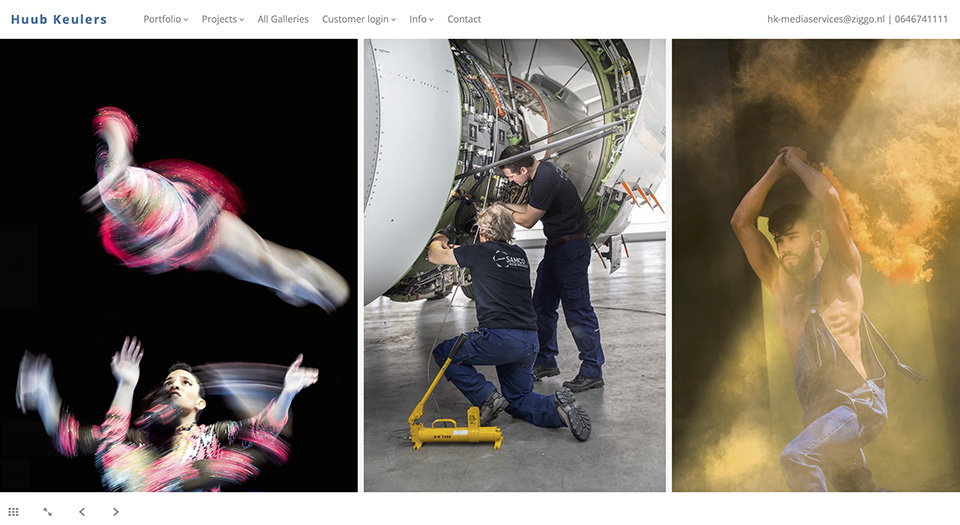
Simple design with templates
Let us first look at the public side of the website. PhotoShelter offers nine responsive templates that can be customised, including colours and fonts. On my website, for example, I use the Horizon template.
Each template comes with a pre-designed layout that generally includes the following:
• A homepage or main portfolio;
• An 'About' page where you can present yourself and your business;
• A contact page with all the necessary contact details;
• An archive page with various ways to store and manage your photos.
The interface for editing the content and layout is very intuitive. You can even add a short or longer description to each photo or gallery. Ideal for explaining your projects or assignments, for example.
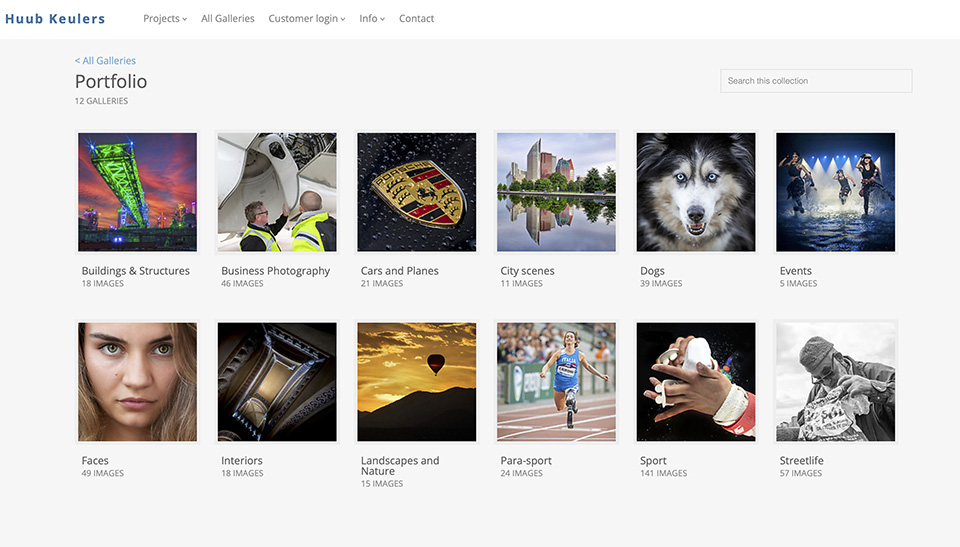
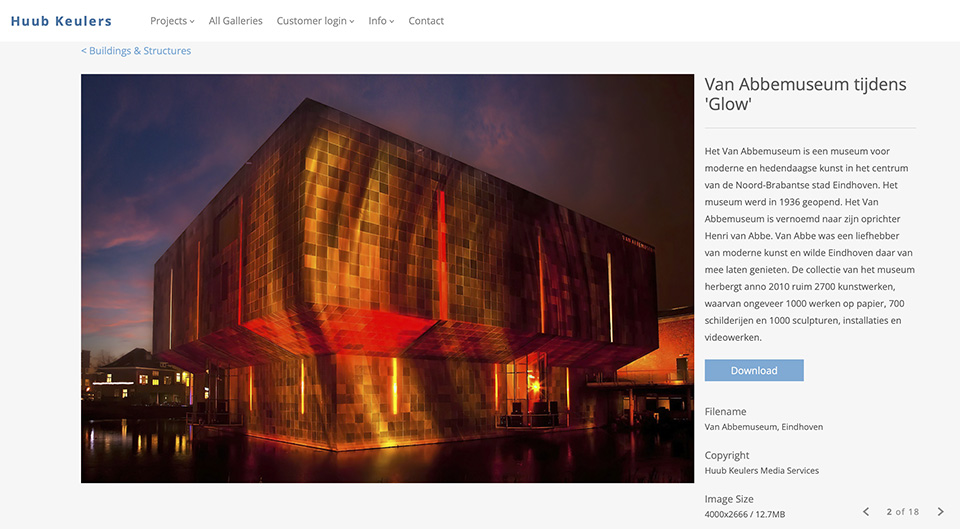
Powerful image bank function
But the real added value is behind the scenes. PhotoShelter is not just a website, but also a powerful image archive where you can upload your photos at full resolution, organised into collections and galleries.
You can then select those galleries to display on the public website, for everyone to see, or keep them private, for clients to download, protected with a password.
Simple download process
When someone receives the link to a gallery, they can download individual images, a few images at a time or all of them.
With PhotoShelter, you can also adjust access, so that specific people can only download small, watermarked images while others have access to the high-resolution photo. PhotoShelter takes care of this, so you do not have to export and upload twice.
You can send a rough edit of your photos to your clients. They can then choose their favourite photos in a simple and intuitive way. At the end, you receive a list of their final choices. You then edit those. It really is that simple.
Seamless integration with Lightroom, YouTube and more
For me, one thing that really sets PhotoShelter apart from its competitors is the plug-in for Adobe Lightroom. You can manage your PhotoShelter photos and galleries directly from Lightroom, so the upload process is very easy.
I often store only RAW files on my external drive, and the conversion to JPG takes place during the upload process.
Another benefit of the plug-in is that when you update the metadata or change the exposure of a photo, or even change the order of the photos in a gallery, the plug-in detects those changes and lets you synchronise them with one click.
This makes it really easy to keep your portfolio and the rest of your galleries up to date.
PhotoShelter also offers advanced features, such as a searchable photo archive and even printing services.
The website also allows integration with your YouTube and Vimeo accounts, and it can retrieve your blog feed, so all the information is in one place.
And the other way around, you can easily choose photos from your PhotoShelter archive to include or embed in your Wordpress blog. PhotoShelter also offers advanced features such as a searchable photo archive and printing services.
Three types of subscription
Photoshelter has 3 types of subscription with corresponding prices. The options are the same for all of them. The only difference is the amount of storage space for your photos:
• Basic: 4 gigabytes of storage for 8.50 euros per month;
• Standard: 100 gigabytes of storage for 22 euros per month;
• Pro: Unlimited storage for 43 euros per month.
You can also start with a 14-day trial.
In a nutshell
With PhotoShelter:
1. ORGANISE your photos in a structured and efficient way;
2. SHOWCASE your photos in the creative way they deserve to be presented to the world or your clients;
3. CONNECT and SYNCHRONISE your photos with Lightroom;
4. PROTECT and PRESERVE your photos in a secure environment!
5. SHARE them with your clients, friends and family, anytime, anywhere and in any way.
Is PhotoShelter perfect?
No, it is not, but the company responds very well to photographers' needs and is always looking for ways to improve its service.
There are, however, a few features I would like to see implemented in the near future:
• More ready-made layouts. It currently offers only 9 different templates;
• A mobile preview mode to check what your website looks like on a smartphone or tablet.
All this comes at a price, but you get some very nice and useful things in return. Remember that you get an all-in-one package, and quality is something we simply have to pay for.
The choice is yours, depending on what you need and how much you want to pay for it. And yes, there are always alternatives if you find the price too high, but I am definitely sticking with PhotoShelter.
I hope this review was useful! Do let me know if you have any questions.
I have absolutely no agreements of any kind with PhotoShelter. If my experiences had been less positive, I would have said so here as well.
About the author
Huub Keulers is een enthousiasmerende veelzijdige freelance fotograaf woonachtig in Elsloo (Li). Hij is gespecialiseerd in sport-, bedrijfs-, straat-, honden en portretfotografie. Daarnaast is Huub auteur van diverse educatieve fotografieboeken en verzorgt hij allerlei fotoworkshops, masterclasses en lezingen.
You might also like
-
 Should you list photography prices on your website?
by Wilmar Dik
-
 Kingfisher groups and nesting banks
by Harry Kiewiet
-
 Where can people admire your photos?
by Nando Harmsen
-
 Photograph a Still Life for a Change
by Laura van der Burgt
-
 Photo archive on an M.2 SSD drive
by Elja Trum
0 comments
Be the first to share what you think!
Have your say
Please note: Articles older than a week can only be commented on by signed-in visitors.Would you still like to comment? sign in or create a free account.
Become a better photographer every week
A practical photography tip in your inbox every week.
38,886 photography enthusiasts already receive the tips! More about the weekly mail. Or keep up to date via  Facebook.

Elja Trum
Photofacts; everything to do with photography!
Would you like to take better photos and keep up with what is happening in photography? Photofacts publishes articles that teach you something about photography — from a product announcement to a practical shooting tip or a look at a website. Photofacts covers photography every day and is a hobby project of Elja Trum's that got out of hand. The articles are written by a team of volunteer authors. If you would enjoy writing one or more articles for Photofacts, do get in touch.More about PhotofactsPhotofacts is made possible in part by
