

Photo archive on an M.2 SSD drive
Saturday 29 July 2023, 15:15 by Elja Trum | 4,268 views | 12 commentsThis article was translated from Dutch with the help of AI. Read the original.
Speed isn't the most important thing for your photo archive. Still, I've moved my archive to a fast M.2 NVMe drive this week. That's ridiculous for storing photos, but it is wonderfully quick.
Since the beginning of this year, I've had a new computer. Mainly so I can play a decent game in the evenings too. In practice, though, I noticed that I hardly use my Apple Mac Pro from 2014 anymore.
That Apple still works brilliantly, by the way. It's still fast enough to run Photoshop and Lightroom smoothly. So I still did that work on the Apple. My archive was stored there too.
I've used the LaCie 5Big for this since 2014. This external drive combines five different old-fashioned drives to achieve speeds of up to 785 MB/s. That was truly unprecedented at the time. And it can still be called pretty quick.
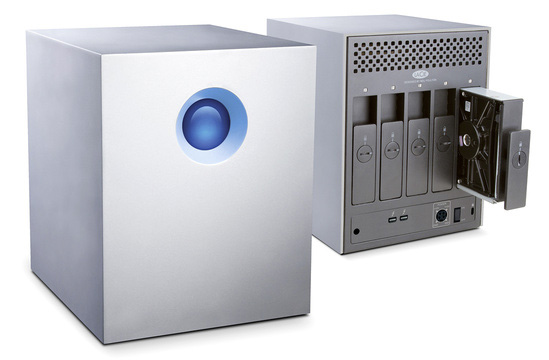
LaCie 5Big Thunderbolt
Now I've decided to switch back to Windows, including for my photo editing. Nothing against Apple, of course. It's hardly surprising that the brand-new Windows PC from 2023 is faster than the nine-year-old Apple Pro.
At first I thought I would use both side by side, but in practice using one system is simply more practical. I'll use the Mac Pro in the office.
How do you store your photo archive?
For a while, I'd been thinking about making the full switch to my new Windows computer. The biggest bottleneck for me was the storage of my archive. This older LaCie 5Big doesn't work with a Windows system.
That meant looking for a new way to store my more than 4 terabytes of photos. Of course, you can buy a traditional drive. An 8 terabyte hard drive costs around 170 euros.
But those things are slow. Unbelievably slow. 100 to 200 megabytes per second. Nothing like the 2 terabyte M.2 NVMe drive in my new computer. That one reaches 7,300 megabytes per second, reading, with writing at 6,600 MB/s.
At around 140 euros for 2 terabytes, you do pay quite a bit more per terabyte, of course.
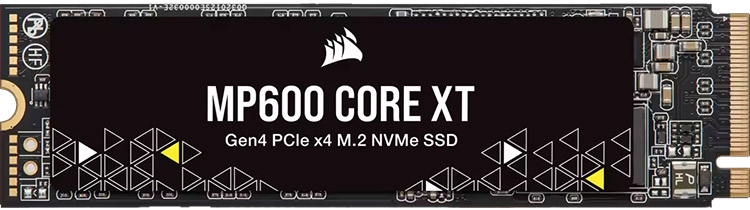
Last Sunday, I was looking again for a possible solution for my archive. Perhaps a Direct Storage Array that could combine multiple M.2 drives. I then discovered that I could buy a 4 terabyte M.2 drive for 179 euros.
It's not as fast as my main drive, with a read speed of 5,000 megabytes per second, but for an archive it's still ridiculously fast, of course. My current motherboard can connect up to four M.2 drives, so adding two extra M.2 drives wasn't a problem.
Combining multiple M.2 drives
If you prefer not to work with multiple separate drives for your archive, you can use Storage Spaces in Windows. This combines multiple drives into a single drive.
This can even work like a RAID system. So you can make your storage space safer by using mirror or parity storage. That way, you won't lose any data if one of your drives gives up the ghost.
I decided to add the drives to my system as two separate extra drives. In Lightroom Classic, you don't really notice any difference anyway.
If a drive fails, that's what my backup setup is for. Always assume that drives will fail. The only question is when. My photos are automatically backed up to a NAS here at home and to online storage.
Lightroom is lightning fast again
The M.2 drives have only been installed for a few days, and I've now transferred my entire archive. My first experience is very positive. Lightroom is lightning fast when browsing through my archive and editing photos.
The time between importing my photos and actually being able to edit them is now much shorter in particular. So far, I'm very happy with the switch.
What do you use for storage?
So this is where my photo archive is now: on two 4 terabyte M.2 NVMe drives installed directly in my computer. Of course, I'm also curious about how you store your archive. Share it in the comments!
About the author
Elja Trum is the founder of Photofacts and online photography course website Photofacts Academy. He has been writing about photography since 2006. Elja is also the author of (Dutch) books on composition, black-and-white photography, flash photography and portrait photography.
You might also like
-
 Review: DigiEra external SSD for iPhone video
by Nando Harmsen
-
 Leica announces M EV1 with electronic viewfinder
by Elja Trum
-
 10 tips to save hard drive space
by Nando Harmsen
-
 Make an Instant Backup While Photographing
by Nando Harmsen
-
 The pros and cons of a backup camera
by Nando Harmsen
12 comments
-

 martinphili wrote on Sunday 30 July 2023 at 12:09
| reply
martinphili wrote on Sunday 30 July 2023 at 12:09
| reply
You’re curious about how I’ve archived my photos?
Translated from Dutch.
Simple: they’re on Flickr.
Speed is totally irrelevant to me. It really only rarely happens that I need a photo again. So the backup is purely for the emergency situation that my PC gives up the ghost and the hard disk is no longer readable. -

-
martinphili wrote on Sunday 30 July 2023 at 20:43
| reply
Then we did indeed understand each other.
Translated from Dutch.
My raw photos are on a separate hard drive and when it starts getting a bit full I throw some of them away. The finished photos, there are obviously a lot fewer of those, are on the PC's C drive and Flickr is a backup of what's on the C drive.
-

-
 Nico van Ast wrote on Tuesday 1 August 2023 at 11:00 | reply
In 2021 I built a new workstation. It contains 3 SSDs and 1 HDD:
Translated from Dutch.
C drive 1Tb M.2 NVMe drive "Installation drive"
D drive 2 TB M.2 NVMe drive "Work drive NEF"
E drive 1 TB SATA SSD "One Drive"
F drive 12 TB HDD "Archive"
I make backups in real time to the cloud.
I import all new (RAW) photos onto my NEF work drive. I delete rejected photos in LR immediately. That keeps my drive tidy. I export the selected and edited photos to my One Drive drive. The E drive contains all the folders for my business. The edited photos are sent to my client from there.
The HDD is my archive drive.
This works wonderfully fast, especially in combination with the AMD Ryzen 9 5900X processor. -
 Peter wrote on Tuesday 1 August 2023 at 11:15 | reply
Thank you. What is unclear to me is why you switched from Mac to Windows...
Translated from Dutch. -
Elja Trum
wrote on Tuesday 1 August 2023 at 14:11
| reply
I've been working with both for years. My laptop is an Apple, my office computer is a Windows. My home computer used to always be Windows as well, but in 2014 I switched to a Mac Pro as my home computer. There was also a second Windows PC at home.
Translated from Dutch.
For gaming, Windows is much more practical than a Mac. But I also personally prefer programming on Windows, as well as managing my email (in Outlook).
The plan was actually to start using a new Windows PC as a Game PC at home. I've had it for half a year now and I notice that I hardly use my Apple anymore.
That is therefore the reason I switched to using my existing Game PC as my main computer.
I can work excellently with both systems and they both have their pros and cons. -
 Henk wrote on Tuesday 1 August 2023 at 11:54 | reply
Elja, quick question what brand-new Windows PC from 2023 did you buy? I'm also looking for a new Desktop or Laptop but only see gaming computers. And do you think that a Desktop is better and or faster than a Laptop? for LR PS? Regards Henk
Translated from Dutch. -
Elja Trum
wrote on Tuesday 1 August 2023 at 14:03
| reply
I put it together myself based on separate parts that I bought. But you can probably also have a shop put something similar together for you.
Translated from Dutch.
In itself, a gaming PC doesn't have to be bad for photo editing; those are often powerful PCs, after all.
A desktop has more options for expansion. A laptop is of course handy if you want to use it in multiple locations. Both can be quite powerful these days. -
 Rik wrote on Tuesday 1 August 2023 at 12:34 | reply
Very simple: all files on a (well-secured) NAS.
Translated from Dutch.
That is also platform-independent: here at home, Mac and Windows are used. And convenient with shared folders. And easy to back up, immediately for all users.
To each their own, but going from Mac to Windows.....that would never be my choice! In any case, Mac OS, just like Linux distros, makes more effective use of the system resources than Windows. If you create a dual-boot on a PC then you can see an obvious difference in a much better graphical display under Linux than under Windows. It's been that way for years. -
 PVB wrote on Tuesday 1 August 2023 at 13:56 | reply
In my PC is an extra SSD, which I use for (almost daily) backup files. Once a week I make an extra backup on an external USB disk. I keep that in the car........
Translated from Dutch. -
 jeepee wrote on Wednesday 2 August 2023 at 19:37
| reply
jeepee wrote on Wednesday 2 August 2023 at 19:37
| reply
The working files, unedited Raw, are on my Imac. The Mac is backed up to my NAS. Once photos have been edited, I move them to the photo folders on the Synology NAS from Lightroom. The NAS itself is then backed up again via an online service and an old NAS at another location. I choose MAC.
Translated from Dutch.
Have your say
Please note: Articles older than a week can only be commented on by signed-in visitors.Would you still like to comment? sign in or create a free account.
Become a better photographer every week
A practical photography tip in your inbox every week.
38,981 photography enthusiasts already receive the tips! More about the weekly mail. Or keep up to date via  Facebook.

Elja Trum
Photofacts; everything to do with photography!
Would you like to take better photos and keep up with what is happening in photography? Photofacts publishes articles that teach you something about photography — from a product announcement to a practical shooting tip or a look at a website. Photofacts covers photography every day and is a hobby project of Elja Trum's that got out of hand. The articles are written by a team of volunteer authors. If you would enjoy writing one or more articles for Photofacts, do get in touch.More about PhotofactsPhotofacts is made possible in part by
