

Review: Canon Irista storage service
Tuesday 29 October 2019, 10:57 by Michelle Peeters | 8,484 views | 2 commentsThis article was translated from Dutch with the help of AI. Read the original.
Irista will stop on 31 January 2020. Your photos, videos and personal data in Irista will be deleted on this date. If you want to save your photos and videos, you can download them to your computer. This may take some time, so get started as soon as possible.
In this article, we share our user experience with the Canon Irista storage service, which lets you safely and easily store, manage, organise, share and print photos in the cloud. This gives you control over your photo collection in one central, secure and organised place.

You can easily use Irista through the app on your smartphone or tablet, and there is also an extensive desktop version with a Lightroom plug-in.
Photos are stored in Irista without compressing the file, so there is no loss of quality and you can also store raw files here. The same applies to videos.
We have previously written about Canon's Irista storage system.
Functionality / objective
- Because you can automatically save smartphone photos in Irista, more space is freed up to take more photos;
- Time saving: you can combine all your photos, from your smartphone with those on your computer, camera, Flickr, Google Photos and Facebook accounts. All duplicate copies are removed automatically;
- Find photos quickly: you can find your photos by the camera and/or lens type used to take them. You can also give your photos different tags yourself, so you can easily find them again;
- Sharing: you can create albums and share them with others through a simple URL. Friends can view them and download photos to their own devices without having to log in or register;
- You can easily create a High Definition (high-quality) photo book from Irista.
Installing and testing
I tested Irista in this test environment: Apple Mac with MacOS 10.13.1, iPhone 7 and Adobe Lightroom 5.7
You can install the software through Canon's Irista site.
You then create a Canon account or sign in with an existing account. You get 15 Gigabytes of storage by default, as also stated on the login page. However, if you look on the smartphone or desktop, you can see that you actually get 100 Gigabytes of space by default!
Desktop use
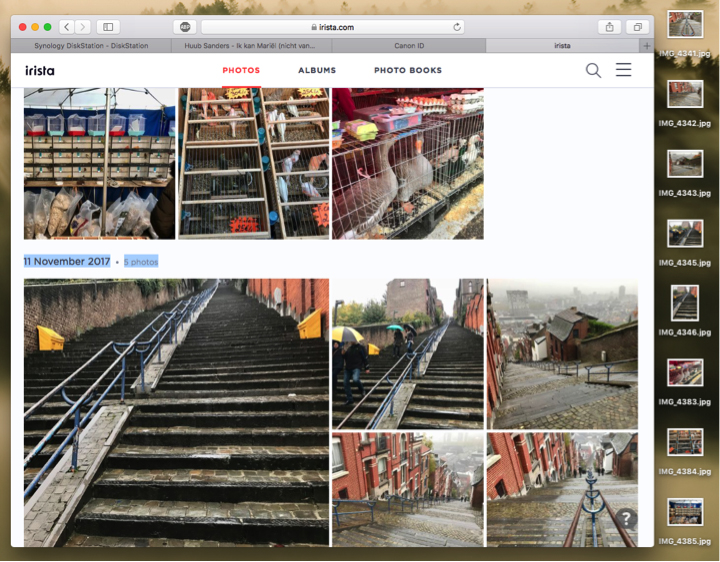
Irista opens in a browser window. Drag and drop your files from the desktop into the browser window. Alternatively, you can install an additional photo uploader on the desktop.
The Irista uploader is a web-based application that allows you to synchronise photos from any folder on your computer with Irista.
Smartphone use (iPhone)
Install the Canon Irista app from the Apple App Store.

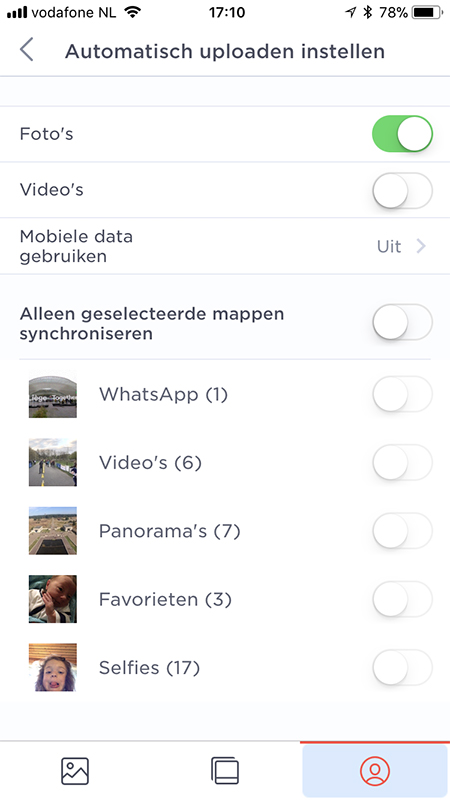
After signing in through the app, you must give the app permission to access your photo library on the smartphone. You can also set up automatic uploading from the smartphone to Canon Irista.
You can then specify whether you only want to upload certain folders. You can also set photos from your Facebook, Google+ or Flickr account to be uploaded automatically.

By default, the app uploads all photos from your smartphone to Irista. This can be a disadvantage if you already use another cloud service, such as Apple iCloud in my case.
You can choose selected folders that you want to upload. Alternatively, you can choose which photos you want to upload to Irista from the Irista app.
Creating an album
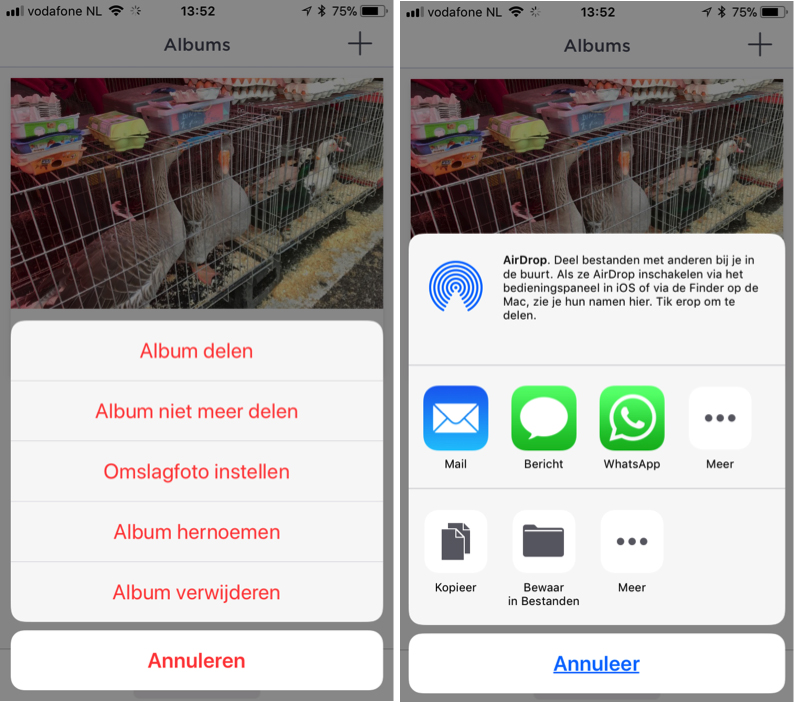
You can create albums in both the smartphone app and the desktop version, and place selected photos in them. Everything is synchronised immediately.
The album is private, but you can share it from both the smartphone and the desktop with specific people, by email, or through a public link, directly on Twitter, Facebook, WhatsApp and so on.

Adobe Lightroom plug-in
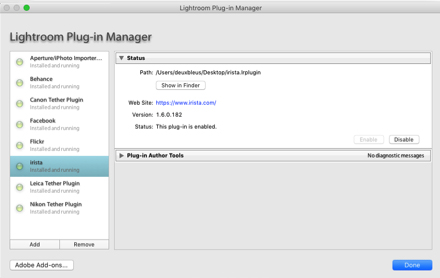
You can download the plug-in you need in Lightroom through the Irista web page.
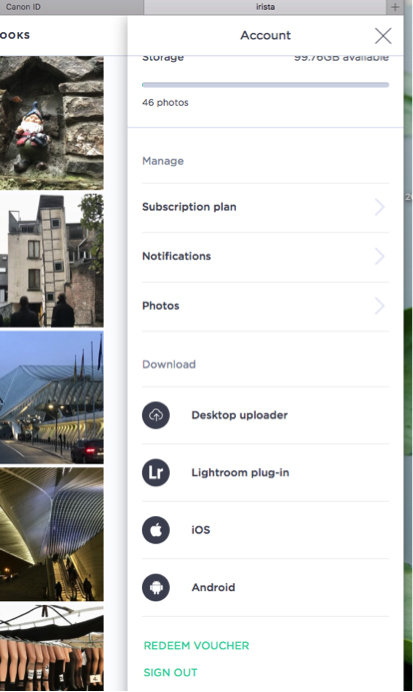
You can also install the plug-in through the Lightroom Plug-in Manager. You can then establish the connection with your Irista account from Lightroom.
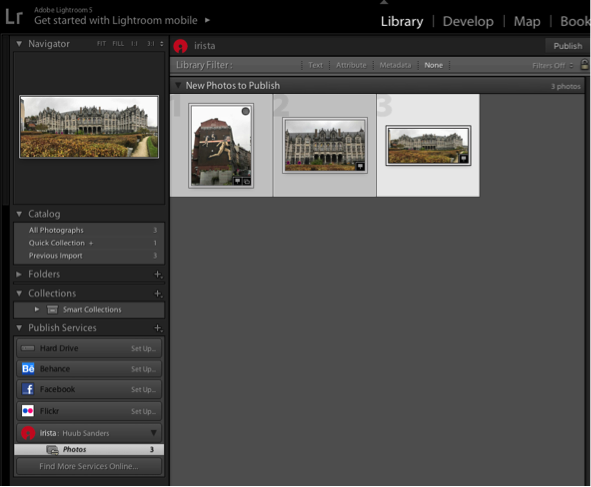
You can then publish photos directly from Lightroom to Irista.
Conclusion
Irista is a very useful and very easy-to-use cloud service for photos and videos. When you sign up, you are told that you get 15 Gigabytes of data by default.
Very convenient, and also quite fast. The connection with Lightroom is very useful and works flawlessly. Creating albums and sharing them with others or through social media is convenient.
Another advantage is that all photos and videos are stored as original files without compression. RAW files too.
If you do not yet use any other cloud services, Irista certainly adds value. Working with other cloud services still requires extra time.
Irista does not have any settings to indicate that, for example, you only want to upload your new photos from your iPhone. In my case, this meant that my entire iCloud photo library was copied to Irista.
If you work from Chrome, it is possible to drag folders into the timeline in the web version of Irista.
I also ran into some strange things while using the desktop photo uploader. By default, it shows that the 'pictures' folder will be uploaded. That is fine, but on the iMac this pictures folder also contains the Lightroom libraries and the Lightroom backups.
It now seemed that large numbers of photos, which had been deleted years earlier, were being sent to Irista through these backups. The advice is to go through the folder and upload the files with EXIF data to Irista.
All in all, Irista is a good product, especially for a beginner. However, in my case the integration into an existing environment was not yet completely trouble-free.
Get started yourself?
Are you curious and would you like to try Irista for yourself? You can start a free account here.
Dit artikel is voor het laatst bijgewerkt op 29 oktober 2019.
De eerste publicatiedatum is vrijdag 30 maart 2018, 13:31.
About the author
Michelle Peeters is fotografe en oprichter van DeuxBleus Fotografie. Michelle herkent het bijzondere in het gewone en het gewone in het bijzondere. Ze heeft zich nooit willen specialiseren en is daardoor van alle markten thuis.
You might also like
-
 What does Adobe ending its cloud services mean for Lightroom?
by Nando Harmsen
-
 Canon launches a new cloud platform for managing and sharing photos
by Michelle Peeters
-
 Review: Sony A7 IV
by Nando Harmsen
-
 Review: Canon EOS R6
by Nando Harmsen
-
 Review: Canon RF 70-200mm f/2.8L IS
by Nando Harmsen
-
 Review of the Eizo ColorEdge CG3100X monitor
by Nando Harmsen
2 comments
-
 Rob IJsselstein wrote on Tuesday 3 April 2018 at 14:16 | reply
Dank voor het verhaal. Als je graag fotografeert is 100 Gb heel snel vol. Daarmee gaat het nut al snel verloren, want dan moet je weer op zoek naar iets anders. Als standaard voor foto’s die je wilt delen is het wellicht wel handig
This comment was written in another language and has not been translated yet. -
 Ivo wrote on Wednesday 4 April 2018 at 21:12 | reply
nadeel is volgens mij dat je alleen foto en video materiaal kunt uploaden, en voor de rest niks. als je je complete fotocollectie daar wil parkeren gaat dat al een duur geintje worden. Kun je beter in 1 x een NAS aanschaffen.
This comment was written in another language and has not been translated yet.
Have your say
Please note: Articles older than a week can only be commented on by signed-in visitors.Would you still like to comment? sign in or create a free account.
Become a better photographer every week
A practical photography tip in your inbox every week.
38,886 photography enthusiasts already receive the tips! More about the weekly mail. Or keep up to date via  Facebook.

Elja Trum
Photofacts; everything to do with photography!
Would you like to take better photos and keep up with what is happening in photography? Photofacts publishes articles that teach you something about photography — from a product announcement to a practical shooting tip or a look at a website. Photofacts covers photography every day and is a hobby project of Elja Trum's that got out of hand. The articles are written by a team of volunteer authors. If you would enjoy writing one or more articles for Photofacts, do get in touch.More about PhotofactsPhotofacts is made possible in part by
