

Review: Topaz DeNoise AI
Saturday 11 April 2020, 14:28 by Michelle Peeters | 17,285 views | 12 commentsThis article was translated from Dutch with the help of AI. Read the original.
Denoise AI from software developer Topaz can distinguish between noise and detail more effectively because it uses artificial intelligence. I have struggled with noise in my evening and night shots for years, so I tried the free 30-day trial version.
Over the years, I have tried quite a few noise reduction tools. I have used external apps, Photoshop/Lightroom plug-ins and the noise reduction controls built into Photoshop and Lightroom.
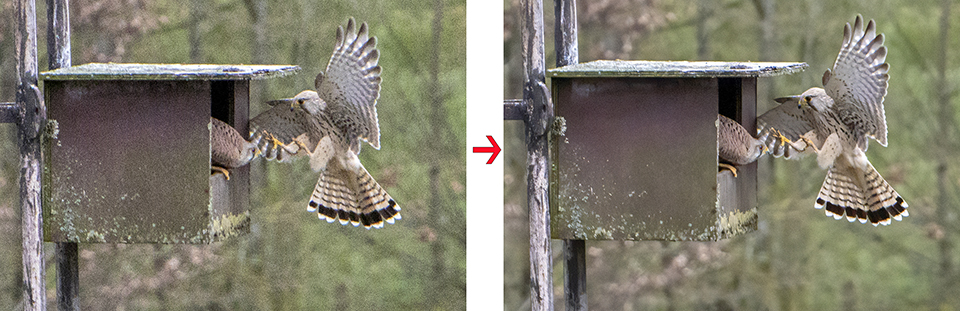
Trading noise reduction for detail
They all work to some extent, but you always end up trading noise reduction for detail.
I have never found a noise reduction tool that did not involve fairly major compromises. Increase the noise reduction and detail suffers. Preserve the detail and the noise reduction is ineffective.
Many of you will know the story. After carrying out a number of detailed tests, I was able to establish that Topaz DeNoise AI works better than comparable software I have ever tried.
Artificial intelligence
Through countless example photos, Topaz learned during development to distinguish between noise and detail. Unfortunately, raw files cannot be processed, but jpg and tiff files can.
The calculations required to remove the noise are intensive, so the whole process is not particularly fast.
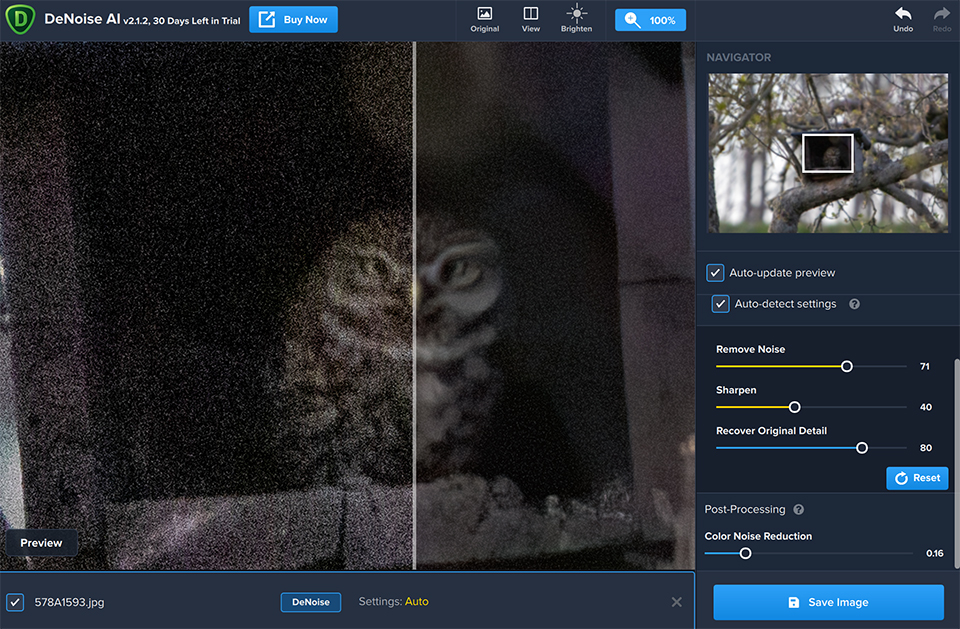
How it works
There are three settings, corresponding in name and operation to what you find in most software, namely:
- The amount of noise reduction;
- Increasing sharpness;
- Preserving detail. Choosing more detail preservation also brings some of the noise back.
Your photos are analysed by comparing neighbouring pixels. If a pixel that differs from the surrounding pixels is found among a large number of blue or black pixels, the programme assumes that it is incorrect.
The pixel is made black or blue. This makes the colour more even. And the stronger you set the effect, the more even the result. Thanks to the intelligent algorithm, the final result still remains reasonably sharp where the software has detected no or little noise.
If you use the sliders in DeNoise AI aggressively, you lose some detail, add some halos, or increase the sharpness to such an extent that you can see a micro image break.
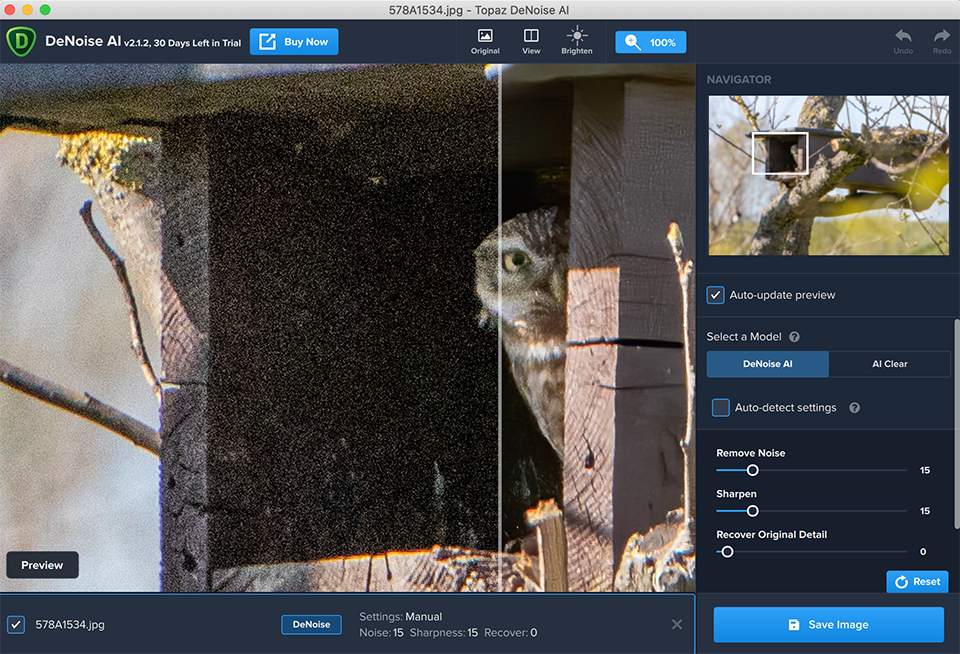
But I did not have to push the sliders very far, because the split-screen function and the image enlarged to 400 per cent allowed me to see clearly and easily find a setting that made the image grain, or noise, invisible without losing detail.
Every photo is different, so your adjustments will vary from image to image. It is not automatic. But it is quick and easy to make changes and see the results.
Star photography and noise
Most of my photos are taken in low light, as I do almost all my bird photography around sunrise and sunset. Working in low light and at high ISO values is an invitation to noise.
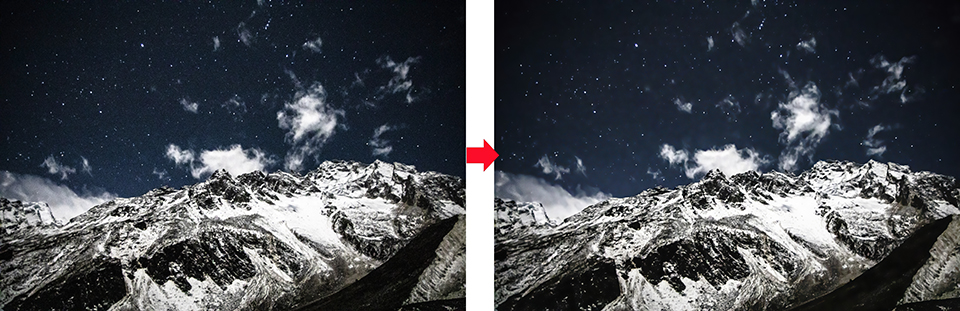
I also do night photography from time to time, trying to capture the Milky Way. When I looked at those images, I again noticed that DeNoise AI significantly reduced the noise without any visible deterioration in detail. Below you can see how the sky is cleaned up in this enlargement without damaging the stars.
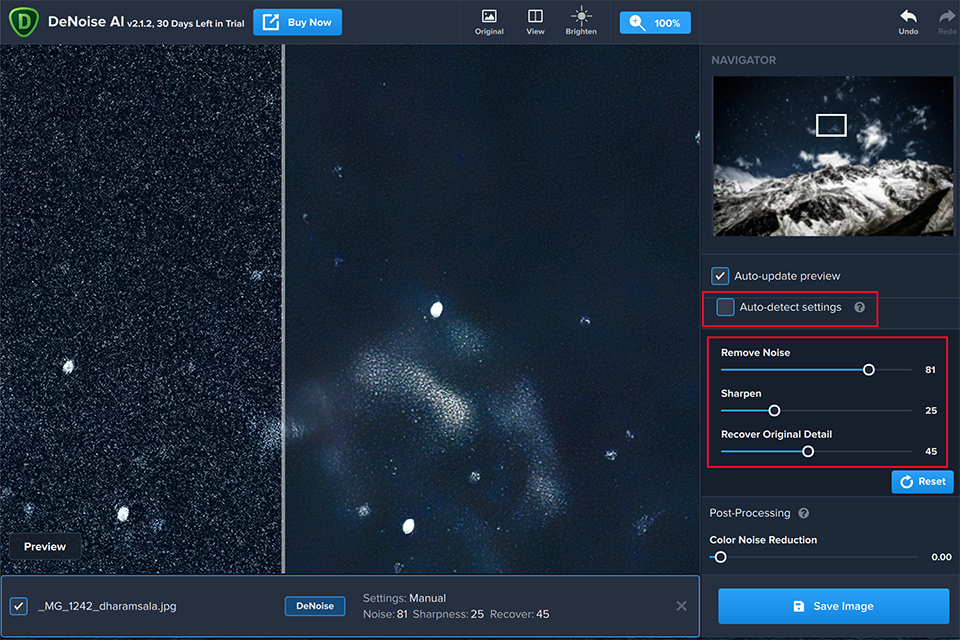
It may be difficult to see the improvement in these examples, as I am limited to small compressed files for uploading, but you can download large examples from the Topaz website.
What I liked
- Very effective at reducing noise without losing detail;
- Easy to use: you can adjust it in (almost) real time to get the desired results;
- Reasonably priced, especially with the introductory discount;
- Use it as a standalone app or Photoshop /Lightroom plug-in;
- Sometimes it even seems better than the original!
- The results are very impressive in the areas of the photo where noise is removed effectively. Skies, for example, are treated very well, although naturally there is no detail there either;
- A large proportion of the noise is removed without really affecting sharpness, except in some areas;
- Camera sensors are getting better, but there was not a single image I put through DeNoise AI that was not improved, even when inspecting the image at high magnification.
What could be better
- Processing can be slow: up to a minute or longer with large RAW files;
- Noise elimination works excellently in principle, but some areas of the image are sometimes less successful. Very dark areas in particular apparently contain too little information for the calculations or image recognition, resulting in a lot of noise;
- That looks particularly ugly when the photo right next to it is completely free of noise;
- The edges of fine details also sometimes remain a little woolly, because even with this programme there is still a relationship between noise removal and sharpness.
Conclusion
If you are also a photographer who is constantly fighting noise, I recommend trying the free trial version of DeNoise AI. No noise reduction tool is 100 per cent effective, but this one comes very close. I am not easily impressed, and this noise solution impressed me.
I tried DeNoise AI both as a standalone app and as a plug-in within Photoshop. The results were, as expected, identical. Topaz offers a free 30-day trial of the software, so you can judge for yourself. The recommended retail price is 79 dollars.
I think Topaz DeNoise AI is a significant achievement in noise reduction. It is not completely automatic and processing is not instant. It can take a few seconds to see the result, but it is worth the wait!
About the author
Michelle Peeters is fotografe en oprichter van DeuxBleus Fotografie. Michelle herkent het bijzondere in het gewone en het gewone in het bijzondere. Ze heeft zich nooit willen specialiseren en is daardoor van alle markten thuis.
You might also like
-
 How can you avoid and reduce noise in your photos?
by Huub Keulers
-
 Which is better? Stacking or noise reduction?
by Nando Harmsen
-
 AI is taking over the world and photo editing
by Dick Holtman
-
 New update for Lightroom Classic enables AI noise reduction
by Nando Harmsen
-
 The new Luminar AI is now available
by Nando Harmsen

12 comments
-
 Jax Kraal wrote on Tuesday 14 April 2020 at 10:13 | reply
How can processing take longer with RAW files? At the beginning of the article it says that RAW files cannot be edited along with them.
Translated from Dutch. -

 Michelle Peeters wrote on Tuesday 14 April 2020 at 10:16
| reply
Michelle Peeters wrote on Tuesday 14 April 2020 at 10:16
| reply
@Jax: it does handle some Raw files (such as those from my own EOS 5d Mark III). Those from the EOS R, however, it doesn't... I'm still trying to figure out how that works!
Translated from Dutch. -
 PvRFotografie
wrote on Tuesday 14 April 2020 at 10:24
| reply
PvRFotografie
wrote on Tuesday 14 April 2020 at 10:24
| reply
@Jax @Michelle That must then have something to do with the RAW files from the EOS R. For me, Denoise (2.1.4) opens all my RAW files from Sony, Canon EOS5mkIV, Fuji X and Fuji GFX
Translated from Dutch. -
Michelle Peeters wrote on Tuesday 14 April 2020 at 10:56
| reply
@PvRFotografie: good to hear, thanks! I asked Topaz about it.
Translated from Dutch. -
 Anton M. Groeneschey wrote on Tuesday 14 April 2020 at 10:57 | reply
The difference in the Raw files of the EOS 5D MarkIII and the EOS R is that the former has Raw 2 CR2 and the latter has the newer Raw 3 CR3 files.
Translated from Dutch. -
Michelle Peeters wrote on Tuesday 14 April 2020 at 11:02
| reply
@Anton: that's right indeed! If Topaz is smart, they'll quickly make a fix for this..
Translated from Dutch. -
 guest wrote on Tuesday 14 April 2020 at 11:50 | reply
I indeed often run into [te] much noise, especially when zooming in a lot. I’m trying the trial version now and find the results amazing. As a plug-in in LR, a RAW is no problem because it gets converted into DNG
Translated from Dutch. -
Michelle Peeters wrote on Tuesday 14 April 2020 at 11:54
| reply
@Guest: zooming in far (often having to crop quite a bit too), having to use high ISO values because of very fast shutter speeds, then you can hardly avoid it indeed. I find it astonishing too, am very enthusiastic! As a plug-in it doesn't work well for me either. But I also can't open the CR3 raw files directly in my latest Photoshop version yet, but that has something to do with my own settings...
Translated from Dutch. -
 Harry Wolf wrote on Tuesday 14 April 2020 at 12:10 | reply
Are there already any experiences with Nikon NEF (Raw) files?
Translated from Dutch. -
Anton M. Groeneschey wrote on Tuesday 14 April 2020 at 12:34 | reply
Yes, no problems with the Nikon NEF files.
Translated from Dutch. -
Harry Wolf wrote on Tuesday 14 April 2020 at 12:47 | reply
Thank you Anton
Translated from Dutch. -
Michelle Peeters wrote on Tuesday 14 April 2020 at 18:46
| reply
I received the following response from Topaz:
Translated from Dutch.
Our software does not yet have full RAW image support.
As a temporary workaround for files where this conflict occurs, we recommend that you convert your RAW image into a .TIFF for editing. This is a common workflow among professional photographers because .TIFF files contain plenty of data for editing, like a RAW file, and are compatible across a broad range of programs where RAW files may have conflicts.
Have your say
Please note: Articles older than a week can only be commented on by signed-in visitors.Would you still like to comment? sign in or create a free account.
Become a better photographer every week
A practical photography tip in your inbox every week.
38,886 photography enthusiasts already receive the tips! More about the weekly mail. Or keep up to date via  Facebook.

Elja Trum
Photofacts; everything to do with photography!
Would you like to take better photos and keep up with what is happening in photography? Photofacts publishes articles that teach you something about photography — from a product announcement to a practical shooting tip or a look at a website. Photofacts covers photography every day and is a hobby project of Elja Trum's that got out of hand. The articles are written by a team of volunteer authors. If you would enjoy writing one or more articles for Photofacts, do get in touch.More about PhotofactsPhotofacts is made possible in part by
