

Review: Shift Art: 50 Photoshop tutorials
Tuesday 17 October 2017, 08:32 by Michelle Peeters | 5,454 views | 0 commentsThis article was translated from Dutch with the help of AI. Read the original.
Shift Art offers online Photoshop art with exclusive, artistic tutorials, galleries and interviews. For the 5DayDeal, they are offering 50 Photoshop tutorials at a reduced price.
I looked at one of them, because its subject appealed to me for this review.
Underwater - Brooke Shaden
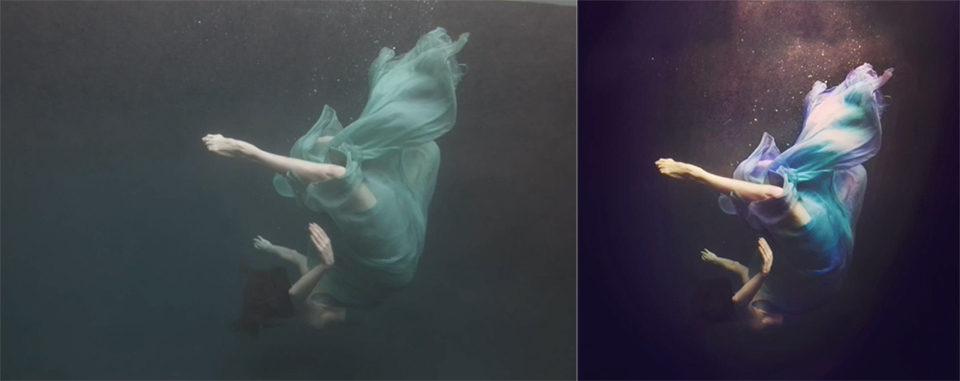
Brooke Shaden shows how you can use a number of highly advanced Photoshop techniques, which she explains clearly, to transform a rather flat underwater photo into a dynamic, almost fairy-tale-like image.
She uses several photos. From other photos that do have air bubbles and a beautiful reflection on the water's surface, she copies sections and pastes them into the 'base photo'. She then blends the copied sections in such a way that they no longer stand out.
Edits
Brooke describes the steps she takes to achieve her final result in great detail. Even so, the whole video is only about fifteen minutes long. You have to pay close attention and also know what she is doing.
I think it is quite difficult for a beginner in Photoshop to follow everything.
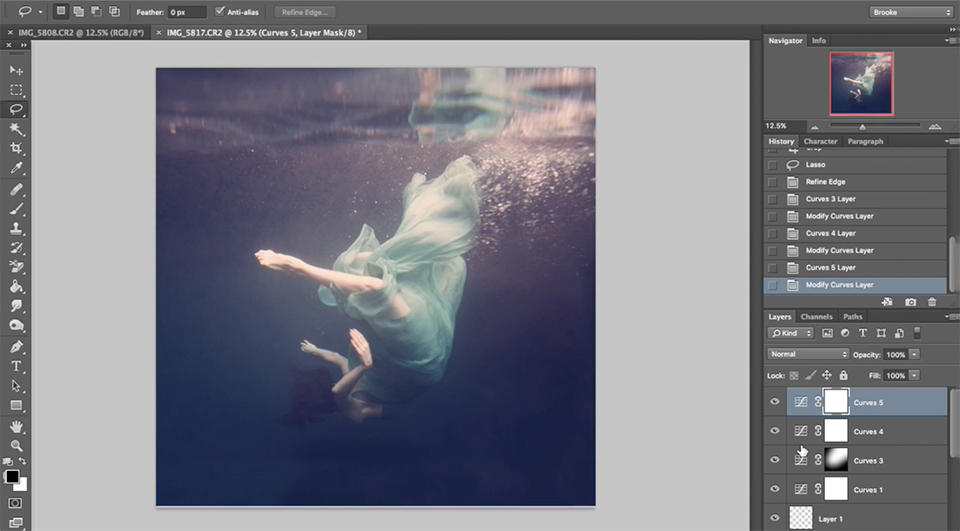
- The tutorial starts by showing you how to extend your frame and then crop it to a square format. Brooke does this with the Crop tool. She pulls the edges outwards and fills the white edges, as the background colour was set to white, with the clone stamp;
- She then uses the Rectangular Marquee Tool to copy the beautiful reflection on the surface from another photo. Using the Move and Free Transform tools, she moves this section into the right position and stretches it a little so that it fits exactly;
- She creates a new Layer Mask on top of the existing layer, sets the foreground and background colours to black and white, sets the opacity to 100%, and uses the Brush to remove the sections she wants to get rid of. Because the new layer is still too light, she creates a new Adjustment Layer on top of the other layers. She makes this darker and lowers the opacity a little;
- She then manipulates the lighting. She does this by selecting the section where more light should appear with the Lasso tool. She then right-clicks and selects Refine Edge.
The Feather slider is moved all the way to the right, so that the hard transitions disappear completely; - Next, she creates a new Curves Adjustment Layer to make this section a little lighter. She does this by pulling the middle section of the curve upwards.
Because she only wants to boost the contrast in the midtones, as this is an underwater photo after all, she does create an S-shape in the curve, but does not start it exactly in the bottom-left corner, instead starting it slightly above it, and ends it in the top-right corner, but slightly lower. Clever trick! - Finally, she adjusts the colour temperature. First of the entire image, and then she adjusts the colour of the dress.
She does this using another Adjustment Layer, where she does not adjust all three RGB colour channels at the same time, but each colour separately. She keeps adding opposing colours.
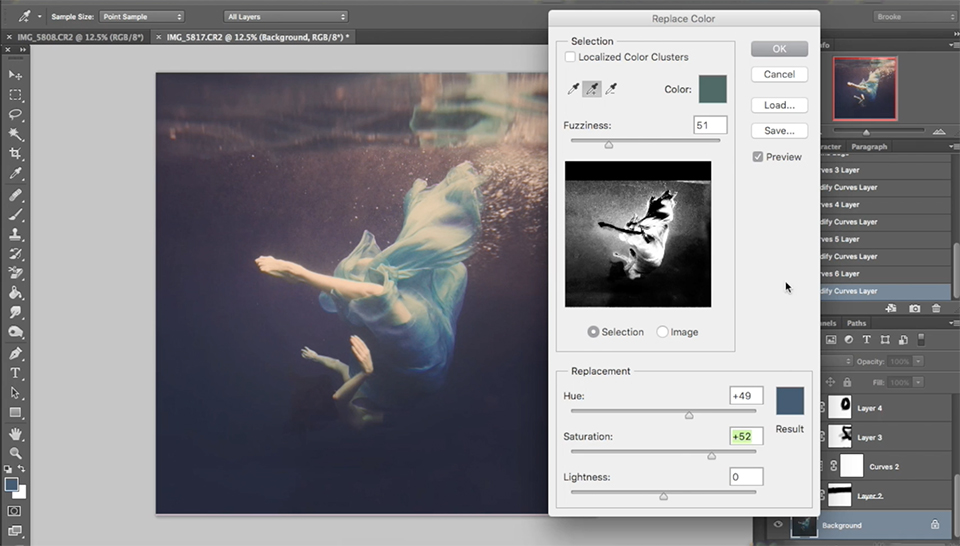
For the dress, she uses the Image - Adjustment - Replace Color tool. She selects the colour of the dress with the Eye-dropper tool.
Everything that is white in the small image is included, while anything black is not. With the plus tool, you can add black or grey sections to your selection.
What did I think of it?
I thought it was a very compact tutorial that I had to watch twice before I fully understood how everything worked.
I am a fairly experienced Photoshop user myself, but I have already realised that even at this level, you only master about 20 per cent of the entire subject.
So I learned quite a lot from it and was able to apply it straight away to my own underwater photos, which I thought were too pale and uninteresting. With a beautiful result!
Who is it for?
I think this tutorial, like the other 50, is intended for experienced Photoshop users who enjoy giving their photos an artistic touch.
The advantage of online courses is that you can replay them whenever you want if you have not quite managed to follow something. That made it manageable for me.
5DayDeal
Would you also like to take these Photoshop courses from Shift Art? They are part of the 5DayDeal offer. During this five-day offer, which runs until Wednesday 18 October 2017 at 9:00 pm, you can buy a complete package of courses for 117 dollars. View a complete overview here.
» Buy 5DayDeal directly
Photofacts receives a commission if you buy 5DayDeal through the link above. This does not cost you anything extra.
Photofacts Academy
Would you rather follow Dutch photography courses? Then take a look at Photofacts Academy too. In our online learning environment, you will find more than 40 courses on photography and post-processing.
Discover all the secrets of Lightroom and Photoshop and follow courses on property photography, autumn photography, landscape photography, portrait photography and much more.
For just 109 euros, you can watch everything you want for a whole year, as often as you like. This includes a completely new photography course every month and a short photography or post-processing tip every week.
» Improve your photography with Photofacts Academy
About the author
Michelle Peeters is fotografe en oprichter van DeuxBleus Fotografie. Michelle herkent het bijzondere in het gewone en het gewone in het bijzondere. Ze heeft zich nooit willen specialiseren en is daardoor van alle markten thuis.
You might also like
-
 Review: Discover the World of Fine Art Photography with Micky Hoogendijk
by Michelle Peeters
-
 Review: Location Shooting Tutorials Package (Joel Grimes)
by Michelle Peeters
-
 Review: Chris Knight - Finding Rembrandt
by Michelle Peeters
-
 Review: e-book: Mastering Exposure by Andrew S. Gibson
by Michelle Peeters
-
 Review: Sony A7 IV
by Nando Harmsen
0 comments
Be the first to share what you think!
Have your say
Please note: Articles older than a week can only be commented on by signed-in visitors.Would you still like to comment? sign in or create a free account.
Become a better photographer every week
A practical photography tip in your inbox every week.
38,765 photography enthusiasts already receive the tips! More about the weekly mail. Or keep up to date via  Facebook.

Elja Trum
Photofacts; everything to do with photography!
Would you like to take better photos and keep up with what is happening in photography? Photofacts publishes articles that teach you something about photography — from a product announcement to a practical shooting tip or a look at a website. Photofacts covers photography every day and is a hobby project of Elja Trum's that got out of hand. The articles are written by a team of volunteer authors. If you would enjoy writing one or more articles for Photofacts, do get in touch.More about PhotofactsPhotofacts is made possible in part by
