
Tip: Multiple exposures in your camera
Saturday 29 February 2020, 14:28 by Huub Keulers | 10,916 views | 9 commentsThis article was translated from Dutch with the help of AI. Read the original.
When analogue cameras dominated the market, photos with multiple exposures were often made by using different slides to create a 'slide sandwich'.
Or if you took a shot with a camera containing a roll of film, did not advance the roll and then took another shot over the previous one, you were using a technique called multiple exposure.
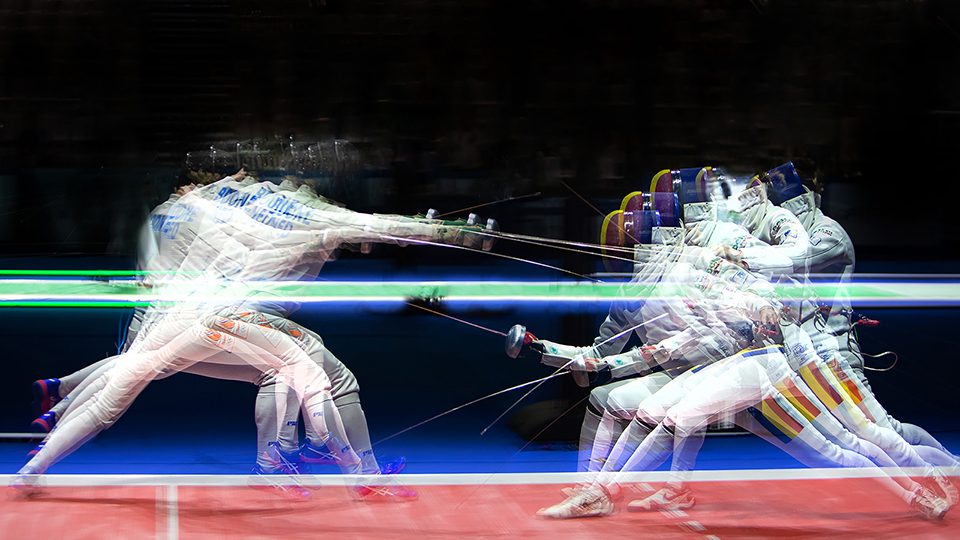
With digital cameras, this was initially more difficult to achieve because, as soon as the image has been recorded on the memory card, it is removed from the camera sensor. This makes it difficult to overlay two or more images.
The Canon EOS-1Dx series, EOS 5D Mark III + IV, EOS 6D Mark I + II and the EOS 70D + 80D + 90D DSLRs have the option to create exposure stacks of between two and nine photos.
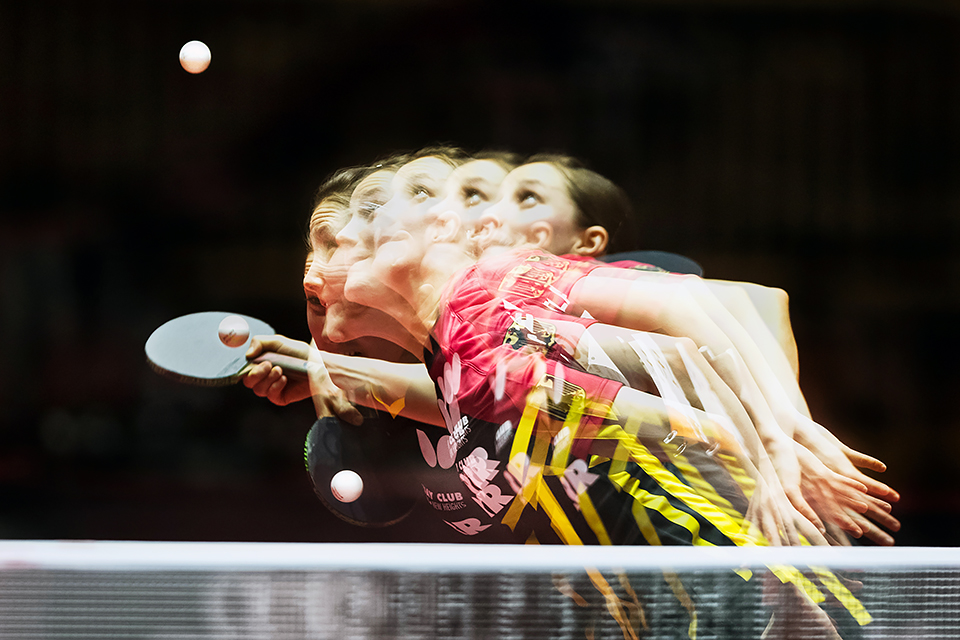
For this technique, it is best to use a tripod or, if you have a steady hand, a monopod. Ideally, you want a background that has not shifted between the multiple images. For the photos in this article, I used a monopod and had the advantage of a dark background.
This function is available for both RAW and JPEG images and is called 'multiple exposures'. Within this function, there are various settings that can be adjusted to tailor the final result to your needs.
These options are Additive, Average, (Comparative) Bright and (Comparative) Dark. Nikon cameras have a similar option called 'Multiple Exposure'.
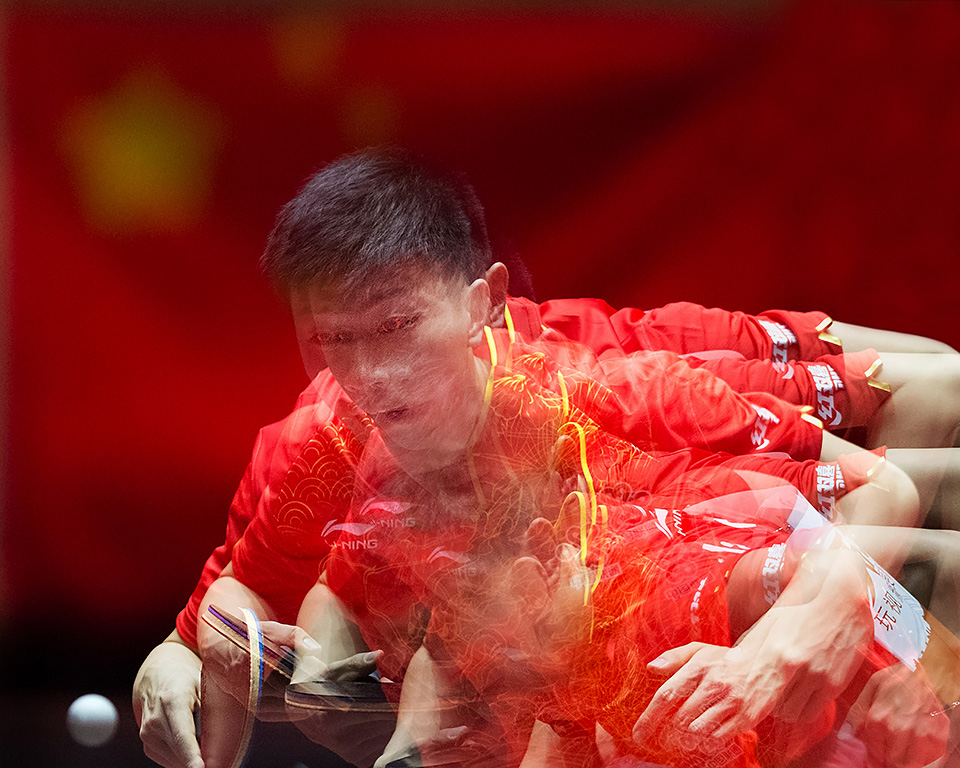
- The additive exposure control is for photographers who are used to making multiple exposures with film cameras. Instead of making each photo with the correct exposure, the total exposure is added together for each individual photo.
To achieve the right result, you need to underexpose each image, so that the resulting image is correctly exposed when they are all combined; - The 'Average' setting provides automatic exposure control, with each image automatically underexposed so that the final image is correctly exposed. Unlike the 'Additive' setting, all images in the 'Average' setting are taken at the same exposure level;
- The (Comparative) 'Bright' setting is suitable for photographing uniform dark scenes with bright objects overlaid. A classic example of such a scene would be a moon over a dark night sky. This can only be achieved by covering the bright objects in the scene;
- Conversely, (Comparative) 'Dark' is used to eliminate the bright parts of images and therefore only overlay the dark parts of each image.
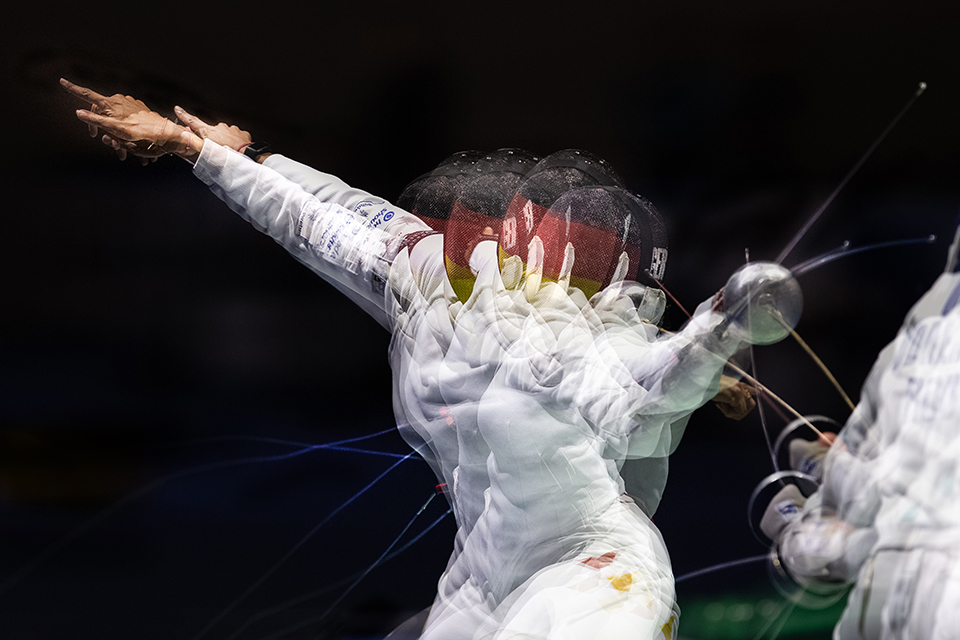
This setting is useful for eliminating reflections and bright spots in an image, such as the reflections you can see when photographing a portrait of someone wearing glasses.
As well as the way the exposures are made, you can also choose whether you want to save all the photos separately or just the final result. You can also choose whether to continue with 'multiple exposures' after your first series or whether your camera should switch 'multiple exposures' off again.
If you want to continue with 'multiple exposures', do not forget to switch this option off again, as I know from personal experience  .
.
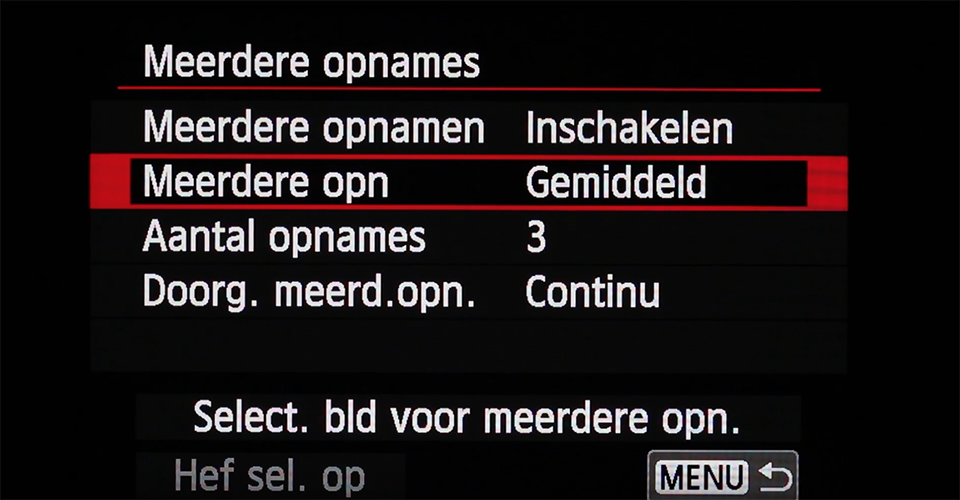
You cannot select 'Multiple exposures' if HDR mode is enabled, if you are recording a video or if white balance bracketing has been set. Automatic exposure bracketing, Auto Lighting Optimizer, Highlight Tone Priority and chromatic aberration correction are also disabled then.
About the author
Huub Keulers is een enthousiasmerende veelzijdige freelance fotograaf woonachtig in Elsloo (Li). Hij is gespecialiseerd in sport-, bedrijfs-, straat-, honden en portretfotografie. Daarnaast is Huub auteur van diverse educatieve fotografieboeken en verzorgt hij allerlei fotoworkshops, masterclasses en lezingen.
You might also like
-
 The Magic of Photography with Multiple Exposures
by Laura van der Burgt
-
 Shoot met meerdere camera's, van chaos naar orde
by Dick Holtman
-
 Improve your panorama with a nodal slide
by Nando Harmsen
-
 Extending shutter speed with multiple exposures
by Nando Harmsen
-
 This is how Ilford film rolls are made
by Elja Trum
-
 Disappointment over multiple exposures in new Canon cameras
by Nando Harmsen
9 comments
-
 Annemie wrote on Saturday 29 February 2020 at 17:20 | reply
Hello Hub,
Translated from Dutch.
Nice informative article. I do wonder if it works that way with Nikon too, they do have the 'multiple exposure' option, but don't save the individual images. The D850 and the new mirrorless cameras do, but the D700, D750 and D7000 don't. -
 Jacqueline de Groot wrote on Sunday 1 March 2020 at 00:07 | reply
Hello Huub!
Translated from Dutch.
Nice article. I use multiple exposure in my macro flower photography. Mainly to achieve some ‘glow’.
Nice to see it being used in sports photography. Cool effect!
I didn’t know there were so many different settings! My camera doesn’t have that many.
Thanks for your piece!
Best,
Jacqueline -
 Marja Driessens-Diessel wrote on Tuesday 3 March 2020 at 12:41 | reply
Addition: the Canon EOS R full-frame mirrorless camera can do all this too. You can also start with a 'single' image that you made earlier, and then overlay newly made images on top of it. I use multiple exposure for abstract images, including images made with Intentional Camera Movement, or where I set the white balance differently for each image. Underexposing and overexposing also produces special effects. Unfortunately, you cannot (yet) switch between modes (dark, light, average, additive) once one has been selected; all images have to be shot in the preselected mode.
Translated from Dutch. -
 Lauran wrote on Tuesday 3 March 2020 at 14:19 | reply
In the past we used Cokin filters for effects. Anyway, I still use some of them from time to time. Much more creative than with Photoshop.
Translated from Dutch. -

 Huub Keulers
wrote on Tuesday 3 March 2020 at 16:20
| reply
Huub Keulers
wrote on Tuesday 3 March 2020 at 16:20
| reply
Hi Annemie, thanks for your response. Essentially, it doesn't matter that much if your Nikon doesn't save the individual images. After all, it's really only about the final photo of the composite images.
Translated from Dutch. -
Huub Keulers
wrote on Tuesday 3 March 2020 at 16:22
| reply
Hi Jacqueline, thank you for your nice response. I was already wondering how she creates that beautiful glow in her flower photos. Mystery solved
Translated from Dutch. See you. -
Huub Keulers
wrote on Tuesday 3 March 2020 at 16:23
| reply
Thank you for your response Marja. I indeed didn't know that the EOS R also has this option but it doesn't surprise me. It is also one hell of a camera. Unfortunately I don't have one (yet)
Translated from Dutch. -
Huub Keulers
wrote on Tuesday 3 March 2020 at 16:25
| reply
Hello Lauran, thanks for your additional response. I also used Cokin filters regularly in the past. Great stuff! Especially back when I still shot analog.
Translated from Dutch. -
Annemie wrote on Tuesday 3 March 2020 at 17:01 | reply
Hi Huub, it is indeed about the end result, but if I am not satisfied with it, I think I would be better able to assess from the individual photos what I need to change in the settings to achieve the result I had in mind. (I think)
Translated from Dutch.
Have your say
Please note: Articles older than a week can only be commented on by signed-in visitors.Would you still like to comment? sign in or create a free account.
Become a better photographer every week
A practical photography tip in your inbox every week.
38,982 photography enthusiasts already receive the tips! More about the weekly mail. Or keep up to date via  Facebook.

Elja Trum
Photofacts; everything to do with photography!
Would you like to take better photos and keep up with what is happening in photography? Photofacts publishes articles that teach you something about photography — from a product announcement to a practical shooting tip or a look at a website. Photofacts covers photography every day and is a hobby project of Elja Trum's that got out of hand. The articles are written by a team of volunteer authors. If you would enjoy writing one or more articles for Photofacts, do get in touch.More about PhotofactsPhotofacts is made possible in part by
