

Digitise your film with Pixl-latr
Wednesday 25 July 2018, 20:02 by Michelle Peeters | 6,904 views | 6 commentsThis article was translated from Dutch with the help of AI. Read the original.
Pixl-latr is a solution for digitising black-and-white or colour negatives and slides. You can use it to digitise film instead of using a scanner. Their Kickstarter campaign has only just started and the goal has already been reached!
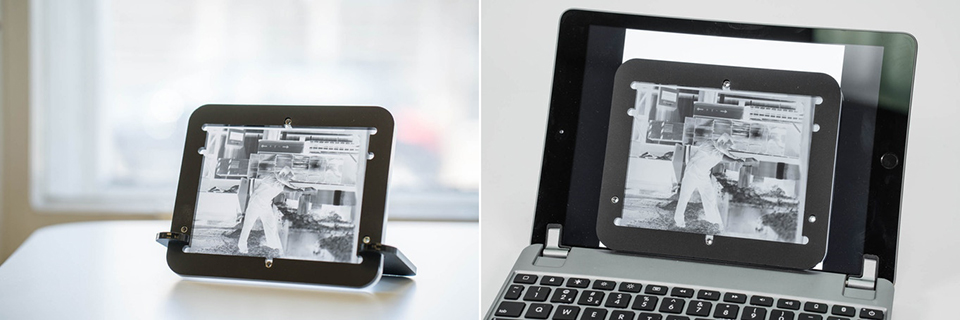
If you have ever tried to digitise a negative or slide with a digital camera, you will know how difficult it is to keep the film in place and flat. And to control the backlighting uniformly as well.
Pixl-latr is intended to be a new, cheap, simple but effective way to solve these problems when digitising 35mm, 120 (up to 6x12) and 5x4 film formats.
How it works
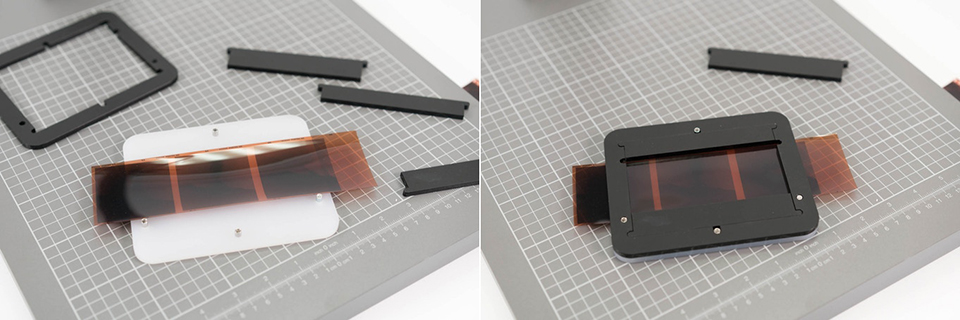
Pixl-latr is a simple product consisting of a few parts. You place the negative inside the 4 locator pins of the pixl-latr. The locator pins are designed to allow different negative sizes to be used.
This also allows a small amount of manoeuvring space within the frame. Place the frame on the locator pins to hold the negative in place.
Place the pixl-latr on a lightbox, a tablet computer works too, or on the stand for a light source, and then take a photo with a digital camera.
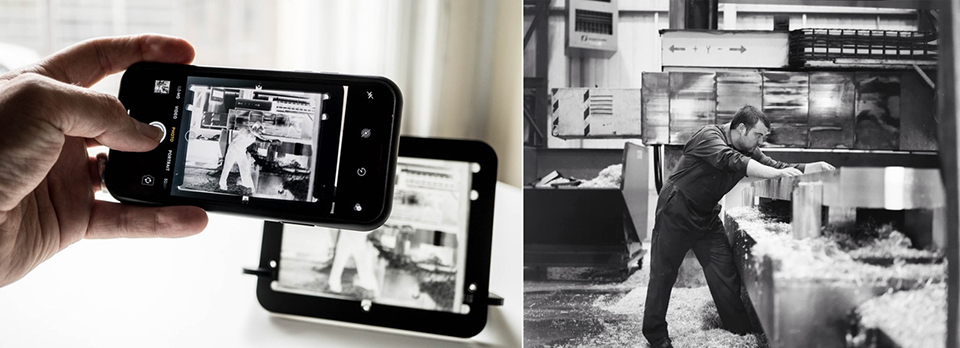
Digitising with a mobile phone!
Place your film/negative in the pixl-latr, put it on its stand in front of a window or lamp and photograph it. With apps such as FilmLab, you can turn the negative into a positive. This is becoming easier and costs little extra, apart from your pixl-latr and the app you choose.
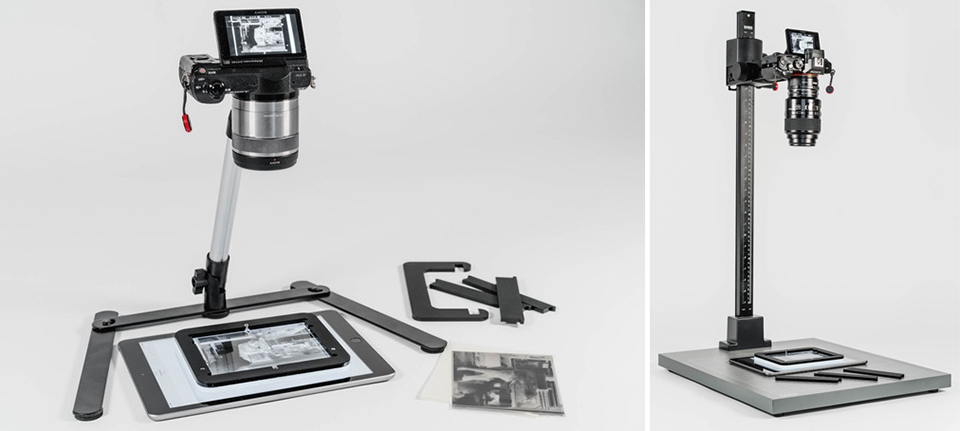
Of course, it is also possible to take photos, to digitise them, with a consumer camera and a cheap stand, or with a professional camera and a copy stand!
Attach the camera to the stand. Place the pixl-latr underneath the stand on a lightbox or tablet computer and take the photo.
About the author
Michelle Peeters is fotografe en oprichter van DeuxBleus Fotografie. Michelle herkent het bijzondere in het gewone en het gewone in het bijzondere. Ze heeft zich nooit willen specialiseren en is daardoor van alle markten thuis.
You might also like
-
 This is how Ilford film rolls are made
by Elja Trum
-
 Improve your panorama with a nodal slide
by Nando Harmsen
-
 The joy of shooting with a roll of film
by Elja Trum
-
 Printing Colour Film in the Black-and-White Darkroom
by Erik van Rosmalen
-
 Cameras used in films
by Elja Trum
-
 Minimalism and negative space in your photo
by Nando Harmsen
6 comments
-
 Gerrito wrote on Tuesday 31 July 2018 at 21:38 | reply
Seems like a nice tool. So far I digitize with an Epson scanner. However, my biggest challenge is getting the negatives (35mm, 120 film) flat after having been rolled up for years. Who has a solution for that?
Translated from Dutch. -

 Michelle Peeters wrote on Tuesday 31 July 2018 at 21:47
| reply
@Gerrito: this device actually makes sure that the film stays flat.
Translated from Dutch. -
Gerrito wrote on Tuesday 31 July 2018 at 22:24 | reply
If only I could send you a little photo of all those rolls of film, tightly rolled up in their original form, with dozens in a little tin . . . . impossible/barely possible to unroll. Is it wise to wet those rolls of film again and hang them on the line?
Translated from Dutch. -
Michelle Peeters wrote on Tuesday 31 July 2018 at 22:26
| reply
@Gerrito: no, I wouldn't do that last part! Maybe put it under something heavy (a book?) for a while? Cut it up first. I think that always worked pretty well.
Translated from Dutch. -
 audb wrote on Sunday 26 August 2018 at 15:34
| reply
@Gerrito buy a photo frame at Action and take the glass out of it and place that on the negative.
Translated from Dutch.
To prevent damage to the negatives and to make it easier to take it off, stick a piece of (black) tape or adhesive plastic to the sides. -
audb wrote on Sunday 26 August 2018 at 15:47
| reply
You can also buy a light panel on aliexpress.
Translated from Dutch.
Do choose cold white, as the others are too yellow or too blue.
Note, the 3 watt version is a 12 volt version, but you do get an adapter with it. It is better not to use this one and connect a regular 2 A adapter to it.
The 6 watt and higher versions do come with a good adapter and it is also necessary to use it.
Have your say
Please note: Articles older than a week can only be commented on by signed-in visitors.Would you still like to comment? sign in or create a free account.
Become a better photographer every week
A practical photography tip in your inbox every week.
38,890 photography enthusiasts already receive the tips! More about the weekly mail. Or keep up to date via  Facebook.

Elja Trum
Photofacts; everything to do with photography!
Would you like to take better photos and keep up with what is happening in photography? Photofacts publishes articles that teach you something about photography — from a product announcement to a practical shooting tip or a look at a website. Photofacts covers photography every day and is a hobby project of Elja Trum's that got out of hand. The articles are written by a team of volunteer authors. If you would enjoy writing one or more articles for Photofacts, do get in touch.More about PhotofactsPhotofacts is made possible in part by
