

Remove a Colour Cast by Converting to Black and White
Thursday 11 July 2019, 20:10 by Elja Trum | 7,196 views | 9 commentsThis article was translated from Dutch with the help of AI. Read the original.
Light reflected off coloured objects near your subject can cause annoying colour casts. Last week, I was taking photos in a forest, which caused a green cast on my model's face.
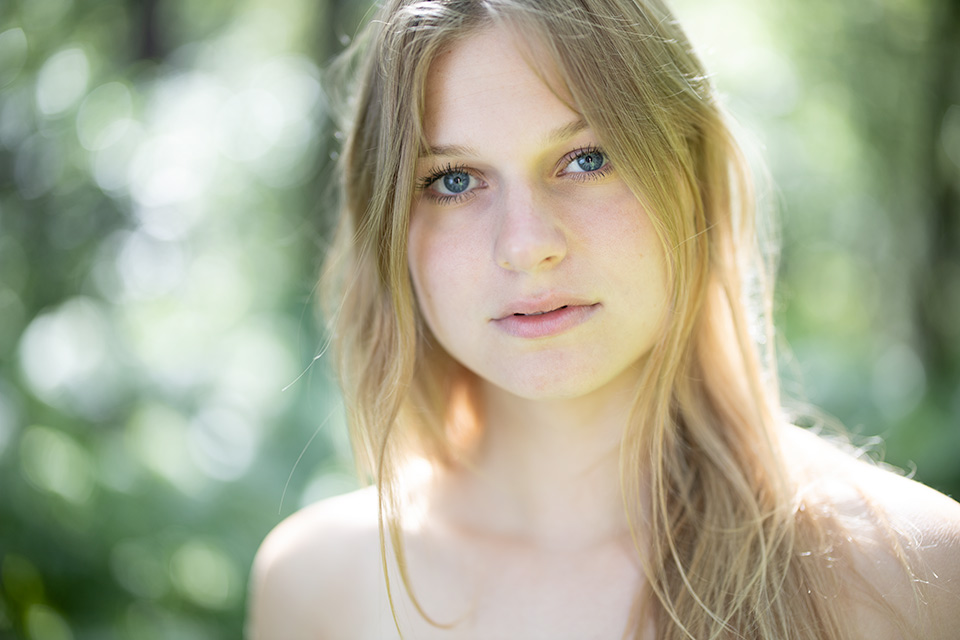
As you can see in the photo above, there is a green cast on parts of Michelle's face, in the eye socket, under her nose and on her chin, and in her hair. This is mainly caused by the green ferns she is standing among and the sunlight reflecting off them.
You can try to remove this cast by, for example, painting over the green areas in Lightroom with an adjustment brush using a red hue. This neutralises the green.
This is quite a difficult job, as it requires precision and, of course, the green cast is not equally strong everywhere.
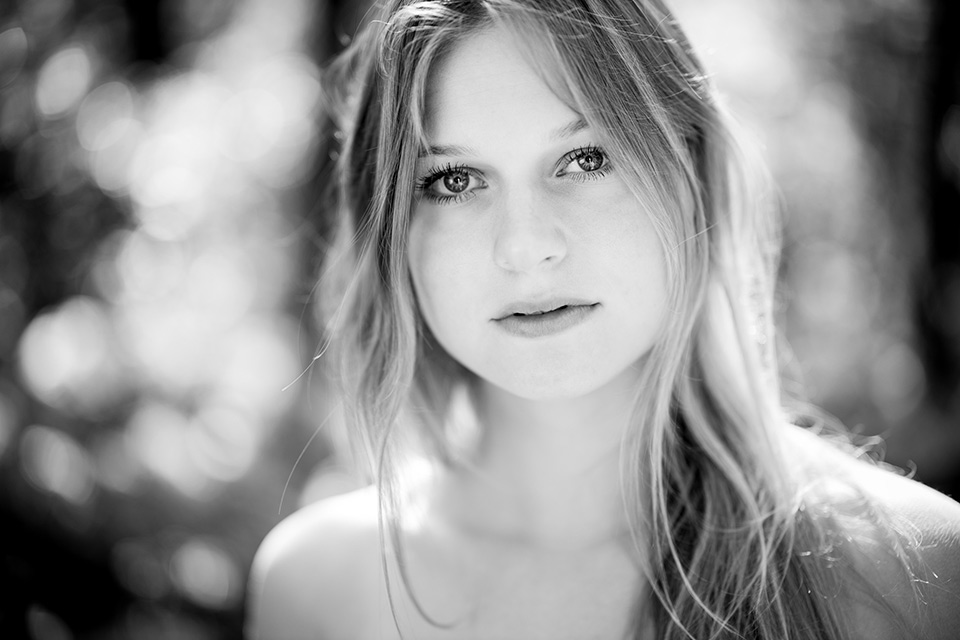
Fortunately, there is a quick solution: you can convert the photo to black and white. Logically, you will not have any trouble with this kind of colour cast in black and white. With the black-and-white conversion, and a few other non-colour-cast-related adjustments in Lightroom, I eventually got this photo:
About the author
Elja Trum is the founder of Photofacts and online photography course website Photofacts Academy. He has been writing about photography since 2006. Elja is also the author of (Dutch) books on composition, black-and-white photography, flash photography and portrait photography.
You might also like
-
 Photographing in a forest
by Nando Harmsen
-
 Photographing a forest with a telephoto lens
by Nando Harmsen
-
 Photographing beautiful autumn colours in the forest
by Laura van der Burgt
-
 Sunlight and forest photography
by Nando Harmsen

9 comments
-
 guest wrote on Tuesday 16 July 2019 at 14:27 | reply
Alleen, daarmee heb je de kleurzweem niet opgelost. Oplossing in de geest van: ik heb last van mijn teen; hak je voet er dan af. Sorry, lees altijd met veel plezier de stukjes, maar dit is geen oplossing.
This comment was written in another language and has not been translated yet. -
guest wrote on Wednesday 17 July 2019 at 15:03 | reply
ik ga altijd naar kleur-verzadiging en dan alles op 0 en dan is bij mij alle kleurzweem weg. succes
This comment was written in another language and has not been translated yet. -
mac wrote on Wednesday 17 July 2019 at 15:42 | reply
Het is een oplossing die makkelijk wordt gebracht, die eigenlijk helemaal niet zo makkelijk is. Want de kleur heeft een grote invloed op je uiteindelijke ZW beeld.
This comment was written in another language and has not been translated yet.
Als je WB niet goedstaat, kan dat je hele ZW omzetting om zeep helpen. want een rode huid toont heel anders in ZW als een groene huid. Je moet echt nog aan veel kleur schuifjes zitten om een goed mooi beeld te krijgen. -

 Michelle Peeters wrote on Wednesday 17 July 2019 at 16:23
| reply
Michelle Peeters wrote on Wednesday 17 July 2019 at 16:23
| reply
@Mac: ik heb altijd geleerd dat als je naar zwart-wit omzet, dat je dan sowieso het rode schuifje (de roodtinten) altijd iets naar links moet bewegen. Wel een interessant onderwerp voor een artikel wellicht, hoe je iets nu echt goed naar zwart-wit omzet.
This comment was written in another language and has not been translated yet. -
Mac wrote on Wednesday 17 July 2019 at 17:17 | reply
@michelle,
This comment was written in another language and has not been translated yet.
nee hoor, het licht eraan wat je wilt bereiken. vaak beweeg ik de schuif zelfs naar rechts.
En als je de rode schuif naar links beweegt, maar er zit een groene kleurzweem op de huid, zal weinig merken op de huid. -
Michelle Peeters wrote on Wednesday 17 July 2019 at 17:52
| reply
@Mac: dus een groene kleurzweem zie je nog steeds terug in een zwart-wit foto? En die moet je dan juist met de ‘groenschuif’ terugreduceren?
This comment was written in another language and has not been translated yet. -
Mac wrote on Wednesday 17 July 2019 at 18:01 | reply
@michelle, die kan je nog inderdaad terug zien (elke kleurzweem trouwens). Niet als kleur natuurlijk, maar hoe het wordt omgezet naar grijs. het kan echt gaan van flets naar heel hard, afhankelijk van de kleur en sterkte van de kleurzweem. Neem maar een raw foto, breng zweem aan met WB en converteer naar ZW. Dan zie je welk effect het heeft. Soms nagenoeg niks, en soms erg veel.
This comment was written in another language and has not been translated yet.
Ik fotografeer veel optredens, en daar heb je heel veel last van kleurzweem (door de lampen). En als je niet eerst goed de zweem eruit haalt, dan kan het je hele ZW omzetting om zeep helpen.
Dit is echt iets wat vaak wordt vergeten door veel mensen tijdens een ZW omzetting. -
Michelle Peeters wrote on Wednesday 17 July 2019 at 18:14
| reply
Een hele goeie Mac, ik ga me daar eens in verdiepen!
This comment was written in another language and has not been translated yet. -
 Elja Trum
wrote on Monday 22 July 2019 at 13:27
| reply
Elja Trum
wrote on Monday 22 July 2019 at 13:27
| reply
@Gast; als het niet jouw oplossing is, prima.
This comment was written in another language and has not been translated yet.
In veel gevallen werkt het echter uitstekend om een foto eenvoudig weer bruikbaar te maken.
@Mac; Bij optredens heb je waarschijnlijk veel verschillende kleuren licht in één foto en zijn de kleuren ook nog eens erg hard/sterk. Dan wordt het inderdaad lastiger.
Bij veel foto's met een subtiele kleurzweem die in de kleurenversie erg opvalt is het omzetten naar zwart-wit vaak een snelle oplossing die prima werkt. Zoals in mijn voorbeeldfoto.
Have your say
Please note: Articles older than a week can only be commented on by signed-in visitors.Would you still like to comment? sign in or create a free account.
Become a better photographer every week
A practical photography tip in your inbox every week.
38,981 photography enthusiasts already receive the tips! More about the weekly mail. Or keep up to date via  Facebook.

Elja Trum
Photofacts; everything to do with photography!
Would you like to take better photos and keep up with what is happening in photography? Photofacts publishes articles that teach you something about photography — from a product announcement to a practical shooting tip or a look at a website. Photofacts covers photography every day and is a hobby project of Elja Trum's that got out of hand. The articles are written by a team of volunteer authors. If you would enjoy writing one or more articles for Photofacts, do get in touch.More about PhotofactsPhotofacts is made possible in part by
