

Create a delayed long timelapse with your GoPro
Sunday 23 May 2021, 23:23 by Elja Trum | 9,714 views | 1 commentThis article was translated from Dutch with the help of AI. Read the original.
A GoPro can make a time-lapse video by default. However, its duration is limited because the GoPro stays on continuously and uses a lot of power. Fortunately, there is a solution using advanced firmware: GoPro Labs.
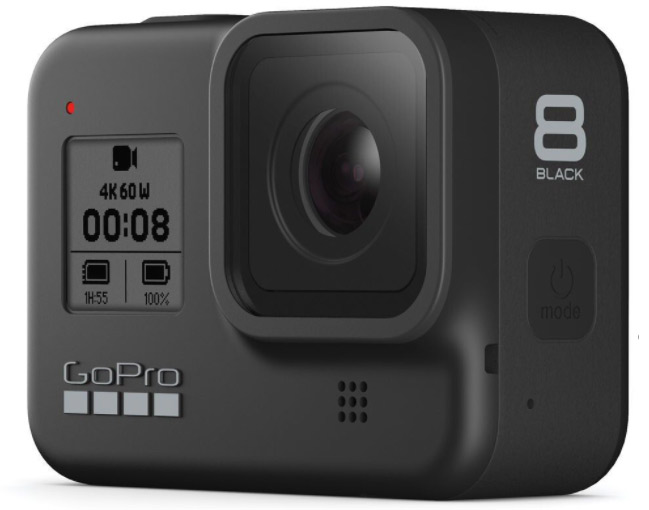
This firmware is also made by GoPro itself and is free to download. By updating your GoPro's firmware to this Labs version, you get more options.
You can activate the new options using QR codes. You can read these codes by switching on your GoPro and showing the QR code to the camera, either on a screen or printed out.
The GoPro then shows on the screen that the code has been recognised and what has been set.
Longer timelapse by switching off in between
By default, your GoPro stays on the entire time while making a timelapse. That naturally uses a lot of battery. Depending on the type of GoPro you use, it will last for less than an hour.
With the GoPro Lapse firmware, you can scan a QR code that enables a longer timelapse by switching the camera off each time in between. This allows you to spread a timelapse over several hours or even days.
The built-in battery naturally remains a limiting factor. That is why your camera will take fewer photos per minute for longer timelapse videos. In total, the camera can take around 400 photos on one battery. You therefore spread those over the period you want to record.
Delaying the GoPro recording
I wanted to make a recording at a building site. There would be activity there from seven o'clock in the morning, but I did not want to be there at seven as well. So I wanted the GoPro to start recording automatically from a certain time.
And that is also possible with the QR codes! For this, you need to use a custom QR code. You can set quite a few things here, including a delayed action.
Combining a delay with a longer time-lapse
Naturally, I wanted both options. So both the longer time-lapse and the delayed start time. This is also possible by adding the time-lapse command to the 'Additional Commands' field in the Curstom QR code.
It is of course sensible to try out your setup first, before using it in the field. The settings are quite precise. For example, if you enter 7:00, the code will not work. It really has to be 07:00. Do not forget the '0'.
This is the final URL with my settings. If I visit this page and scan the QR code with the GoPro, the camera will make a timelapse from 7 o'clock in the morning that lasts 3 hours, or until the battery runs out.
Fortunately, when the battery runs out, the recording is still saved properly. So I was able to pick up an empty camera with the recordings safely stored.
Combined with some drone footage and some handheld video, I was able to make the video below. The footage is not particularly spectacular, but for an assignment such as documenting construction work, it is very practical.
About the author
Elja Trum is the founder of Photofacts and online photography course website Photofacts Academy. He has been writing about photography since 2006. Elja is also the author of (Dutch) books on composition, black-and-white photography, flash photography and portrait photography.
You might also like
-
 Review: LRTimelapse Pro Timer 3 for timelapse photography
by Nando Harmsen
-
 Paying Attention to Timelapse Photography
by Nando Harmsen
-
 Photographing a Timelapse by the Waal
by Nando Harmsen
-
 The importance of the interval in a timelapse
by Nando Harmsen
-
 Make a timelapse more engaging with video footage
by Nando Harmsen
-
.jpg "Nature photography tip: Create a timelapse with your phone") Nature photography tip: Create a timelapse with your phone
Nature photography tip: Create a timelapse with your phoneby Rob Dijkstra
1 comment
-

 Jo VP wrote on Wednesday 26 May 2021 at 10:14
| reply
Jo VP wrote on Wednesday 26 May 2021 at 10:14
| reply
Another (simple) way to extend your battery life, and thus also be able to make longer recordings, is to keep it connected to a power bank throughout the entire recording. The only downside is that the cover for the connection is open or removed, so your camera is not waterproof at that moment.
Translated from Dutch.
Have your say
Please note: Articles older than a week can only be commented on by signed-in visitors.Would you still like to comment? sign in or create a free account.
Become a better photographer every week
A practical photography tip in your inbox every week.
39,079 photography enthusiasts already receive the tips! More about the weekly mail. Or keep up to date via  Facebook.

Elja Trum
Photofacts; everything to do with photography!
Would you like to take better photos and keep up with what is happening in photography? Photofacts publishes articles that teach you something about photography — from a product announcement to a practical shooting tip or a look at a website. Photofacts covers photography every day and is a hobby project of Elja Trum's that got out of hand. The articles are written by a team of volunteer authors. If you would enjoy writing one or more articles for Photofacts, do get in touch.More about PhotofactsPhotofacts is made possible in part by
