

Flash photography tip: Make the background darker
Wednesday 29 November 2023, 16:32 by Elja Trum | 3,133 views | 3 commentsThis article was translated from Dutch with the help of AI. Read the original.
Does the flash illuminating your subject also fall on the background? Try moving your flash closer to your model. Your background will become darker, with a correctly exposed photo.
Read that sentence again, because the effect of moving a flash closer to your model is the opposite of what you might expect. The light fall-off behind your subject towards the background becomes greater.
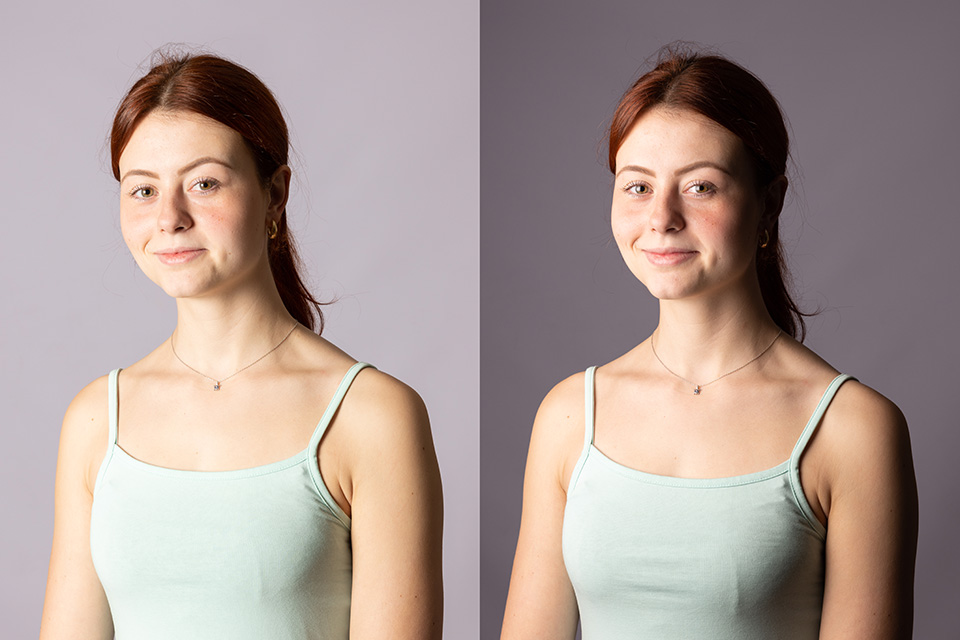
Suppose the distance from your flash to your subject is 2 metres. And the distance from your subject to the background is another 2 metres. Your subject receives a certain amount of light, and the background receives a quarter of that light, because the distance has doubled.
Now halve the distance between your flash and your subject. That quarter of the light then falls 1 metre behind your subject. At the background, 2 metres away, only a ninth of the amount of light reaches it.
About the author
Elja Trum is the founder of Photofacts and online photography course website Photofacts Academy. He has been writing about photography since 2006. Elja is also the author of (Dutch) books on composition, black-and-white photography, flash photography and portrait photography.
You might also like
-
 The inverse square law in photography.
by Frank Doorhof
-
 Flash photography tip: Forget the inverse square law
by Elja Trum
-
 Falling stars (Lyrids), photographic contributions
by Michelle Peeters



3 comments
-
 guest wrote on Tuesday 5 December 2023 at 15:27 | reply
It can also be done by stopping down the aperture to achieve a longer shutter speed.
Translated from Dutch. -

 Elja Trum
wrote on Wednesday 6 December 2023 at 09:24
| reply
Elja Trum
wrote on Wednesday 6 December 2023 at 09:24
| reply
Perhaps I don't understand you correctly, but as far as I understand it, the aperture has no effect on the background here.
Translated from Dutch.
If you 'increase the aperture', for example from f/5.6 to f/11, you also have to increase the flash power of your flash for the correct exposure on your subject.
The falloff of light on the background then remains the same in terms of proportions. The background therefore does not become darker or lighter as a result.
The higher aperture (at equal ISO) may be a reason to adjust the shutter speed (to make it longer). However, the shutter speed only affects the ambient light, not the flash light.
With a longer shutter speed, more light therefore reaches your sensor and the background (if there is sufficient ambient light) will only become lighter. -

Have your say
Please note: Articles older than a week can only be commented on by signed-in visitors.Would you still like to comment? sign in or create a free account.
Become a better photographer every week
A practical photography tip in your inbox every week.
38,982 photography enthusiasts already receive the tips! More about the weekly mail. Or keep up to date via  Facebook.

Elja Trum
Photofacts; everything to do with photography!
Would you like to take better photos and keep up with what is happening in photography? Photofacts publishes articles that teach you something about photography — from a product announcement to a practical shooting tip or a look at a website. Photofacts covers photography every day and is a hobby project of Elja Trum's that got out of hand. The articles are written by a team of volunteer authors. If you would enjoy writing one or more articles for Photofacts, do get in touch.More about PhotofactsPhotofacts is made possible in part by
