

LUT Export-plug-in, het verhaal erachter
Tuesday 23 October 2018, 20:40 by Dick Holtman | 6,805 views | 0 commentsThis article was translated from Dutch with the help of AI. Read the original.
In the series "The story behind a plug-in", John Ellis talks about his Export LUT plug-in. A great story about how something completely unexpected comes about.
In addition to the Export LUT plug-in mentioned above, he has many more very interesting plug-ins on offer. His website is definitely worth visiting.
John's story
My most popular plug-in is Export LUT, which allows photographers to adjust the colour and tint of their videos with Lightroom. YouTube alone has 30 tutorials on how to use the plug-in.

All my other plug-ins were motivated by something I wanted for my personal use but which Lightroom lacked. I don't make videos, so how did I end up creating Export LUT?
I actively contribute to Adobe's Lightroom forums and at the end of 2014 a few people asked about the possibility of creating LUTs based on Lightroom presets. I had no idea what a "LUT" was, so I read up on it and replied that, although it would be relatively easy, I wondered how useful it would be. Oops, it turned out to be very useful.
A 3D LUT (three-dimensional lookup table) is a de facto industry-standard way of manipulating colour and tone in videos and images, comparable to Lightroom presets.
LUTs are mostly used in video editing, although more and more image-editing tools are beginning to support them too, including Photoshop, Luminar and, more recently, Adobe Camera Raw and Lightroom Classic 7.3, although not fully.
LUTs have become a popular way of sharing colour and tone effects between users and tools. There are thousands available to download.
With Export LUT, a photographer can create LUTs using Lightroom. The photographer exports a frame from a video editor, imports it into Lightroom, makes adjustments in the Develop module, exports those adjustments as a LUT and then applies the LUT to the video.
That may seem like a lot of work, but many photographers find it much easier than using the built-in colour-correction tools in video editors. Those editors, Adobe Premiere Pro, Apple Final Cut Pro X and Davinci Resolve, have advanced tools for "colour grading" designed for studio productions with one or more professionals specialising in colour correction. These tools are much more difficult to use than Lightroom's Develop module.
As the high-quality video capabilities of DSLR cameras have increased, more and more photographers are making videos and photos for their clients, and films are being produced by individuals and small teams without professional colour-grading systems.
A typical Export LUT user is a wedding photographer who wants their videos to have the same customised look as their photos. They know how to use Lightroom quickly and efficiently to get that look.
More people started asking how they could use LUTs in Lightroom, so six months ago I released the companion Apply LUT plugin.
Interestingly, although the request for this feature has many more votes than the request to create LUTs, sales of Apply LUT have been much slower.
Recently, Lightroom Classic 7.3 introduced "enhanced profiles", which can contain LUTs. Unfortunately, you have to use Camera Raw to create a LUT profile, and, strangely enough, Adobe is ignoring the opportunity to include the industry-standard video colour space Rec 709, used by most available LUTs and video editors.
Driven by intellectual curiosity rather than need, I implemented the first version of Export LUT in about a month of part-time effort. I do almost no marketing for my plug-ins apart from posting a few links on the forums, and sales were slow for the first 18 months:
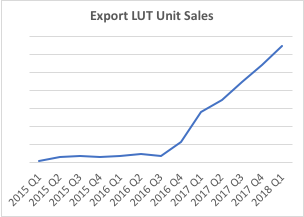
Mixing Light, a website providing courses on video colour correction, published an excellent blog post about Export LUT early on. But it wasn't until several tutorials appeared on YouTube in 2016 that sales began to pick up.
In the two years since then, 30 videos have appeared in English, French, Spanish, Portuguese, Vietnamese, Indonesian and Thai, with more than 275,000 views.
As with any software product, the core engineering was only a small part of the total effort. I spent much more time on customer support, tracking down ICC colour profiles, adjusting the options, dealing with annoying bugs in Lightroom, ExifTool, Mac and Windows, and talking to my accountant about whether software downloads are taxable in California. They aren't.
Afterword
Not many people will know John, but he has a tremendous amount of knowledge about Lightroom, software development in general and Lightroom plug-ins in particular. When a plug-in developer runs into problems while writing a plug-in and posts a message on the SDK forum, it is often John who replies the same day or even faster.
Do take a look at his other plug-ins, as some of them are real gems. John is also a successful entrepreneur who has set up several start-ups. See his LinkedIn profile.
To be continued
The next blog will be about a new plug-in that will soon be released.
Background information
You can find more information through the following links.
About the author
Dick Holtman is getrouwd met een enthousiaste fotografe en een ervaren Lightroom post-processing specialist. Hij werkt al ruim 30 jaar in de IT. Uit deze interesses is het bedrijf LightroomStatistics.com ontstaan. Dick maakte al 11 Lightroom plug-ins die te vinden zijn op de Photographers-Toolbox.com. Ook geeft hij IT en workflow adviezen aan fotografen.
You might also like
-
 Keyword Exporter Lightroom plug-in, the story behind it
by Dick Holtman
-
 What are Lightroom plug-ins and what can you do with them?
by Dick Holtman
-
Plug-in: Translating keywords, titles and captions in Lightroom
by Dick Holtman
-
 An impression of the DxO PureRAW4 plugin for Lightroom
by Nando Harmsen
-
 ImageMagick, photo editing from the command line and Lightroom
by Dick Holtman
-
 RapidRAW, het gratis Lightroom-alternatief
by Nando Harmsen
0 comments
Be the first to share what you think!
Have your say
Please note: Articles older than a week can only be commented on by signed-in visitors.Would you still like to comment? sign in or create a free account.
Become a better photographer every week
A practical photography tip in your inbox every week.
38,937 photography enthusiasts already receive the tips! More about the weekly mail. Or keep up to date via  Facebook.

Elja Trum
Photofacts; everything to do with photography!
Would you like to take better photos and keep up with what is happening in photography? Photofacts publishes articles that teach you something about photography — from a product announcement to a practical shooting tip or a look at a website. Photofacts covers photography every day and is a hobby project of Elja Trum's that got out of hand. The articles are written by a team of volunteer authors. If you would enjoy writing one or more articles for Photofacts, do get in touch.More about PhotofactsPhotofacts is made possible in part by
