

An impression of the DxO PureRAW4 plugin for Lightroom
Friday 13 December 2024, 13:26 by Nando Harmsen | 3,925 views | 6 commentsThis article was translated from Dutch with the help of AI. Read the original.
By a happy coincidence, I got the chance to use DxO's PureRAW4 software. This software is designed to apply optical corrections to RAW images. In this article, I share my first impressions of the software, which also works as a plugin for Lightroom Classic.
DxO is the supplier of a photo editing programme that can be compared with Lightroom Classic. This is DxO PhotoLab. It is also the supplier of the popular Nik Collection software. DxO PureRAW4 is the software for applying image corrections.
First, a short note about the cost of this software. Unlike Adobe's software, you pay for it once. You get a lifetime licence. New versions will have to be purchased again, but you are free to decide whether or not to do so.
A licence costs 119 euros as a one-off payment. Unfortunately, the software cannot be downloaded in Dutch.

DxO PureRAW4 is specifically designed for lens corrections. Think of vignetting, distortion and lens softness. It works as stand-alone software, but also as a plugin for Lightroom Classic. If you use Lightroom, the latter is naturally a great option.
To use DxO PureRAW4 as a plugin, it must offer added value over the image corrections already built into Lightroom. Using the plugin takes more time and effort compared with what is already available in Lightroom.
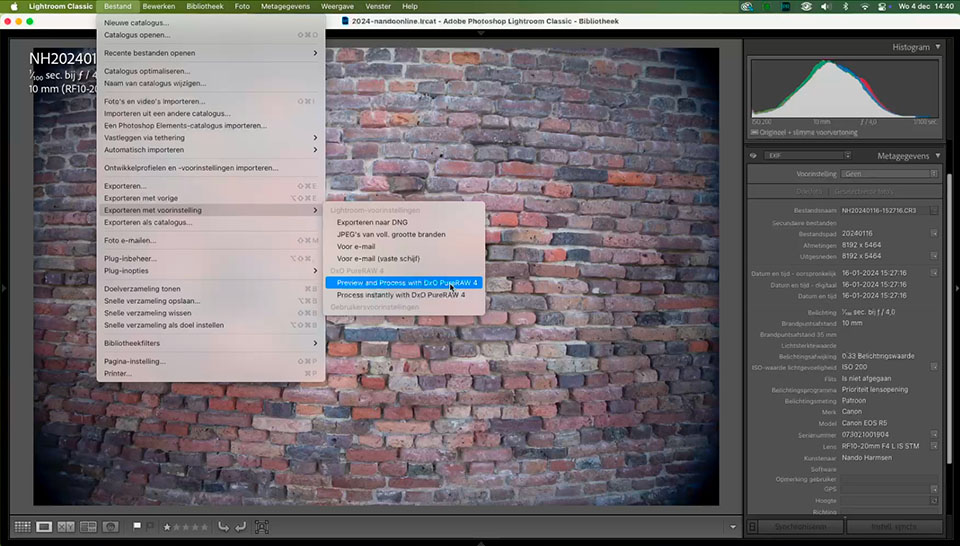
DxO PureRAW is very simple to use. Instead of 'edit in', the plugin has to be loaded by choosing 'export with preset'. You can apply PureRAW4 directly, or load the entire programme.
Preview and Process
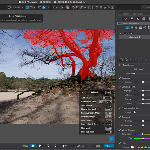
This option takes you to the programme itself, where you can set and adjust all the details of the image correction. DxO PureRAW4 works fully automatically in principle, choosing the best settings based on lens profiles that are downloaded automatically.
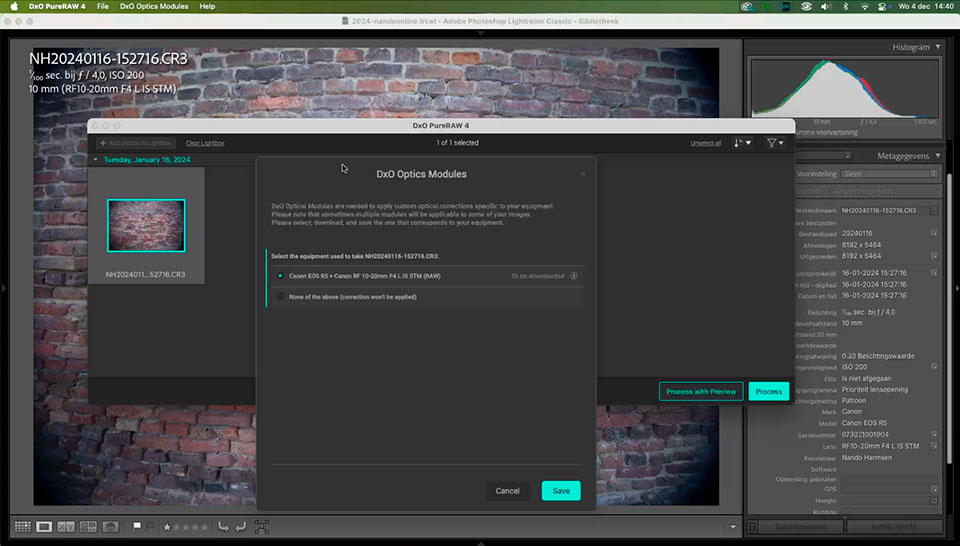
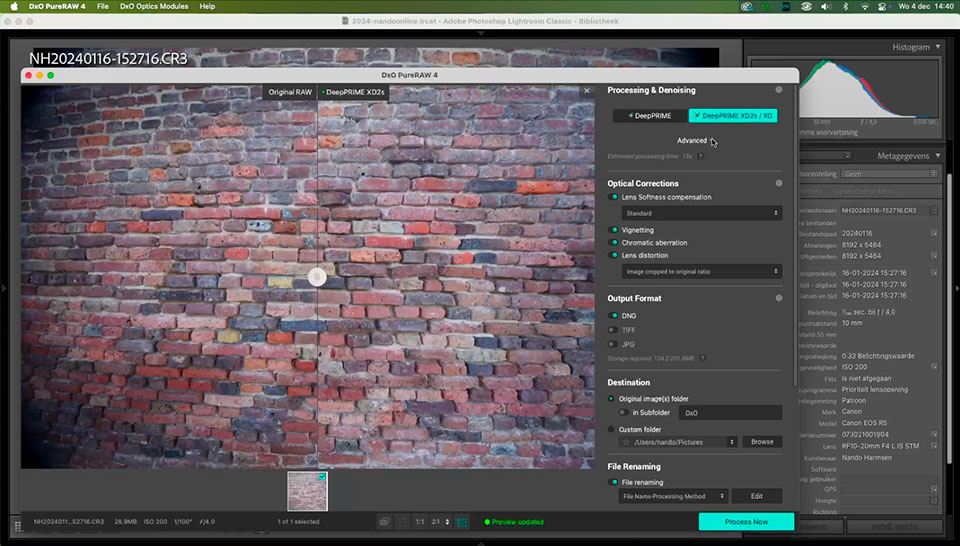
The various parameters can be adjusted as desired. Once you are happy, it is simply a matter of exporting to a DNG, TIFF or JPEG file. If desired, this can be done in a separate folder, with an import into Lightroom.
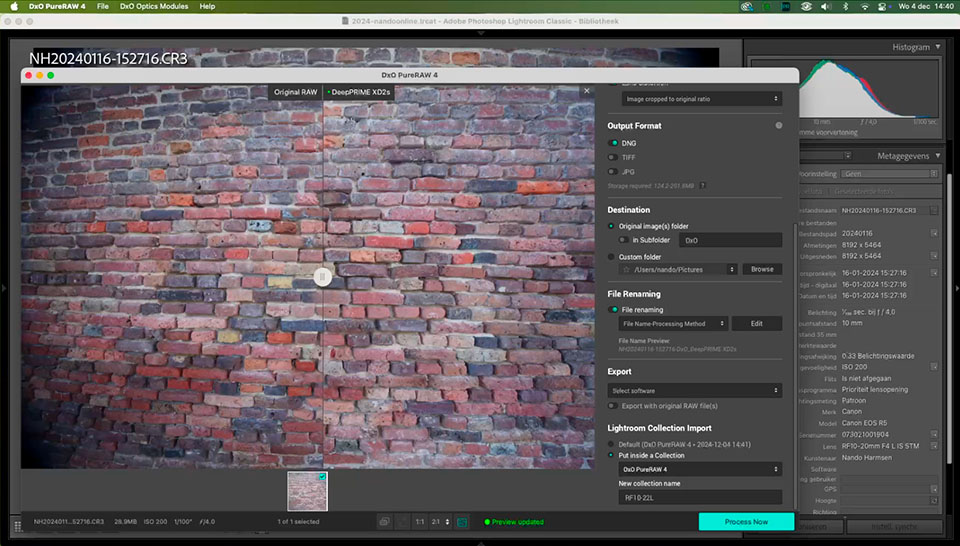
Process Instantly
The other option is a faster method. The DxO PureRAW4 programme does not need to be opened fully for this. The settings are applied directly. This limits the number of steps and makes the process much faster.
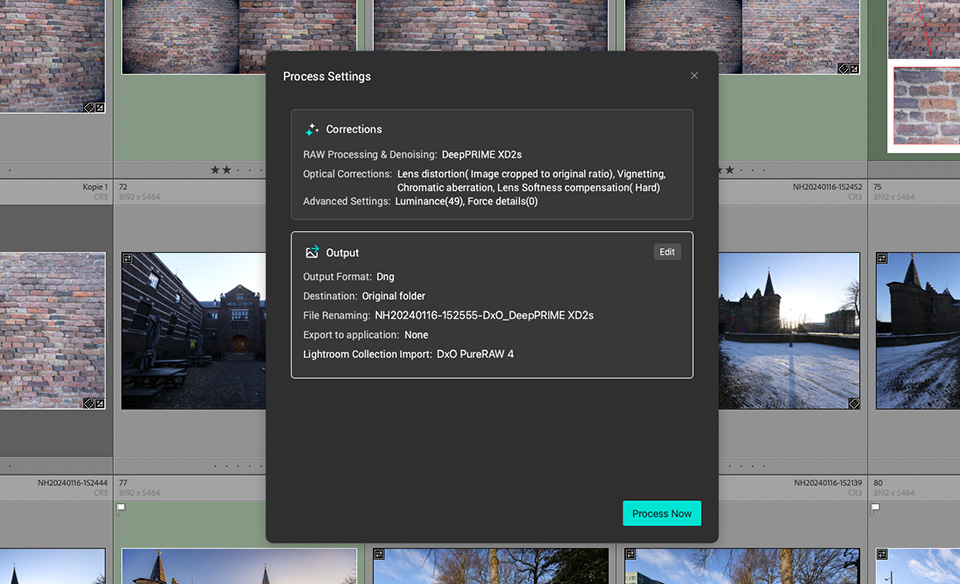
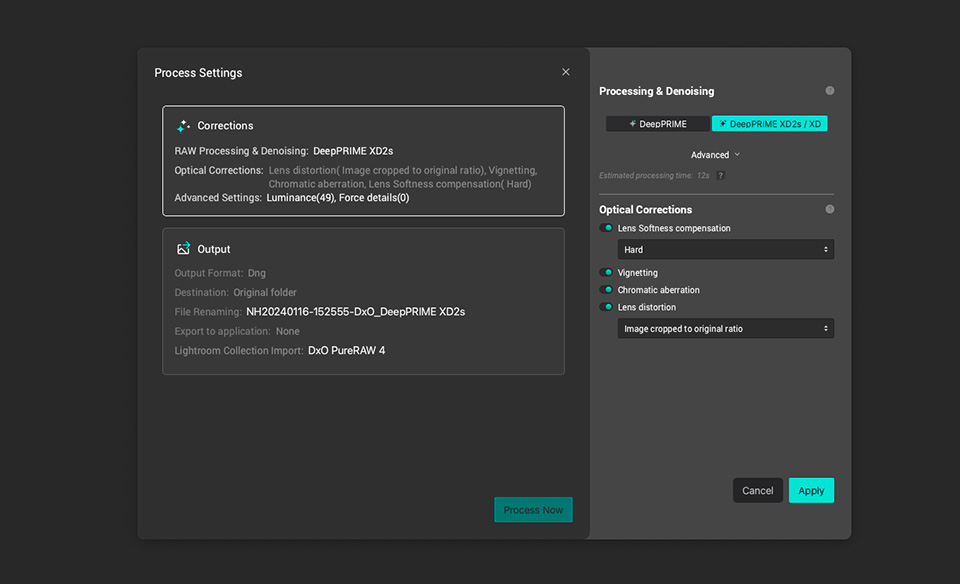
You do have the option to change the settings. The only thing missing is the preview window where you can view the result of those changes before applying them.
Better results than in Lightroom Classic
The results from DxO PureRAW seem to be much better than the lens corrections in Lightroom Classic itself. At first glance, the difference seems small, but it becomes noticeable when it is used for star trail photos.
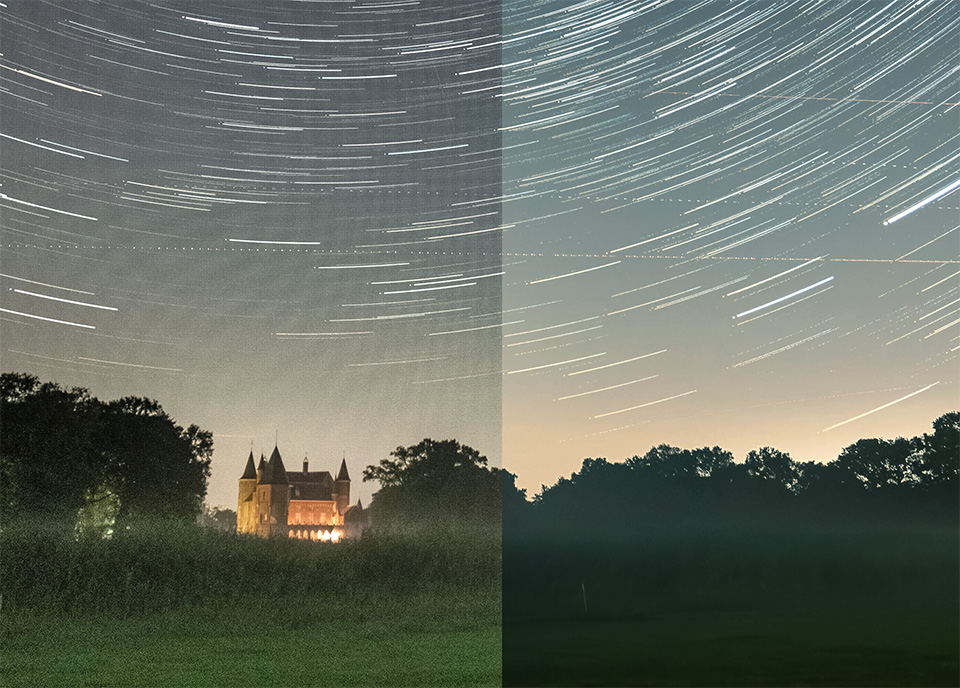
With lens corrections in Lightroom Classic, banding appears when stacking photos. This simply makes the result unusable. The lens profiles from DxO PureRAW4, however, show no banding after stacking.
An additional advantage of DxO PureRAW4 is the option to correct lens softness. This can make a considerable difference to sharpness.
First impressions
I am pleasantly surprised by the capabilities of DxO PureRAW4. Especially with the growing need for lens corrections in modern lenses, this is a valuable programme and/or plugin.
For anyone photographing star trails with lenses that need correction, the absence of banding after stacking is particularly valuable. I still need to find out how noise is kept under control when correcting vignetting.
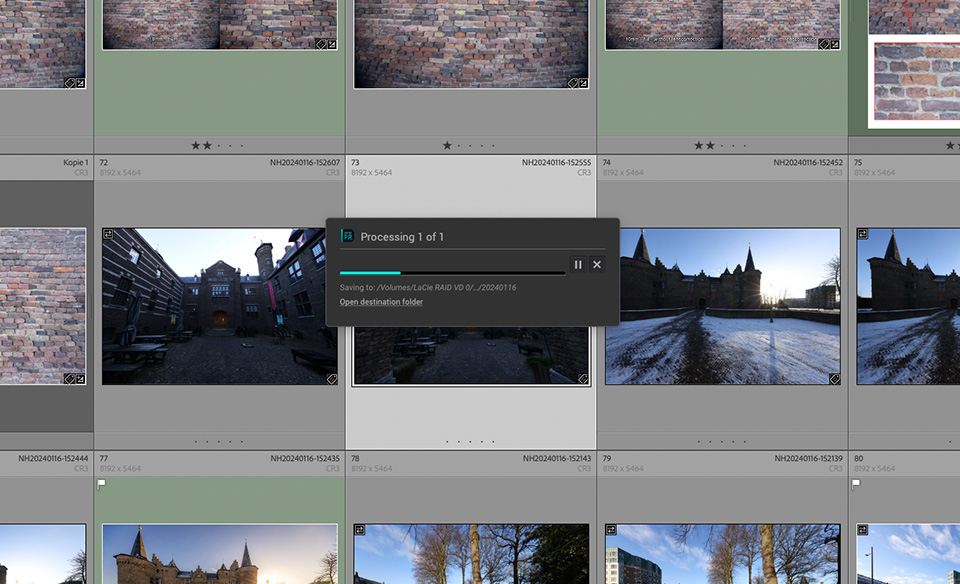
There is one disadvantage compared with the lens corrections performed in Lightroom Classic. If you do this in Lightroom Classic, it is performed non-destructively on the RAW file. With DxO PureRAW4, you get a new file.
If you apply PureRAW4 to many files and want to retain maximum editing options, you end up with DNG files up to six times larger. A 30MB RAW file soon becomes a 180MB DNG file.
DxO PureRAW4 is an interesting programme, including for Lightroom Classic users. It offers advantages, but also some disadvantages. It is time to take a closer look at it.
And who knows, DxO PhotoLab8, an alternative to Lightroom Classic, may also be worth looking at. Especially because it does not require a subscription. You buy the programme once. Perhaps it is even worth making an entire course about it for Photofacts Academy.
About the author
Nando Harmsen has been photographing for more than 40 years. He specialises in wedding photography and landscape photography. Nando also gives talks, workshops, masterclasses and photo trips, and regularly reviews new and interesting equipment.
You might also like
-
 An honest comparison between DxO PhotoLab and Lightroom Classic
by Nando Harmsen
-
 What to consider when switching photo editing software
by Nando Harmsen
-
 DxO PhotoLab as an alternative to Lightroom
by Nando Harmsen
-
Price comparison of software with and without a subscription
by Nando Harmsen
-
 ON1 Photo RAW 2019.5 launched. Lightroom rival?
by Michelle Peeters

6 comments
-
 Donald Willemsen wrote on Tuesday 17 December 2024 at 14:24 | reply
I would appreciate an extensive course. However, I do see a problem with this one-time software. The software is made based on current knowledge and techniques. We all know that technology is advancing very quickly these days, especially when AI is involved.
Translated from Dutch.
You can hardly avoid having to buy a new version every time, because you probably won't get any updates. -

 Nando
wrote on Tuesday 17 December 2024 at 15:42
| reply
Nando
wrote on Tuesday 17 December 2024 at 15:42
| reply
If you want to use AI, and need to have the latest techniques, then it is indeed a recurring purchase. There will be updates, and you will get those too. But you do have to buy a completely new version then.
Translated from Dutch.
There are enough people for whom that requirement does not apply, but who do object to a subscription with monthly costs. Then this is a good alternative. It is certainly not a problem. -
 Marcel van den van den Heuvel wrote on Tuesday 17 December 2024 at 15:17 | reply
Hi Nando, isn't this plugin for PSE?
Translated from Dutch.
Regards, Marcel -
-
 Hans Keijzer wrote on Tuesday 17 December 2024 at 17:22 | reply
It's just a shame that the new Fujicameras aren't supported yet.
Translated from Dutch. -
 Rob wrote on Tuesday 17 December 2024 at 23:51 | reply
DxO Pure RAW can be used in combination with any other photo software, just like its big brother DxO PL 8. You make the desired corrections, export as DNG or TIFF and finish working in the software of your choice. I use it myself in combination with C1 and Affinity, works perfectly.
Translated from Dutch.
Updates I buy every 2 versions, usually with a 40% discount …
Have your say
Please note: Articles older than a week can only be commented on by signed-in visitors.Would you still like to comment? sign in or create a free account.
Become a better photographer every week
A practical photography tip in your inbox every week.
38,937 photography enthusiasts already receive the tips! More about the weekly mail. Or keep up to date via  Facebook.

Elja Trum
Photofacts; everything to do with photography!
Would you like to take better photos and keep up with what is happening in photography? Photofacts publishes articles that teach you something about photography — from a product announcement to a practical shooting tip or a look at a website. Photofacts covers photography every day and is a hobby project of Elja Trum's that got out of hand. The articles are written by a team of volunteer authors. If you would enjoy writing one or more articles for Photofacts, do get in touch.More about PhotofactsPhotofacts is made possible in part by
