

Plug-in: Translating keywords, titles and captions in Lightroom
Saturday 21 December 2019, 14:41 by Dick Holtman | 5,203 views | 4 commentsThis article was translated from Dutch with the help of AI. Read the original.
Do you work with Lightroom and stock agencies? Then this plug-in is probably useful to you. Keywords, captions and titles are often a requirement, and otherwise they offer a chance to increase your sales.
Origin
One day I received a phone call from a professional photographer, asking whether it was possible to automatically translate keywords, titles and captions of photos in Lightroom.
He had switched to another stock agency, which also required keywords, titles and so on in English..
Adding metadata such as keywords is not the most enjoyable job anyway, let alone having to translate them into a second, foreign language as well.
I obviously do not need to argue here that good metadata is always hugely important! This certainly applies to photographers who use stock agencies. Many stock agencies make keywords and similar information a condition and requirement.
Essence
As a photographer, I want to automatically translate keywords, titles and captions into another language, such as English.
This plug-in translates keywords, titles and captions into another language. You can first view, check and, if necessary, improve the translation before applying it.
Adjusted translations are stored locally, so they can be used again next time.
YouTube video
Curious? Then watch the YouTube demo below:
Options
Although the plug-in has many options, the standard / default settings are sufficient in almost all cases.
You can also adjust the default settings via the plug-in configuration panel.
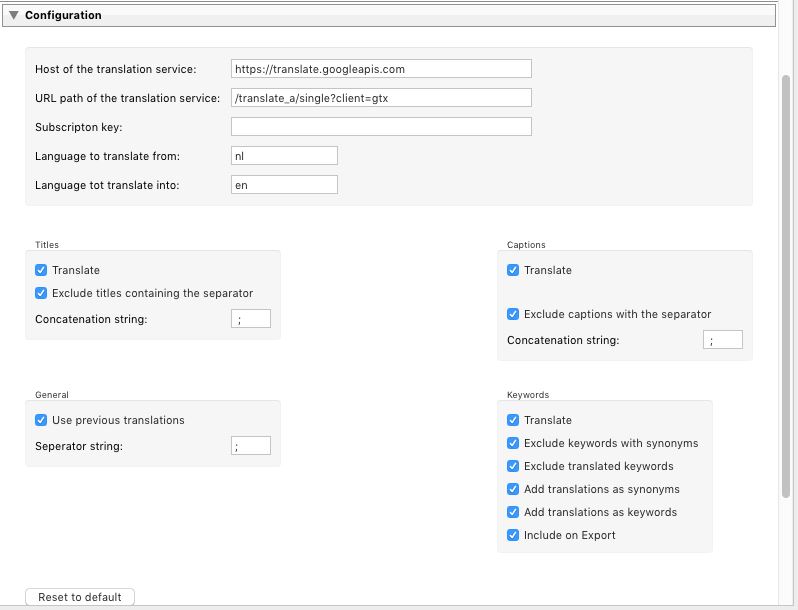
For more information about the different options, see the product page .
Free trial version
On the product page you can download a free trial version, which allows you to translate the keywords, titles and captions of up to 5 photos..
Experiment with it and see whether the plug-in adds value for you.
Background information
You can find more information via the following links.
LightroomStatistics.com
LightroomStatistics is the company that, alongside Lightroom plug-ins, also produces analysis software for analysing Lightroom usage and your camera and lenses.
- Product page
- Photographers-Toolbox: overview of LightroomStatistics plug-ins
- Photographers-Toolbox, marketplace for Lightroom plug-ins
- LightroomStatistics website
- Analysis reports
- Earlier blog in the series: "The story behind a plug-in"
About the author
Dick Holtman is getrouwd met een enthousiaste fotografe en een ervaren Lightroom post-processing specialist. Hij werkt al ruim 30 jaar in de IT. Uit deze interesses is het bedrijf LightroomStatistics.com ontstaan. Dick maakte al 11 Lightroom plug-ins die te vinden zijn op de Photographers-Toolbox.com. Ook geeft hij IT en workflow adviezen aan fotografen.
You might also like
-
 What are Lightroom plug-ins and what can you do with them?
by Dick Holtman
-
 Presets in Lightroom Classic
by Nando Harmsen
-
 What is the Comments tab in Lightroom Classic for?
by Nando Harmsen
-
 Automate your Lightroom Classic imports
by Nando Harmsen
-
My 10-step Lightroom Classic workflow
by Nando Harmsen
-
Adding keywords, do you do it consistently?
by Nando Harmsen
4 comments
-

 Donald Willemsen
wrote on Wednesday 25 December 2019 at 00:02
| reply
Donald Willemsen
wrote on Wednesday 25 December 2019 at 00:02
| reply
I prefer working with Photoshop. Is there also a plug-in for Photoshop that does the translation as well? Not that I don't have a good command of English, but it would be handy if keywords were immediately included bilingually in the metadata.
Translated from Dutch. -
 Lightroomstatistics
wrote on Friday 27 December 2019 at 12:00
| reply
Lightroomstatistics
wrote on Friday 27 December 2019 at 12:00
| reply
Unfortunately, this plug-in is only for Lightroom and doesn't work with Photoshop.
Translated from Dutch. -
Lightroomstatistics
wrote on Friday 27 December 2019 at 12:08
| reply
Unfortunately, this plug-in is only for Lightroom. The technology for creating plug-ins for Lightroom and Photoshop is completely different, so migrating is basically rewriting it.
Translated from Dutch. -
Donald Willemsen
wrote on Friday 27 December 2019 at 15:50
| reply
Thanks for the response. Such a plug-in could also be useful for Ps. I prefer working with Ps, because I place every edit on a photo in a separate layer. If I realize afterwards that I made a mistake with an adjustment, I only have to throw away the layer with the incorrect adjustment.
Translated from Dutch.
Have your say
Please note: Articles older than a week can only be commented on by signed-in visitors.Would you still like to comment? sign in or create a free account.
Become a better photographer every week
A practical photography tip in your inbox every week.
39,024 photography enthusiasts already receive the tips! More about the weekly mail. Or keep up to date via  Facebook.

Elja Trum
Photofacts; everything to do with photography!
Would you like to take better photos and keep up with what is happening in photography? Photofacts publishes articles that teach you something about photography — from a product announcement to a practical shooting tip or a look at a website. Photofacts covers photography every day and is a hobby project of Elja Trum's that got out of hand. The articles are written by a team of volunteer authors. If you would enjoy writing one or more articles for Photofacts, do get in touch.More about PhotofactsPhotofacts is made possible in part by
