
EditCheck plug-in, the story behind it
Friday 31 August 2018, 16:32 by Dick Holtman | 5,429 views | 0 commentsThis article was translated from Dutch with the help of AI. Read the original.
Over the coming period, I want to share with you the stories behind the development of a number of well-known Lightroom plug-ins from various developers.
The first plug-in I am covering is EditCheck. I wrote this plug-in myself and it was the start of the development of a whole series of Lightroom plug-ins and of LightroomStatistics.com, the company behind it.
EditCheck in essence
As a photographer, I want to be able to check whether one or more edits have or have not been applied to a series of photos, so that I do not deliver half-edited or unedited photos to my client, including myself.
Example: show all photos without sharpening, or without a clarity adjustment, or without ...
How it started
It all started with three people around me. First of all, Ada, my wife. She is an enthusiastic wildlife photographer.
In 2005, she bought her first digital camera, a Canon 350D.
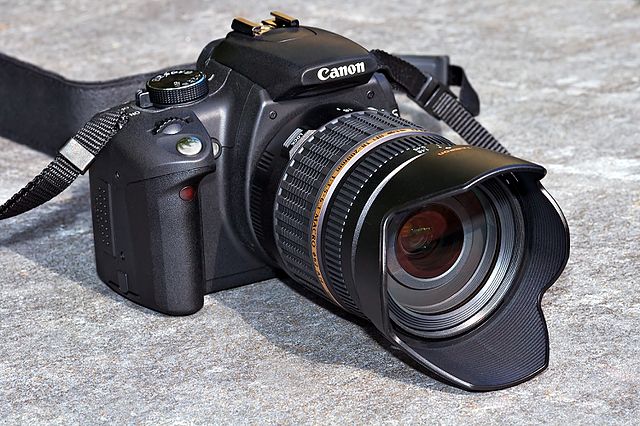
Source: Wikimedia Commons, by André Karwath aka Aka
Of course, the photos she took also had to be edited. And that is where I came in. She was the photographer and I was the computer expert. I have worked as a software engineer in IT for years and it is my passion. When Lightroom came out, I immediately saw its potential and bought a licence straight away. I still have the licence key for version 1.0. All your photos together, well organised, no more opening and saving photos, no complicated menus, all metadata at hand, so photos can be found again quickly. Ideal!
Through my work, I came into contact with the second main character. He came from East Germany and had been hired as a self-employed IT contractor at the company where I worked. We were on the same team. Every afternoon, we went for a walk during lunch and he invariably took a camera and a GPS with him. For the record, this was around 2007. During one of these walks, he said to me: “Dick, one day I will be one of the few people with digital photos from the early 2000s.” Why, I asked in surprise. Well, he said: “everyone takes photos everywhere and they are everywhere, but nobody makes proper backups.” That remark triggered me and from that moment on I started looking into Digital Asset Management. At the bottom of the article, you will find two blogs about making backups.
Not long afterwards, I bought Peter Krogh's book “The Dam book”. A fantastic reference work, the third edition of which was recently published. You can buy it at a discount via the link at the bottom of the blog.
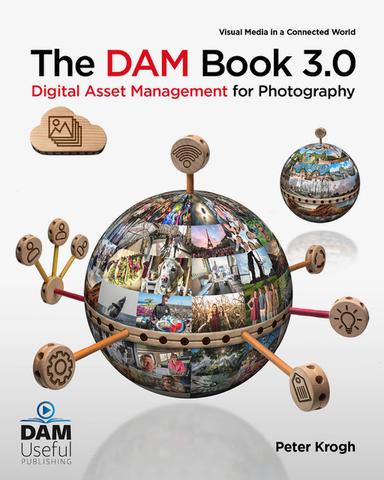
Source: The DAM book website
The final main character is Geurt Besselink. For years, he has been one of the better professional wildlife photographers in the Netherlands. He has since written three books about the Veluwe, runs photography courses and lectures, and organises fascinating photography trips to beautiful places abroad.

Source: Geurt Besselink's website
EditCheck plug-in
At one point, Geurt and I got talking and he asked whether it would be possible to write a plug-in for him. From a quality perspective, he wanted a plug-in that would allow him to quickly check whether he had applied all the necessary edits to a series of photos before delivering his images to his clients.
The customer request
Or, as he put it: “I want to see all photos without sharpening, or where the exposure has not yet been adjusted, or that have no vibrance or clarity adjustment . And so on.”
The plug-in reports almost 50 settings.
This was the birth of EditCheck, my first Lightroom plug-in. Since then, many more plug-ins have seen the light of day, including various bespoke plug-ins for professional photographers and companies.

The next blog is about a peculiar outsider among Lightroom plug-ins, namely the Export LUT plug-in by John R. Ellis.
Price reduced
From 1 September 2018, the plug-in costs 10 instead of 20 euros.
Background information
You can find more information via the following links.
LightroomStatistics.com
LightroomStatistics is the company that, in addition to Lightroom plug-ins, also releases analysis software for analysing your use of Lightroom and your camera and lenses.
- LightroomStatistics website
- Analysis reports
- Photographers-Toolbox, marketplace for Lightroom plug-ins (all)
- Photographers-Toolbox: overview of LightroomStatistics plug-ins
- Photofacts: Photos & computers, backup (1 of 2)
- Photofacts: Photos & computers, backup (2 of 2)
The DAM book
The DAM book 3 is one of the better reference works on digital photography. A real recommendation for anyone who is proficient in English.
Geurt Besselink
For years, Geurt has been building a career as a professional wildlife photographer, educator and organiser of photography trips. For more information, see his website.
About the author
Dick Holtman is getrouwd met een enthousiaste fotografe en een ervaren Lightroom post-processing specialist. Hij werkt al ruim 30 jaar in de IT. Uit deze interesses is het bedrijf LightroomStatistics.com ontstaan. Dick maakte al 11 Lightroom plug-ins die te vinden zijn op de Photographers-Toolbox.com. Ook geeft hij IT en workflow adviezen aan fotografen.
You might also like
-
 What are Lightroom plug-ins and what can you do with them?
by Dick Holtman
-
 LUT Export-plug-in, het verhaal erachter
by Dick Holtman
-
 Keyword Exporter Lightroom plug-in, the story behind it
by Dick Holtman
-
Plug-in: Translating keywords, titles and captions in Lightroom
by Dick Holtman
-
Improve your workflow with your own Lightroom scripts
by Dick Holtman


0 comments
Be the first to share what you think!
Have your say
Please note: Articles older than a week can only be commented on by signed-in visitors.Would you still like to comment? sign in or create a free account.
Become a better photographer every week
A practical photography tip in your inbox every week.
38,886 photography enthusiasts already receive the tips! More about the weekly mail. Or keep up to date via  Facebook.

Elja Trum
Photofacts; everything to do with photography!
Would you like to take better photos and keep up with what is happening in photography? Photofacts publishes articles that teach you something about photography — from a product announcement to a practical shooting tip or a look at a website. Photofacts covers photography every day and is a hobby project of Elja Trum's that got out of hand. The articles are written by a team of volunteer authors. If you would enjoy writing one or more articles for Photofacts, do get in touch.More about PhotofactsPhotofacts is made possible in part by
