

Combining an action sequence into a single image
Saturday 18 October 2025, 14:41 by Nando Harmsen | 2,619 views | 2 commentsThis article was translated from Dutch with the help of AI. Read the original.
With action photography, you quickly end up taking a lot of photos. In fact, it is enough to keep just one image from a series: the best one. The rest can go. Or you can get creative and combine them.
From an action sequence, you keep the best one. You do not really look at the rest anymore, because they are not as good as the best one in the series. Apart from one or two, you can throw them all away.
It is also possible to combine a number of images from a series into a compilation. An action sequence in a single photo. It does not work for every type of sequence, but panning often offers an option.
I was recently in Lofoten, where we also photographed white-tailed eagles. Catching a fish from the water is a typical moment for taking a series of photos to capture that one moment.
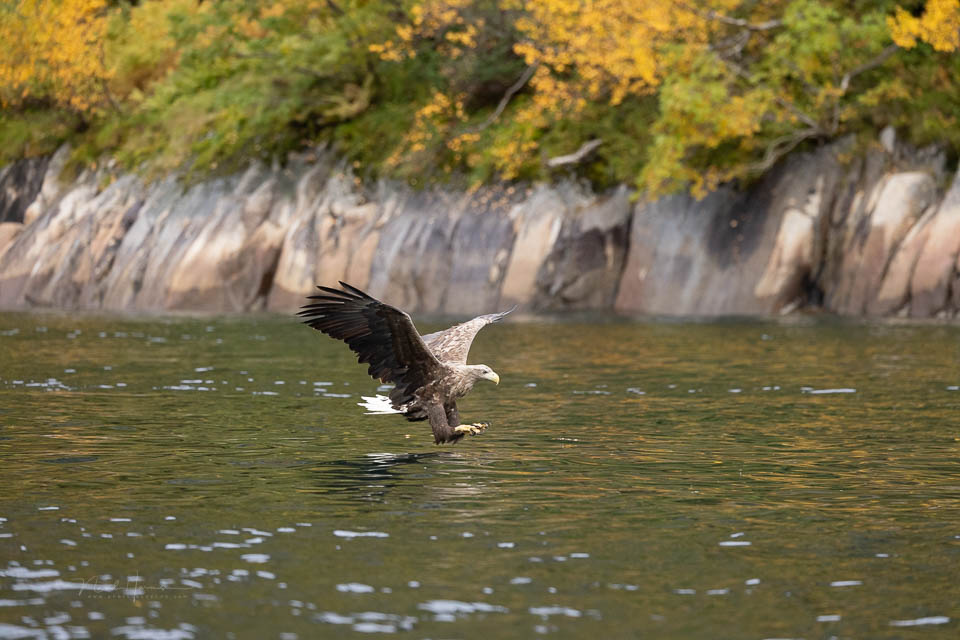
With panning, the movement of the subject, the eagle in this case, is parallel to the camera. In each photo, the eagle is in a different position relative to the background.
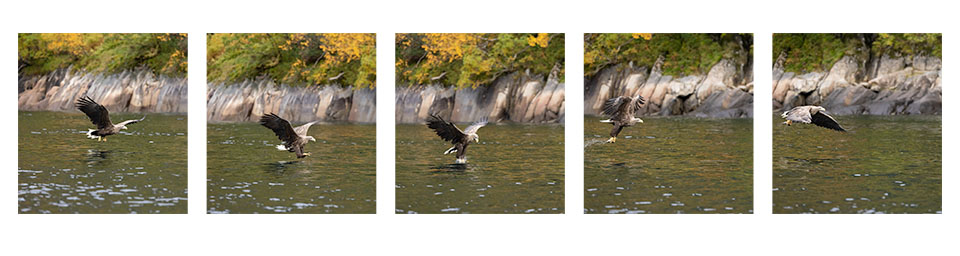
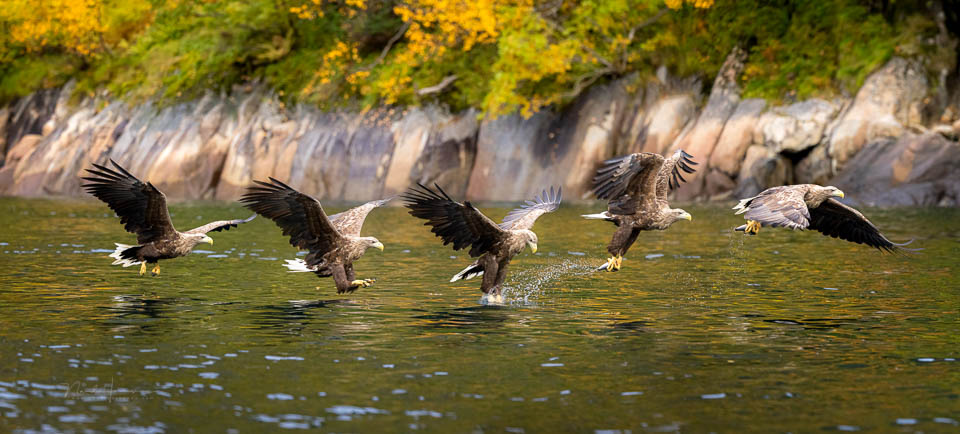
Because the eagle flies in front of a different part of the background, these photos can be combined into a single photo. A kind of panorama, but with the five positions of the eagle visible.
Combining them as a panorama in the usual way is not possible. But it can be done manually. Make sure that every photo has exactly the same editing, and remove any vignetting if necessary. Then open the photos as layers in Photoshop.
Enlarge the canvas in the direction of movement and shift each photo until the background lines up seamlessly. There will be a lot of overlap, but that is not a problem. Temporarily set the opacity of the layer you are moving to 50% so that you can see what you are doing.
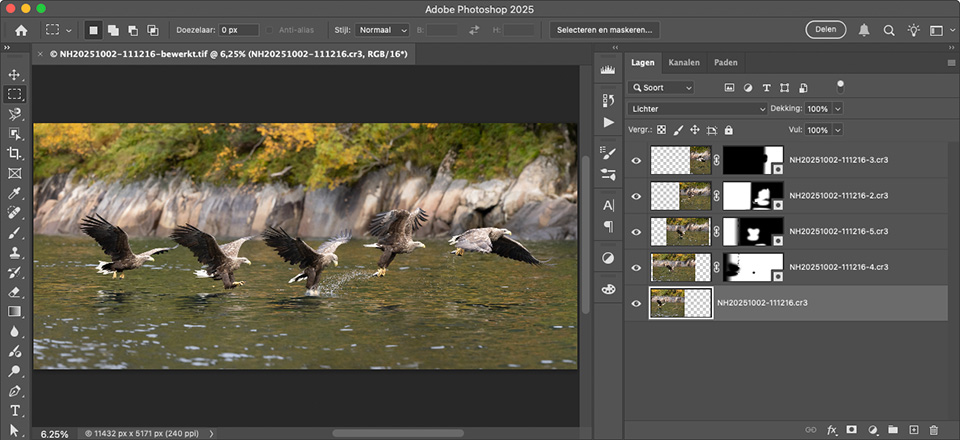
Do this for every photo. Create a mask on each layer and use the brush to make the parts you want to see visible or invisible.
Pay attention to details such as shadows, drops, overlapping parts and so on. The result is a panorama showing five eagles catching a fish.
The photo will probably be very large, more than 16,000 pixels in my case. Crop the photo and, if desired, reduce the canvas to a usable size, for example 8,000 pixels.
About the author
Nando Harmsen has been photographing for more than 40 years. He specialises in wedding photography and landscape photography. Nando also gives talks, workshops, masterclasses and photo trips, and regularly reviews new and interesting equipment.
You might also like
-
 Photoshop tip: Use a copy of a merged layer
by Nando Harmsen
-
 Combine star trails in Photoshop with an action
by Nando Harmsen
-
 Replacing skies in Photoshop is getting easier
by Johan Elzenga
-
 Everything about Generative Fill in Photoshop Beta
by Nando Harmsen
-
 Create your own reusable photo frame in Photoshop
by Nando Harmsen
-
The 6 most important new options for photographers in Photoshop 2020
by Nando Harmsen
2 comments
-

 mousquito wrote on Tuesday 21 October 2025 at 10:44
| reply
mousquito wrote on Tuesday 21 October 2025 at 10:44
| reply
I did this once too, but back then the subject was my daughter and not an eagle. My daughter walked over a number of stones that formed a path. She jumped from stone to stone and with the camera's burst mode I shot at 3.7 frames per second (EOS600D). What I did have was that 2 layers overlapped. By this I mean that my daughter overlapped herself, she wasn't fast enough
Translated from Dutch. Still a fun exercise to do.
 -
 bram.stanja@gmail.com wrote on Tuesday 21 October 2025 at 13:44
| reply
bram.stanja@gmail.com wrote on Tuesday 21 October 2025 at 13:44
| reply
During the F1 at Hockenheim, a few years ago, the safety car drifted through the corners between the practice sessions, much to the amusement of the audience. I combined 4 photos of it, using masks to blend the smoke from the tires. Great fun to do.
Translated from Dutch.
Have your say
Please note: Articles older than a week can only be commented on by signed-in visitors.Would you still like to comment? sign in or create a free account.
Become a better photographer every week
A practical photography tip in your inbox every week.
38,937 photography enthusiasts already receive the tips! More about the weekly mail. Or keep up to date via  Facebook.

Elja Trum
Photofacts; everything to do with photography!
Would you like to take better photos and keep up with what is happening in photography? Photofacts publishes articles that teach you something about photography — from a product announcement to a practical shooting tip or a look at a website. Photofacts covers photography every day and is a hobby project of Elja Trum's that got out of hand. The articles are written by a team of volunteer authors. If you would enjoy writing one or more articles for Photofacts, do get in touch.More about PhotofactsPhotofacts is made possible in part by
