

Adobe's improved Content-Aware Fill coming soon to Photoshop
Wednesday 2 October 2019, 22:11 by Michelle Peeters | 4,516 views | 0 commentsThis article was translated from Dutch with the help of AI. Read the original.
Adobe is making a number of major improvements to the Content-Aware Fill tool in Photoshop.
In a preview of an update coming soon, Photoshop Product Manager Meredith Stotzner shows how an upcoming version of the tool makes it even easier to get realistic results with this already powerful fill tool.
Content-Aware Fill is already a powerful feature that works well around 50% of the time. But it is about to become even more intelligent.
In future, when you open Content-Aware Fill from the Edit menu, you will see that Adobe has added a section called Sampling Area Options with two new options, Auto and Custom, instead of the automatic version, which is available under the Fill options.
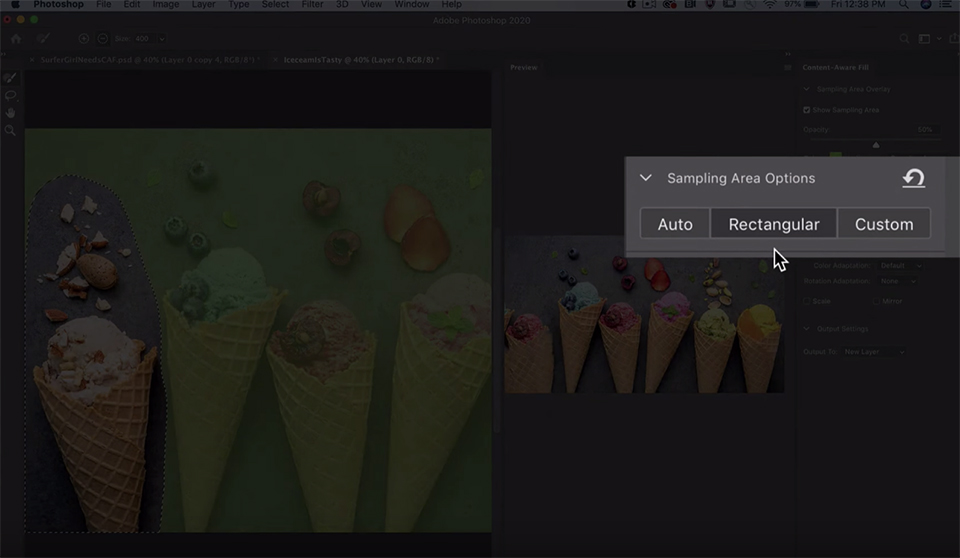
The current version of Content-Aware Fill uses the Rectangular option, which places a box around the selection. You can then mask it as needed to make sure the right area is sampled for your fill. This manual process works, but it can be very fiddly.
The Auto option uses Adobe's Sensei AI to do the work for you by analysing the image content and determining which areas best match the pixels directly next to the selection. The difference in results between Rectangular Content-Aware Fill and Auto Content-Aware Fill is enormous.
Custom, meanwhile, starts with a blank slate, giving you complete control over the sampling area. You simply select the pixels you want to use for the fill, instead of modifying a selection that Photoshop created automatically.
Watch the video above to see the improved Content-Aware Tool in action. Adobe has not revealed exactly when the feature will be included, other than saying it will be available "soon", but based on the video's opening title, it looks like these improvements will be fully built into Photoshop before the end of the year.
About the author
Michelle Peeters is fotografe en oprichter van DeuxBleus Fotografie. Michelle herkent het bijzondere in het gewone en het gewone in het bijzondere. Ze heeft zich nooit willen specialiseren en is daardoor van alle markten thuis.
You might also like
-
 'Color Adaptation' gebruiken om Content-Aware Fill te verbeteren
by Michelle Peeters
-
 Everything about Generative Fill in Photoshop Beta
by Nando Harmsen
-
 Fill gaps in your photo realistically
by Michelle Peeters
-
 Adobe and the cost of AI generative fill
by Nando Harmsen
-
 New in Photoshop Beta: Generative Fill
by Nando Harmsen
-
 The New Photoshop 2020 Updates
by Nando Harmsen
0 comments
Be the first to share what you think!
Have your say
Please note: Articles older than a week can only be commented on by signed-in visitors.Would you still like to comment? sign in or create a free account.
Become a better photographer every week
A practical photography tip in your inbox every week.
38,982 photography enthusiasts already receive the tips! More about the weekly mail. Or keep up to date via  Facebook.

Elja Trum
Photofacts; everything to do with photography!
Would you like to take better photos and keep up with what is happening in photography? Photofacts publishes articles that teach you something about photography — from a product announcement to a practical shooting tip or a look at a website. Photofacts covers photography every day and is a hobby project of Elja Trum's that got out of hand. The articles are written by a team of volunteer authors. If you would enjoy writing one or more articles for Photofacts, do get in touch.More about PhotofactsPhotofacts is made possible in part by
