

Save a Photoshop file with layers
Thursday 13 December 2018, 12:30 by Michelle Peeters | 10,404 views | 3 commentsThis article was translated from Dutch with the help of AI. Read the original.
Suppose you've already made lots of edits to your photo and want to continue working on it later. How do you safely save your file in Photoshop without losing all the layers containing your edits?
Via File, Save, you can save your work in different file types. Choose Photoshop as the type. A Photoshop file can be recognised by the '.psd' extension after the file name.
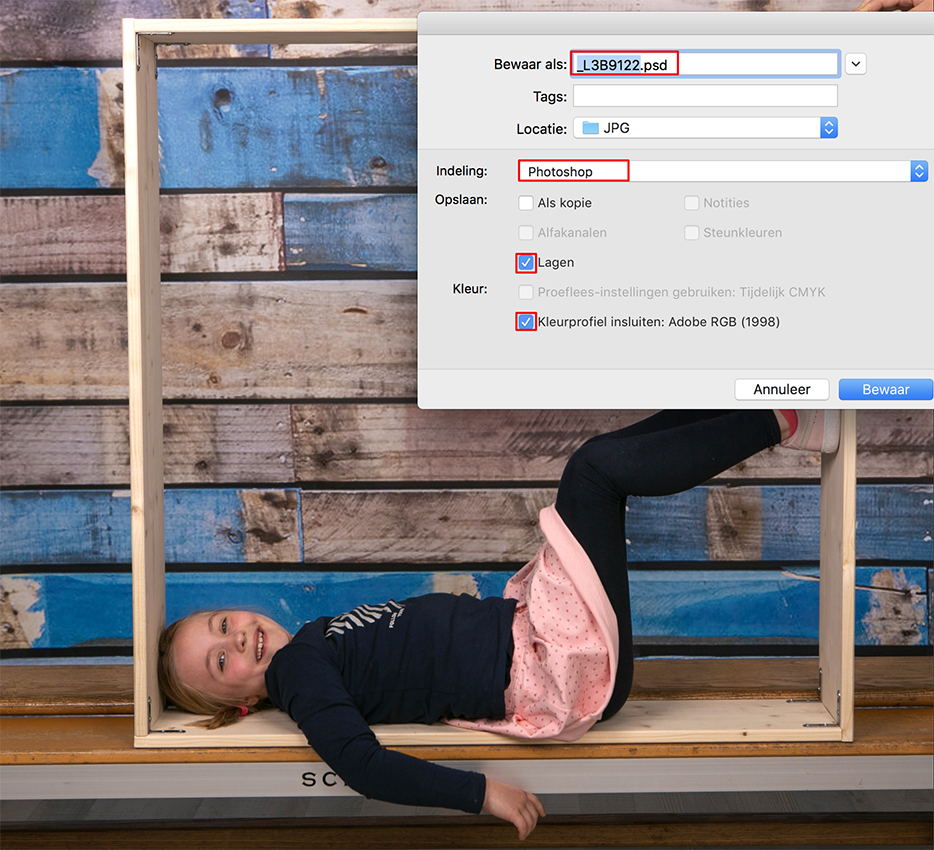
The Photoshop format (PSD) is the standard file format and the only format that, apart from the Large Document Format (PSB), supports all Photoshop features (TIFF is a close second).
Thanks to the extensive integration between Adobe products, you can import PSD files directly into other Adobe applications, such as Illustrator, InDesign, Premiere and After Effects, while retaining many Photoshop features.
When you save a PSD, you have the option to maximise the file's compatibility. This saves a version of the image with the different layers merged into the file.
This version can be opened in other programmes, including older versions of Photoshop.
The document's appearance is also preserved, in case the behaviour of some features changes in future versions of Photoshop. If you include the composite, the image also loads and can be used much faster in applications other than Photoshop.
You can also save high dynamic range (HDR) images with 16 or 32 bits per channel as a PSD file.
Want to learn more about image editing in Photoshop?
At Photofacts Academy, our online learning environment for photographers, we have several courses about Adobe Photoshop.
- Photoshop for Beginners (Johan Elzenga)
- Photoshop for Photographers (Piet van den Eynde)
- Advanced Photoshop (Marit Hilarius)
- Photoshop Effects (Elja Trum)
And much more...
You can take these courses for two weeks with a free trial membership.
About the author
Michelle Peeters is fotografe en oprichter van DeuxBleus Fotografie. Michelle herkent het bijzondere in het gewone en het gewone in het bijzondere. Ze heeft zich nooit willen specialiseren en is daardoor van alle markten thuis.
You might also like
-
 The difference between file size and resolution
by Nando Harmsen
-
 Photoshop tip: Keep your layer stack organised
by Nando Harmsen
-
 Having trouble with Photoshop's new 'Save As'? Change your shortcut
by Nando Harmsen
-
 Review: The Photoshop Layers Book - Johan Elzenga
by Michelle Peeters
-
 Street photography tip: Add layers to your street photo
by Michiel Heijmans
-
 Is there a reason to save both raw and jpeg?
by Nando Harmsen
3 comments
-
 guest wrote on Saturday 15 September 2018 at 18:09 | reply
Is this little triviality really worth an article? Every Photoshop user has known this for ages.
Translated from Dutch. -

 Michelle Peeters wrote on Saturday 15 September 2018 at 19:10
| reply
@Leo: you might still be surprised about that, we get quite a lot of questions about basic Photoshop operations.
Translated from Dutch. -
 PvRFotografie
wrote on Tuesday 18 September 2018 at 11:17
| reply
You already touch on it a bit: TIFF can do it too, but produces considerably larger files. That's why I save everything with layers as PSD. Without layers, I also regularly save an existing one as a TIFF. This as a good alternative to JPG.
Translated from Dutch.
Have your say
Please note: Articles older than a week can only be commented on by signed-in visitors.Would you still like to comment? sign in or create a free account.
Become a better photographer every week
A practical photography tip in your inbox every week.
38,886 photography enthusiasts already receive the tips! More about the weekly mail. Or keep up to date via  Facebook.

Elja Trum
Photofacts; everything to do with photography!
Would you like to take better photos and keep up with what is happening in photography? Photofacts publishes articles that teach you something about photography — from a product announcement to a practical shooting tip or a look at a website. Photofacts covers photography every day and is a hobby project of Elja Trum's that got out of hand. The articles are written by a team of volunteer authors. If you would enjoy writing one or more articles for Photofacts, do get in touch.More about PhotofactsPhotofacts is made possible in part by
