

The difference between file size and resolution
Monday 3 July 2023, 20:10 by Nando Harmsen | 17,908 views | 11 commentsThis article was translated from Dutch with the help of AI. Read the original.
Megabytes, megapixels, resolution, file size, file format. These are terms that can be confusing. How can a 24-megapixel photo sometimes be 30 megabytes and at other times only 3 megabytes? Is the photo then also smaller than 24 megapixels, or not?
This often causes confusion and misunderstanding. There is, of course, a logical reason for this. If you know what that reason is, this article is not for you. Do you find it confusing? Then read on. By the end, you will understand it better.
A starting point, where are we looking?
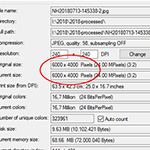
I want to use a starting point to make things easier. For this, I will use a Nikon Z 6II as an example, a camera with a 24-megapixel sensor. Photos from this camera have 6,000 x 4,000 pixels.
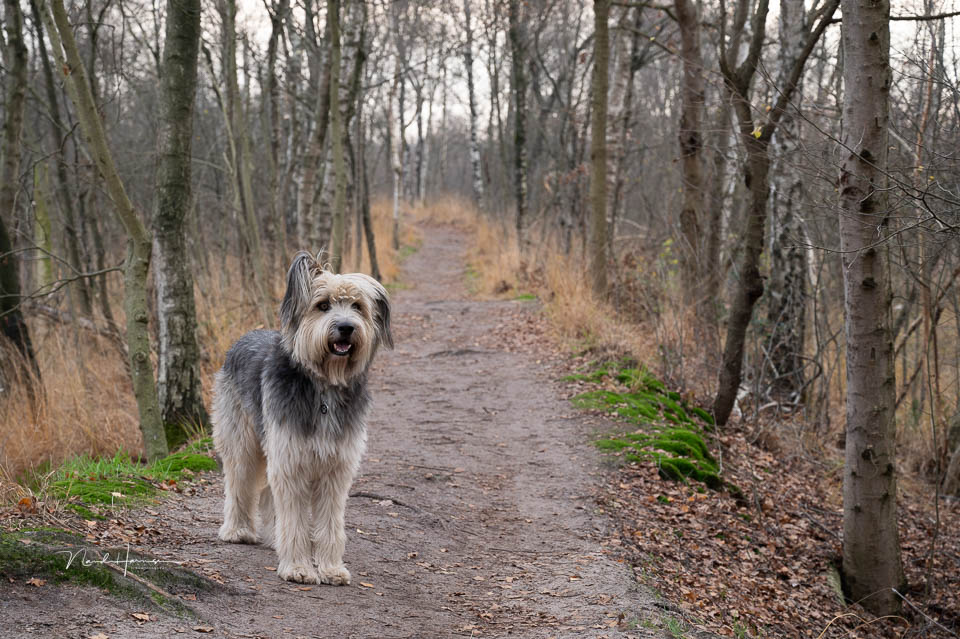
I took the photo above of our dog Bruc with this camera. This photo will be the basis for all the explanations.
Resolution
Resolution means the ability to distinguish detail. How much detail can the photo show? Pixels are needed for this. The more pixels you have, the smaller the details you can distinguish in a photo. The Nikon Z 6II has 6,000 on the longest side and 4,000 on the shortest side of the photo.

The Nikon Z 6II has a higher resolution than a camera that takes photos with 3,000 x 2,000 pixels. After all, the photo has twice as many pixels on the longest side and twice as many on the shortest side. The resolution is four times as large. Do you have a camera with 9,000 x 6,000 pixels? That camera then has a higher resolution than the Nikon Z 6II.
Of course, you can reduce a 6,000 x 4,000 pixel photo to 3,000 x 2,000 pixels. This means that you reduce the resolution of the photo. You can then no longer see as much detail as in the original image.

However, you cannot simply enlarge a 3,000 x 2,000 pixel photo to 6,000 x 4,000 pixels. Details that were not visible in the photo at the lower resolution will not appear in the enlarged photo either. I will leave out the smart software of today that invents additional details.
The number of pixels a photo has on its sides is also sometimes called image size. Do not confuse this with file size, though. That is something completely different.
Megapixels
The number of megapixels is simply another name for resolution. It is the total number of pixels on a sensor. Multiply the number of pixels on the longest side by the number of pixels on the shortest side. The result is the number of megapixels, abbreviated to MP and sometimes simply shown as a capital M.
An example is the 6,000 x 4,000 pixel photo. If you multiply these two numbers, you get 24,000,000 pixels. A million is also called mega. This means that the 24 million pixels can also be called 24 megapixels.

If I use the 3,000 x 2,000 pixel photo, multiplying these two numbers shows that it is a 6-megapixel photo. As we have seen, that is therefore four times smaller.
File size and megabyte
Photos are stored on a memory card or hard drive. The space required is measured in bytes. A thousand bytes is a kilobyte, abbreviated to KB. A thousand kilobytes is a megabyte, abbreviated to MB. A thousand megabytes is a gigabyte, abbreviated to GB).
The amount of space your photo needs is called the file size. This depends on many factors. The number of pixels is important, as is the amount of detail visible in a photo. Another major factor determining the file size is the file format.
File format
Now it gets a little more complicated. You can save a photo in different file formats. In the camera, this can be a raw or a JPEG file. On the computer, you can also choose a TIFF, DNG, PNG or Photoshop file (PSD). There are many more, but these are the most common.

Each file format is unique, which means that the same 24-megapixel photo of 6,000 x 4,000 pixels can have a different file size. My example photo in raw file format is 30.2 megabytes. In TIFF format, it varies between 37.1 and 146.1 megabytes. An edited Photoshop file with layers and masks is no less than 1,890 megabytes, or 1.89 gigabytes.
As you can see in the screenshot, a JPEG has the smallest file size. It varies between 16.2 megabytes and 0.93 megabytes, or 930 kilobytes. This is because JPEG has the ability to pack the file, so to speak. The more you pack it, the smaller the file size. However, this does affect the quality of the photo.

A few examples
The 6,000 x 4,000 pixel photo in raw file format has a resolution of 24 megapixels and a file size of 30.2 megabytes.
That photo is saved as a low-quality JPEG file and then has a file size of just 2.8 megabytes. However, the photo still has 6,000 x 4,000 pixels, so it still has a resolution of 24 megapixels.
The photo is then reduced to 3,000 x 2,000 pixels. The resolution has become smaller and is now only 6 megapixels. If I save the photo in JPEG format at the same low quality, the file size will now be 0.8 megabytes, or 800 KB.
If I save the same 3,000 x 2,000 pixel photo as a 16-bit TIFF file, the file size will be 36 megabytes because of this file format. This is a photo with four times less resolution than the original, while the file size is still larger.

What if I need to save a photo for a specific purpose?
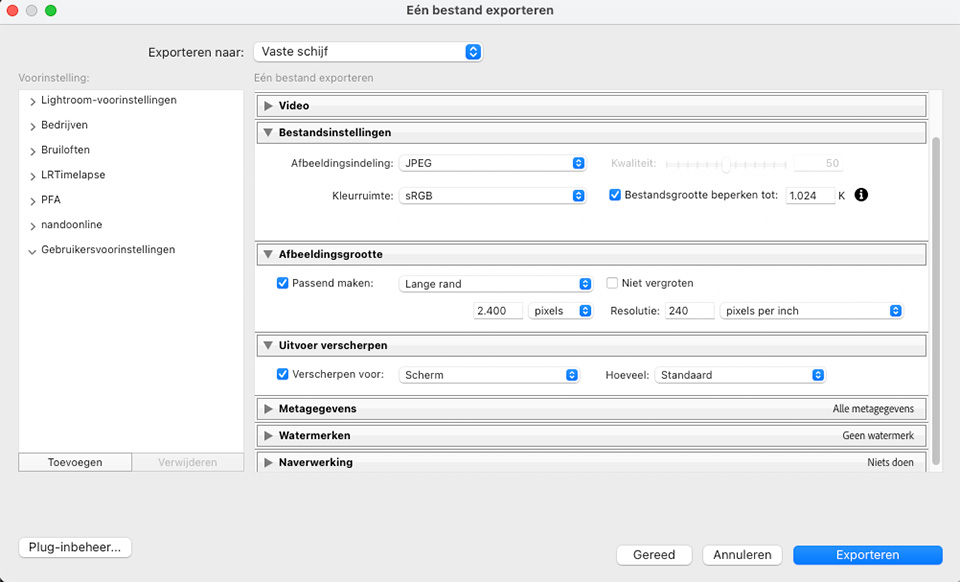
For normal use, most photos should be saved in JPEG file format. If you submit them to a photo competition or something similar, there will be requirements. One example is that a photo may be no more than 2,400 pixels on its longest side and no larger than 1 MB.
This means that you need to reduce the resolution of a photo to 2,400 x 1,800 pixels. You then need to save it in JPEG file format.
Because the file size may not exceed 1 MB, you need to set the JPEG compression when saving the 2,400 x 1,800 pixel JPEG photo so that the file size is no more than 1 megabyte.
The photo this article started with is a photo saved with an image size of 960 x 639 pixels, in JPEG file format. The photo was compressed with a quality setting of 60%, so that the file size is just 203 kilobytes.
In conclusion
Did you have trouble distinguishing between resolution, file formats, file size and all those things? Then I hope this article has made it a little clearer.
About the author
Nando Harmsen has been photographing for more than 40 years. He specialises in wedding photography and landscape photography. Nando also gives talks, workshops, masterclasses and photo trips, and regularly reviews new and interesting equipment.
You might also like
-
 Everything you need to know about resolution
by Nando Harmsen
-
How do resolution, dpi and ppi actually work?
by Nando Harmsen
-
 The new Lightroom update now offers super-resolution
by Nando Harmsen
-
 Is the Canon EOS R5's high-resolution option any use?
by Nando Harmsen
-
 A 3,200-megapixel camera
by Nando Harmsen
11 comments
-

 Donald Willemsen
wrote on Tuesday 4 July 2023 at 10:44
| reply
Donald Willemsen
wrote on Tuesday 4 July 2023 at 10:44
| reply
Nando, I’m missing something in your story. It may be due to my simple understanding. So don’t blame me for it. I have a Canon Eos R7. It has a 32MP sensor. If I take a photo with it and save it on the PC, it gives a number of pixels for the longest and shortest side, for example 8000x4000. Finally, the resolution is also indicated and that is then set to 240 pixels per inch. The resolution is among other things what determines what a print will look like if you print it at a certain size.
Translated from Dutch.
To show a photo on a screen, you generally only need 72 pixels per inch.
Can you explain to me once again which resolution you are referring to? -

-
 Marlies Pennings wrote on Tuesday 4 July 2023 at 13:22 | reply
Is there also a course on photographing with a mobile phone. Can you save in RAW format with it or does it automatically save as jpeg. The latest iPhone 14 Max does have a nice camera on board, I think.
Translated from Dutch. -
 Elja Trum
wrote on Tuesday 4 July 2023 at 14:21
| reply
Elja Trum
wrote on Tuesday 4 July 2023 at 14:21
| reply
We have two courses on taking photos with your smartphone:
Translated from Dutch.
- Reporting with your Smartphone
- Smartphone Photography Course
And yes, your iPhone 14 also has a RAW format that you can use. -
 A.J.J.Maas wrote on Tuesday 4 July 2023 at 15:13 | reply
Dear Nando, perhaps you could also add why you would want to save a photo in TIFF or PNG format as an amateur. And what the pros and cons are if you are, for example, an avid photo editor.
Translated from Dutch. -
-
 guest wrote on Tuesday 4 July 2023 at 19:18 | reply
Thank you Nando!
Translated from Dutch.
I had more or less figured out myself by then how exactly it works, but it is very nice to have everything together in one article in a clear overview once again.
One more comment:
I have discovered that, if you want to print photos in a larger format, you need to increase the size in your export in LRC. Normally I save at 1920 pixels on the long side, resolution 300 pixels, JPEG quality 100. With my photo book in A3 format, I kept getting the message that the quality was insufficient for the size of the photo. Then I increased the size to 3840 pixels on the long side. Problem solved. The result turned out very good. -
Nando
wrote on Thursday 6 July 2023 at 11:22
| reply
Dear guest,
Translated from Dutch.
If you save a photo at 1920px, you have no more than 1920 pixels. The 300 DPI setting does not change that. In fact, 1920 pixels at 92 DPI is exactly the same.
That 300 DPI is only a value that allows you to determine how large your photo can be printed at that resolution. At 300 DPI, your 1920 pixels is only 1920/300=6.4 inches in print. That is a little over 16cm in size. A print at A3 in 300DPI therefore needs many more pixels. -
guest wrote on Thursday 6 July 2023 at 11:43 | reply
Nando, earlier you answered me the following: 'The term DPI and PPI has nothing to do with the resolution of your camera or with the image size.'
Translated from Dutch.
I just read that DPI or PPI does indeed have something to do with the image size. It namely determines how large you can print an image. In the example from 'guest' you do the calculation yourself: '1920/300=6.4 inches large in print. A print on A3 at 300 DPI therefore needs many more pixels.' So there is indeed a connection between the resolution and the image size. -
Nando
wrote on Thursday 6 July 2023 at 11:56
| reply
You need to understand the difference between the resolution of your camera and the resolution of a print. You can print at 300 DPI, at 150 DPI or at 75 DPI. You can even print at 600 DPI, if you want. Each of those DPI values determines how large your photo from the camera can be printed at that resolution.
Translated from Dutch.
But that doesn't change the resolution of what your camera produces. If your photo is 6,000 x 4,000 pixels, it will always be that amount.
That is separate from the print that you are going to make, and the resolution of that print. -
 Ruurd van Dijk wrote on Saturday 8 July 2023 at 21:53 | reply
The eternal DPI (PPI) misunderstandings... Almost impossible to eradicate! I understand that this is still taught incorrectly at some courses... But well explained, @Nando! By the way, I think that Photoshop, with the very prominent presence of DPI fields when you want to set the canvas size, certainly doesn't help clarify this concept...
Translated from Dutch.
Have your say
Please note: Articles older than a week can only be commented on by signed-in visitors.Would you still like to comment? sign in or create a free account.
Become a better photographer every week
A practical photography tip in your inbox every week.
39,079 photography enthusiasts already receive the tips! More about the weekly mail. Or keep up to date via  Facebook.

Elja Trum
Photofacts; everything to do with photography!
Would you like to take better photos and keep up with what is happening in photography? Photofacts publishes articles that teach you something about photography — from a product announcement to a practical shooting tip or a look at a website. Photofacts covers photography every day and is a hobby project of Elja Trum's that got out of hand. The articles are written by a team of volunteer authors. If you would enjoy writing one or more articles for Photofacts, do get in touch.More about PhotofactsPhotofacts is made possible in part by
