

Review: Pictar grip for the iPhone
Friday 14 July 2017, 10:01 by Michelle Peeters | 9,634 views | 5 commentsThis article was translated from Dutch with the help of AI. Read the original.
The Pictar for the iPhone is an ergonomic grip that slides around the iPhone, from the 4S up to and including the 7.
The grip has a shutter button and several dials, making the iPhone camera much easier to operate. Even with one hand and while wearing gloves.
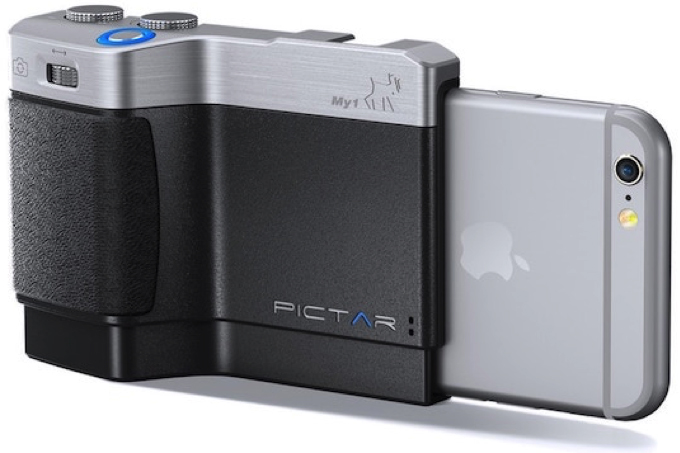
The Pictar started as a Kickstarter project and was developed exclusively for the iPhone.
Research in 2015 showed that more than 75 per cent of all photographs worldwide are taken with smartphones. Only a very small part of the smartphone camera's capabilities is used for this. Pictar makes it possible to use many hidden functions.
The Pictar works with an app on the iPhone. Communication takes place via high-frequency sounds, which are picked up by the iPhone's microphone and passed on to the app. The app can be installed via the Apple App Store.
A wide range of extra options is now available through the Pictar, such as setting the shutter speed, ISO value and white balance. It is even possible to save the photographs taken as TIFF instead of in Jpeg format.
The Pictar is available from specialist photography retailers or online for a price of around 110 euros.
The functions of the various buttons
The Pictar has various buttons, as you can see in the image below.
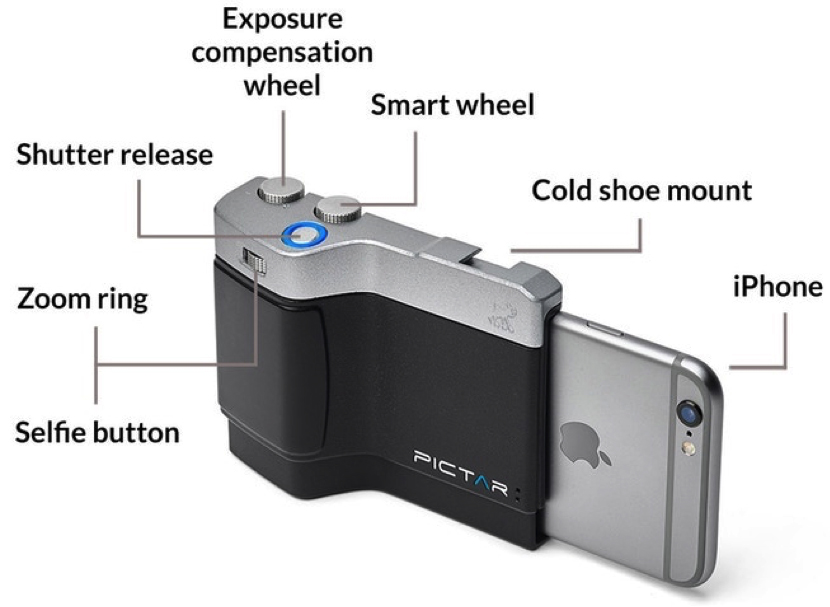
1. The shutter button
Half-pressing this button focuses the camera and locks the focus. You can determine the focus point yourself beforehand by tapping the right place on the iPhone screen. Fully pressing the shutter button takes the photograph.
2. The zoom dial
This dial has two functions. Turning it zooms in or out. Pressing it switches between the rear and front cameras (selfie mode).
You can also assign this dial another function through the settings menu, such as controlling the flash or setting the white balance.
3. The exposure compensation dial
You can use this to increase or decrease the exposure of the photograph in 1/3-stop increments. If the Pictar is set to Manual mode (see point four), you use this dial to set the ISO value.
4. The 'Smart' dial
Several modes are set by default to make things as easy as possible for beginners. These are the following settings:
- Shutter priority mode
- ISO priority mode
- Auto mode
- Filter mode: a choice of many filters, such as brightness, contrast, levels, white balance, black and white, and much more
- Selfie mode: selects the front-facing camera
- Video mode: obviously intended for recording video
- Macro mode: makes it possible to photograph from extra close up
- Sports mode: this mode sets a very short shutter speed of 1/500 second by default
- Manual mode: in this mode, you can set the ISO value with the exposure compensation dial and the shutter speed with the 'virtual' dial (see point five).
There is a choice of many filters, such as brightness, contrast, levels, white balance, black and white, and much more.
5. The 'virtual' dial
In the settings mentioned above, a control option also appears on the right-hand side of the screen, allowing you to set the flash or ISO value, for example.
This is easy to operate with your thumb while continuing to hold the grip normally.
6. The ergonomic grip
The grip, made from non-slip material, is designed to sit comfortably and securely in your hand, with all buttons and dials directly accessible using the same hand.
7. Tripod mount
There is a standard ¼-inch tripod mount on the underside of the Pictar. This means you can easily attach your iPhone to a tripod.
8. Flash shoe
There is a so-called 'cold-shoe' flash shoe mount on the top. You can mount all kinds of professional LED lights with the correct foot on it. You cannot trigger a flash through this shoe, as no signal is sent when the photograph is taken.
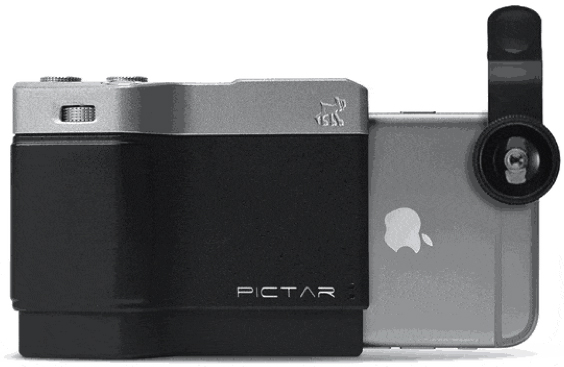
9. Extra lenses
Because the Pictar covers only around two thirds of the iPhone, enough space remains to use extra 'clip-on' lenses on the iPhone if desired.
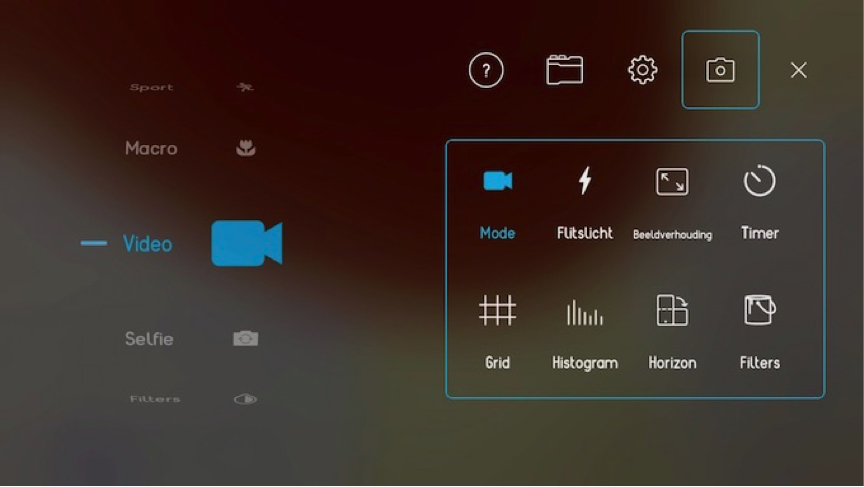
All the functions described above are also available through the settings menu, which you can access by tapping the 'dial' symbol on the iPhone screen.
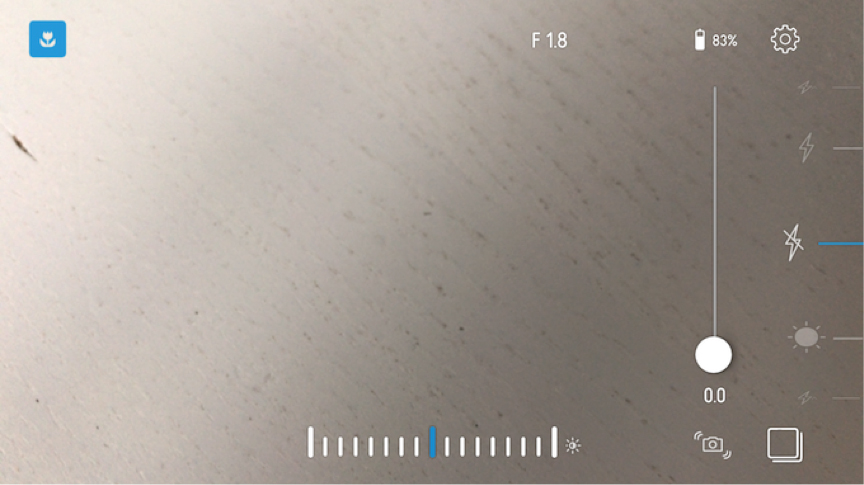
You will find this in the top-right corner of the screen. In the screen that then appears, you can quickly find and select any setting you want.
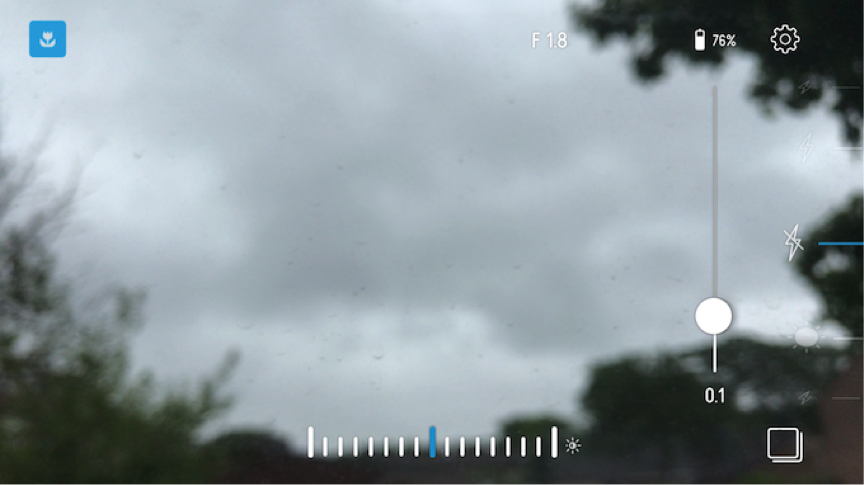
For each selected function on the left, you can then adjust a number of associated settings, such as the aspect ratio, self-timer, grid on or off, and so on.
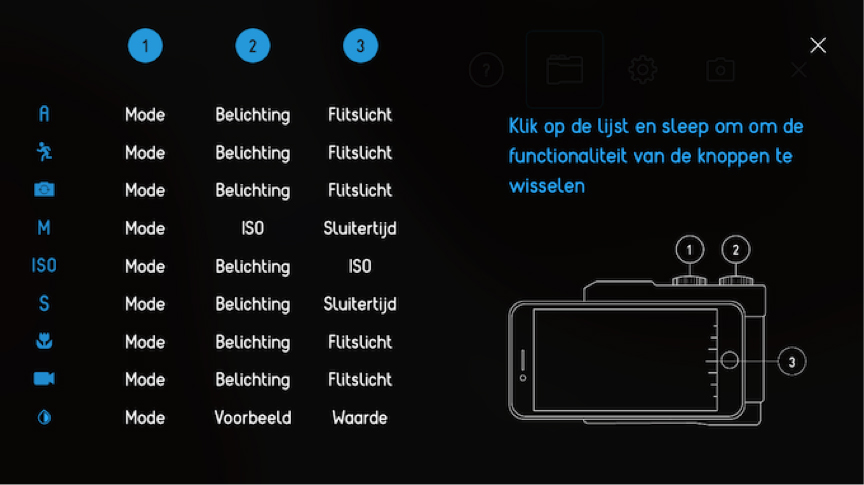
You can also use one of the options on this screen to change the function of the dials.
My first impressions
I have not yet had the opportunity to test the Pictar extensively in practice. That will happen over the coming weeks during a trip through various Northern European countries.
There is no comprehensive printed manual in the box supplied. I cannot find one even on the supplier's website.
There are, however, a few interesting videos on this website about using this gadget and its capabilities.
The Pictar does sit comfortably in the hand, and with the supplied wrist strap you have everything close at hand. The iPhone is held firmly in the Pictar and certainly will not fall out by itself.
I do find the dials feel a little cheap and do not work particularly smoothly. Especially when I compare them with the dials on a genuine DSLR.
Practice will show whether this gadget is worth the money, or whether I will soon return to the more limited capabilities of the iPhone camera itself.
Conclusion
The Pictar turns your iPhone into a 'real' compact camera. The grip improves practical things such as how it sits in your hand and the shutter button.
The big question is whether the Pictar offers enough added value to make carrying an extra device with you all the time worthwhile. I will find this out in practice over the coming weeks. At 110 euros, it is certainly not a cheap solution.
About the author
Michelle Peeters is fotografe en oprichter van DeuxBleus Fotografie. Michelle herkent het bijzondere in het gewone en het gewone in het bijzondere. Ze heeft zich nooit willen specialiseren en is daardoor van alle markten thuis.
You might also like
-
 Review: iPhone XS, the latest iPhone camera
by Lars Paymans
-
 Review: Canon EOS R5
by Nando Harmsen
-
 Review: Photographing with the iPhone by Scott Kelby
by Elja Trum
-
 Review: DigiEra external SSD for iPhone video
by Nando Harmsen
-
 Review: Sony A7 IV
by Nando Harmsen
-
 Review: Sony A9 mark III
by Nando Harmsen
5 comments
-
 Jan wrote on Wednesday 19 July 2017 at 00:10 | reply
Wat een onzin: je bouwt een camera body om een Smart Phone heen. Het is misschien slimmer om een kwalitatief veel betere compactje aan te schaffen met optische zoom voor veel minder kosten. Men gebruikt tegenwoordig overal een Smart Phone voor foto's vanwege zijn compactheid en waarbij men de Illusie heeft dat deze goede foto's oplevert.
This comment was written in another language and has not been translated yet. -

 Michelle Peeters wrote on Wednesday 19 July 2017 at 09:31
| reply
@Jan: het is ook puur en alleen voor het gebruiksgemak. Je smartphone heb je toch altijd bij je, je hoeft geen aparte compactcamera mee te slepen. En ik moet zeggen (ben hem nu pas goed aan het uittesten): er zitten zeer handige opties in waaronder de zelfontspanner. Daarnaast het feit dat je je settings kunt zien en wijzigen! De app kost wel veel batterijen, dat is toch wel een nadeel..
This comment was written in another language and has not been translated yet. -
 guest wrote on Wednesday 19 July 2017 at 11:26 | reply
Heel handig zo'n zelfontspanner. Daarom heeft elk compactje er een. Eens met Jan. Kijk naar het eerste plaatje: achter die mini-lens zit een minisensor.
This comment was written in another language and has not been translated yet.
Onbegrijpelijk dat mensen die zweren bij fullframe dan wel ineens de voordelen van het andere uiterste prediken. Een compacte camera zou juist allround inzetbaar moeten zijn. -
 R K wrote on Wednesday 19 July 2017 at 12:21 | reply
Of je kiest gewoon voor een smartphone als bijvoorbeeld de Huawei P10, waar alles (ISO, sluitertijd, belichtingscompensatie, AF-S of AF-C, witbalans, spot of matrix lichtmeting, enzovoort) in de camera zelf in te stellen is. En dat alles zonder de ballast van een extra apparaat; het feit dat je de smartphone altijd in broek- of binnenzak bij je hebt, is nu juist het ultieme voordeel van de mobiele fotografie.
This comment was written in another language and has not been translated yet.
Ik ben inmiddels 100% mobiel fotograferend, maar ik zie totaal niet het nut van dit soort toeters en bellen (net als de voorzetlenzen). Eenvoud is juist dé kracht van smartphone fotografie. -
 HuubS
wrote on Saturday 16 September 2017 at 01:18
| reply
During my recent holiday in the Baltic States, I worked with this grip for a few days. To put it bluntly: after 2 days I no longer took this grip out of my bag. Why? 1. My iPhone's battery consumption seemed to increase enormously. 2. It remains a fiddly business with the grip's buttons that are too small. 3. The filenames of the files are no longer logical (they become very long names consisting of a series of numbers). 4. Biggest drawback: the location information that is normally always stored with a photo taken by the iPhone is missing when you use this grip. A huge omission!!!
Translated from Dutch.
Have your say
Please note: Articles older than a week can only be commented on by signed-in visitors.Would you still like to comment? sign in or create a free account.
Become a better photographer every week
A practical photography tip in your inbox every week.
38,836 photography enthusiasts already receive the tips! More about the weekly mail. Or keep up to date via  Facebook.

Elja Trum
Photofacts; everything to do with photography!
Would you like to take better photos and keep up with what is happening in photography? Photofacts publishes articles that teach you something about photography — from a product announcement to a practical shooting tip or a look at a website. Photofacts covers photography every day and is a hobby project of Elja Trum's that got out of hand. The articles are written by a team of volunteer authors. If you would enjoy writing one or more articles for Photofacts, do get in touch.More about PhotofactsPhotofacts is made possible in part by
