

How necessary is a flash meter?
Sunday 19 September 2021, 20:20 by Elja Trum | 6,468 views | 7 commentsThis article was translated from Dutch with the help of AI. Read the original.
Last week I asked you which questions you have about flash photography for my new book. One of the subjects I heard about several times was flash meters. But do you actually need one?
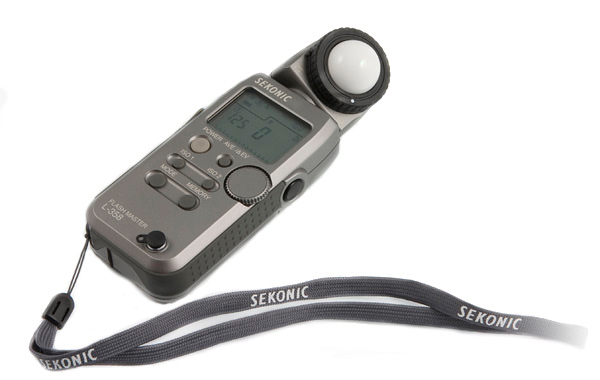
I know that some photographers swear by using a light meter when setting up their lighting. After all, it is the only way to know exactly how much light is coming from each light source.
In practice, I hardly ever use my light meter for my flash photography. Instead, I check the histogram of the first photos I take when setting up my lights.
I mainly look at the right-hand side of the histogram. Is my photo overexposed or underexposed?
Underexposed
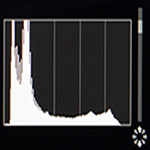
With an underexposed photo, you can see that there are no pixels on the right-hand side of the histogram, in the highlights. The graph is empty there.
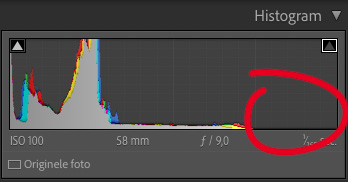
The photo is probably too dark as well, but you often cannot see that on the screen on the back of your camera. Especially when you are taking photos in a dark room. Such a screen is often so bright that you think your photo is correctly exposed.
When you are doing low-key photography, you are even more likely to think that it is fine like this. However, it is better to have a little too much light and make it darker afterwards in Lightroom than the other way around.
Overexposed
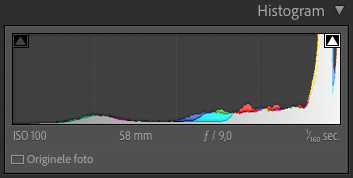
If your photo is overexposed, you can also see this on the right-hand side of your histogram. The graph then runs all the way to the right edge. Those pixels on the far right are all pure white. There is no image information left in them.
Even when you have a white background in your photo, you do not generally want a blown-out background. Make sure that your peak is just before the far-right point in the histogram.
Correctly exposed
If your photo is correctly exposed, you can see that directly in your histogram as well. No overexposed pixels and a distribution across the entire histogram. This gives you the greatest possible flexibility when editing.
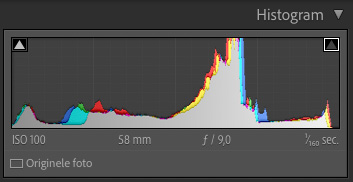
It is also useful to know that the rest of your histogram is less important. It does not matter where the hills in your histogram are, and it is not a problem if there is a peak on the left-hand side of your histogram.
That left-hand side shows pixels that are completely blocked up. This is not what you want in principle either, but with some photos, such as the low-key photos mentioned earlier, it is perfectly normal.
It is not always possible to prevent blown-out white pixels from appearing in your photo. If the sun or another light source is in the frame, it is often blown out to white. That is not something you can simply solve, and it is generally not much of a problem either.
So you always look at the histogram in combination with the photo you have taken. Does the distribution of light and dark points in your photo match the histogram? And keep a close eye on that right-hand side in particular.
Flash meter
In my view, a flash meter is therefore not necessary in many cases. In some situations, it can certainly be useful for reaching the correct settings more quickly.
I will certainly also cover the use of a flash meter in my book.
Do you use a flash meter for your flash photos?
Why do you, or do you not?
Let me know in the comments!
About the author
Elja Trum is the founder of Photofacts and online photography course website Photofacts Academy. He has been writing about photography since 2006. Elja is also the author of (Dutch) books on composition, black-and-white photography, flash photography and portrait photography.
You might also like
-
 7 myths about the histogram
by Nando Harmsen
-
 The Light Meter, How Do You Read It?
by Frank Doorhof
-
 A Histogram Says Nothing Without a Photo
by Nando Harmsen
-
 Book: Scott Kelby, how do you do that in Photoshop?
by Michelle Peeters
-
 Is it necessary to choose a lens with a wide aperture?
by Nando Harmsen
7 comments
-
 frans wrote on Tuesday 21 September 2021 at 10:20 | reply
Reasons to use a light meter after all.
Translated from Dutch.
The histogram is always based on the JPEG photo and not on the RAW file. RAW has a much greater dynamic range than a JPEG.
Additionally, once you start understanding light, you can immediately set up any situation using the light meter.
Nothing is more difficult for a model than having to wait for a photographer who has to adjust his lights every time, readjust his flashes and take another photo to check again.
If you measure the light, you immediately know how much you need to adjust your flashes. Especially if you work with multiple flashes, and for example want to highlight parts in your setup.
It is also very useful to measure your background. To flash it towards white, grey or black.
Only if you only shoot JPEG would you, for lack of anything better, be able to shoot based on the histogram. -
 Debergh wrote on Tuesday 21 September 2021 at 11:27 | reply
For the general exposure, the histogram is good enough.
Translated from Dutch.
To know the brightness contrast in a scene and control the lighting contrast in every lighting setup, measuring means knowing. The meter tells you how much the light source deviates from your intention. Someone who always works with the standard lighting setups in a familiar environment can build up experience and no longer needs a light meter. A photographer who consciously wants to work with light everywhere will know the deviations and their magnitude with a light meter and thus arrive at the desired result faster. -
 André wrote on Tuesday 21 September 2021 at 12:05 | reply
More or less the same comments as Frans: in principle, I set everything based on my light meter (flash by flash, first the main light then fill lights and possibly background lights) before the model is done with makeup or clothing. Then I take a few shots with the gray card (the model holds it in the right place, facing the camera) and see if the histogram is nicely in the middle, possibly shifting it a little to the right by adjusting the aperture or ISo until it is just not overexposed. I also sometimes work with a mannequin with extreme lighting setups (e.g. with gels) to estimate the effect in advance. At the beginning of the shoot, I often still correct the light ratios a little if I don't really like them in the first shots with the model. This preparation gives you the certainty of a good lighting setup and therefore peace of mind to focus on the composition.
Translated from Dutch. -

 ErikvanRosmalen
wrote on Tuesday 21 September 2021 at 12:54
| reply
ErikvanRosmalen
wrote on Tuesday 21 September 2021 at 12:54
| reply
Another use of the light meter is that it creates consistency. For example, if you take profile photos in the same environment each time, but with a model with a different skin tone, the built-in light meter in your camera will indicate different values. A dark-skinned person versus a redhead with white skin, for example: you will see differences in the lighting when you put the series next to each other. If you measure the incident light and keep that value consistent? Then the series of photos is consistent. In some situations that is very relevant.
Translated from Dutch.
Additionally, I meter all my analogue work myself, purely because my analogue camera doesn't have a built-in meter. The same applies there: quickly measuring with a digital camera as a light meter gives a different result.
And finally, least important but sometimes very handy: if I have to take a business portrait of someone who actually has no time and actually doesn't want to either, you make more of an impression with a light meter in your hand than when you start fiddling with your histogram. It has already regularly resulted in the person being portrayed obediently listening to the 'professional' and taking the time
-
 Robert wrote on Tuesday 21 September 2021 at 13:00 | reply
Long live the light/ flash meter. You can immediately set your desired aperture and also measure the backlight/ and background . And set it according to your ' figures/ values' .
Translated from Dutch.
But to each their own thing.
Photo-shooting regards Robert -
 Donald Willemsen
wrote on Tuesday 21 September 2021 at 15:14
| reply
Donald Willemsen
wrote on Tuesday 21 September 2021 at 15:14
| reply
A histogram only tells you whether your photo is properly exposed. Nothing more. If you want to take the DoF into account, you are better off using a flash meter. The flash meter takes the aperture to be used into account. So I basically agree with Frans and Erik. A flash meter is very useful in studio photography.
Translated from Dutch. -
frans wrote on Tuesday 21 September 2021 at 15:54 | reply
"A histogram only tells you whether your photo is properly exposed."
Translated from Dutch.
This isn't even entirely true.
It only says whether there are blown-out whites or crushed blacks in the JPEG preview.
And this can sometimes be intentional.
Every photo with the sun in it has a histogram climbing to the right... and blown-out areas.
Crushed blacks can for example be desirable because of the background...
But as said, the histogram you see on your camera is only of the JPEG photo. From the RAW file you can recover several stops that you can no longer reach in the jpeg
Have your say
Please note: Articles older than a week can only be commented on by signed-in visitors.Would you still like to comment? sign in or create a free account.
Become a better photographer every week
A practical photography tip in your inbox every week.
38,937 photography enthusiasts already receive the tips! More about the weekly mail. Or keep up to date via  Facebook.

Elja Trum
Photofacts; everything to do with photography!
Would you like to take better photos and keep up with what is happening in photography? Photofacts publishes articles that teach you something about photography — from a product announcement to a practical shooting tip or a look at a website. Photofacts covers photography every day and is a hobby project of Elja Trum's that got out of hand. The articles are written by a team of volunteer authors. If you would enjoy writing one or more articles for Photofacts, do get in touch.More about PhotofactsPhotofacts is made possible in part by
