

How to take Kim Feenstra's selfie
Thursday 1 December 2016, 10:20 by Elja Trum | 40,426 views | 13 commentsThis article was translated from Dutch with the help of AI. Read the original.
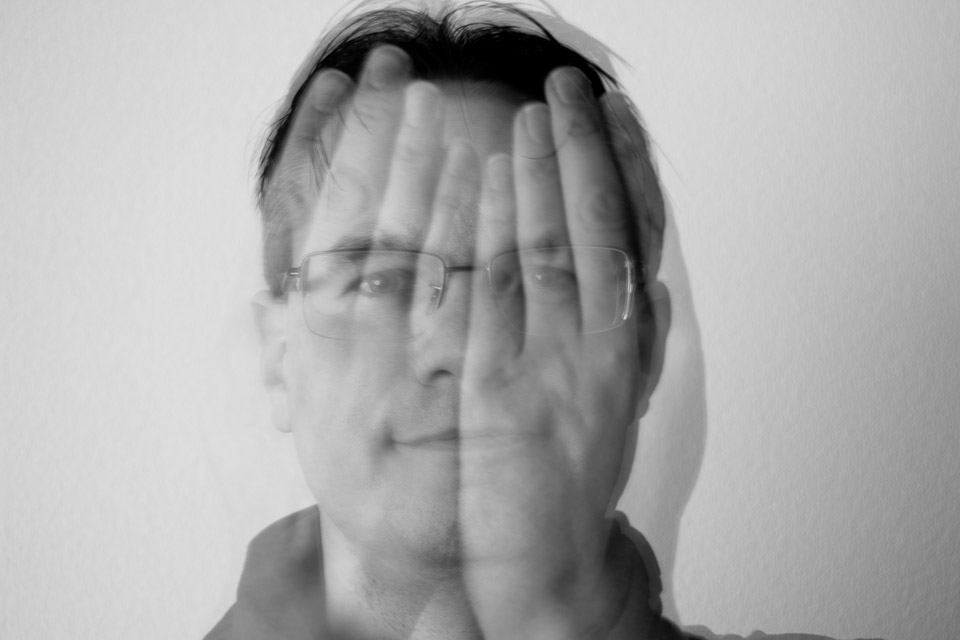
In Het Perfecte Plaatje, we saw last Monday that Kim Feenstra took a selfie where her face could be seen through her hands. Taking a photo like this isn't that difficult, but it's great fun to try yourself. I'll show you how to do it.
I don't have Kim's good looks, of course, but you'll have to make do with me as an example. In the video below, I explain how you can take this selfie yourself.
The trick is the long shutter speed. I used the same shutter speed as Kim did in Het Perfecte Plaatje, 4 seconds, but 5, 6 or another long shutter speed works fine too. The longer it is, the more chance there is of movement. That's why four seconds is not a bad choice at all.
Set your camera to shutter priority, Tv or S. Then set the light sensitivity of your camera to the lowest setting, often ISO 100. Your camera will choose a matching aperture. This will soon be higher than your lens can handle, so you need to make sure there is little light in the room where you are.
If you really want to take the photo yourself, it helps to have a flip-out screen so you can see what you are doing. Turn on the self-timer, I chose 2 seconds, so you have time to put your hands in front of your face.
Taking the photo takes 4 seconds. During that time, you should move as little as possible. With one exception, of course: you need to move your hands away after about 2 seconds. This gives you the effect you are looking for: transparent hands in the final image, so you can see your face through them.
Editing
In the editing, I converted the photo to black and white and added some extra contrast. Converting it to black and white really draws the focus to the face. Combined with the extra contrast, this also means you pay less attention to the blurred details.
To create the perfect see-through selfie, you obviously need to take lots of photos. Try varying little things each time and check the result in between, so you can see what you can improve.
Good luck with your own Kimfie!

About the author
Elja Trum is the founder of Photofacts and online photography course website Photofacts Academy. He has been writing about photography since 2006. Elja is also the author of (Dutch) books on composition, black-and-white photography, flash photography and portrait photography.
You might also like
-
 Het Perfecte Plaatje: the fifth episode
by Elja Trum
-
 The Perfect Picture; the final
by Elja Trum
-
 How selfies make your nose 30 per cent larger
by Michelle Peeters
-
 The Perfect Picture; season 3, episode 1
by Elja Trum
-
 Het Perfecte Plaatje: Dutch summer and nude
by Elja Trum
13 comments
-

 Arthur Wittendorp
wrote on Thursday 1 December 2016 at 11:04
| reply
Je maakt één misser @Elja! Kim Feenstra gebruikt voor haar selfie een flitser om haar beweging te bevriezen. In haar ogen kan je ook de reflectie van die flitser zien.
This comment was written in another language and has not been translated yet.
Overigens zou ik zelf 'gewoon' 2 foto's gemaakt hebben en deze in PS samengevoegd hebben. -
 Elja Trum
wrote on Thursday 1 December 2016 at 11:12
| reply
@Arthur; Hmm, ik weet niet of ze wel een flitser gebruikt heeft. Die catchlight kan ook een reflectie van het licht door een raam zijn (in mijn ogen zie je ook de reflectie van de softbox - zonder flits te gebruiken). Kan me ook niet herinneren dat er een flitser te zien was in het programma. Ik denk eigenlijk niet dat ze geflitst heeft.
This comment was written in another language and has not been translated yet.
Natuurlijk is het gemakkelijker om twee foto's samen te voegen in de nabewerking, maar dit is leuker. Gewoon direct uit de camera een bijzonder resultaat. -
 edith wrote on Thursday 1 December 2016 at 12:20 | reply
Something isn't right about Kim's photo. Her hands are way too big, right?
Translated from Dutch. -
-
 jan doedel wrote on Thursday 1 December 2016 at 18:47 | reply
This video immediately proves my claim about how heavily photoshopped Kim's photo is, as far as the black background is concerned
Translated from Dutch. -
 Monique wrote on Thursday 1 December 2016 at 19:19 | reply
This has been around for a while.. I took the same photo almost three years ago too, without flash, long exposure.
Translated from Dutch. -
Elja Trum
wrote on Thursday 1 December 2016 at 19:40
| reply
@Monique; it’s certainly not the first photo made that way, it’s just that Kim has now brought this to people’s attention in a fun way. Hence I made a video about it.
Translated from Dutch.
@Jan Doedel; or perhaps Kim, after she was filmed in front of the wall you saw on TV, also did it in front of a dark wall. As far as I know, the photos may only be processed using Canon’s DPP. You can’t really make Photoshop-like adjustments in it. -
guest wrote on Friday 2 December 2016 at 14:53 | reply
With my Nikon D600, up to three images can be exposed over each other when shooting.
Translated from Dutch. -
 Hay Herben wrote on Saturday 3 December 2016 at 10:57 | reply
I already made this kind of photo`s in the analog era. Simply by taking a photo and then cocking again without advancing the film and taking another photo. Nowadays cameras have a setting, double exposure.
Translated from Dutch. -
 Maja wrote on Saturday 10 December 2016 at 04:22
| reply
Good day. I noticed a small mistake in your explanation above: "So you set your camera to shutter priority (Av or S). "
Translated from Dutch.
Should be (Tv or S) -
-

-

Have your say
Please note: Articles older than a week can only be commented on by signed-in visitors.Would you still like to comment? sign in or create a free account.
Become a better photographer every week
A practical photography tip in your inbox every week.
38,783 photography enthusiasts already receive the tips! More about the weekly mail. Or keep up to date via  Facebook.

Elja Trum
Photofacts; everything to do with photography!
Would you like to take better photos and keep up with what is happening in photography? Photofacts publishes articles that teach you something about photography — from a product announcement to a practical shooting tip or a look at a website. Photofacts covers photography every day and is a hobby project of Elja Trum's that got out of hand. The articles are written by a team of volunteer authors. If you would enjoy writing one or more articles for Photofacts, do get in touch.More about PhotofactsPhotofacts is made possible in part by
