

Rotate your preview on your computer, not in the camera
Thursday 14 March 2024, 13:31 by Nando Harmsen | 2,897 views | 7 commentsThis article was translated from Dutch with the help of AI. Read the original.
Do you ever take photos with your camera held vertically? Then you know the image is displayed upright on the LCD screen. A horizontal photo fills the screen, but a vertical photo does not. Set up your camera so that it uses the entire screen in that case too.
Your camera knows whether you are taking a photo in portrait or landscape orientation. This information is also stored in the EXIF data of your photo. When you view the photo again, either on the LCD screen or on your computer screen, it is always displayed upright.
That is perfect for your computer, as that is how you want to view the photo. Your computer screen is probably large enough to view the photo properly. An LCD screen on your camera is not that large, however, so a photo taken in portrait orientation appears very small.
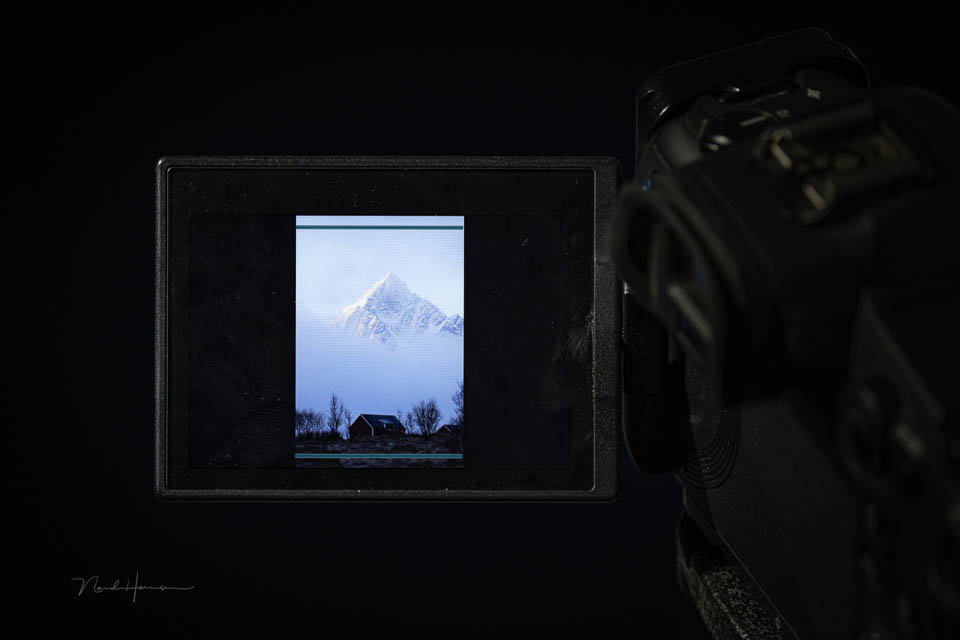
It is difficult to judge whether a portrait photo is good when it is displayed so small. You still want to keep that rotation information in the photo, for when you view it again on your computer. Fortunately, most cameras offer a good solution.
Go to the menu and look for the rotation settings for viewing a photo. You have a few options there. You can choose to rotate on the camera and computer, rotate on the computer, or not rotate at all. Choose the option to rotate on the computer.
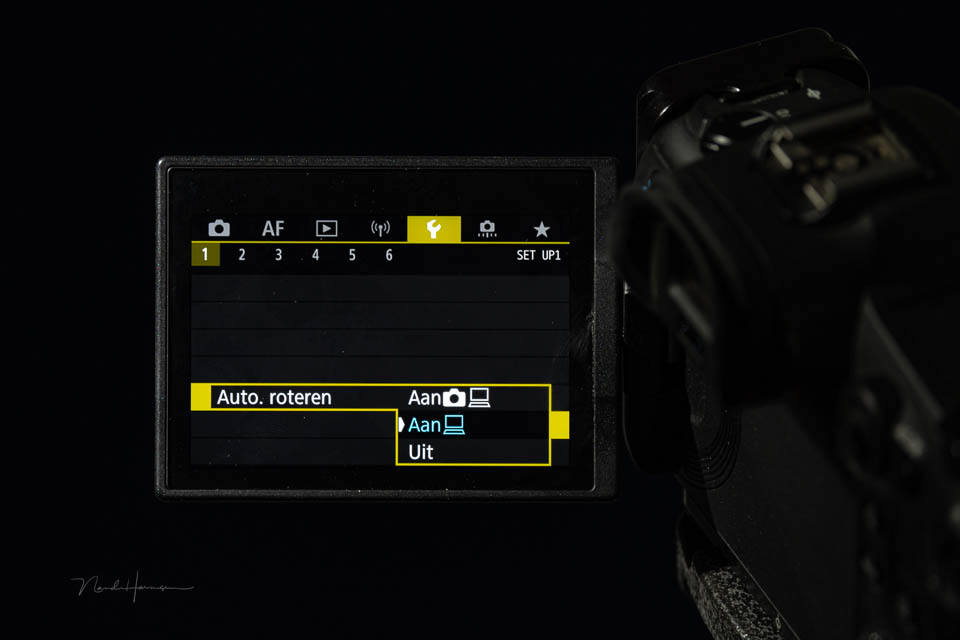
If you now view the photo again on your camera's LCD screen, the photo will not be rotated. The entire LCD screen is used. You do have to turn the camera a quarter turn, but that is easy enough.
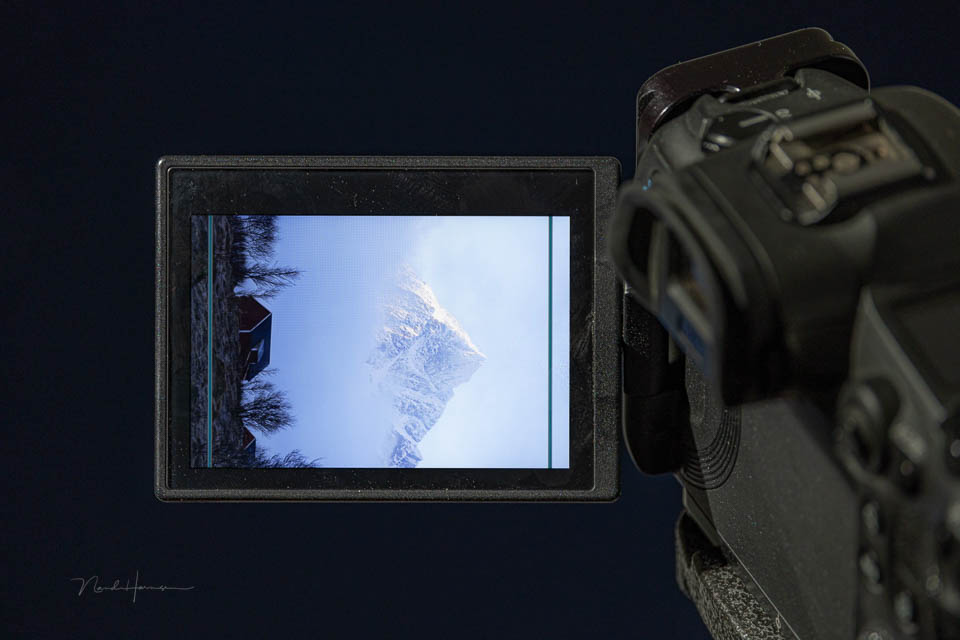
If you view the photo again on your computer, it will be rotated so that this portrait photo is displayed upright.
I don't know where the setting is on your camera. You will have to find that out yourself. Once you have set this up, you will find that it works very well.
Did you know about this setting, and are you already using it? Or is it new to you? Let us know in a comment below.
About the author
Nando Harmsen has been photographing for more than 40 years. He specialises in wedding photography and landscape photography. Nando also gives talks, workshops, masterclasses and photo trips, and regularly reviews new and interesting equipment.
You might also like
-
 A vertical or horizontal landscape photo - part 1
by Nando Harmsen
-
 A Vertical or Horizontal Landscape Photo - Part 2
by Nando Harmsen
-
 The Earth's Rotation and Image Stabilisation
by Nando Harmsen
-
 Landscape photography tip: also take vertical landscape photos
by Nando Harmsen
-
 Portrait photography tip: Rotate the camera
by Elja Trum
-
 A vertical panorama for a wider angle
by Nando Harmsen
7 comments
-
 Donald Willemsen wrote on Thursday 14 March 2024 at 14:13 | reply
I have a Canon Eos R7 and I am familiar with the setting. I actually rarely or never look back at photos on the camera's LCD. I review them on the PC screen. While taking photos, I use the histogram, which allows me to assess whether the shot is getting the correct exposure as desired.
Translated from Dutch.
Looking at the photos on the LCD screen uses energy, and I would rather use that to take photos.
For those who are interested, the tip is of course welcome. -

 Nando
wrote on Thursday 14 March 2024 at 14:24
| reply
Nando
wrote on Thursday 14 March 2024 at 14:24
| reply
Reviewing is useful for checking your composition, whether there are distracting things at the edges of the photo, whether things are too close to the edge of the frame or just fall outside the frame. You can also check whether the focus is at the right point. And a few more things like that.
Translated from Dutch.
If you do that at home, it’s too late to correct it. -
Donald Willemsen wrote on Thursday 14 March 2024 at 14:50 | reply
Everything you say is true Nando, but..... you create the composition while taking the photo and if you take the time, that composition is immediately right. Moreover, editing software such as Lightroom, Photoshop, Luminar Neo and others has so many tools that adjusting/repairing afterwards is quite easy. Add the current AI options to that, and you hardly need to check a photo on the LCD screen anymore. You even have focus peaking available on many cameras already. So you immediately see where the sharpness is before you take the photo.
Translated from Dutch.
Let it be clear Nando, that I do appreciate your tip and am not trying to contradict you. I am merely pointing out that it can also be done differently precisely to save battery power. Energy that I would rather use to take as many photos as possible. -
 Henk wrote on Tuesday 19 March 2024 at 11:51 | reply
In my Canon EOS R I have exactly the screen that Nando shows. But when I set the rotate mode, then - recently - ALL photos rotate, including the horizontal ones. I reset the camera to the factory settings, but that doesn't help. According to Canon support, the camera (outside the warranty period) needs to be sent in for repair. For now I'll leave it as it is, because I can rotate the few vertical photos I take on the PC. Or does anyone have any more tips?
Translated from Dutch. -
Nando
wrote on Tuesday 19 March 2024 at 12:29
| reply
That's strange, Henk.
Translated from Dutch.
Do bear in mind that pointing far down (for example for macro) or far up (for example astrophotography) can mess up the orientation information. Especially if the camera is also held at an angle, things often go wrong.
If it is indeed a camera problem, then I would indeed turn it off completely. After all, it is not that important because it does not negatively affect your photography. -
 Wolfgang Stollenwerk wrote on Tuesday 19 March 2024 at 13:22 | reply
Nice tip Nando. I didn't know about the option yet. I'll have to look up how that works on a Nikon camera.
Translated from Dutch. -
 Wim wrote on Tuesday 19 March 2024 at 16:32 | reply
Hello Nando, with my Sony A500 you only have the option to turn it on or off. So on my PC it is always upright.
Translated from Dutch.
Have your say
Please note: Articles older than a week can only be commented on by signed-in visitors.Would you still like to comment? sign in or create a free account.
Become a better photographer every week
A practical photography tip in your inbox every week.
38,937 photography enthusiasts already receive the tips! More about the weekly mail. Or keep up to date via  Facebook.

Elja Trum
Photofacts; everything to do with photography!
Would you like to take better photos and keep up with what is happening in photography? Photofacts publishes articles that teach you something about photography — from a product announcement to a practical shooting tip or a look at a website. Photofacts covers photography every day and is a hobby project of Elja Trum's that got out of hand. The articles are written by a team of volunteer authors. If you would enjoy writing one or more articles for Photofacts, do get in touch.More about PhotofactsPhotofacts is made possible in part by
