

From Course to Practice: My First Experience with Flash Compositing
Tuesday 27 October 2026, 20:20 by Rob Zwart | 59 views | 0 commentsThis article was translated from Dutch with the help of AI. Read the original.
Anyone who has seen Frederik Herregods' car photography course on Photofacts Academy knows the magic: perfectly lighting a car by walking around it with a flash and combining the photos later in Photoshop.
Sounds like a great idea, but how do you do it?
But how does this ‘writing with light’ really work when you are on location yourself, with the sun slowly sinking behind the horizon? As a course participant, I put it to the test in Wijk aan Zee with my Mercedes-Benz.
The Race Against the Setting Sun
The plan was clear: put Frederik's theory into practice. Armed with my camera and a Godox AD200 Pro2, I started the process in the car park.
With flash compositing, you always start with a solid base.
My workflow on location:
• The Base Photo: First, take a photo, with the camera on a tripod, without flash in Av mode (aperture priority), to expose the surroundings correctly.
• Locking It in Manual: Once the background exposure is right, copy these settings exactly in M mode (Manual). This keeps the background identical in every subsequent photo.
• The Contour Flash: The first flash photo with the Godox AD200 Pro2 in TTL mode behind the car, to capture those beautiful, subtle edges of light. You then also lock this flash setting in manual mode. This means every subsequent flash uses the same power.
• The Creative Round: And then it is time to run! The sun is setting, time is ticking and you only get one chance. Walk around the car, flash at strategic spots, in front of the wheels, inside the wheel arches and across the bodywork, and hope you have captured everything. With this light, checking at home or doing another set is not an option.
The Magic in Post-Processing
The real work only starts behind the computer the next day. While Frederik Herregods makes it look effortless in the course, it is only in practice that you realise how much time, focus and precision, and hours
 , go into post-processing.
The workflow at home consisted of a powerful trio of software:
- Lightroom Classic: For the basic corrections and perfectly synchronising the white balance and exposure of all the chosen/selected RAW files.
- Photoshop: The heart of the technique. By loading the photos as layers and working with the Screen or Lighten blend mode, the flashed areas appear in the base photo as if by magic. With layer masks, you can carefully remove reflections and sometimes the photographer too.
- Topaz: As a finishing touch, to give the details in the paintwork and surroundings just that little extra sharpness and structure without introducing noise.
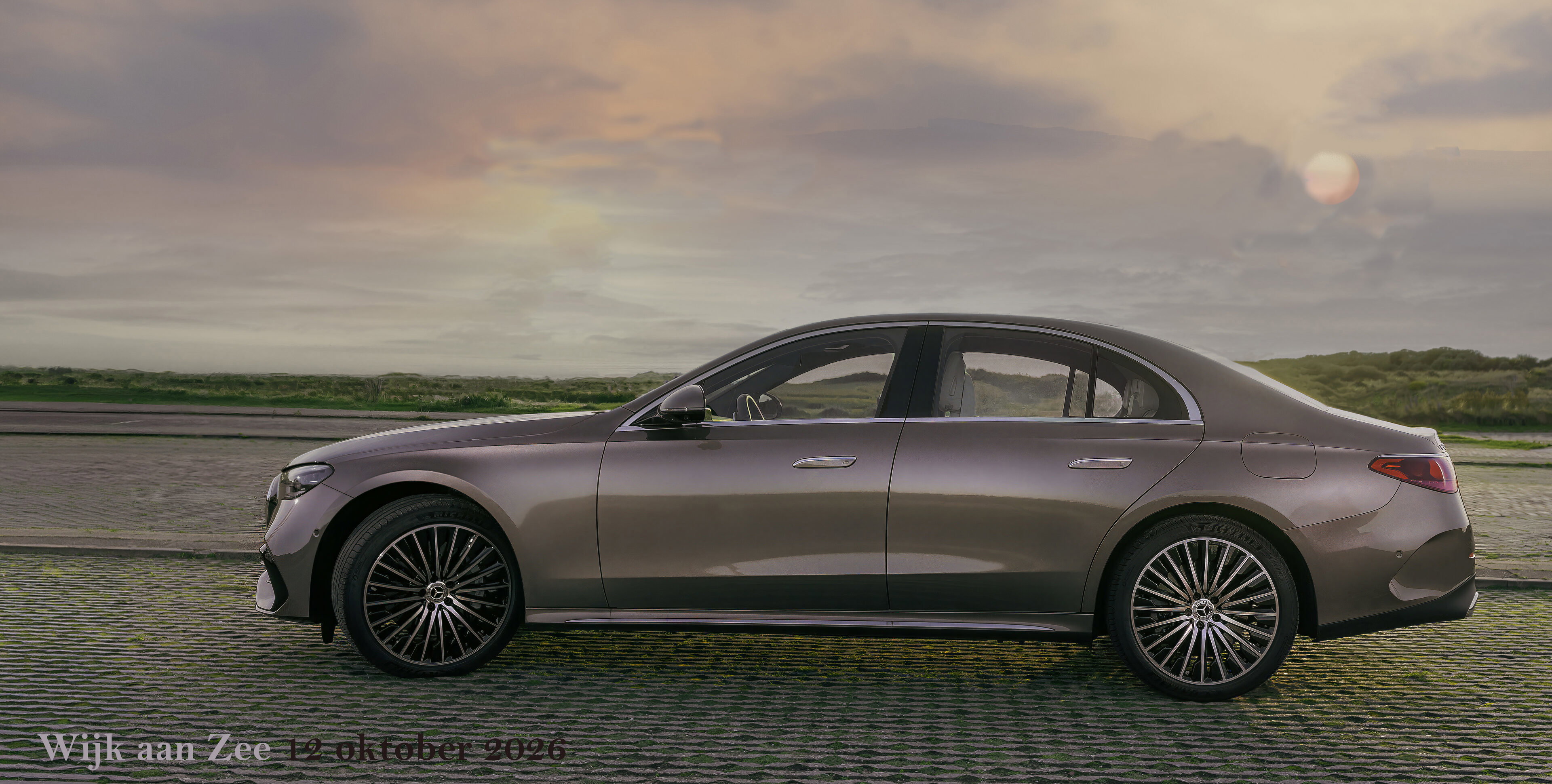
Mercedes flash compositing 1 - f/6.3, 1/50s, 100 ISO @ 35mm
The End Result: Enjoying the Process
It takes a lot of time, and as a beginner you will undoubtedly run into challenges. I am not yet a master like Frederik, but the result is absolutely worth it, in my opinion.
The car looks powerful, the light accentuates the model's flowing lines, and the atmosphere of Wijk aan Zee and the edge of the dunes leaps off the screen.
The most important lesson? Photography literally means ‘writing with light’. By trying this technique, you only really understand what light does to shapes and reflections.
And best of all, the time you put into it is pure relaxation and a great investment in your own skills!
About the author
My motto is: being a bit good is not good enough. I try to learn something new every day so I can do it better next time.
You might also like
-
 How to create reflections in Photoshop
by Michelle Peeters
-
 How much do Lightroom and Photoshop subscriptions really cost?
by Nando Harmsen
-
 Avoiding or removing reflections in glasses
by Michelle Peeters
-
 Editing photos without Lightroom or Photoshop
by Nando Harmsen
-
 Reduce reflections on a face with Photoshop
by Elja Trum
-
 Wanneer Lightroom en Photoshop niet meer samenwerken
by Nando Harmsen
0 comments
Be the first to share what you think!
Become a better photographer every week
A practical photography tip in your inbox every week.
38,943 photography enthusiasts already receive the tips! More about the weekly mail. Or keep up to date via  Facebook.

Elja Trum
Photofacts; everything to do with photography!
Would you like to take better photos and keep up with what is happening in photography? Photofacts publishes articles that teach you something about photography — from a product announcement to a practical shooting tip or a look at a website. Photofacts covers photography every day and is a hobby project of Elja Trum's that got out of hand. The articles are written by a team of volunteer authors. If you would enjoy writing one or more articles for Photofacts, do get in touch.More about PhotofactsPhotofacts is made possible in part by
