

Flash photography tip: Use colour filters for a special effect
Monday 17 March 2025, 16:09 by Elja Trum | 2,162 views | 0 commentsThis article was translated from Dutch with the help of AI. Read the original.
It can look good to give your background a different colour, such as blue. This often works well in combination with white or yellowish light.
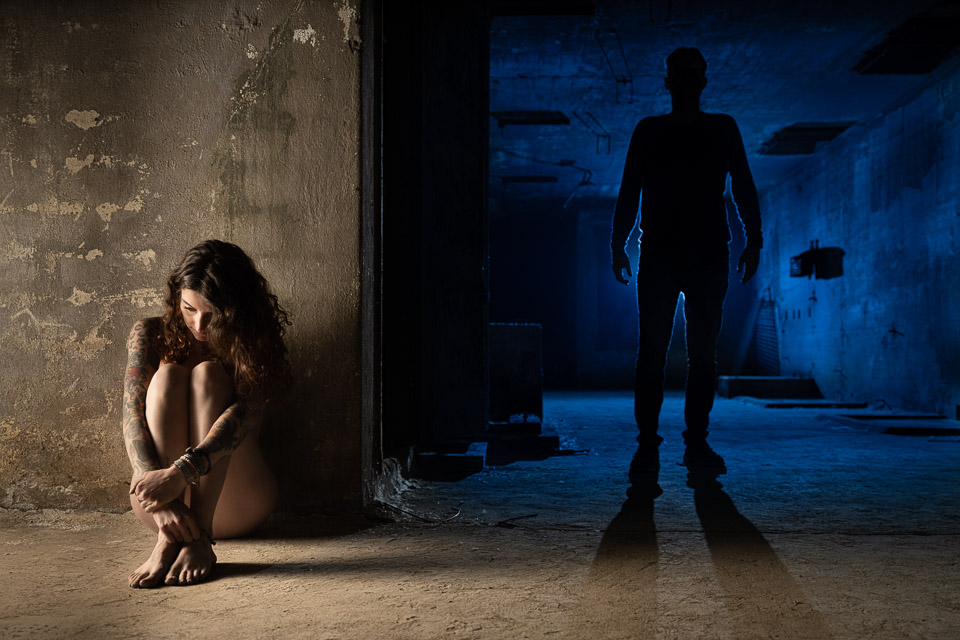
You can of course attach a blue colour filter to a flash and use it to light the background. However, that is not always very practical. If your background is very large, it may be impossible to light it completely with flashes.
A fun alternative is to attach an orange (CTO) colour filter to your main light instead. In other words, the flash you use to light your subject. By correcting for the yellow light using the white balance in your camera, or afterwards in editing, the background will automatically take on a blue colour.
Dit artikel is voor het laatst bijgewerkt op 17 maart 2025.
De eerste publicatiedatum is donderdag 24 oktober 2024, 15:51.
About the author
Elja Trum is the founder of Photofacts and online photography course website Photofacts Academy. He has been writing about photography since 2006. Elja is also the author of (Dutch) books on composition, black-and-white photography, flash photography and portrait photography.
You might also like
-
 Review: the Haida M10 filter system and Red Diamond filters
by Nando Harmsen
-
 Control reflections with a polarising filter
by Erik Nevels
-
 Review: Haida M10 Insert Variable ND filter
by Nando Harmsen
-
 7Artisans launches Handheld Split Diopter Filter
by Elja Trum
-
 Review: Haida variable ND filter with built-in polarisation
by Nando Harmsen
0 comments
Be the first to share what you think!
Have your say
Please note: Articles older than a week can only be commented on by signed-in visitors.Would you still like to comment? sign in or create a free account.
Become a better photographer every week
A practical photography tip in your inbox every week.
38,982 photography enthusiasts already receive the tips! More about the weekly mail. Or keep up to date via  Facebook.

Elja Trum
Photofacts; everything to do with photography!
Would you like to take better photos and keep up with what is happening in photography? Photofacts publishes articles that teach you something about photography — from a product announcement to a practical shooting tip or a look at a website. Photofacts covers photography every day and is a hobby project of Elja Trum's that got out of hand. The articles are written by a team of volunteer authors. If you would enjoy writing one or more articles for Photofacts, do get in touch.More about PhotofactsPhotofacts is made possible in part by
