

A critical note on the new landscape masks in Lightroom
Saturday 3 May 2025, 20:10 by Nando Harmsen | 3,836 views | 5 commentsThis article was translated from Dutch with the help of AI. Read the original.
The latest Lightroom update (spring 2025) has added landscape masks. Automatic masks are created based on the contents of your photo. They are not limited to landscapes. How useful are they?
Lightroom reads the photo and creates masks based on what it recognises in the photo. There are seven different objects that can be recognised. Think of it as a variation on the automatic masks for people.
People are often reasonably easy to recognise in a photo, just like hair, eyes, faces and so on. That is not always so obvious with a landscape. Atmospheric conditions in particular can blur the boundary between one thing and another.
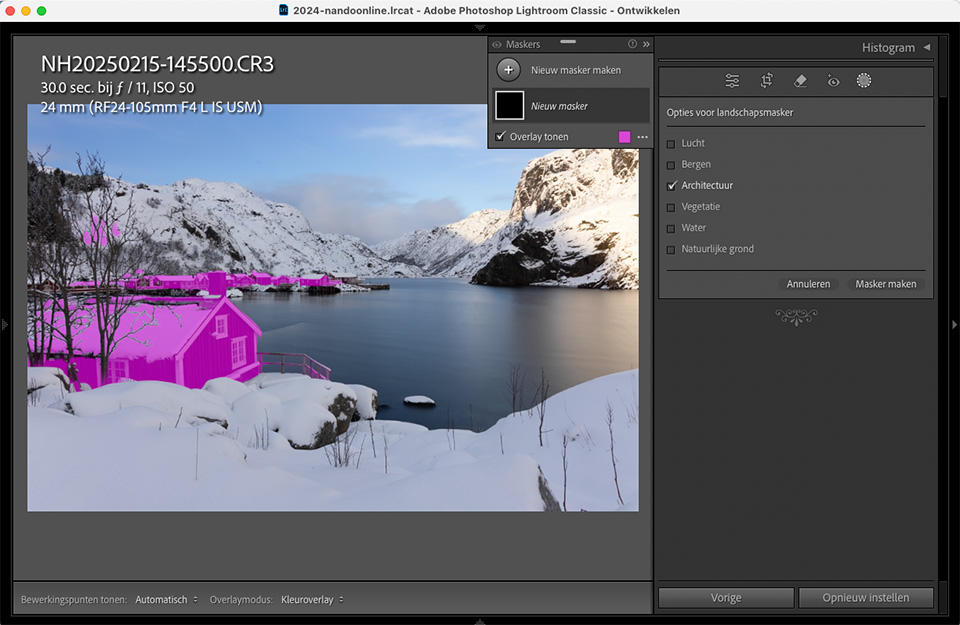
Not only do atmospheric conditions play a role in the difficulty of the selection. Telling the difference between different elements can be difficult because there is almost never a sharp dividing line.
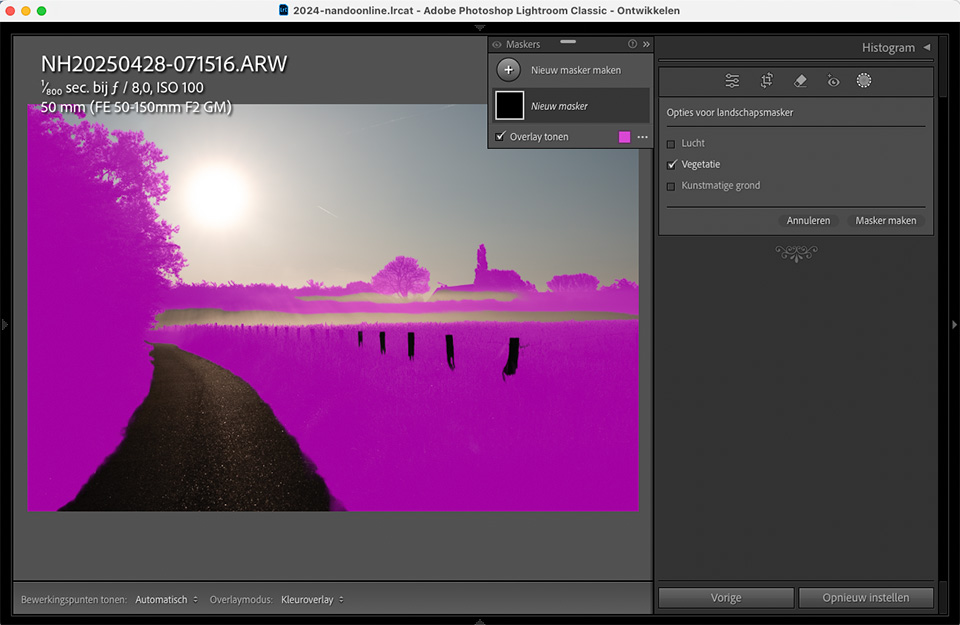
On the whole, the software produces an impressive result. Even in situations where I did not expect it to work well. However, it also often gets things wrong. Sometimes it even produces unusable results.
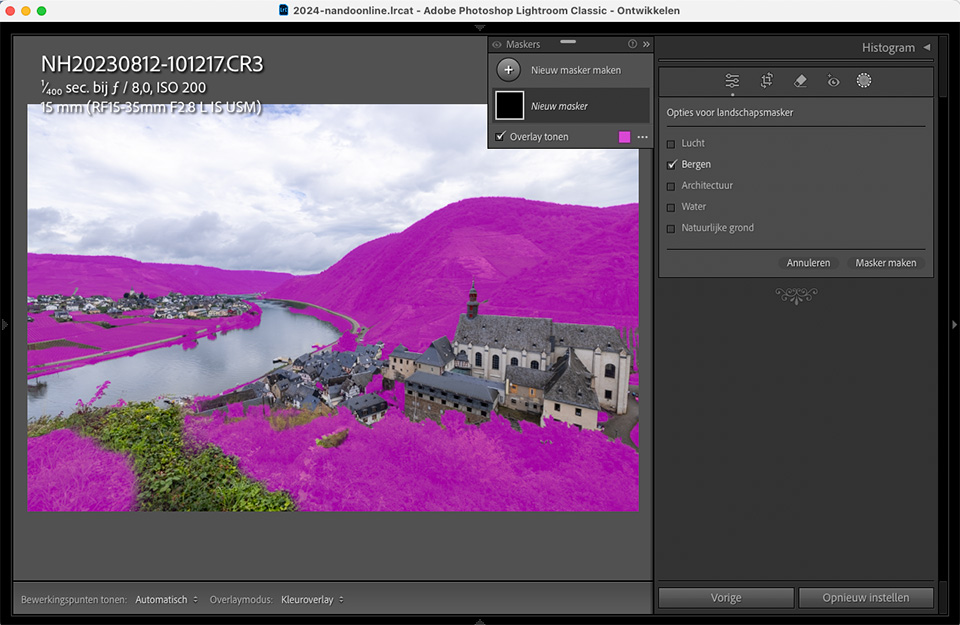
I have an example of a landscape with a river, mountains, buildings and some foreground vegetation. We can clearly see the difference between the mountains and the foreground vegetation. Lightroom has more trouble with it. Distinguishing between mountains and natural ground in particular proves difficult.
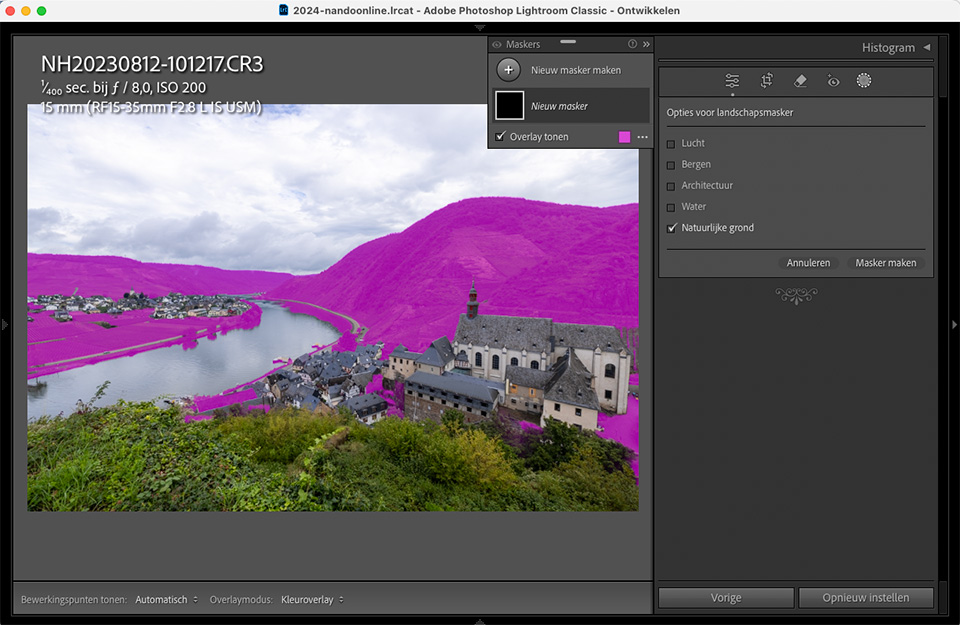
Ironically, if you look at the natural ground mask, the mountains are selected, along with the fields. In addition, the mountains and natural ground masks overlap considerably.
There is another aspect to take into account. The selections are often sharply outlined, resulting in abrupt transitions in the masks. In many cases, these are undesirable in landscapes. There is no clear dividing line.
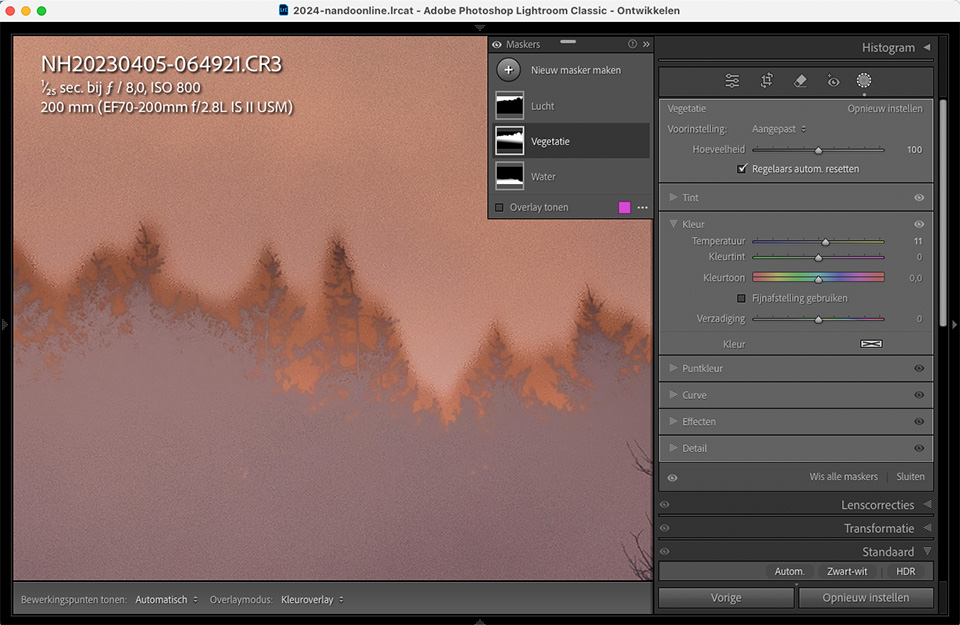
The sharp transitions create an unrealistic edit of the photo, which often becomes very clear with transitions from sky to vegetation. In addition, the transitions are rarely accurate enough, resulting in bleed.
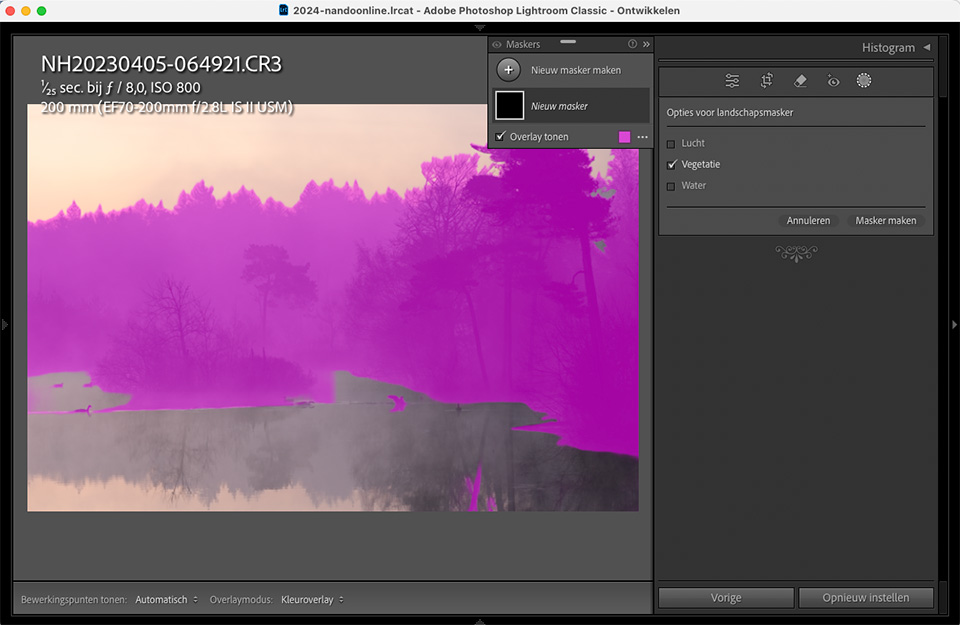
Of course, it is important to make the transitions very gradual. This produces much more realistic results. It is therefore important to adjust masks and correct them where necessary. Creating mask intersections is an effective tool for this.
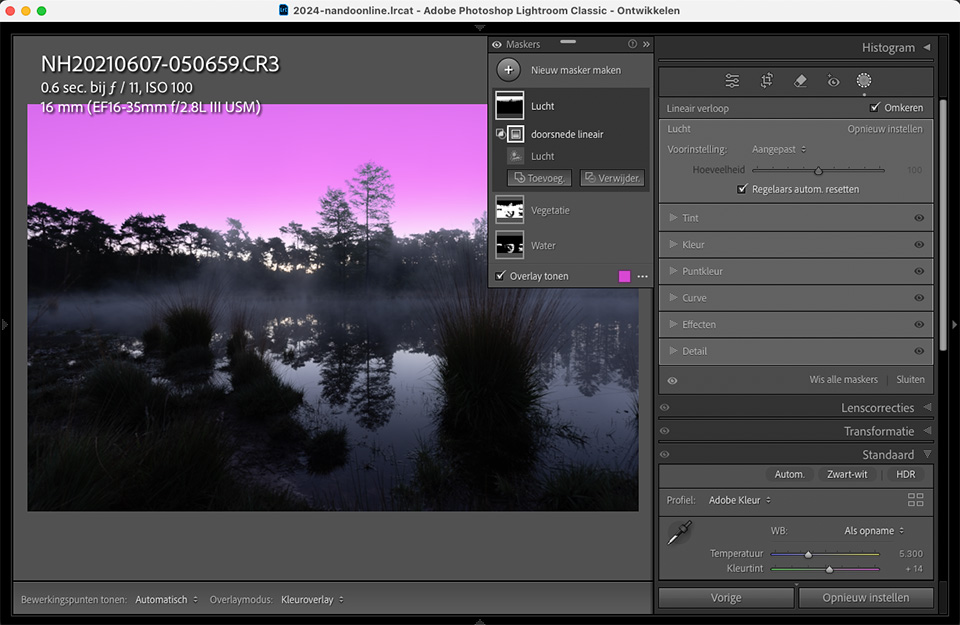
Bear in mind that the masks Lightroom creates for you can provide an excellent starting point in some cases. However, they are not finished, and adjusting the masks until they are correct will become very important in your workflow.
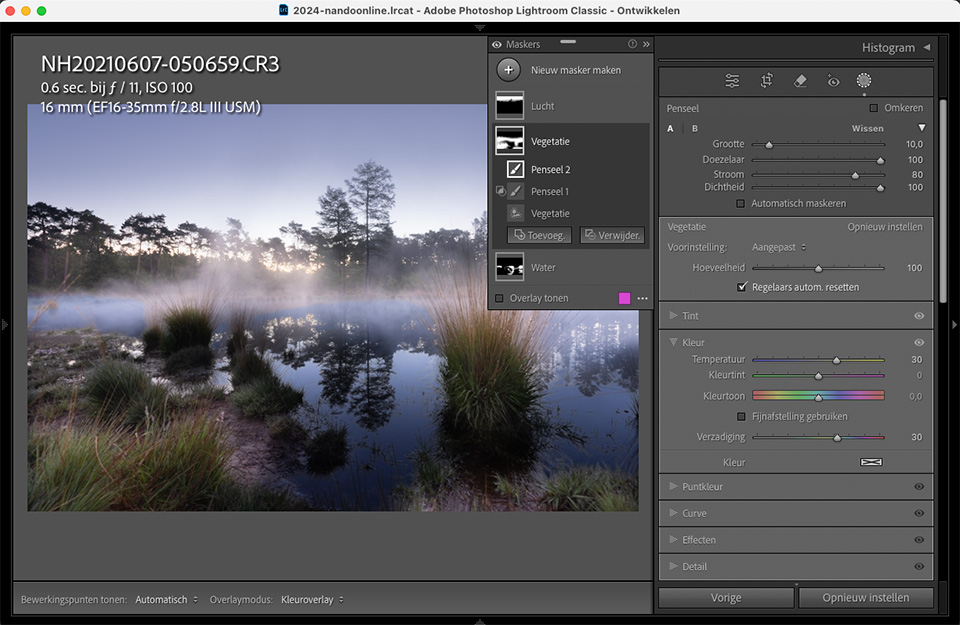
If you use the automatic landscape masks in your edit, make sure you correct and adjust them. However, be careful that you do not spend more time correcting them than the result is worth. If it takes too much time, a normal manually applied mask may have been much better.
What do you think of the new landscape masks in Lightroom, Lightroom Classic and Adobe Camera Raw? Have you used them yet, and if so, what do you think of them? Let us know in a comment below this post.
About the author
Nando Harmsen has been photographing for more than 40 years. He specialises in wedding photography and landscape photography. Nando also gives talks, workshops, masterclasses and photo trips, and regularly reviews new and interesting equipment.
You might also like
-
 Lightroom updates 2025, with more useful AI features
by Nando Harmsen
-
 Lightroom Classic 8.0 and Lightroom CC 2.0
by Michelle Peeters
-
 A new update for Lightroom Classic
by Nando Harmsen
-
 Adobe updates Lightroom (Classic) with new AI masks
by Elja Trum
-
 New update for Lightroom Classic enables AI noise reduction
by Nando Harmsen
-
 Lightroom update with generative AI
by Nando Harmsen
5 comments
-
 Donald Willemsen wrote on Saturday 3 May 2025 at 23:36 | reply
Adobe jumped on the AI bandwagon far too late and is now lagging behind compared to some other editing software that chose the path of AI much earlier. All those different automatic masks are based on AI models. Adobe is now trying to catch up on the backlog it has and is releasing updates too quickly that do not function properly yet.
Translated from Dutch.
If you have to correct a lot of things in those automatic masks, you lose a lot of time. The analysis of your photo by Adobe also takes quite some time, and you could have used that time to create a mask yourself of the part in the photo that you want to edit. After all, Adobe creates masks for all the elements in the photo during the analysis. -

 Nando
wrote on Monday 5 May 2025 at 13:40
| reply
Nando
wrote on Monday 5 May 2025 at 13:40
| reply
Why always that preachy finger about 'jumping in too late and lagging behind', and more of that sort of thing? If you don't like the software, or you find something that works better, then use that.
Translated from Dutch.
You turn it into a battle, as if the software has personally caused you suffering. It's simply software that either works to your satisfaction, or it doesn't. Accept that. It's not a competition.
Personally, I don't see any immediate added value in this new masking option. I'm giving ideas for dealing with it differently. That's all. -
Donald Willemsen wrote on Monday 5 May 2025 at 14:23 | reply
Nando, if I have a strongly held opinion, I am allowed to say (write) that. You are too. We live in a (still) fairly free Europe where freedom of speech (for now) still counts as a great good.
Translated from Dutch.
Likewise, you have every right to misinterpret my words.
My words have nothing, but absolutely nothing, to do with personal suffering. Let that be especially clear.
My criticism is not aimed at the software as such, but rather at Adobe's policies as a developer. -
 RAWshooter wrote on Tuesday 6 May 2025 at 11:15 | reply
This is not about Adobe or its competitors, but about the effects of AI. Every editing software maker that uses AI for masking is making a mistake and saddling its customers with an empty promise. It never works with the promised “one click”.
Translated from Dutch.
And it can't either, if you understand a little about what AI in photography entails. Nothing new is invented, existing functions are merely automated. Old wine in mouldy bags. -
 Ron wrote on Tuesday 6 May 2025 at 11:44 | reply
Donald apparently works at Adobe and has inside information at his disposal and knows how the company approaches the various software branches it has. To point out to a company that has already more than earned its stripes in the world of photo and video editing what it is doing wrong. To lecture condescendingly to a company that leads the way in the world of image, film and audio software that it is too late with the implementation of various AI modules.
Translated from Dutch.
Furthermore, everyone should do what he or she feels comfortable with. I swear by Adobe and advise: cobbler, stick to your last.
Have your say
Please note: Articles older than a week can only be commented on by signed-in visitors.Would you still like to comment? sign in or create a free account.
Become a better photographer every week
A practical photography tip in your inbox every week.
38,937 photography enthusiasts already receive the tips! More about the weekly mail. Or keep up to date via  Facebook.

Elja Trum
Photofacts; everything to do with photography!
Would you like to take better photos and keep up with what is happening in photography? Photofacts publishes articles that teach you something about photography — from a product announcement to a practical shooting tip or a look at a website. Photofacts covers photography every day and is a hobby project of Elja Trum's that got out of hand. The articles are written by a team of volunteer authors. If you would enjoy writing one or more articles for Photofacts, do get in touch.More about PhotofactsPhotofacts is made possible in part by
