

Lightroom update with generative AI
Wednesday 22 May 2024, 14:41 by Nando Harmsen | 6,293 views | 3 commentsThis article was translated from Dutch with the help of AI. Read the original.
Lightroom has received a new update. Alongside several improvements and new presets, the addition of generative AI is particularly interesting. It makes a trip to Photoshop much less necessary.
The new Lightroom update brings the generative AI function to this platform. It is hidden in the retouching tool. For now, it does have the status of 'early access'. However, it already offers a very useful way to remove unwanted elements from a photo.
The normal removal tool in Lightroom was very limited. Sometimes it was better to use the retouching tool itself. If things became complex, switching to Photoshop was necessary.
Removing image elements with the help of an AI engine works particularly well in Photoshop. I am not talking about the Firefly AI tools found in the Beta version.
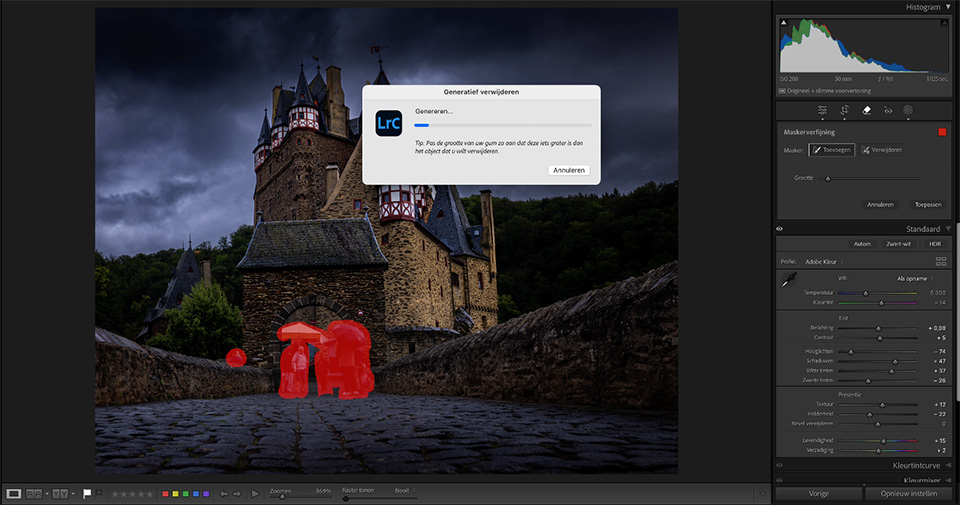
However, it is a lot of work to move every photo in which you want to remove image elements to Photoshop. It also creates extra files. With generative AI in Lightroom, this is no longer necessary.
It is very simple. You select the object you want to remove. Lightroom removes it and fills in the missing part with something that fits seamlessly into the photo. You get a choice of three possible options, and you can generate new options if you wish.
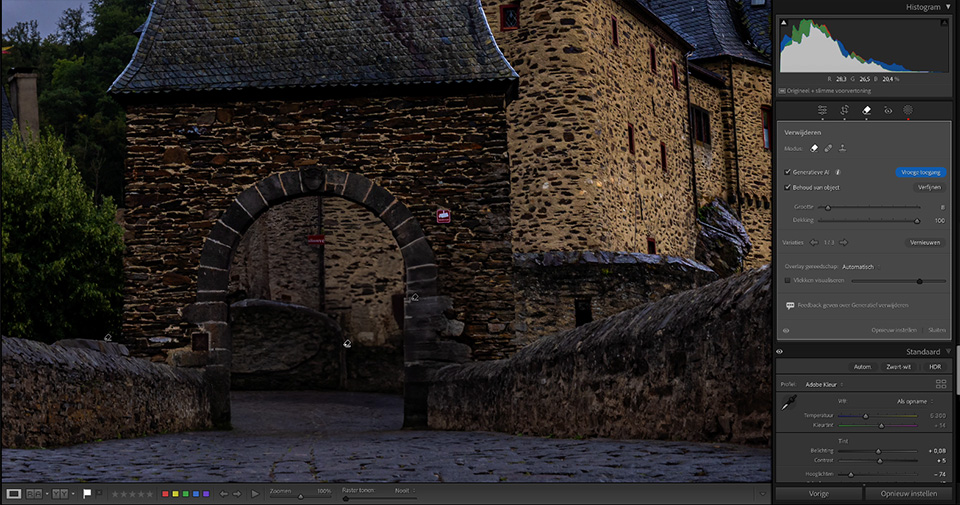
Once you have used this new tool and leave the retouching tool, you can no longer adjust it. However, it can be removed again because it is non-destructive. Your original file remains unchanged.
More changes have been made in the latest update. The Lens Blur option no longer has the label 'early access.' In addition, several adaptive presets have been added that use background blur through Lens Blur.
If you have not installed the new update yet, you can find it in the Creative Cloud app.
About the author
Nando Harmsen has been photographing for more than 40 years. He specialises in wedding photography and landscape photography. Nando also gives talks, workshops, masterclasses and photo trips, and regularly reviews new and interesting equipment.
You might also like
-
 Lightroom updates 2025, with more useful AI features
by Nando Harmsen
-
 A new update for Lightroom Classic
by Nando Harmsen
-
 Updates for LrC, LR and ACR
by Nando Harmsen
-
 New update for Lightroom Classic enables AI noise reduction
by Nando Harmsen
-
 The annual major update for Lightroom and Photoshop
by Nando Harmsen
-
 Adobe updates Lightroom (Classic) with new AI masks
by Elja Trum
3 comments
-
 Donald Willemsen wrote on Thursday 23 May 2024 at 10:29 | reply
That new addition is a blessing. Recently I was in Leuven to photograph the town hall, but without people in the photo. That is normally not doable. A second attempt with a 10-stop ND filter delivered a better result, but at 100% you could still see traces. To remove the traces you then spend quite a while. Not really fun either.
Translated from Dutch.
Now with those generative AI applications it has become a 'piece of cake.
I think a great many photographers welcome these new applications in Lightroom. -
 guest wrote on Tuesday 28 May 2024 at 11:55 | reply
Totally agree, what spectacular results I got! For some landscape photos I really wanted them without hikers. Beforehand I had removed them with the normal removal and retouching tool. It was more or less okay to have in a photo album at A4 size. But what an improvement after doing it again with that new gen.AI. Very happy with it
Translated from Dutch.
-

 Liesbeth Verkade wrote on Tuesday 28 May 2024 at 14:28
| reply
Liesbeth Verkade wrote on Tuesday 28 May 2024 at 14:28
| reply
Great addition! It really works amazingly well for removing distracting elements from a photo, such as a post or traffic sign that’s just in the wrong place. With the old tool I sometimes left it in because I couldn’t remove it properly and I’m not very handy in PS.
Translated from Dutch.
Have your say
Please note: Articles older than a week can only be commented on by signed-in visitors.Would you still like to comment? sign in or create a free account.
Become a better photographer every week
A practical photography tip in your inbox every week.
38,886 photography enthusiasts already receive the tips! More about the weekly mail. Or keep up to date via  Facebook.

Elja Trum
Photofacts; everything to do with photography!
Would you like to take better photos and keep up with what is happening in photography? Photofacts publishes articles that teach you something about photography — from a product announcement to a practical shooting tip or a look at a website. Photofacts covers photography every day and is a hobby project of Elja Trum's that got out of hand. The articles are written by a team of volunteer authors. If you would enjoy writing one or more articles for Photofacts, do get in touch.More about PhotofactsPhotofacts is made possible in part by
