

Look at your own photos with fresh eyes in Lightroom
Monday 9 November 2020, 20:40 by Frédéric Paulussen | 6,331 views | 6 commentsThis article was translated from Dutch with the help of AI. Read the original.
A week after exporting your photos in Lightroom, it's time to post them on Instagram. Only, that one photo you worked on for hours suddenly looks awful. How do you prevent that?
We all know it: we edit a photo and are happy with it, but come back to it later and see that it really isn't what we wanted.
More experienced photographers know by now that they need to pause regularly and look at their photos again with fresh eyes. In this article, I'd like to explain a few techniques that can help you do that.
Lights Out in Lightroom
This is by far my favourite technique for looking at edited photos in a different situation for a moment. Pressing 'L' on your keyboard makes the modules around your photo darker. Pressing it twice makes everything black.
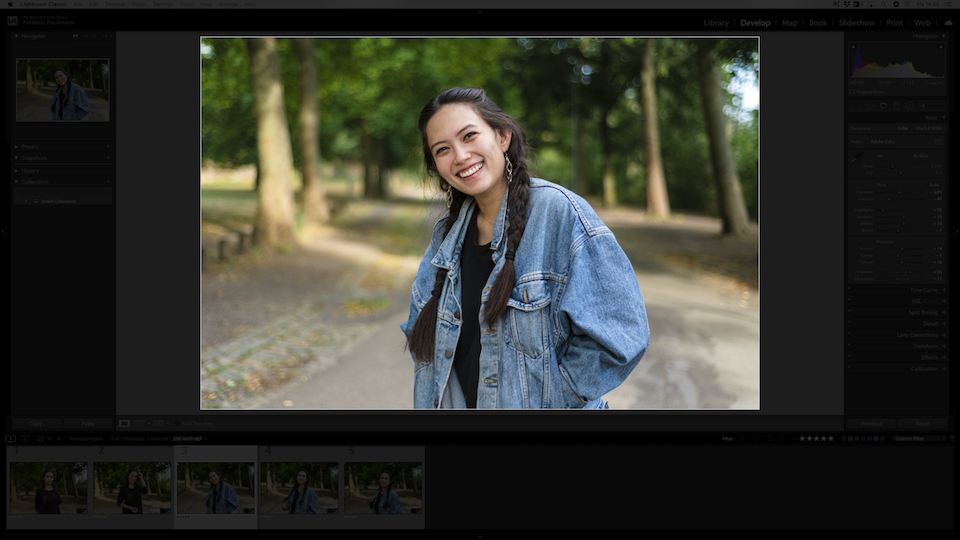
This lets you really look at your photo for a moment, without all the modules around it distracting you
Change the ratio
A second technique I regularly use is adjusting the ratios. You do this in the top left, in the navigator. I usually edit photos in 'Fit'. This lets me see the photo at the largest size my screen allows, without losing the overview of the whole image.
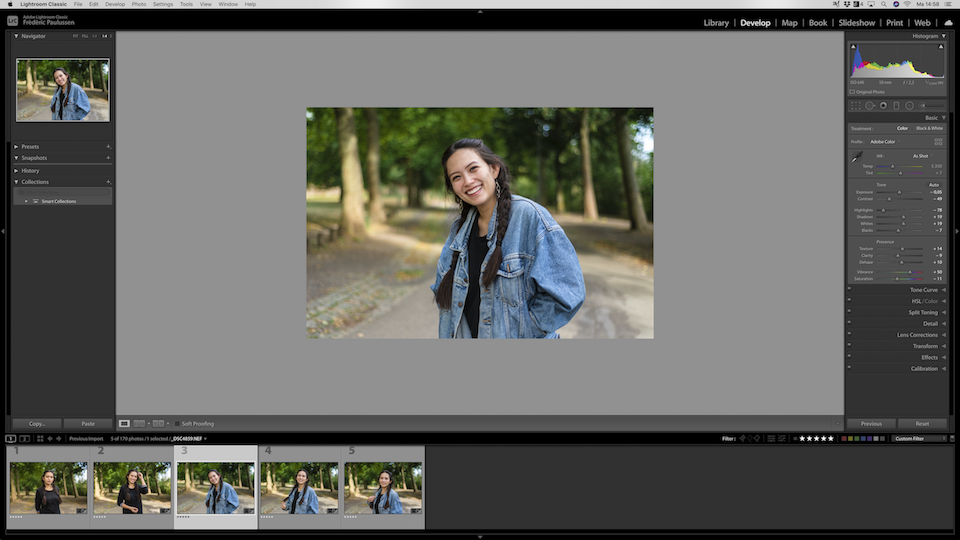
But sometimes you become fixated on details that don't matter. Try making the photo smaller. I usually go to 1:4, but also dare to go to 1:8. These dimensions do depend on your screen, so depending on its size you can go smaller or larger.
A similar technique: put all the photos in the overview so you can look at them as a kind of contact sheet (analogue photographers know what's up).
'Squinting'
A little Flemish word. Squinting means narrowing your eyes tightly. It's what you do when there is a lot of sun in your eyes, or when you've lost your glasses and try to look around for where you left them.
But what squinting does when you look at your photos is quite interesting. It helps you judge the contrast better and will enlarge distracting details. When 'squinting', only your subject should really stand out from the photo.
Move away from your screen
After editing your photos, it's best to do something else for a while before pressing the export button. Go and have lunch or take a short walk. Let your eyes rest and look at other things for a while.
When you come back, you'll notice that you can look at the photo with fresh eyes again.
Before/after
Sometimes you've been working on a photo for so long that you almost forget where you actually came
from. Putting the before and after images next to each other for a moment can help.
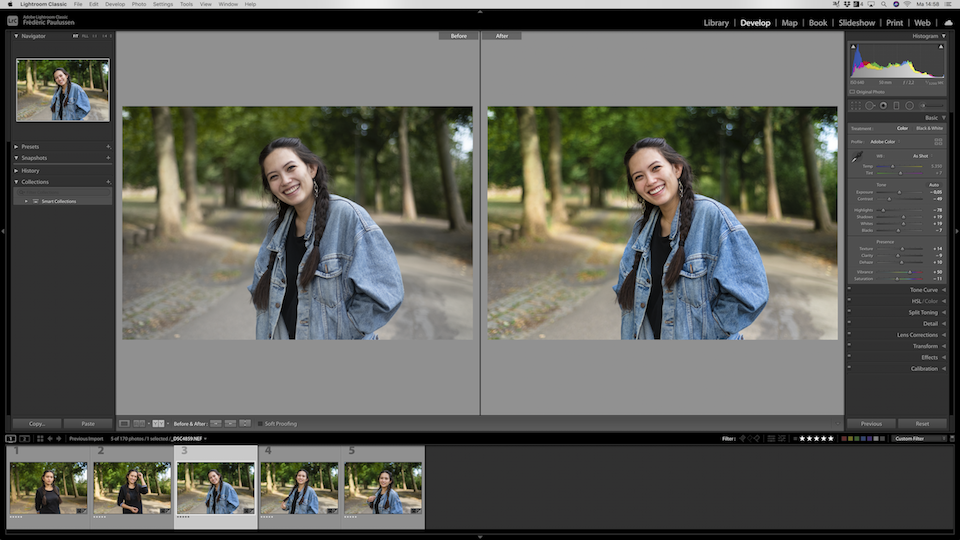
You may then discover that, for example, you've gone too far with some edits. Or that you were actually still too cautious with the sliders and can safely go a bit further.
Rotate or flip the photo
Whether you rotate it 180* degrees or simply flip it horizontally and vertically doesn't matter that much. But especially with landscape and architectural photography, it can help to look at your photo differently.
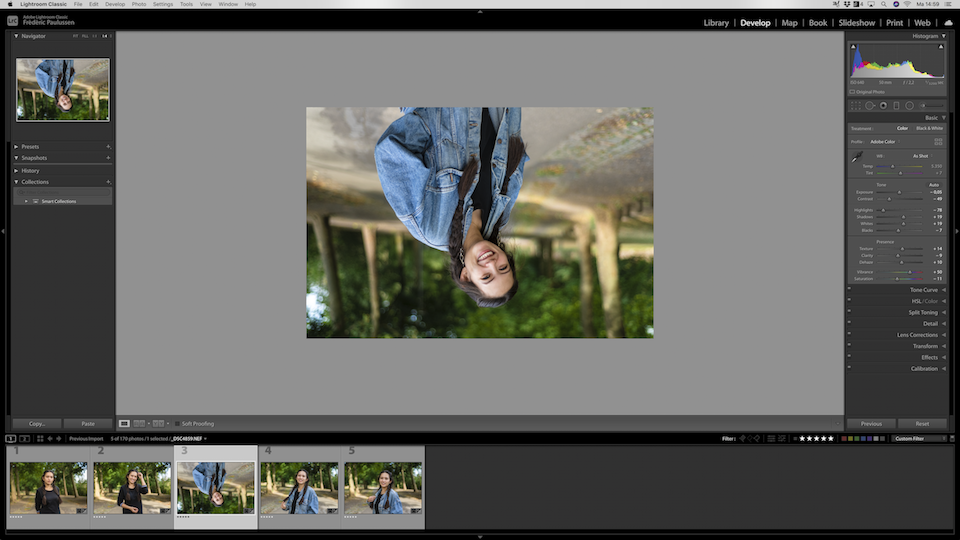
The context is temporarily gone, so you can check whether the lines and colours are completely right.
Leave your photos alone for a while.
Even after all these techniques, I leave my Lightroom catalogue alone for a while after editing. At least half a day, but longer if the deadline allows it. This lets you look at your photos with truly fresh eyes.
The techniques above are very useful for checking colours, tones and composition. But each technique focuses on one or two elements. By stepping away from your catalogue for a while and coming back later, you look at the photos all over again.
A few extra tips
It is of course also important to know your equipment. In this case, your monitor. Good calibration can be important, but even then it is important to regularly check what your photos look like on other monitors.
Because the person looking at your photos probably won't have a calibrated monitor. They may even have 'eye comfort' switched on.
It is also important to give your eyes enough rest. Step away from your screen if you've been sitting behind it for a long time, even if your photos aren't finished yet. With tired eyes, you'll only have to redo a lot of work later.
Let us know in the comments what your favourite techniques are for looking at your photos with fresh eyes!
About the author
Als bedrijfsfotograaf bij Fredography focust Frederic zich op portretten en reportages. Daarnaast heeft hij ook een passie voor workflows, social media, en smartphone fotografie.
You might also like
-
 The new updates for Adobe Lightroom and Photoshop
by Nando Harmsen
-
 Adobe updates Lightroom (Classic) with new AI masks
by Elja Trum
-
 Lightroom Tip: Back Up More Than Just Your Photos and Catalogue
by Huub Keulers
-
 Keyword Exporter Lightroom plug-in, the story behind it
by Dick Holtman
-
 Using Lightroom Without a Catalogue
by Nando Harmsen

6 comments
-
 Rob wrote on Tuesday 10 November 2020 at 14:17 | reply
Maybe also useful to mention what the best Istagram jpg photo format is (export from Lr, upload to Istagram):
Translated from Dutch.
1080px by 1080px (square)
1080px by 1350px (portrait)
1080px by 608px (Landscape). -

 Frederic Paulussen
wrote on Tuesday 10 November 2020 at 15:13
| reply
Frederic Paulussen
wrote on Tuesday 10 November 2020 at 15:13
| reply
Hey Rob
Translated from Dutch.
Thanks for posting it here too
Especially with portrait I think we still too often forget that Instagram uses a different ratio (5:4). -
 Gerard wrote on Wednesday 11 November 2020 at 13:39 | reply
I think it’s great to read this kind of similar explanation. Sometimes you don’t understand it or don’t see it.
Translated from Dutch.
Add an example sometime of how you, for example, perform that pieren before and after. What do you notice then. Or what do you see differently in the photo you’re working on when you flip it. What triggers you then as to why the photo still needs something to be edited. -
Frederic Paulussen
wrote on Wednesday 11 November 2020 at 13:59
| reply
Hey Gerard
Translated from Dutch.
Squinting is of course difficult to show because it is something you do with your eyes. In English it's called 'squinting' if that helps.
What it does is increase the contrast, making some elements (often in the background) suddenly stand out more or less. If they stand out more, you know that they are still a subtle distraction in the background.
You can then take appropriate action. For example, make those elements a bit lighter or darker or even just photoshop them out completely. -
 Jean Paul WItteman wrote on Friday 13 November 2020 at 14:52 | reply
Hello, I sometimes post a photo on fb that only I myself can see. Can I quickly check how it comes across
Translated from Dutch.
-
Frederic Paulussen
wrote on Friday 13 November 2020 at 15:43
| reply
Hey Jean Paul
Translated from Dutch.
That’s a really great tip! That indeed helps to see the photo in its final context.
Have your say
Please note: Articles older than a week can only be commented on by signed-in visitors.Would you still like to comment? sign in or create a free account.
Become a better photographer every week
A practical photography tip in your inbox every week.
38,937 photography enthusiasts already receive the tips! More about the weekly mail. Or keep up to date via  Facebook.

Elja Trum
Photofacts; everything to do with photography!
Would you like to take better photos and keep up with what is happening in photography? Photofacts publishes articles that teach you something about photography — from a product announcement to a practical shooting tip or a look at a website. Photofacts covers photography every day and is a hobby project of Elja Trum's that got out of hand. The articles are written by a team of volunteer authors. If you would enjoy writing one or more articles for Photofacts, do get in touch.More about PhotofactsPhotofacts is made possible in part by
