

The best affordable computer for photo editing is an Apple
Monday 23 February 2026, 16:08 by Elja Trum | 5,017 views | 31 commentsThis article was translated from Dutch with the help of AI. Read the original.
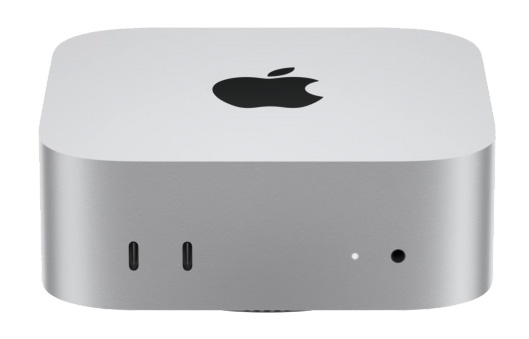
Apple computers are known for being expensive. Surprisingly, I think the best affordable computer for editing your photos right now is an Apple Mac Mini. You can get one for just over 600 euros.
Why the Mac Mini is so suitable for photographers
Apple's M4 processor is incredibly fast. You notice this very clearly when editing photos in, for example, Lightroom Classic.
I have had a 100-megapixel medium-format camera for a little while now. The images it produces are fantastic, but also extremely large. More than 200 megabytes per photo.
On my Windows computer, with 64 gigabytes of RAM and a 3060 graphics card, I notice that the computer struggles with it. I have had to adjust my workflow: remove spots first, then make other adjustments. Otherwise, it becomes annoyingly slow.
On the Mac Mini I have at the office, Lightroom Classic flies through the files. Even when I simply make other edits before removing spots. It really is a night-and-day difference.
Extra costs with the Mac MiniIn practice, you are not quite done with that 600 euros, by the way. You obviously need a monitor too. I would not buy that from Apple, incidentally. But perhaps you already have a decent monitor.
The same applies to a keyboard and mouse, or graphics tablet. Those are not included either. You probably have a mouse and keyboard lying around that you can use perfectly well. You will need a USB-C to USB-A hub, though.
You will also need extra storage. This cheapest Mac Mini only comes with 256 gigabytes of storage. That is not enough for us photographers. Unfortunately, more storage is very expensive from Apple.
An alternative is a handy docking station that you can easily connect to your Mac Mini. You can put an extra M.2 NVMe SSD drive in it, up to 8 terabytes, and it immediately gives you many extra connections that you will probably find useful.
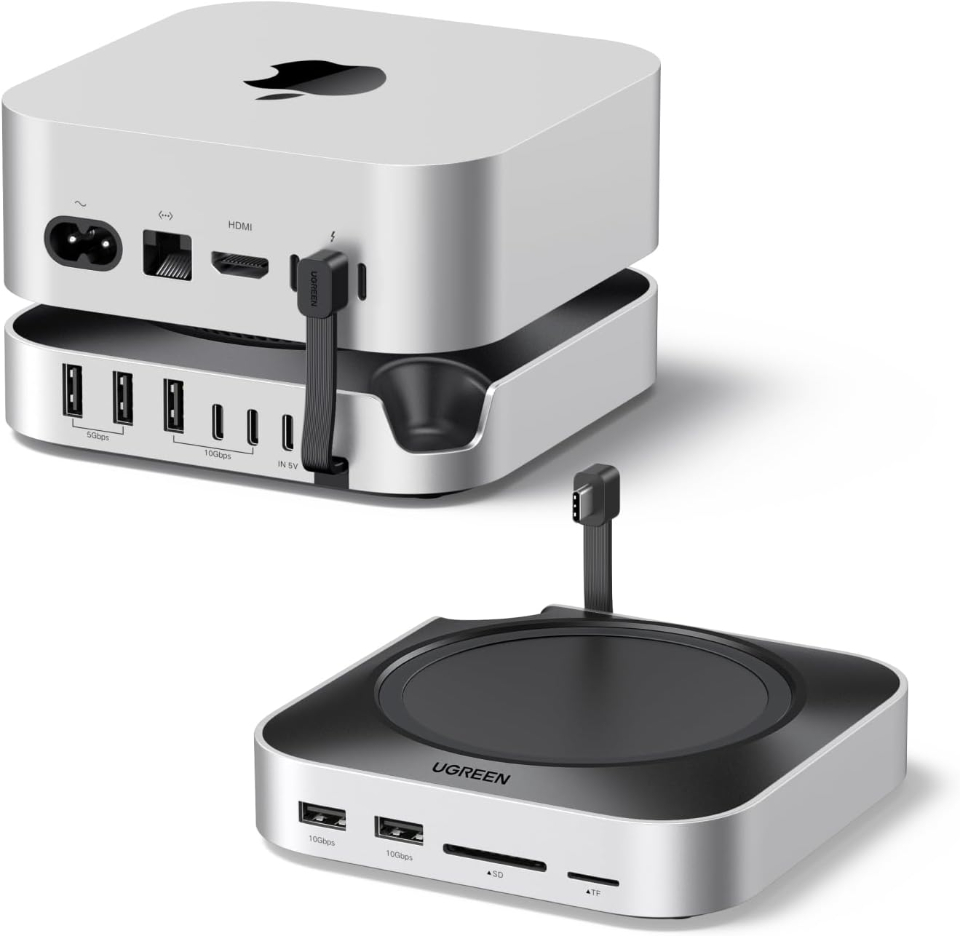
When I buy computer equipment, I usually go for the cheapest supplier. You can easily find one through the Tweakers Pricewatch. At the time of writing, you can get a Mac Mini for 620 euros.
So, in my view, the Apple Mac Mini is a smart purchase for photographers. Including the hub I mentioned above, you pay just under 700 euros. Especially if you still have extra peripherals, such as a monitor, mouse, keyboard and perhaps external storage, from your current setup, it is quite a bargain.
What do you think is currently the best computer for photographers? And at what price? Let us know in the comments.
About the author
Elja Trum is the founder of Photofacts and online photography course website Photofacts Academy. He has been writing about photography since 2006. Elja is also the author of (Dutch) books on composition, black-and-white photography, flash photography and portrait photography.
You might also like
-
 Switching to the Mac Studio or not? Part 2
by Nando Harmsen
-
Switching to the Mac Studio or not? Part 1
by Nando Harmsen
-
Switching to the Mac Studio or not? Part 3 - the decision
by Nando Harmsen
-
 Editing photos with the Apple Vision Pro
by Elja Trum
-
 Apple announces iPhone 11 Pro
by Elja Trum

31 comments
-
 Martin Verbruggen wrote on Tuesday 24 February 2026 at 10:26 | reply
Sounds like a great choice. Without a screen and keyboard, what in your opinion is the ideal configuration and approximately how much would that cost? Is the SSD drive you mention also from Apple?
Translated from Dutch. -

 Elja Trum
wrote on Tuesday 24 February 2026 at 12:16
| reply
Elja Trum
wrote on Tuesday 24 February 2026 at 12:16
| reply
Ah yeah, it of course depends on what you want yourself. A higher-spec version is always nice, but especially with that base version you get an incredible amount of speed and quality for the money. If you expand at Apple itself, it quickly gets expensive.
Translated from Dutch.
For example, if you upgrade your Mac Mini from 256 GB to 1 TB, you simply pay 500 euros extra. If you buy a separate 2 TB SSD for in such a docking station, you pay 250 euros for it. That's quite a difference.
The built-in SSD will be faster, but for your photo storage an external one like that is perfectly fine. For 400 euros you have a 4 TB M.2 MVNe SSD. So instead of 1 TB you then have 4.25 TB, including a docking station like that. -
 Lieve wrote on Tuesday 24 February 2026 at 12:05 | reply
I am about to make a new purchase and I would actually like more in-depth info on this subject, also about combining it with the docking station.
Translated from Dutch. -
-
 gerard@terpstraa.nl wrote on Tuesday 24 February 2026 at 12:31 | reply
Good morning Elja, can this choice also be combined with an Eizo monitor . At the moment I also work with a reasonably fast 64-bit Windows PC, but I indeed notice that edits often don't work well together. Another question: Apple is somewhat different from a PC ... is that quick to learn ? I work with a large-format printer and ICC profiles, that doesn't cause any problems I assume ? Regards, Gerard
Translated from Dutch. -
Elja Trum
wrote on Tuesday 24 February 2026 at 15:14
| reply
Works fine with an Eizo screen. In principle, the printer shouldn't be a problem either, but it's smart to check that beforehand. Older printers can sometimes be a problem.
Translated from Dutch.
Mac OS takes some getting used to. Basically, the same things are possible and many programs are available for both systems. I use both systems and both have their pros and cons. -
 Thierry Declerck wrote on Tuesday 24 February 2026 at 13:07 | reply
Hello Elja. I am very satisfied with this post, because I am about to buy a new computer. Of course there is a lot to see and read on the internet, but still it is not that simple. I have read that the Mac mini 4 only has 16GB of RAM. Is this enough for editing in Lightroom and Photoshop.
Translated from Dutch. -
Elja Trum
wrote on Tuesday 24 February 2026 at 13:29
| reply
Yes, that's enough. If you fall short, the computer simply continues with the (fast) internal SSD drive as extra memory. In practice, you don't notice anything, in my experience.
Translated from Dutch.
If your budget allows it, it's always nice to have more, but as I indicated earlier, with Apple that does come at a hefty extra cost. -
 Henri
wrote on Tuesday 24 February 2026 at 13:10
| reply
Henri
wrote on Tuesday 24 February 2026 at 13:10
| reply
Hello Elja,
Translated from Dutch.
Last August I switched from Windows (10) to a Mac Studio M4.
It is a fact that the Mac is MUCH faster in Photoshop/ARC than Windows, but I still have some reservations about it;
After 30 years of Windows (Starting with Windows '95 with Photoshop 4), it takes a lot of getting used to MacOS.
And in some respects MacOS is downright inferior to Windows. In particular, the "Finder" is a rudimentary contraption that is barely workable. Just try quickly to 'cut and paste' a file to another folder or from one external SSD to another: hopeless! You only get the choice "move to bin". There is not much more to choose from.
You simply miss the layout with the folder on the left and its contents on the right, so you can then easily move things by dragging or cutting & pasting. You really need to have several "Finder" windows open at the same time to be able to work with it at all.
I also regularly get lost in the "Finder".
When you have a Back-up on a NAS, you obviously work with folders that have the same name on multiple drives. The "Finder" often shows no info about the root of the folder, so you don't know whether you are in the folder on your Mac or in the folder with the same name on the NAS, or in the Back-up on the second external SSD.
I also expected not to have to deal with crashes and such anymore on a Mac: after all, Apple knows which components are in their hardware and so they can test everything extensively?
Well, I have news: I still have crashes and other problems every week.....
Also, for example, selecting text in Apple's version of 'notepad' is a disaster. Sometimes nothing happens when you try to select text and you have to 'position' several times to select a piece of text. I often run into this because I first type the titles that I am going to use in Bridge for my photos into Note to check for spelling errors. I have already tried several mice, unfortunately without success.
And I have a whole list of other annoyances, but I will spare you those: these are the worst.
As for the speed of the PC, despite the ample 64GB of RAM: I have had that experience too. Much too late I found out that the PC is much faster with 2 sticks of 32GB on the motherboard than with 4 sticks of 16GB. Apparently it is a technical problem with how Windows handles working memory. I removed 2 sticks and my PC is now faster with 32GB of working memory than with the 64GB that was in it before..... -
Elja Trum
wrote on Tuesday 24 February 2026 at 15:19
| reply
Ah yes, relatable. I don't find Finder as convenient to use as Windows Explorer either (there are alternatives to Finder available). And for the standard notepad, you can indeed also do better by looking for an alternative (I use Sublime Text, but there are thousands of them).
Translated from Dutch.
I've been using both operating systems alongside each other for years and both have their pros and cons. -
 PvRFotografie
wrote on Wednesday 25 February 2026 at 10:14
| reply
PvRFotografie
wrote on Wednesday 25 February 2026 at 10:14
| reply
@henry Perhaps I am misinterpreting your comment "The "Finder" often doesn't show any info about the root of the folder" but in Finder you can make this visible via 'VIEW'->'SHOW(of) HIDE PATHBAR'.
Translated from Dutch.
You will then see at the bottom of the folder (for example): Macintosh HD>Users>(name)>Downloads -
 Ada wrote on Tuesday 24 February 2026 at 13:13 | reply
I am also faced with choosing a new PC, but my preference is for a Windows system. I have worked with Apple, but it was never my preference. Which criteria are important/decisive for a PC suitable for photo editing, Photoshop/Lightroom, storage space, graphics card, etc. ? I am a hobby photographer, creative image editor, without a bulky camera and with a limited budget. I would love to hear from you!
Translated from Dutch. -
 Maarten wrote on Tuesday 24 February 2026 at 13:40 | reply
I myself have been using a MacMini M4 since November last year as a successor to my iMac. The 16 GB of memory is more than sufficient for photo editing, probably in the longer term as well. For storage I went with 512 GB, also because a lot of old junk had to be transferred from my previous Mac. I moved my photo libraries to a 2TB SSD drive/card (Samsung) that found a home in a hub from Satechi that fits nicely under the Mac Mini and suits me very well, partly because of the additional connection options (SD cards, etc.). Quite a bit of weighing and considering preceded the purchase in order to find the most ideal combination of components. I bought the hub on sale and found the 2TB via Tweakers.
Translated from Dutch. -
 Dick de Roos wrote on Tuesday 24 February 2026 at 14:16 | reply
Interesting discussion.
Translated from Dutch.
I have always worked with Windows at work.
At home I have always had an Apple (and still do).
My laptop (Macbook Air) is now 8 years old and my iMac is nine years old. I do sometimes look at the Mac mini and the Mac Studio (which is more expensive), but the current computers still work perfectly.
I work a lot with Photoshop (Adobe Creative Cloud), Affinity Photo 2 and also do a lot of video editing (regularly demanding tasks, such as multicam etc.) and the usual everyday computer work.
Crashes on my Mac are unknown to me.
I can imagine that working with the "Finder" is different from working with "File Explorer". Many actions on a Mac are just slightly different from those in Windows.
I used to give people switching over the advice: "Forget Windows, then getting used to it will go faster".
Incidentally, nobody has to "switch" because of me.
Finally: if you have bought a Mac and have questions about things related to working with it, you can always turn to forums, such as https://www.macfreak.nl.
Finally: If you are considering another computer, choosing a good-quality monitor is also not easy in terms of price. It is not for nothing that I am so attached to my 27" iMac.
Furthermore, I wish everyone much wisdom in choosing and lots of enjoyment with their new purchase. -
 Jan ten Kate wrote on Tuesday 24 February 2026 at 14:34 | reply
I also find Finder a piece of junk. I've been using Commander One for file management for years. You don't have any of the problems with Finder you mentioned with Commander One. Affordable and effective.
Translated from Dutch. -
 Bart wrote on Tuesday 24 February 2026 at 14:35 | reply
Dear Henri, it's annoying that you get lost in Finder. I can imagine it, but getting lost really isn't necessary. There are -many- handy keyboard shortcuts with which you can perform a lot of tasks. Dragging and dropping is perfectly doable in MacOS. But with a mouse, not a trackpad. And it takes a while to get used to it after 30 years. For me it's the other way around: I've been working with Apple for years and for some time now professionally with a Windows PC. What a nightmare that is! Nothing to be found, handy Apple things don't exist, constant notifications about Windows updates and apps that only start working after trying for a long time. Crashes on a Mac are rare for me and only occur with apps that have been translated for MacOS. Perhaps something went wrong during the installation?
Translated from Dutch.
I have a Macmini with an M2 processor and 16 GB of internal memory. LRC works perfectly on it. -
 Donald Willemsen wrote on Tuesday 24 February 2026 at 15:01 | reply
Why buy an Apple when you can't change anything about it afterwards? Apple works with fixed configurations that you can't change yourself anymore. I certainly don't want to claim that Apple is bad, but I still prefer to build my own PC. You can then make it as expensive as you want.
Translated from Dutch. -
Elja Trum
wrote on Tuesday 24 February 2026 at 15:12
| reply
Of course, you can do whatever you find most comfortable.
Translated from Dutch.
My point is mainly that the entry-level Mac Mini is surprisingly cheap and good. Indeed, expanding it afterwards is very difficult (and will mainly have to be external), but that is also rarely necessary.
I also build my own Windows PC. I always put a lot of time and effort into that. That's why it stood out to me even more how this affordable Mac Mini completely outclasses my (3-year-old) Windows home computer from back then, which cost around 2,000 euros. -
guest wrote on Tuesday 24 February 2026 at 16:27 | reply
I don't have a Mac myself, but I do have an Iphone and Ipad.
Translated from Dutch.
What is not unimportant is the difference in service between Apple and Microsoft. The latter is no longer what it used to be and you can no longer raise problems by phone. Fortunately, you still can with Apple and they help where necessary remotely. For me, this would be a reason to switch to a Mac, and then just take the 'unfamiliar little things' as mentioned by others for granted. -
 Jack Veraart wrote on Tuesday 24 February 2026 at 16:41 | reply
I have just retired. I have more time to photograph again. I am saving up for a new computer. I am happy with the tips. In the analogue era, I attended photography school. I had a darkroom and, if I may say so myself, I was good at developing and printing photos. I have also taught photography courses in the past. In the digital onslaught, I still feel like a 'rookie'. Thank you! Tips are welcome
Translated from Dutch. -
 Annette wrote on Tuesday 24 February 2026 at 17:26 | reply
Hi Ilja, just like Ada, I would also like to buy a new Windows desktop and I am curious about the required specs.
Translated from Dutch.
But your comment about 2 systems side by side and the price of 600 also really appeals to me. Seems ideal to me to use the Apple only for photography and avoid all the Apple annoyances for other things by simply continuing to do the rest on my Windows computer ( which is still perfectly suitable for that). Can you also connect 2 computers to a Dell monitor and can you use one wireless keyboard and mouse on 2 systems or do you really have to set everything up completely and -
Lieve wrote on Tuesday 24 February 2026 at 17:45 | reply
Is this docking station a single 8TB SSD, or can you connect multiple drives to it and, for example, include a backup drive in the setup?
Translated from Dutch.
I also currently have an Apple mini (Intel version) and unfortunately can't expand the RAM, which means I don't have access to the latest versions of LR and it's also painfully slow.
I've also thought about switching to Windows because you can expand the RAM there, but when I read the comments, Apple still seems to be THE best choice. So yes, it remains difficult. -
Bart wrote on Tuesday 24 February 2026 at 17:51 | reply
And that's how it is. And not to forget (and that's been the case for years): Apple works, always. In an exceptional case, restart your Mac. macOS is an official clone of Unix. You can't get more stable than that at home
Translated from Dutch. -
Lieve wrote on Tuesday 24 February 2026 at 17:55 | reply
Hey I also have an iMac (10 years old) and a Mac mini (5 years old), but I still run into problems editing with LR and Ps, not only agonizingly slow but it also crashes.
Translated from Dutch. -
 Bernard Lanssens wrote on Tuesday 24 February 2026 at 21:37 | reply
Hello!
Translated from Dutch.
I also have a Mac with an M1, and now I have a MacBook Air with an M4 alongside it, and it is indeed incredibly fast, also in Lr. Also super handy, and with various external storage systems. Works great -
 Stefan ALEN wrote on Tuesday 24 February 2026 at 22:38
| reply
Stefan ALEN wrote on Tuesday 24 February 2026 at 22:38
| reply
Then you might as well choose the cheapest camera and the cheapest lenses and the cheapest tripod and a free editing program.....
Translated from Dutch.
Everyone has their own view. -
Elja Trum
wrote on Tuesday 24 February 2026 at 23:23
| reply
You're missing my point. It's not about the cheapest, but the best option. The Mac Mini is better than many computers costing 2,000 euros, while you can get it for 600 euros.
Translated from Dutch.
The most expensive isn't always the better choice. -
 Peter Rinkel wrote on Wednesday 25 February 2026 at 07:19 | reply
Good morning Elja,
Translated from Dutch.
So you can expand the number of connections of a standard Apple mini m4 by means of a hub, create an SD card reader, and 2 USB type 2 connections, which I really need. But I also read that you can install extra internal storage in this hub. So suppose you buy an Apple with a 256TB SSD hard drive, and for your hub you buy another 256TB internal SSD hard drive. Do you suddenly have 512TB of internal SSD storage, sounds good and I think cheaper than upgrading the Apple mini m4 from 256 SSD to 512 SSD storage. But how does making backups via Apple Timemachine work?, does Apple make a backup of the 2 x 256TB SSD storage, or only of the SSD present in the Apple mini M4?
Kind regards,
Peter Rinkel -
-
 rik wrote on Thursday 26 February 2026 at 09:53 | reply
when it comes to docking stations, there are better choices than the one in the article. I had one like that and switched to a Caldigit. The Caldigit uses Thunderbolt, so it’s nice and fast. I connected an external M.2 SSD to it, which provides fast external storage.
Translated from Dutch.
The Caldigit is quite pricey, but you notice that in the quality and speed.
A docking station is actually a must if you work more extensively (read: do more than just read emails and browse the web) -
rik wrote on Thursday 26 February 2026 at 09:58 | reply
In my opinion, Finder has been made a bit too much 'dummy proof'. I understand your objection.
Translated from Dutch.
Personally, I switched to Double Commander (yes, it looks like the old Norton Commander ), and with it you have many more tools at your disposal than with Finder.
Have your say
Please note: Articles older than a week can only be commented on by signed-in visitors.Would you still like to comment? sign in or create a free account.
Become a better photographer every week
A practical photography tip in your inbox every week.
38,937 photography enthusiasts already receive the tips! More about the weekly mail. Or keep up to date via  Facebook.

Elja Trum
Photofacts; everything to do with photography!
Would you like to take better photos and keep up with what is happening in photography? Photofacts publishes articles that teach you something about photography — from a product announcement to a practical shooting tip or a look at a website. Photofacts covers photography every day and is a hobby project of Elja Trum's that got out of hand. The articles are written by a team of volunteer authors. If you would enjoy writing one or more articles for Photofacts, do get in touch.More about PhotofactsPhotofacts is made possible in part by
