

Switching to the Mac Studio or not? Part 2
Sunday 11 September 2022, 17:17 by Nando Harmsen | 5,081 views | 16 commentsThis article was translated from Dutch with the help of AI. Read the original.
I have been happily using a Windows computer for many years. Why not Apple? Simply because it is too expensive. But the Mac Studio may have changed that.
In this second article, I think further about whether or not to switch from Windows to Apple.
I wrote about my idea of switching to an Apple Mac Studio in part 1. This led to a number of interesting responses, for which I am grateful.
Preconceptions
As expected, the preconceptions also came to the surface again. As if Apple is only good enough for photo editing, or that Apple is better because of its resale value.
I found the comment about the pointlessness of a laptop particularly interesting, because it is also possible to give a presentation with a smartphone.
Although some of the responses seem prejudiced to me, I still find them useful, apart from one or two. They made me think about it further.
Besides, and this should not be forgotten, they were written with the best intentions. That counts too.
Software issue
Of course, working on a Windows system or an Apple system is not very different when it comes to working with the familiar software packages. Adobe Premiere Pro, InDesign, Lightroom Classic, Photoshop and Illustrator all work in the same way.
I also use Word and Excel a lot, and all my text and spreadsheet files were created or saved in them. I do not want to learn a completely new word processor or spreadsheet programme.
But as far as I know, Word and Excel can also run on an Apple system, although perhaps not optimally. The same applies to PowerPoint, although I think Apple's system also works well for presentations, of course.
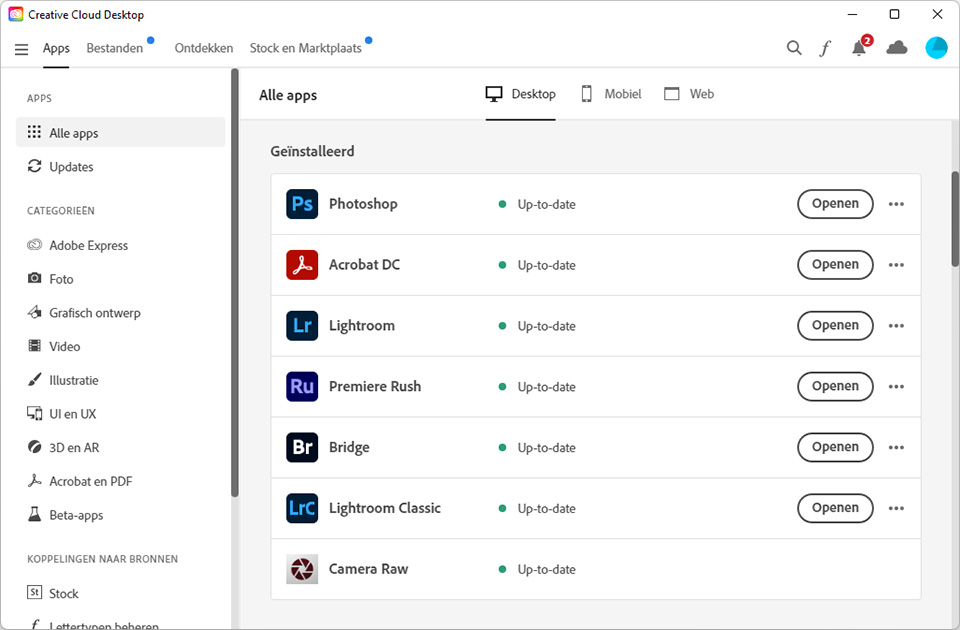
What about the smaller software packages I use alongside Adobe and Microsoft? Do they also work on Apple, or would I have to buy another one? I made a list of the software I use, apart from Adobe and Microsoft Office. Are they compatible with Apple?
- PTgui (compatible)
- Set.a.Light.3D (compatible)
- Deep Sky Stacker (compatible)
- Flashback Pro Recoder
- Pixellu Smartalbums (compatible)
- FSP Viewer
- Irfanview
- VLC Media Player (compatible)
In fact, it is not too bad, and I do not need to worry too much about licences no longer being usable because they would not work on Apple.
Incidentally, the software without the word compatible next to it is what I still need to look into. But perhaps you know?
The cost
I have an Eizo monitor that no Apple Cinema screen can match. I have a Lacie DAS system with 24 terabytes of storage and a Thunderbolt connection. I use one of the fastest SSD drives available for my Lightroom Classic catalogue.
I also have a dedicated CF Express Type B card reader and a simple wireless Canon printer. And an Ethernet connection instead of WiFi.
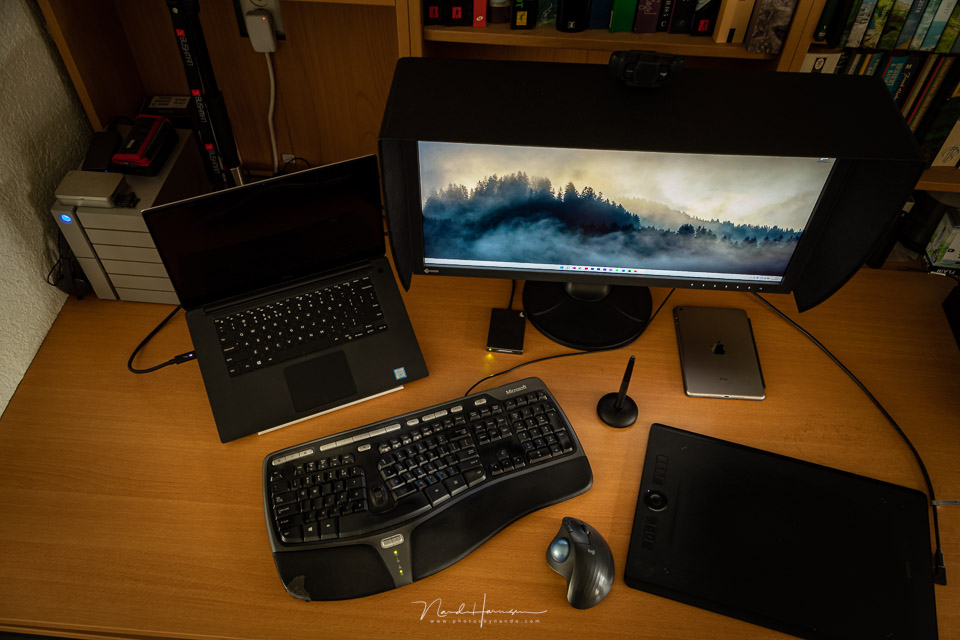
I have an ergonomic keyboard that is due for replacement, but that I would not want to be without for anything. A Logitech mouse and a Wacom Intuos Pro. All these things will work with a Mac Studio if I switch.
That is also why I would prefer a Mac Studio with all the connection options, rather than a MacBook Pro with yet another separate hub.
This does mean that I would need to keep a laptop for when I give presentations or need to work portably. I already use that laptop and can continue to use it: my Dell XPS i9 with a 4K OLED monitor, 1 terabyte SSD and 32 gigabytes of RAM.
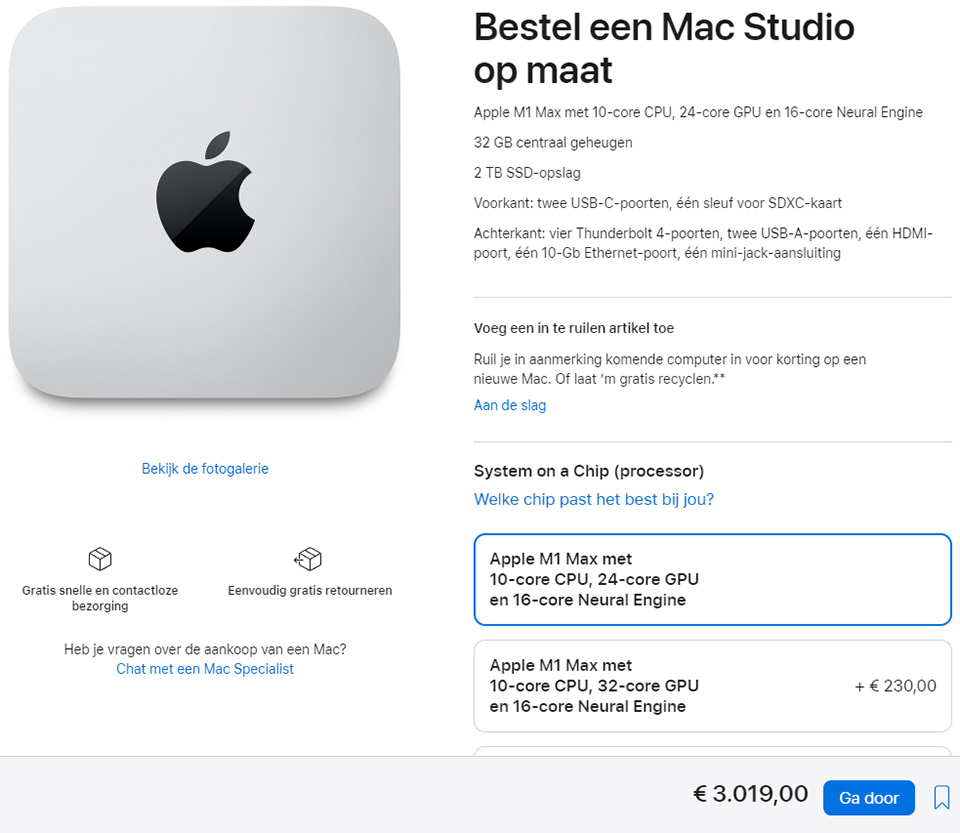
What would I need, then? Just a Mac Studio with the following specifications.
- Apple M1 Max
- 10-core CPU
- 24-core GPU
- 16-core Neural Engine
- 32 GB unified memory
- 2 TB SSD storage
The cost of this system would come to 3,019 euros, which is of course a considerable amount. It would have to last at least 4 years to make it worthwhile, preferably longer.
Although it is a huge amount, bear in mind that it would be used professionally. Besides, the cost is comparable to a top-of-the-range Canon L lens.
So if you would spend that kind of money on a lens, why not also spend it on the machine you use to manage and edit your images?
Or a laptop after all?
Suppose I chose a laptop after all. If I choose the same specifications, 10-core CPU, 24-core GPU, 16-core Neural Engine, 32 gigabytes of unified memory and 2 terabytes of storage, the cost would be 3,899 euros.
That is 880 euros more to make it portable. I chose a 14-inch MacBook Pro.
What connections would I have? Three Thunderbolt 4 ports, an HDMI port, an SDXC card slot and that is it. No standard, old-style USB ports, no Ethernet connection and too few Thunderbolt ports.
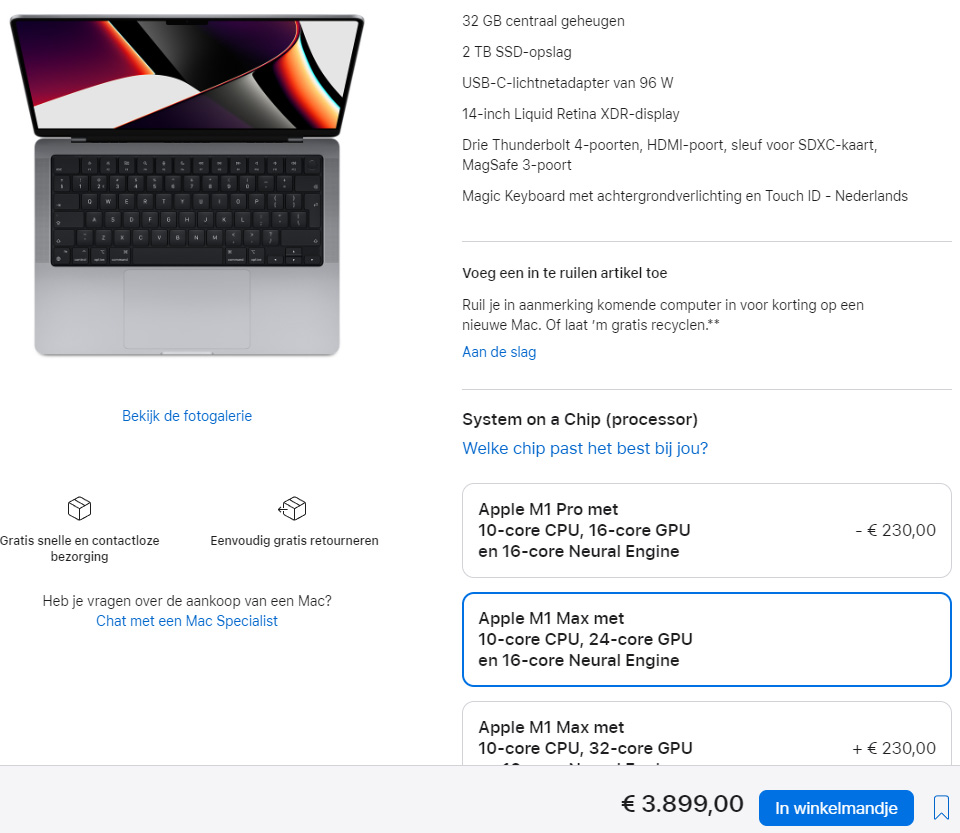
In other words, I would need a separate hub to connect everything. These vary in price between 100 and 250 euros, depending on what you want to have.
In short, all together, a MacBook Pro costs about 1,000 euros more than an equivalent Mac Studio.
What is the best choice?
What is the best choice? That is the question I want to answer for myself first. Is a Mac Studio the best choice, with my 'old' super-fast XPS laptop for use on the go, or a MacBook Pro for roughly 1,000 euros more?
Do you have a good argument for what I should choose? Let me know in a comment below this article. If there are other points I have overlooked, let me know that too. I look forward to your response.
About the author
Nando Harmsen has been photographing for more than 40 years. He specialises in wedding photography and landscape photography. Nando also gives talks, workshops, masterclasses and photo trips, and regularly reviews new and interesting equipment.
You might also like
-
 Switching to the Mac Studio or not? Part 1
by Nando Harmsen
-
Switching to the Mac Studio or not? Part 3 - the decision
by Nando Harmsen
-
 Apple launches Creator Studio software
by Elja Trum
-
 Apple announces iPhone 11 Pro
by Elja Trum

16 comments
-

 Elja Trum
wrote on Sunday 11 September 2022 at 17:29
| reply
Elja Trum
wrote on Sunday 11 September 2022 at 17:29
| reply
Tough choice, Nando.
Translated from Dutch.
I myself have had an Apple Mac Pro since 2014. I'm typing this comment on exactly the same computer; 8 and a half years later it still actually works perfectly fine.
What's remarkable is that I work on a Windows computer at the office that isn't even two years old. For some reason, it's insanely slow with Lightroom. This old Mac still runs circles around it with two fingers in its nose... or fan..
I still haven't decided what I'll do for my next computer. A PC certainly appeals to me too, despite my good experiences with the Mac Pro.
I personally notice that there are certain things, such as programming, that are more pleasant to do on a Windows computer than on a Mac. Using Photoshop and Lightroom, on the other hand, isn't one of them. -
 Piet van Kroonenburg
wrote on Monday 12 September 2022 at 21:59
| reply
Piet van Kroonenburg
wrote on Monday 12 September 2022 at 21:59
| reply
The argument that an Apple computer is expensive is, as far as I'm concerned, outdated and really old hat. A year or so ago, a journalist made a comparison between a Windows laptop and a MacBook Pro. He based it on the same/comparable specs and apps. The result was a difference of only a few tens of euros, so what are we talking about! Unfortunately, that article has disappeared into the depths of the internet, I haven't been able to find it anymore. A professional photographer has less to worry about when it comes to price, they can depreciate and offset the purchase of hardware and software as business expenses against their profits and/or pass them on in their rates.
Translated from Dutch.
My Lenovo laptop from 2018 (€700) can be taken to the recycling center after 2025, when Windows 10 is no longer supported, because it is not hardware-wise suitable for running Windows 11. Microsoft has already let me know that. My 21.5-inch iMac from 2011 - so by ICT standards by now extremely old - is still happily humming along to my satisfaction and still receives security updates. So, what is expensive…?
My experience is that technically and, since Windows 11, also software-wise, an iMac simply lasts longer than a Windows PC/laptop. Finally: for a Windows desktop, you also have to invest quite a bit in a calibrated (Eizo) monitor, while an iMac already has a good display.
More important to me seems to be the question of how things stand with the applications: wasn't it a year or so ago that Adobe Lightroom (32-bit), particularly highly praised by professional photographers, kept its iMac customers waiting for a long time because they had not responded in time to an update to a new macOS that ran on 64 bits. Okay, the late Steve Jobs wasn't fond of Adobe Flash (as leaky as a basket) and Adobe wasn't really happy about that either - until Adobe itself pulled the plug a few years ago because of the security issues - so there must surely have been some old resentment there, but that's beside the point.
By the way Nando: IrfanView isn't available in a macOS version, see https://www.irfanview.com/ The same applies to Faststone’s Image Viewer (another great app). Apps such as Word versus Pages, Excel versus Numbers, and Keynote versus Power Point are comparable in terms of learning curve and don't require much time to get used to. Migrating your files from one to the other does present some hurdles, but they can be overcome. There are also Linux distros, by the way, which you could consider. You can then work with GIMP (now that really is a dreadful app) and LibreOffice (in my experience better than Word et al.). A Linux variant (there is also a version for older PCs/laptops) and the apps are not expensive at all because, completely free…! After Windows XP ended, I switched a very old HP laptop from 2004 to Linux Mint and it still works perfectly on it to this day. No, I won't bash Windows (or rather Microsoft), but it is no longer the operating system it once was. And that's without even mentioning the frequent grumbling from IT people about Windows' update policy. According to Microsoft, Windows 10 was supposed to become the last operating system ever, and look, we now have Windows 11….!
Good luck making your choice, I know what I would do -
 Nando
wrote on Tuesday 13 September 2022 at 09:11
| reply
Nando
wrote on Tuesday 13 September 2022 at 09:11
| reply
@Piet van Kroonenburg:
Translated from Dutch.
What a story, Piet. But did you know that for the choice I want to make, I’m not interested in how it was. I want to know how it is now.
By the way, it’s about the choice between a Mac Studio or MacBook Pro, or sticking with a very capable Windows machine. Not about Linux.
Although well-intentioned, I can’t do anything with your extensive story. -
 Alex Leys wrote on Tuesday 13 September 2022 at 10:41 | reply
Just like Elja, still very satisfied with my macbook Pro from 2014. Extremely portable, only the battery was replaced last year, my own fault, you shouldn't leave it plugged in continuously....
Translated from Dutch.
For the rest, once gone Mac you never go back! -
 Jan Willem wrote on Tuesday 13 September 2022 at 12:19 | reply
If you've had a Window computer for 40 years, you don't switch over to a MAC computer that quickly anymore, certainly not now, it's simply too expensive to do that now. And honestly, I don't see the advantages of it now. I also don't have an Apple phone or tablet, I just don't like the prices anymore.
Translated from Dutch. -
 Rob wrote on Tuesday 13 September 2022 at 13:08 | reply
Reading everything, I don't see anywhere what the real major pros and cons are by now, apart from the compatibility of a few small software packages. So if the differences are small now then it simply becomes a personal choice! I still prefer a Windows PC system partly because you can easily tinker with the hardware yourself, upgrade it and/or repair it! I use a laptop sporadically so that matters less to me.
Translated from Dutch. -
 Albert Brunsting wrote on Tuesday 13 September 2022 at 13:10 | reply
I still work with a Mac Pro (Mid 2010), so that's already 12 years to my complete satisfaction and I can still effortlessly finish 4K video. A bargain, then. Now I'm switching to Mac Studio because I can no longer upgrade my programs and besides, this new machine of course offers many more advantages. If that one also lasts more than 10 years, I'll be very satisfied again!
Translated from Dutch. -
 John wrote on Tuesday 13 September 2022 at 13:42 | reply
In the spring, I traded in my MacBook Pro mid 2015, partly because of screen and battery problems, but it was still good to work with, for a 2021 model M1 Max 32gb and 1 TB psd internal memory. Okay, it costs quite a bit of money, but with the trade-in I still got € 400,- back for my old Apple, despite its very poor condition. The battery life has improved considerably and the battery charges very quickly. I can edit effortlessly for 6 to 8 hours straight on a full battery, in Lightroom and or Photoshop. The screen has also improved greatly, I also find the build quality considerably better compared to many other laptops. I chose the MacBook Pro because I want to be flexible and be able to take the macbook with me everywhere. I can move forward for at least another 10 years with updates (free) Mac is compatible with many programs and they are reliable machines, which have never let me down, I have been working with Apple since 2000.
Translated from Dutch. -
 guest wrote on Tuesday 13 September 2022 at 15:27 | reply
I have a MacBook Pro and an iMac, in other words a mobile laptop and a computer in a fixed location. My experience is that the flexibility of my laptop has led me to do much more with the laptop than with the desktop computer. So I would choose the MacBook and not the Mac Studio. With an expected lifespan of 10 years, that comes to 80 Euros per year.
Translated from Dutch. -
 Marc wrote on Tuesday 13 September 2022 at 17:10 | reply
- You can easily turn a MacBook Pro into a desktop...close it, connect it to the mains, connect your screen, connect your keyboard/graphics tablet (Bluetooth) and off you go. I've been doing it this way for years.
Translated from Dutch.
- If you really can't find a replacement program (which I don't believe) for your Windooz programs, you can always use Parallels Desktop or others (https://techpulse.be/tips/218858/hoe-draai-ik-windows-apps-op-mac/).
- On a Windows PC...isn't it best not to run an anti-virus program on that either ? what does that cost you annually ? -
 Jan J. Holvoet wrote on Tuesday 13 September 2022 at 18:37 | reply
As a hobby photographer, I also face the same choice
Translated from Dutch.
I grew up with Windows as an IT guy
My current workhorse is a DELL workstation that is more than 5 years old ( i7 and 48gb RAM) it can't run Windows 11 because the TPM chip is only version 1.2 and can't be upgraded
Windows often causes me stress after updates, no internet again,...
Most important applications are Lightroom & Photoshop and Coredraw
I am also already looking at the Mac Studio
I got an old iMac from my son-in-law which still runs but not with the latest iOS
I have a 6-year-old iPad Pro that still runs the latest version
And an iPhone XR
With Windows it is very difficult to get photos off the iPhone -
guest wrote on Wednesday 14 September 2022 at 08:42 | reply
Hello Nando,
Translated from Dutch.
I would like to make a few comments, hopefully relevant to you:
* my Mac is 11 years old, and still runs perfectly on the new 64-bit system.
A few weeks ago I had a small problem, called Apple, and they stayed on the phone with me for well over half an hour to solve it, at no cost….
My MacBook is 6 years old and runs problem-free on battery for an entire day
* the differences between Apple's Excel, Word and PP are minimal. There is
absolutely no question of learning new software. They are fully compatible.
* with all due respect, but Apple's security is at a much higher level.
That comes at a price, Apple checks all software before it enters the store. Not everyone is happy about that, but still.
* I would advise you to buy directly from Apple for business. Sometimes better
prices, but also more complete service. And above all, register all Apple devices
on their site, I have the idea that that also makes a difference.
* probably superfluous to mention: I am an IT veteran and also have plenty of experience
with Windows and still have and use Windows PCs
Good luck with your choice
Chiel -
guest wrote on Wednesday 14 September 2022 at 10:26 | reply
In part 1, Nando mentioned that his Dell has trouble with 4K videos in Adobe Premiere.
Translated from Dutch.
Recently, I had to make a 1.5-hour film on my 2017 iMac, with 4 cameras and an extra audio track (multicam), and that went smoothly with Final Cut Pro X; admittedly in FHD and in proxy, but editing and color grading went smoothly. From my colleagues I heard that they had doubts whether that would also work on their Windows PC.
I have also never encountered any problems with Photoshop (multiple layers) and Lightroom.
And for presentations, I still think Keynote is a great program.
But if you're used to Windows and look at Apple, some things are different and therefore strange. And vice versa.
On the other hand: I know notorious Windows users who, after switching to a Mac, said to me: I should have done that much earlier.
Finally: A Mac lasts much longer as standard (software support and hardware) than the indicated 4 years. -
Nando
wrote on Wednesday 14 September 2022 at 12:08
| reply
@Marc: of course I run a good anti-virus program, but those costs are negligible.
Translated from Dutch.
@Jan J: I have no trouble getting my photos from my iPhone to my Windows machine. But I do believe it is much easier with a Mac
@Gast: 4K video in Premiere Pro works fine with proxies. That’s how I always do it. And that also works with multi-tracks. In FHD I don’t need to create proxies. It runs smoothly as it is.
But I would prefer to skip the step with proxies and edit 4K the way I do with FHD. Without any stuttering. -
 Niven wrote on Wednesday 14 September 2022 at 14:56 | reply
Keep in mind that not all non-Apple software runs on the M1 chip yet, even if these programs run on regular Apple computers. Manufacturers will provide their software for the M1 chip in the future.
Translated from Dutch. -
 Jean-Paul wrote on Friday 16 September 2022 at 12:20 | reply
Nando, I’ve been happily working on an iMac for years, but it’s now due for replacement. Switch to a Mac Studio or go with Windows after all? So, going the other way. What’s holding me back from switching platforms is Backblaze (online backup). The backup doesn’t work cross-platform, so it will have to slog away for months again to get completely online. If you use an online backup, be sure to look into this too!
Translated from Dutch.
Have your say
Please note: Articles older than a week can only be commented on by signed-in visitors.Would you still like to comment? sign in or create a free account.
Become a better photographer every week
A practical photography tip in your inbox every week.
38,938 photography enthusiasts already receive the tips! More about the weekly mail. Or keep up to date via  Facebook.

Elja Trum
Photofacts; everything to do with photography!
Would you like to take better photos and keep up with what is happening in photography? Photofacts publishes articles that teach you something about photography — from a product announcement to a practical shooting tip or a look at a website. Photofacts covers photography every day and is a hobby project of Elja Trum's that got out of hand. The articles are written by a team of volunteer authors. If you would enjoy writing one or more articles for Photofacts, do get in touch.More about PhotofactsPhotofacts is made possible in part by
