

Applying the Orton effect to your photos
Saturday 26 August 2017, 14:41 by Elja Trum | 16,468 views | 4 commentsThis article was translated from Dutch with the help of AI. Read the original.
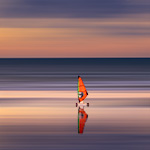
The Orton effect is a technique that gives your photos a dreamy, watercolour-like look. In this video, you’ll discover how to apply the Orton effect to your photos using Photoshop.
Michael Orton came up with the technique in the 1980s. He took two photos of a scene, one sharp and one blurred and overexposed. When printing, he placed these two images on top of each other.
These days, it’s of course very easy to recreate the technique in Photoshop. You don’t even need to take two photos. In the video below, I’ll show you how to do this in 3 minutes.
About the author
Elja Trum is the founder of Photofacts and online photography course website Photofacts Academy. He has been writing about photography since 2006. Elja is also the author of (Dutch) books on composition, black-and-white photography, flash photography and portrait photography.
You might also like
-
 Orton effect directly in the camera
by Nando Harmsen
-
 The Orton effect without Photoshop
by Nando Harmsen
-
10 Tips for Applying the Orton Effect
by Nando Harmsen
-
 Playing with blur
by Laura van der Burgt
-
 Have you ever heard of the Pep Ventosa technique?
by Nando Harmsen
4 comments
-
 willy duvel wrote on Tuesday 29 August 2017 at 12:25 | reply
Simple and very clever ! Cheers
Translated from Dutch. -
 Tineke Van Wegberg wrote on Tuesday 29 August 2017 at 15:27 | reply
Fun and educational, great!
Translated from Dutch. -

-
 guest wrote on Friday 1 September 2017 at 13:32 | reply
do it, looks nice
Translated from Dutch.

Have your say
Please note: Articles older than a week can only be commented on by signed-in visitors.Would you still like to comment? sign in or create a free account.
Become a better photographer every week
A practical photography tip in your inbox every week.
38,766 photography enthusiasts already receive the tips! More about the weekly mail. Or keep up to date via  Facebook.

Elja Trum
Photofacts; everything to do with photography!
Would you like to take better photos and keep up with what is happening in photography? Photofacts publishes articles that teach you something about photography — from a product announcement to a practical shooting tip or a look at a website. Photofacts covers photography every day and is a hobby project of Elja Trum's that got out of hand. The articles are written by a team of volunteer authors. If you would enjoy writing one or more articles for Photofacts, do get in touch.More about PhotofactsPhotofacts is made possible in part by
