

Stretching the Background of Your Images
Wednesday 12 December 2018, 21:23 by Michelle Peeters | 36,978 views | 1 commentThis article was translated from Dutch with the help of AI. Read the original.
In this video from PixImperfect, you’ll learn a great trick for stretching the background of your photo without distorting your subject in Photoshop. Learn how to use Content-Aware Scale effectively.
If you need to extend the edges of a photo, for example to make it fit a particular format such as A4, you can use a Photoshop technique to stretch or even shrink unimportant parts of your image.
And you can do this without stretching or shrinking the most important parts. Here’s how it works: click the layer you want to stretch, then go to Content-Aware Scale in the Edit menu (Content-Aware Scale).
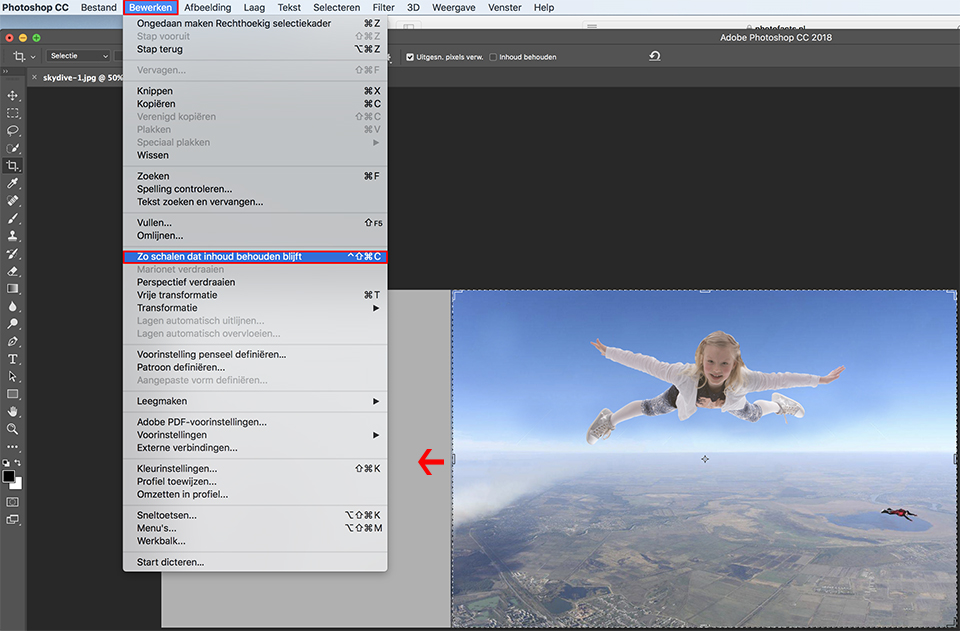
Now grab a side or corner point and start dragging in the direction you want. Somehow, Photoshop determines what is important in the image and tries to lock that part in place.
So if you’re editing a landscape photo, it will only stretch the sky, for example, and not the mountains. It’s a very good method, and it’s incredible how much you can often stretch an image without ruining it. When you’re done, press Return (PC: Enter) to apply this clever stretching.
One more thing: if there are people in the photo and you’ve selected 'Content-Aware Scale', click Protect Skin Tones (the little person icon) in the options bar before you actually start stretching.
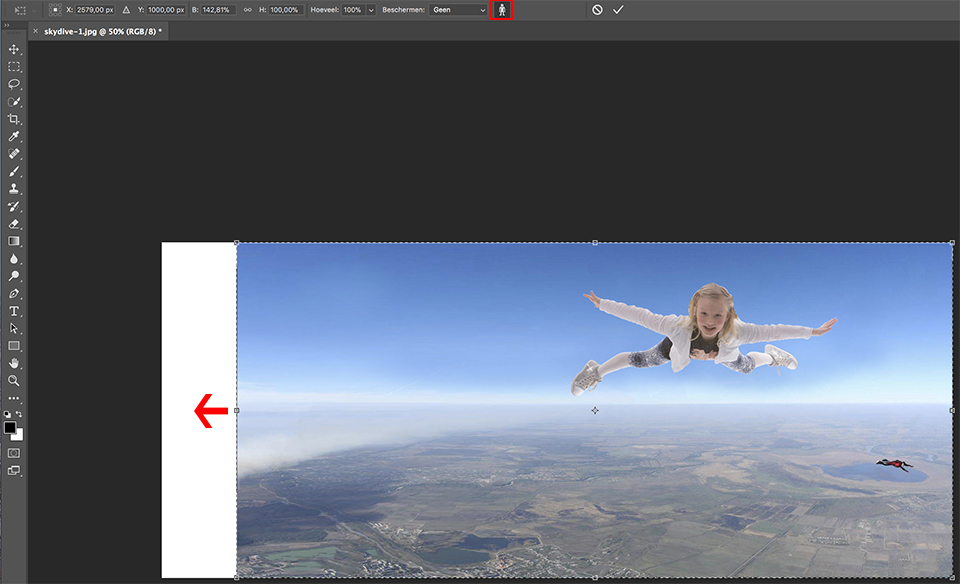
Photoshop will then take the people in the image into account and won’t stretch them.
Want to learn more about editing images in Photoshop?
At Photofacts Academy, our online learning environment for photographers, we have several courses about Adobe Photoshop.
- Photoshop for Beginners (Johan Elzenga)
- Photoshop for Photographers (Piet van den Eynde)
- Advanced Photoshop (Marit Hilarius)
- Photoshop Effects (Elja Trum)
And much more...
You can take these courses for two weeks with a free trial membership.
About the author
Michelle Peeters is fotografe en oprichter van DeuxBleus Fotografie. Michelle herkent het bijzondere in het gewone en het gewone in het bijzondere. Ze heeft zich nooit willen specialiseren en is daardoor van alle markten thuis.
You might also like
-
 5 Tips to Prevent Distortion
by Michelle Peeters
-
 17 Lightroom tips for editing architecture photos
by Michelle Peeters
-
 5 clever, funny and money-saving tricks for photographers
by Michelle Peeters
-
 Are manufacturers relying more and more on digital image correction?
by Nando Harmsen
-
 Portrait photography tip: Use a wide-angle lens
by Elja Trum

1 comment
-
 H van Til wrote on Tuesday 10 April 2018 at 12:58 | reply
Een , wat mij betreft, beter filmpje is hier te vinden (https://youtu.be/ixCroJfzM6U).
This comment was written in another language and has not been translated yet.
Met name het voorkomen van vervormingen door selectie wordt toegevoegd.
Have your say
Please note: Articles older than a week can only be commented on by signed-in visitors.Would you still like to comment? sign in or create a free account.
Become a better photographer every week
A practical photography tip in your inbox every week.
38,886 photography enthusiasts already receive the tips! More about the weekly mail. Or keep up to date via  Facebook.

Elja Trum
Photofacts; everything to do with photography!
Would you like to take better photos and keep up with what is happening in photography? Photofacts publishes articles that teach you something about photography — from a product announcement to a practical shooting tip or a look at a website. Photofacts covers photography every day and is a hobby project of Elja Trum's that got out of hand. The articles are written by a team of volunteer authors. If you would enjoy writing one or more articles for Photofacts, do get in touch.More about PhotofactsPhotofacts is made possible in part by
